This thread has been locked.

If you have a related question, please click the "Ask a related question" button in the top right corner. The newly created question will be automatically linked to this question.

AM69: AM69

Part Number: AM69
Other Parts Discussed in Thread: CSD

Tool/software:

Hi,

The page below has information how to flash the eMMC:

https://software-dl.ti.com/jacinto7/esd/processor-sdk-linux-am69/10_00_07_06/exports/docs/linux/How_to_Guides/Target/How_to_flash_emmc_device.html

However, I am not able to locate the mentioned files, mksdboot.sh and uenv.txt.base, from the installed SDK inside the container:

/home/tisdk/ti-processor-sdk-linux-am69-sk-10_01_08_01

Can you advise?

Thanks.

Walter

  • Hi Walter,

    Can you try using the below mksdboot.sh script to partition the eMMC.

    https://e2e.ti.com/cfs-file/__key/communityserver-discussions-components-files/791/0312.mksdboot.sh

    The uenv.txt.base refers to the uEnv.txt present in <linux sdk folder>/board-support/prebuilt-images/.

    Regards

    Gokul

  • Hi Gokul,

    Appreciate your pointer and information.  I have some followup questions:

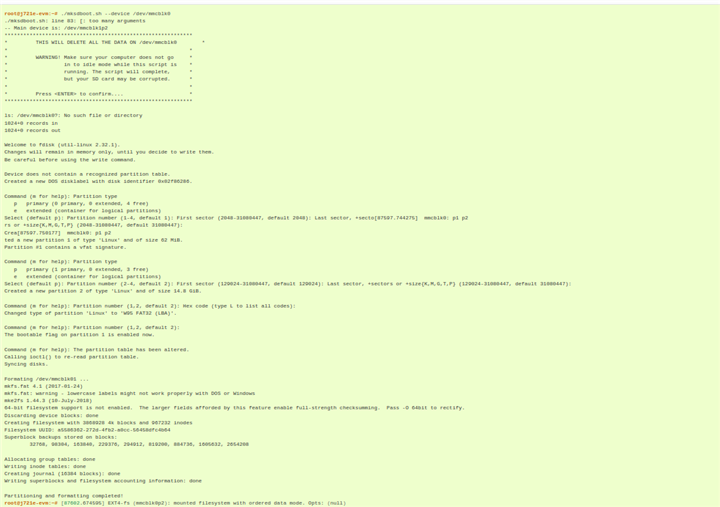
    . mksdboot.sh created mmcblk0p1 which doesn't have anything?  What is the purpose of it?
    . lsblk also listed mmcblk0boot0 and mmcblk0boot1.  What is the purpose of them?
    . after eMMC programming, AM69 still relies on SD to boot into u-boot so that to setenv for mmcdev and bootpart in order to boot kernel and rootfs from eMMC.  How can AM69 fully boot up from eMMC wihtout a programmed SD card inserted into sd slot?
    . Once AM69 can fully boot from eMMC, how to switch back to boot from SD?

    Thanks.

    Walter

  • Hi Chow,

    . mksdboot.sh created mmcblk0p1 which doesn't have anything?  What is the purpose of it?

    The mksdboot.sh should ideally create 2 partitions for mmcblk0:mmcblk0p1 and mmcblk0p2  with the command:[./mksdboot.sh --device /dev/mmcblk0] as mentioned in the below link:

    software-dl.ti.com/.../How_to_flash_emmc_device.html

    . lsblk also listed mmcblk0boot0 and mmcblk0boot1.  What is the purpose of them?

    These are raw partitions of the emmc which can be used for storing the boot files.

    after eMMC programming, AM69 still relies on SD to boot into u-boot so that to setenv for mmcdev and bootpart in order to boot kernel and rootfs from eMMC.  How can AM69 fully boot up from eMMC wihtout a programmed SD card inserted into sd slot?

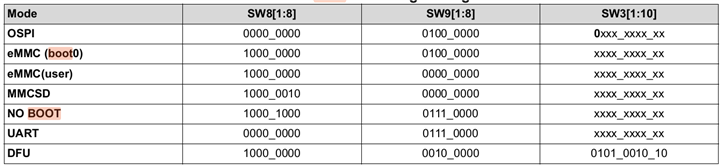
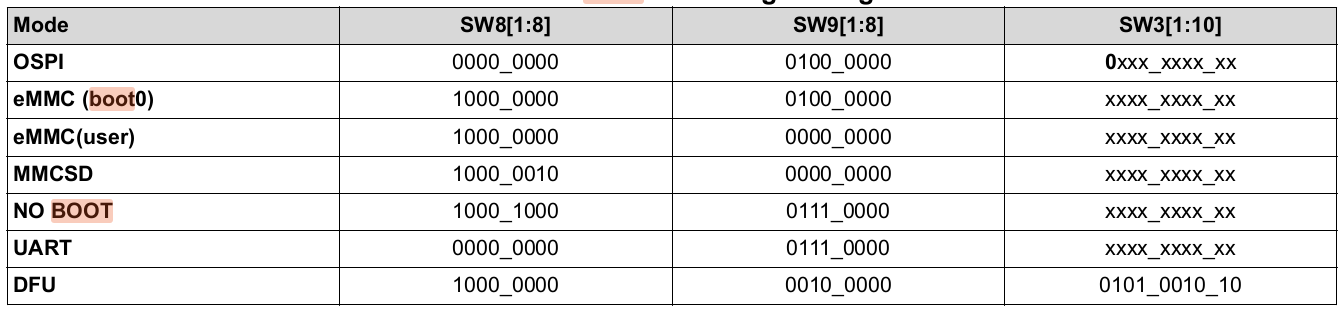
    Can to try switching to the eMMC(user) partition configuration given below.Instead of SW8 use SW11 and instead of SW9 use SW7 respectively.No need to to consider SW3 as it is don't care configuration.

    Also make sure you have the boot files upto uboot in mmcblk0p1 and the rootfs in mmcblk0p2.Then set mmcdev and bootpart after entering into UBOOT.

    . Once AM69 can fully boot from eMMC, how to switch back to boot from SD?

    To switch back to SD boot mode,just use the MMCSD bootswitch settings below.Instead of SW8 use SW11 and instead of SW9 use SW7 respectively.No need to to consider SW3 as it is don't care configuration.More info regarding the bootswitch settings can be found in the below link.

    software-dl.ti.com/.../J784S4_EVM_Hardware_Setup.html

    Regards

    Gokul

  • Hi Gokul,

    I followed the steps from the link of software-dl.ti.com/.../How_to_flash_emmc_device.html 
    and mksdboot.sh created two partitions, mmcblk0p1 and mmcblk0p2.  The link only has information
    how to set up the rootfs by copying it into mmcblk0p2 but it doesn't explain what mmcblk0p1  is used for.
    Do you have information what mmcblk0p1 is used for?

    Regarding mmcblk0boot0 and mmcblk0boot1, can you advise what boot files should be stored there, and
    how to make use of these two raw partitions?

    I am not sure how to locate those switches you mentioned.  The AM69 SK hardware Setup has inofrmation
    how to set the boot pings to SD boot mode but not eMMC boot mode.  Can you advise?

    Thanks.

    Walter

  • HI Walter,

    Do you have information what mmcblk0p1 is used for?

    mmcblk0p1 can be used for storing the boot files using a FAT32 filesystem just like how we can store the boot files in raw partitions like mmcblk0boot0 and mmcblk0boot1.

    Regarding mmcblk0boot0 and mmcblk0boot1, can you advise what boot files should be stored there, and
    how to make use of these two raw partitions?

    I suggest you to go through section 3.1.1.5.5. in the below link for gaining info regarding that:

    https://software-dl.ti.com/jacinto7/esd/processor-sdk-linux-am69/10_00_07_06/exports/docs/linux/Foundational_Components/U-Boot/UG-Memory.html#booting-tiboot3-bin-tispl-bin-and-u-boot-img-from-emmc-boot-partition-for-k3-class-of-socs

    I am not sure how to locate those switches you mentioned.  The AM69 SK hardware Setup has inofrmation
    how to set the boot pings to SD boot mode but not eMMC boot mode.  Can you advise?

    Regarding this , the switch configurations are mentioned in the below document ,but this is for j721E.For AM69 , just need to compare the same with SD boot mode settings present in the AM69SK hardware setup and just update the switch numbers.The configuration of the switches remains the same.

    TDA4_FLASHING_TECHNIQUES.pdf

  • Hi Gokul,

    It seems that mmcblk0p1, mmcblk0boot0 and mmcblk0boot1 are used to store the boot files but the difference lies on that 
    mmcblk0p1 needs to use a FAT32 filesystem.  Section 3.1.1.5.5 has information how to activate mmcblk0boot0 (via
    mmc partconf 0 1 1 1) and mmcblk0boot1 (via mmc partconf 0 1 2 1) so that either one of them will be chosen for eMMC
    boot.  Can mmcblk0p1 be activated so that it will be chosen for eMMC boot?

    Thanks.

    Walter

  • Hi Walter,

    Can mmcblk0p1 be activated so that it will be chosen for eMMC boot?

    Really sorry,I forgot to say that for eMMC boot from mmcblk0p1 , [mmc partconf 0 1 7 1] can be used.Also ,for convenience , I am attaching a link sharing the entire steps to boot from mmcblk0p1 without SD card.

    https://e2e.ti.com/support/processors-group/processors/f/processors-forum/1459027/faq-am69a-booting-from-emmc-without-sd-card

    Regards

    Gokul

  • Hi Gokul,

    I am not able to activate mmcblk0p1 to be chosen for eMMC boot by doing:

    . using the mksdboot script to set up the mmcblk0p1  and mmcblk0p2
    . copy the bootloader files (tiboot3.bin, tispl.bin, u-boot.img) from SD (mmcblk1p1) to mmcblk0p1
    . setup the rootfs by copying files from SD (mmcblk1p2) to mmcblk0p2
    . do the 'sync'
    . power cycle and then stop at u-boot do do 'mmc partconf 0 1 7 1' and 'mmc bootbus 0 2 0 0'
    . power off, and then update dip siwtch on SW2 to do eMMC boot.
    . power on but nothing happen.

    Can you advise?

    By following instructions from section 3.1.1.5.5, I am able to do eMMC boot from either mmcblk0boot0
    (via mmc partconf 0 1 1 1 ) or mmcblk0boot1 (via mmc partconf 0 1 2 1).  However, I need to stop at u-boot
    do do "setenv mmcdev 0" and "setenv bootpart 0:2".  Can you advise what can be done to automate booting 
    from eMMC rootfs on mmcblk0p2?

    Thanks.

    Walter

  • Hi Walter ,

    . power off, and then update dip siwtch on SW2 to do eMMC boot.

    Its not SW2 that you have to update.

    You will have to switch to the eMMC(user) mode configuration given below where Instead of SW8 use SW11 and instead of SW9 use SW7 respectively.No need to to consider SW3 as it is don't care configuration.

  • Hi Walter,

    I actually interchanged it with AM69 board instead of AM69-SK.Sorry for that confusion.

    Regarding the AM69-SK,I discussed it with the development team and they said that taking the boot files from emmc UDA is not supported.However rootfs can be taken from mmcblk0p2.

    Regards

    Gokul

  • Hi Gokul,

    Appreciate your help.  Do you have any pointer to tell difference between AM69 board and AM69-SK?

    In addition, can you advise my quetions in previous post:


    By following instructions from section 3.1.1.5.5, I am able to do eMMC boot from either mmcblk0boot0
    (via mmc partconf 0 1 1 1 ) or mmcblk0boot1 (via mmc partconf 0 1 2 1).  However, I need to stop at u-boot
    do do "setenv mmcdev 0" and "setenv bootpart 0:2".  Can you advise what can be done to automate booting 
    from eMMC rootfs on mmcblk0p2?

    Thanks.

    Walter

  • Hi Walter,

    Do you have any pointer to tell difference between AM69 board and AM69-SK?

    AM69 is the base general purpose device, and AM69-SK adds the HW accelerated AI functionality to it.

    AM69-SK Linux SDK adds AI libraries, and has an Vision AI-oriented Out Of Box GUI demo, as opposed to the Graphics Display HMI Out Of Box GUI demo of AM69.

    By following instructions from section 3.1.1.5.5, I am able to do eMMC boot from either mmcblk0boot0
    (via mmc partconf 0 1 1 1 ) or mmcblk0boot1 (via mmc partconf 0 1 2 1).  However, I need to stop at u-boot
    do do "setenv mmcdev 0" and "setenv bootpart 0:2".  Can you advise what can be done to automate booting 
    from eMMC rootfs on mmcblk0p2?

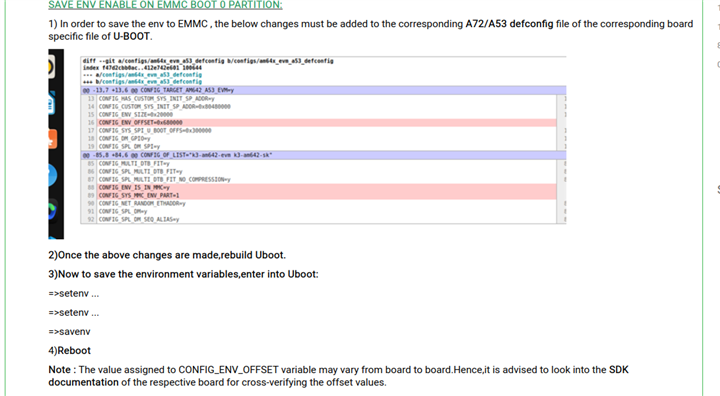
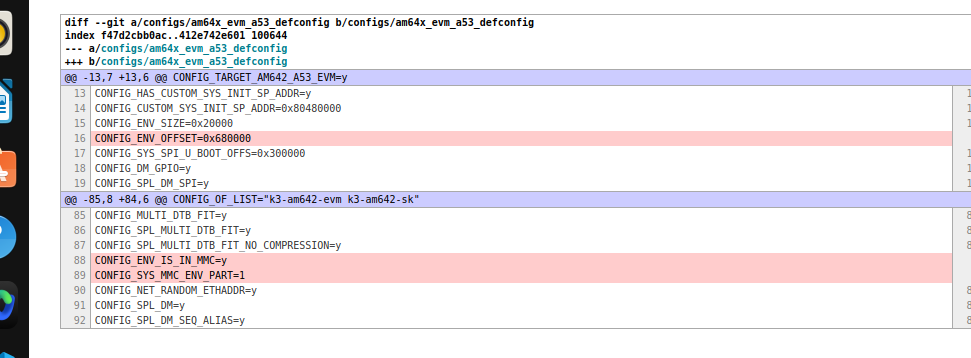
    To automate booting from emmc rootfs,the saveenv feature will have to be enabled.I am attaching the steps for the same below.

    I am reattaching the changes to be made in the j784s4_evm_a72 def config file for better visibility:

  • Hi Gokul,

    Thanks.  I will look into enabling the saveenv in u-boot.

    For AM69 starter kit, 

    . does it support "USB Device Firmware Upgrade (DFU)?

    . does it support PCIe Gen 2?

    Thanks.

    Walter

  • Hi Walter,

    . does it support "USB Device Firmware Upgrade (DFU)?

    Yes,it supports it.You can also refer to the below link for more info.

    https://software-dl.ti.com/jacinto7/esd/processor-sdk-linux-am69/latest/exports/docs/linux/Foundational_Components/U-Boot/UG-DFU.html

    . does it support PCIe Gen 2?

    Regarding this , can you raise a new E2E.

    Regards Gokul

  • Hi Gokul,

    For u-boot saveenv, does u-boot for AM 69 have a equivalent *.env mentioned by https://git.ti.com/cgit/ti-u-boot/ti-u-boot/tree/board/ti/am62x/am62x.env?h=09.01.00.008#n30?
    For CONFIG_SYS_MMC_ENV_PART=1, does it mean that the changes will be saved into mmcblk0boot0?
    For CONFIG_ENV_OFFSET=0x680000, where is this location?  I am not sure which location it will be by looking out the emmc layout mentioned by https://software-dl.ti.com/jacinto7/esd/processor-sdk-linux-am69/10_01_08_01/exports/docs/linux/Foundational_Components/U-Boot/UG-Memory.html (Extracted below:)

               boot0 partition (8 MB)                        user partition
       0x0+----------------------------------+      0x0+-------------------------+
          |     tiboot3.bin (512 KB)         |         |                         |
     0x400+----------------------------------+         |                         |
          |       tispl.bin (2 MB)           |         |                         |
    0x1400+----------------------------------+         |        rootfs           |
          |       u-boot.img (4 MB)          |         |                         |
    0x3400+----------------------------------+         |                         |
          |      environment (128 KB)        |         |                         |
    0x3500+----------------------------------+         |                         |
          |   backup environment (128 KB)    |         |                         |
    0x3600+----------------------------------+         |                         |
          |          sysfw (1 MB)            |         |                         |
    0x3E00+----------------------------------+         +-------------------------+

    Regarding DFU, what is the pin settings on SW2 so that it will work with DFU?

    Regarding the PCIe Gen 2, sure I will file a new one.

    Thanks.

    Walter

  • HI Walter,

    For CONFIG_SYS_MMC_ENV_PART=1, does it mean that the changes will be saved into mmcblk0boot0?

    Yes , that is correct.

    For CONFIG_ENV_OFFSET=0x680000, where is this location?  I am not sure which location it will be by looking out the emmc layout mentioned

    This offset refers to the byte offset.However the addreses in the emmc layout mentioned are sector addresses.1 Sector is 512 bytes.Hence the byte offset 0x680000 corresponds to a sector offset of 0x3400(ie:0x680000 divided by 0x200(512 in decimal).

    For u-boot saveenv, does u-boot for AM 69 have a equivalent *.env mentioned by https://git.ti.com/cgit/ti-u-boot/ti-u-boot/tree/board/ti/am62x/am62x.env?h=09.01.00.008#n30?
    • Yes AM69, uses j784s4.env present in the <SDK Folder>/board-support/<u-boot folder>/board/ti/j784s4/j784s4.env
  • Hi Gokul,

    Thanks for the explanation and information.
    How can I program bootloader binaries including tiboot3.bin, tispl.bin and u-boot.img to either mmcblk0boot0 or mmcblk0boot1 at linux space instead of u-boot space?
    In addition, how can I control which boot partition to use at linux space instead of  u-boot space which sets mmcdev and bootpart?

    Thanks.

    Walter

  • Hi Walter,

    Sorry for the late reply.

    How can I program bootloader binaries including tiboot3.bin, tispl.bin and u-boot.img to either mmcblk0boot0 or mmcblk0boot1 at linux space instead of u-boot space?

    Actually I found out a way through which these binaries can be coped to boot0/boot1 from linux space.The following commands will copy the same to boot0 partition of EMMC.

    NOTE: Ensure that the bootpartition is set to boot0 once the below command is executed to boot from boot0


    >echo 0 > /sys/block/mmcblk0boot0/force_ro
    >dd if=/dev/zero of=/dev/mmcblk0boot0
    >dd if=/run/media/BOOT-mmcblk1p1/tiboot3.bin of=/dev/mmcblk0boot0 seek=0
    >dd if=/run/media/BOOT-mmcblk1p1/tispl.bin of=/dev/mmcblk0boot0 seek=1024
    >dd if=/run/media/BOOT-mmcblk1p1/u-boot.img of=/dev/mmcblk0boot0 seek=5120

    n addition, how can I control which boot partition to use at linux space instead of  u-boot space which sets mmcdev and bootpart?

    Sets the boot partition to boot0:

    >mmc extcsd write 179 0x48 /dev/mmcblk0
    >mmc extcsd write 177 0x02 /dev/mmcblk0

    Sets the boot partition to UDA:

    >mmc extcsd write 179 0x78 /dev/mmcblk0
    >mmc extcsd write 177 0x02 /dev/mmcblk0

    Also,Chow can you help us by closing this thread,if this issue is resolved.

    Regards

    Gokul

  • Hi Gokul,

    I just read your response as I didn't receive any email notification about your update.
    Thanks for the information.
    Once I get a chance to try out your solution, I will close this thread.
    Thanks.

    Walter

  • Hi Gokul,

    Regarding:
    >mmc extcsd write 179 0x48 /dev/mmcblk0
    >mmc extcsd write 177 0x02 /dev/mmcblk0

    What is the meaning of 179, 177, and 0x48, and 0x02?
    If I want to set the boot partition to boot1, what is the correspond command or number?

    Thanks.

    Walter

  • Hi Walter,

    >mmc extcsd write 179 0x48 /dev/mmcblk0
    >mmc extcsd write 177 0x02 /dev/mmcblk0
    • 179 refers to the 179th byte of the Extended CSD register.This byte is responsible for enabling the boot partition from which the boot files can be taken.
      • 0x48 : This basically sets the BOOT_ACK bit(BIT 6) and (BIT 3).Hence the value of BOOT_PARTITION_ENABLE woulb be 0x1 which corresponds to BOOT PARTITION 1 enabled for boot.
      • 0x78 : This basically sets the BOOT_ACK bit(BIT 6) and (BIT 3,BIT,4,BIT 5).Hence the value of BOOT_PARTITION_ENABLE would be 0x7 which corresponds to User Area enabled for boot.

    • 177 refers to 177th byte of Extended CSD register.
      • 0x02:This basically sets(bit1 is set) the bus width to 8 bit bus width in boot operation mode.
    If I want to set the boot partition to boot1, what is the correspond command or number?

    To set to boot 1,

    >mmc extcsd write 179 0x50 /dev/mmcblk0
    >mmc extcsd write 177 0x02 /dev/mmcblk0

    Once I get a chance to try out your solution, I will close this thread.

    Sure Walter.

  • Hi Gokul,

    I tested the commands to boot from mmcblk0boot0 or mmcblk0boot1.  However, the UDA boot partition doesn't work, and
    it may have to do with the devkit doesn't support it as you mentioned previously.

    At linux space, how can I control to use the rootfs on mmcblk0p2 without patching the u-boot? 
    Currently, there is still a need to stop at u-boot space in order to set 'mmcdev' to be 0 and 'bootpart' to be 0:2
    so that it will fully boot from emmc.

    Thanks.

    Walter

  • Hi Walter,

    However, the UDA boot partition doesn't work, and
    it may have to do with the devkit doesn't support it as you mentioned previously.

    Yea,thats correct,I am sorry,I forgot about that.

    At linux space, how can I control to use the rootfs on mmcblk0p2 without patching the u-boot? 
    Currently, there is still a need to stop at u-boot space in order to set 'mmcdev' to be 0 and 'bootpart' to be 0:2
    so that it will fully boot from emmc.

    Since UBOOT decides where to take the rootfs from,the only way would be to be do it from UBOOT.

    However,on enabling the saveenv feature mentioned in the previous replies,this command only needs to be set once.

    Regards

    Gokul

  • Hi Gokul,

    Thanks for the support.

    Walter