This thread has been locked.

If you have a related question, please click the "Ask a related question" button in the top right corner. The newly created question will be automatically linked to this question.

TDA4VH-Q1: XDS110 - On board debugger issue

Part Number: TDA4VH-Q1
Other Parts Discussed in Thread: TDA4VH

Tool/software:

Hi Ti team,

When I try to update the firmware using

gowtham_s@17878:~/ti/ccs1240/ccs/ccs_base/common/uscif/xds110$ ./xdsdfu -f firmware_3.0.0.26.bin -r

USB Device Firmware Upgrade Utility
Copyright (c) 2008-2019 Texas Instruments Incorporated. All rights reserved.

Scanning USB buses for supported XDS110 devices...

Downloading firmware_3.0.0.26.bin to device...
Error DFU_ERR_UNSUPPORTED (-5) reported during file download

I am getting the following error .

Please let us know how to proceed further its a blocker for us. We are not able to debug using ccs studio

  • I am using TDA4VH

    SDK RTOS 9.02

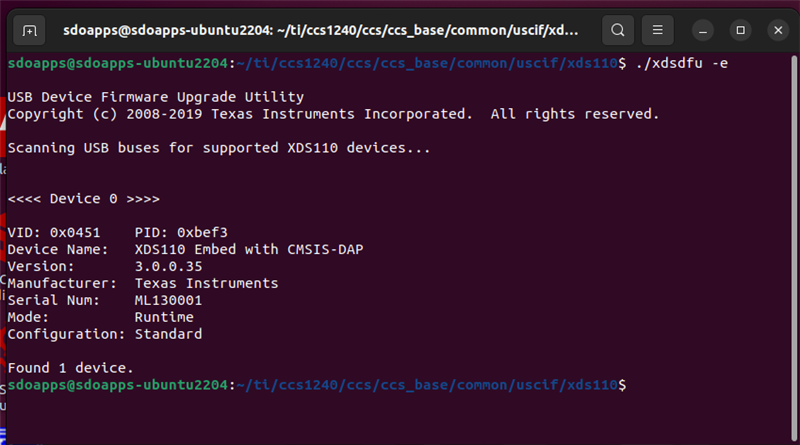
  • What is the output when you run ./xdsdfu -e ?

    Thanks

    ki

  • It gave me a xdc device details,

    What you are exactly asking for?

    I ran ./xdsdfu -e

    ./xdsdfu -m

    and then this,

    /xdsdfu -f firmware_3.0.0.26.bin -r

    When I tried to connect my config via ccs, it asked for update to firmware, I updated but it, but still not updating, it crashes

  • What you are exactly asking for?

    I ran ./xdsdfu -e

    I'm asking for the output of the above command when you run it now:

  • Thanks for the quick response, 

    Sorry, I won't be able to send a screenshot, the board is not with me now.

    I think everything was there, except Seriel number ,which were all zeros, Will attach the screenshot once i have it back.

  • /ti/ccs1240/ccs/ccs_base/common/uscif/xds110$ ./xdsdfu -e

    USB Device Firmware Upgrade Utility
    Copyright (c) 2008-2019 Texas Instruments Incorporated.  All rights reserved.

    Scanning USB buses for supported XDS110 devices...


    <<<< Device 0 >>>>

    VID: 0x0451    PID: 0xbef3
    Device Name:   XDS110 Embed with CMSIS-DAP
    Version:       3.0.0.20
    Manufacturer:  Texas Instruments
    Serial Num:    49240520
    Mode:          Runtime
    Configuration: Standard

    Found 1 device.

  • ti/ccs1240/ccs/ccs_base/common/uscif/xds110$ ./xdsdfu -m

    USB Device Firmware Upgrade Utility
    Copyright (c) 2008-2019 Texas Instruments Incorporated.  All rights reserved.

    Scanning USB buses for supported XDS110 devices...


    <<<< Device 0 >>>>

    VID: 0x0451    PID: 0xbef3
    Device Name:   XDS110 Embed with CMSIS-DAP
    Version:       3.0.0.20
    Manufacturer:  Texas Instruments
    Serial Num:    49240520
    Mode:          Runtime
    Configuration: Standard

    Switching device into DFU mode.
    gowtham_s@:~/ti/ccs1240/ccs/ccs_base/common/uscif/xds110$ ./xdsdfu -e

    USB Device Firmware Upgrade Utility
    Copyright (c) 2008-2019 Texas Instruments Incorporated.  All rights reserved.

    Scanning USB buses for supported XDS110 devices...


    <<<< Device 0 >>>>

    VID: 0x1cbe    PID: 0x00ff
    Device Name:   Tiva Device Firmware Update
    Manufacturer:  Texas Instruments Incorporated
    Serial Num:    00000000
    Mode:          DFU

    Found 1 device.
    gowtham_s@:~/ti/ccs1240/ccs/ccs_base/common/uscif/xds110$ ./xdsdfu -f firmware_3.0.0.26.bin -r

    USB Device Firmware Upgrade Utility
    Copyright (c) 2008-2019 Texas Instruments Incorporated.  All rights reserved.

    Scanning USB buses for supported XDS110 devices...

    Downloading firmware_3.0.0.26.bin to device...
    Error DFU_ERR_UNSUPPORTED (-5) reported during file download

  • A few questions:

    1) Are you running in a VM? If so, please update the firmware on a native machine

    2) If #1 does not apply, what Linux distro are you using?

    3) Can you try updating the firmware on a native Windows PC?

  • 1) Are you running in a VM? If so, please update the firmware on a native machine

    No

    2) If #1 does not apply, what Linux distro are you using?

    Distributor ID:    Ubuntu
    Description:    Ubuntu 22.04.5 LTS
    Release:    22.04
    Codename:    jammy

    uname -srm
    Linux 6.8.0-52-generic x86_64

    3) Can you try updating the firmware on a native Windows PC?

    is it possible to solve in Linux ?

  • is it possible to solve in Linux ?

    It should work on Linux but for some reason there is an issue with your Linux environment. Hence why I am asking you to try on Windows.

    One more question: Are you using the onboard XDS110 of a TI EVM board? Or is this a custom board with a custom XDS110 implementation?

  • One more question: Are you using the onboard XDS110 of a TI EVM board? Or is this a custom board with a custom XDS110 implementation?

    I am using on board debugger of TI EVM
  • Did you try on Windows yet? Did it fail there also?

  • Yes I tried on Windows, Its working fine.

    Only in Linux I am not able to update.

    So I updated the xds 110 firmware in windows and after that if I connect through linux its working fine.

  • Thanks for the update. I'm not sure what the issue is in your Linux environment. Ubuntu 22.04 is a supported environment and it works fine for me. It may be some configuration issue. I would continue to update the firmware as needed on Windows.