This thread has been locked.

If you have a related question, please click the "Ask a related question" button in the top right corner. The newly created question will be automatically linked to this question.

PROCESSOR-SDK-J784S4: PROCESSOR-SDK-J784S4 build issue

Part Number: PROCESSOR-SDK-J784S4

Tool/software:

compiling scripts:

cd ~/ti-processor-sdk-rtos-j784s4-evm-10_01_00_04/pdk_j784s4_10_01_00_25/packages/ti/build

make -s all BOARD=j784s4_evm SOC=j784s4 BUILD_PROFILE=release CORE=mcu1_0 BUILD_OS_TYPE=freertos

It stopped for missing gcc-arm compiler. I downloaded gcc arm before, but not sure if I am using the right version. This time I would like to follow the right instruction to download the exact version used by TI:

/home/u_ZHANGZ1/ti-processor-sdk-rtos-j784s4-evm-10_01_00_04/pdk_j784s4_10_01_00_25/packages/ti/build/makerules/common.mk:365: *** gcc-arm compiler not found. Please refer user guide to download the same. Stop.
make[2]: *** [/home/u_ZHANGZ1/ti-processor-sdk-rtos-j784s4-evm-10_01_00_04/pdk_j784s4_10_01_00_25/packages/ti/build/makefile:328: csl_uart_test_app] Error 2
make[1]: *** [/home/u_ZHANGZ1/ti-processor-sdk-rtos-j784s4-evm-10_01_00_04/pdk_j784s4_10_01_00_25/packages/ti/build/makefile:113: csl_uart_test_app_has_dep] Error 2
make: *** [makefile:135: all_apps] Error 2

Please provide instructions to download the right gcc arm version!

Thanks

  • Please provide the link/instruction to download gcc-arm first to matching the version used by TI, then think about the issue below

    The next issue after I download gcc version myself, I have a linker scripts issue for the same build commnad

    Nothing to be done for j784s4 pm_example_utils
    Nothing to be done for j784s4 mcu1_0 dss_app_utils
    Nothing to be done for j784s4 csl_dss_display_app
    Nothing to be done for j784s4 csl_dss_colorbar_app
    Nothing to be done for j784s4 csl_edma_test_app
    Nothing to be done for j784s4 csl_i2c_led_blink_app
    Nothing to be done for j784s4 csl_mailbox_ipc_app
    # Linking into /home/u_ZHANGZ1/sdk-rtos-j784s4/pdk_j784s4/packages/ti/binary/csl_uart_test_app/bin/j784s4_evm/csl_uart_test_app_mcu1_0_release.xer5f...
    #

    undefined first referenced
    symbol in file
    --------- ----------------
    _freertosresetvectors

    error #10234-D: unresolved symbols remain
    warning #10062-D: entry-point symbol "_freertosresetvectors" undefined
    error #10010: errors encountered during linking;
    "/home/u_ZHANGZ1/sdk-rtos-j784s4/pdk_j784s4/packages/ti/binary/csl_uart_test
    _app/bin/j784s4_evm/csl_uart_test_app_mcu1_0_release.xer5f" not built
    tiarmclang: error: tiarmlnk command failed with exit code 1 (use -v to see invocation)
    make[4]: *** [/home/u_ZHANGZ1/sdk-rtos-j784s4/pdk_j784s4/packages/ti/build/makerules/rules_ti_cgt_arm.mk:319: /home/u_ZHANGZ1/sdk-rtos-j784s4/pdk_j784s4/packages/ti/binary/csl_uart_test_app/bin/j784s4_evm/csl_uart_test_app_mcu1_0_release.xer5f] Error 1
    make[3]: *** [/home/u_ZHANGZ1/sdk-rtos-j784s4/pdk_j784s4/packages/ti/build/makerules/common.mk:348: mcu1_0] Error 2
    make[2]: *** [/home/u_ZHANGZ1/sdk-rtos-j784s4/pdk_j784s4/packages/ti/build/makefile:328: csl_uart_test_app] Error 2
    make[1]: *** [/home/u_ZHANGZ1/sdk-rtos-j784s4/pdk_j784s4/packages/ti/build/makefile:113: csl_uart_test_app_has_dep] Error 2
    make: *** [makefile:135: all_apps] Error 2

  • Hi Jim,

    /home/u_ZHANGZ1/ti-processor-sdk-rtos-j784s4-evm-10_01_00_04/pdk_j784s4_10_01_00_25/packages/ti/build/makerules/common.mk:365: *** gcc-arm compiler not found. Please refer user guide to download the same. Stop.
    make[2]: *** [/home/u_ZHANGZ1/ti-processor-sdk-rtos-j784s4-evm-10_01_00_04/pdk_j784s4_10_01_00_25/packages/ti/build/makefile:328: csl_uart_test_app] Error 2
    make[1]: *** [/home/u_ZHANGZ1/ti-processor-sdk-rtos-j784s4-evm-10_01_00_04/pdk_j784s4_10_01_00_25/packages/ti/build/makefile:113: csl_uart_test_app_has_dep] Error 2
    make: *** [makefile:135: all_apps] Error 2

    Please refer to the directions in error log 2 from the following FAQ on how to run the setup script to help resolve this issue.

    then think about the issue below

    The next issue after I download gcc version myself, I have a linker scripts issue for the same build commnad

    Instead of "make -s all", can you show me the logs you get when you test with the following command:

    make -s freertos_test_task_switch BOARD=j784s4_evm
    

    Additionally, you can add 'BUILD_PROFILE=debug' to also have symbols.

    Thanks,

    Neehar

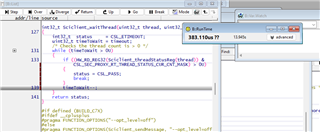
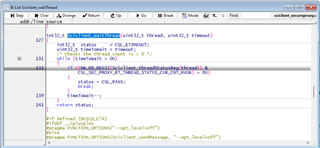
  • I built the app, it waits on function Sciclient_waitThread() forever. It looks like that the ping_main/pong_main is not created or not ready for task switch. Another interesting thing to be noticed: the wait loop time is the same as my fake interrupt time.

    I attached the elf I built for you to check on your side, and see if it behaves same or not. this could check my HW firmware/configuration/setup

    7144.test.zip 

  • Hi Jim

    I built the app, it waits on function Sciclient_waitThread() forever. It looks like that the ping_main/pong_main is not created or not ready for task switch.

    Can you debug and confirm it is getting called from Board_init() in task_switch.c? It is expected that ping_main and pong_main would not be created as this is still part of Board and Sciclient initialization.

    Have you made any changes to any of the source files from the SDK?

    I will test with your binary and let you know the results.

    Thanks,

    Neehar

  •  I did not change source code, just try to replicate whatever you did

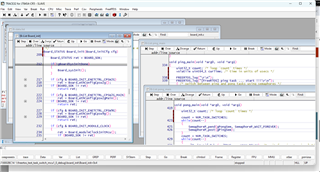
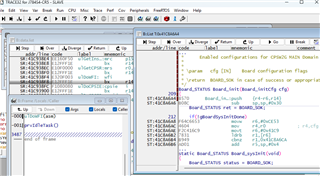
    I put break point at Board_init() and it stops there:

    I also put breakpoint on ping_main() and pong_main() like above, and hit "run", the breakpoints on ping_main/pong_main() never hit

    it stuck at Sciclient_waitThread()

  • Hi Jim,

    What is the call stack when the program gets stuck at Sciclient_waitThread()? I understand that the program stops at the breakpoint at Board_init() as it should if you are able to hit main(). I meant does the program get stuck within the Sciclient initialization calls and call stack starting from Board_init()?

    I will check with my colleague to understand if there are any issues that debugging with Lauterbach may be causing to running this task switch example. Are you able to run any other examples from the SDK? Or do you have the same issue with all the examples? Such as the Sciserver test app?

    Thanks,

    Neehar

  • if you give me the command to build the test app name, I will build and try. Thanks

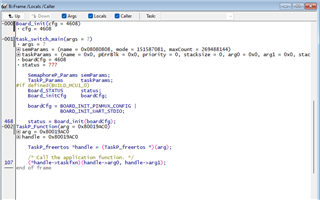
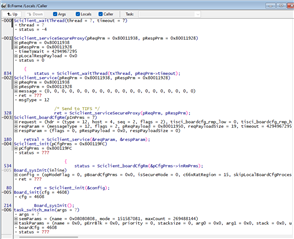
  • The stackframe after break at Board_init()

    If I continue running the program, the program wait for thread forever, and the stack frame is below:

    I am loading the elf to MCU1_0 core directly using debugger, and there is no sciserver running on any core. the sciclient is supposed to talk to sciserver to create threads ? 

  • Hi Jim,

    Do you have the same issues with any other examples from the PDK?

    if you give me the command to build the test app name, I will build and try. Thanks

    Please try building and running "sciserver_testapp_freertos". You can use the following command:

    make -s sciserver_testapp_freertos BOARD=j784s4_evm

    Thank you for this call stack information. Could you provide more details on the request and reqParam parameters, passed to Sciclient_boardCfgRm()?

    I am loading the elf to MCU1_0 core directly using debugger, and there is no sciserver running on any core. the sciclient is supposed to talk to sciserver to create threads ? 

    Additionally, what CMM script are you using? You should have Sciserver running on MCU1_0 core from the CMM script. Take a look at this documentation for more information.

    Thanks,

    Neehar

  • Here is the reqParam info you need

    build sdk-rtos-j784s4/pdk_j784s4/packages/ti/binary/sciserver_testapp_freertos/bin/j784s4/sciserver_testacu1_0_debug.xer5f, and test:

    app is looping in the idel 

  • Hi Jim,

    Here is the reqParam info you need

    Thanks, I will compare these values to my working example to understand the issue better.

    Thanks,

    Neehar