This thread has been locked.

If you have a related question, please click the "Ask a related question" button in the top right corner. The newly created question will be automatically linked to this question.

TDA4VM: TDA4 -VM PCIE DMA issue

Part Number: TDA4VM
Other Parts Discussed in Thread: PROCESSOR-SDK-J721E, , TDA4VH, AM69, DRA821

Tool/software:

Hello, TI,

​1.In the thread at e2e.ti.com/.../processor-sdk-j721e-pci_epf_test-pci_epf_test-1-failed-to-get-private-dma-rx-channel-falling-back-to-generic-one, you mentioned that the issue ​​“PROCESSOR-SDK-J721E: pci_epf_test pci_epf_test.1: Failed to get private DMA rx channel. Falling back to generic one”​​ would be fixed in the ​​SDK 10 timeframe​​. Has this issue been resolved in the current ​​SDK 10​​ release?

2. We are using ​​RK3588 (RC)​​ and ​​TDA4 (EP)​​ for PCIe communication.

    1. Without DMA, directly using ioread32_rep/memcpy_fromio in the RC-side driver can correctly read data from the EP’s ​​BAR Space​​.
    2. When invoking ​​DMA​​ in the RC-side PCIe device driver to read data from the EP’s ​​BAR Space​​, an error occurs: only the first 4 bytes are correct, and the subsequent data is incorrect.
      • With assistance from ​​RK FAE​​, debug logs show that the TDA4 returns an ​​“Unsupported Request completion”​​ error to the RK3588.
      • They suggested checking the ​​inbound configuration​​ of the EP’s BAR space.
    3. Using similar code in a scenario where two ​​RK3588s​​ are interconnected via PCIe (RC Left right arrow EP), controlling the RC-side PCIe DMA enables successful data communication with the EP.

Question​​: What could be the cause of the error in case 2.b, and how can it be resolved?

3. We have identified specific operations for the ​​ATU inbound registers​​ of the PCIe EP. Are all the inbound configuration operations here?

pci_epf_test_set_bar(struct pci_epf *epf)  -->
pci_epc_set_bar(struct pci_epc *epc, u8 func_no, struct pci_epf_bar *epf_bar) -->


//pcie-cadence-ep.c
static int cdns_pcie_ep_set_bar(struct pci_epc *epc, u8 fn,
struct pci_epf_bar *epf_bar)
{
....
dma_addr_t bar_phys = epf_bar->phys_addr;
....
addr0 = lower_32_bits(bar_phys);
addr1 = upper_32_bits(bar_phys);
....
cdns_pcie_writel(pcie, CDNS_PCIE_AT_IB_EP_FUNC_BAR_ADDR0(fn, bar),
addr0);
cdns_pcie_writel(pcie, CDNS_PCIE_AT_IB_EP_FUNC_BAR_ADDR1(fn, bar),
addr1);
...
}

  • Hi Wang,

    1. Yes, the issue is fixed. The warning logs still print out, but those warnings due to the pci_epf_test example from upstream Linux adding in new features for specific devices that have an internal DMA on the PCIe controller. For TDA4VM, there are DMA channels internal to SoC, but not internal to PCIe controller, hence the warning message prints out. Functionally, it is the same as 8.6 SDK where the warning message was not printing out.

    2. Without DMA read/write works, but with DMA read/write does not work -> maybe it is a cache issue? DMA does not have cache coherency with the CPU, so maybe there needs to be an explicit invalidate/flush to get read/write to work with DMA.

    3. For the third question, is the pci_epf_test kernel driver in-use? Please send the output from "lspci -vvv" which should show what kernel driver is bound to the PCIe device.

    Regards,

    Takuma

  • Thank you very much for your reply.
    1、Could you provide any related patches for SDK 9.X?

    2、When using DMA for reading and writing, we use the following interfaces for invalidate/flush.
    read :PCIE_DMA_CACHE_INVALIDE -> dma_sync_single_for_cpu
    write: PCIE_DMA_CACHE_FLUSH -> dma_sync_single_for_devic

    3、On the TDA4 ( EP) side, the driver used is partially customized based on pci-epf-test.
    The "lspci -v" command does not produce any output on the EP device, but there are partial debug logs in dmesg.

    [    6.104738] j721e_pcie_probe endpoint start!!!
    [    6.110614] j721e_pcie_common_init, pcie->num_lanes=2, pcie->max_lanes=2
    [    6.119189] cdns_pcie_init_phy, phy_count=1,phy-names=pcie-phy
    [    6.138685] epf bind,  epc name=2900000.pcie-ep
    [    6.144531] cdns_pcie_ep_setup max_functions=6
    [    6.151143] j721e_pcie_probe endpoint end!
    [    6.169060] j721e_pcie_probe endpoint start!!!
    
    [    6.178670] j721e_pcie_common_init, pcie->num_lanes=2, pcie->max_lanes=2
    [    6.187092] cdns_pcie_init_phy, phy_count=1,phy-names=pcie-phy
    [    6.198882] epf bind,  epc name=2910000.pcie-ep
    [    6.211321] cdns_pcie_ep_setup max_functions=6
    [    6.217227] j721e_pcie_probe endpoint end!
    
    [   10.862578] epf bind,  pci_ep_cfs_init auto start!
    
    [   10.872411] pci_epf_test_probe
    
    [   10.886661] phys_addr 0xa966a000   0x2966a000   bar1 size 0x100
    [   10.897378] phys_addr 0xb5807000   0x35807000   bar0 size 0x100
    [   10.929123] phys_addr 0xe0500000   0x60500000   bar2 size 0x100000
    [   11.084845] phys_addr 0xe0600000   0x60600000   bar3 size 0x100000
    [   11.105316] phys_addr 0xe0700000   0x60700000   bar4 size 0x100000
    [   11.126000] phys_addr 0xe0800000   0x60800000   bar5 size 0x100000
    [   11.132743]  reg=0x100240, cfg=0x5050585
    [   11.137123]  reg=0x100240, cfg=0x5050581
    [   11.141650]  reg=0x100240, cfg=0x5058181
    [   11.146140]  reg=0x100240, cfg=0x58d8181
    [   11.150511]  reg=0x100244, cfg=0x505
    [   11.154527]  reg=0x100244, cfg=0x58d
    [   11.158675] pci_epf_test pci_epf_test.0: Failed to get private DMA rx channel. Falling back to generic one
    [   11.170692] register misc pcie device ok

    On the RC (Root Complex) side, lspci shows the following output:

    root@ok3588:/opt# lspci -v
    00:00.0 Class 0604: Device 1d87:3588 (rev 01)
            Flags: bus master, fast devsel, latency 0, IRQ 151
            Bus: primary=00, secondary=01, subordinate=ff, sec-latency=0
            I/O behind bridge: [disabled] [16-bit]
            Memory behind bridge: f0200000-f06fffff [size=5M] [32-bit]
            Prefetchable memory behind bridge: [disabled] [64-bit]
            Expansion ROM at f0700000 [virtual] [disabled] [size=64K]
            Capabilities: [40] Power Management version 3
            Capabilities: [50] MSI: Enable+ Count=16/32 Maskable+ 64bit+
            Capabilities: [70] Express Root Port (Slot-), IntMsgNum 8
            Capabilities: [b0] MSI-X: Enable- Count=128 Masked+
            Capabilities: [100] Advanced Error Reporting
            Capabilities: [148] Secondary PCI Express
            Capabilities: [190] L1 PM Substates
            Capabilities: [1d0] Vendor Specific Information: ID=0002 Rev=4 Len=100 <?>
            Capabilities: [2d0] Vendor Specific Information: ID=0006 Rev=0 Len=018 <?>
            Kernel driver in use: pcieport
    
    01:00.0 Class ff00: Device 104c:b00d
            Control: I/O- Mem+ BusMaster- SpecCycle- MemWINV- VGASnoop- ParErr- Stepping- SERR- FastB2B- DisINTx+
            Status: Cap+ 66MHz- UDF- FastB2B- ParErr- DEVSEL=fast >TAbort- <TAbort- <MAbort- >SERR- <PERR- INTx-
            Interrupt: pin A routed to IRQ 169
            Region 0: Memory at f0600000 (32-bit, non-prefetchable) [size=256]
            Region 1: Memory at f0600100 (32-bit, non-prefetchable) [size=256]
            Region 2: Memory at f0200000 (32-bit, non-prefetchable) [size=1M]
            Region 3: Memory at f0300000 (32-bit, non-prefetchable) [size=1M]
            Region 4: Memory at f0400000 (32-bit, non-prefetchable) [size=1M]
            Region 5: Memory at f0500000 (32-bit, non-prefetchable) [size=1M]
            Capabilities: [80] Power Management version 3
                    Flags: PMEClk- DSI- D1+ D2- AuxCurrent=0mA PME(D0+,D1+,D2-,D3hot+,D3cold-)
                    Status: D0 NoSoftRst+ PME-Enable- DSel=0 DScale=0 PME-
            Capabilities: [90] MSI: Enable+ Count=8/8 Maskable- 64bit+
                    Address: 00000000fe670040  Data: 0000
            Capabilities: [b0] MSI-X: Enable- Count=6 Masked-
                    Vector table: BAR=1 offset=00000080
                    PBA: BAR=1 offset=000000d0
            Capabilities: [c0] Express (v2) Endpoint, IntMsgNum 0
                    DevCap: MaxPayload 256 bytes, PhantFunc 0, Latency L0s <1us, L1 <1us
                            ExtTag- AttnBtn- AttnInd- PwrInd- RBE+ FLReset+ SlotPowerLimit 0W TEE-IO-
                    DevCtl: CorrErr- NonFatalErr- FatalErr- UnsupReq-
                            RlxdOrd+ ExtTag- PhantFunc- AuxPwr- NoSnoop+ FLReset-
                            MaxPayload 128 bytes, MaxReadReq 512 bytes
                    DevSta: CorrErr+ NonFatalErr+ FatalErr- UnsupReq+ AuxPwr- TransPend-
                    LnkCap: Port #0, Speed 8GT/s, Width x2, ASPM L1, Exit Latency L1 <8us
                            ClockPM- Surprise- LLActRep- BwNot- ASPMOptComp+
                    LnkCtl: ASPM Disabled; RCB 64 bytes, LnkDisable- CommClk-
                            ExtSynch- ClockPM- AutWidDis- BWInt- AutBWInt-
                    LnkSta: Speed 8GT/s, Width x2
                            TrErr- Train- SlotClk- DLActive- BWMgmt- ABWMgmt-
                    DevCap2: Completion Timeout: Range B, TimeoutDis+ NROPrPrP- LTR+
                             10BitTagComp+ 10BitTagReq- OBFF Not Supported, ExtFmt+ EETLPPrefix+, MaxEETLPPrefixes 1
                             EmergencyPowerReduction Not Supported, EmergencyPowerReductionInit-
                             FRS- TPHComp- ExtTPHComp-
                             AtomicOpsCap: 32bit- 64bit- 128bitCAS-
                    DevCtl2: Completion Timeout: 50us to 50ms, TimeoutDis-
                             AtomicOpsCtl: ReqEn-
                             IDOReq- IDOCompl- LTR+ EmergencyPowerReductionReq-
                             10BitTagReq- OBFF Disabled, EETLPPrefixBlk-
                    LnkCap2: Supported Link Speeds: 2.5-8GT/s, Crosslink- Retimer- 2Retimers- DRS-
                    LnkCtl2: Target Link Speed: 8GT/s, EnterCompliance- SpeedDis-
                             Transmit Margin: Normal Operating Range, EnterModifiedCompliance- ComplianceSOS-
                             Compliance Preset/De-emphasis: -6dB de-emphasis, 0dB preshoot
                    LnkSta2: Current De-emphasis Level: -6dB, EqualizationComplete+ EqualizationPhase1+
                             EqualizationPhase2+ EqualizationPhase3+ LinkEqualizationRequest-
                             Retimer- 2Retimers- CrosslinkRes: unsupported
            Capabilities: [100 v2] Advanced Error Reporting
                    UESta:  DLP- SDES- TLP- FCP- CmpltTO- CmpltAbrt- UnxCmplt- RxOF- MalfTLP-
                            ECRC- UnsupReq+ ACSViol- UncorrIntErr- BlockedTLP- AtomicOpBlocked- TLPBlockedErr-
                            PoisonTLPBlocked- DMWrReqBlocked- IDECheck- MisIDETLP- PCRC_CHECK- TLPXlatBlocked-
                    UEMsk:  DLP- SDES- TLP- FCP- CmpltTO- CmpltAbrt- UnxCmplt- RxOF- MalfTLP-
                            ECRC- UnsupReq- ACSViol- UncorrIntErr+ BlockedTLP- AtomicOpBlocked- TLPBlockedErr-
                            PoisonTLPBlocked- DMWrReqBlocked- IDECheck- MisIDETLP- PCRC_CHECK- TLPXlatBlocked-
                    UESvrt: DLP+ SDES+ TLP- FCP+ CmpltTO- CmpltAbrt- UnxCmplt- RxOF+ MalfTLP+
                            ECRC- UnsupReq- ACSViol- UncorrIntErr+ BlockedTLP- AtomicOpBlocked- TLPBlockedErr-
                            PoisonTLPBlocked- DMWrReqBlocked- IDECheck- MisIDETLP- PCRC_CHECK- TLPXlatBlocked-
                    CESta:  RxErr+ BadTLP- BadDLLP+ Rollover- Timeout- AdvNonFatalErr- CorrIntErr- HeaderOF+
                    CEMsk:  RxErr- BadTLP- BadDLLP- Rollover- Timeout- AdvNonFatalErr+ CorrIntErr+ HeaderOF+
                    AERCap: First Error Pointer: 14, ECRCGenCap+ ECRCGenEn- ECRCChkCap+ ECRCChkEn-
                            MultHdrRecCap- MultHdrRecEn- TLPPfxPres- HdrLogCap-
                    HeaderLog: 40000001 0000000f 00000000 00000000
            Capabilities: [140 v1] Alternative Routing-ID Interpretation (ARI)
                    ARICap: MFVC- ACS-, Next Function: 0
                    ARICtl: MFVC- ACS-, Function Group: 0
            Capabilities: [150 v1] Device Serial Number 00-00-00-00-00-00-00-00
            Capabilities: [160 v1] Power Budgeting <?>
            Capabilities: [1b8 v1] Latency Tolerance Reporting
                    Max snoop latency: 0ns
                    Max no snoop latency: 0ns
            Capabilities: [1c0 v1] Dynamic Power Allocation <?>
            Capabilities: [200 v1] Single Root I/O Virtualization (SR-IOV)
                    IOVCap: Migration- 10BitTagReq- IntMsgNum 0
                    IOVCtl: Enable- Migration- Interrupt- MSE- ARIHierarchy- 10BitTagReq-
                    IOVSta: Migration-
                    Initial VFs: 4, Total VFs: 4, Number of VFs: 0, Function Dependency Link: 00
                    VF offset: 6, stride: 1, Device ID: 0100
                    Supported Page Size: 00000553, System Page Size: 00000001
                    Region 0: Memory at 0000000000000000 (64-bit, non-prefetchable)
                    VF Migration: offset: 00000000, BIR: 0
            Capabilities: [300 v1] Secondary PCI Express
                    LnkCtl3: LnkEquIntrruptEn- PerformEqu-
                    LaneErrStat: LaneErr at lane: 0
            Capabilities: [400 v1] Vendor Specific Information: ID=0001 Rev=1 Len=010 <?>
            Capabilities: [440 v1] Process Address Space ID (PASID)
                    PASIDCap: Exec+ Priv+, Max PASID Width: 14
                    PASIDCtl: Enable- Exec- Priv-
            Capabilities: [4c0 v1] Virtual Channel
                    Caps:   LPEVC=0 RefClk=100ns PATEntryBits=1
                    Arb:    Fixed- WRR32- WRR64- WRR128-
                    Ctrl:   ArbSelect=Fixed
                    Status: InProgress-
                    VC0:    Caps:   PATOffset=00 MaxTimeSlots=1 RejSnoopTrans-
                            Arb:    Fixed- WRR32- WRR64- WRR128- TWRR128- WRR256-
                            Ctrl:   Enable+ ID=0 ArbSelect=Fixed TC/VC=ff
                            Status: NegoPending- InProgress-
                    VC1:    Caps:   PATOffset=00 MaxTimeSlots=1 RejSnoopTrans-
                            Arb:    Fixed- WRR32- WRR64- WRR128- TWRR128- WRR256-
                            Ctrl:   Enable- ID=1 ArbSelect=Fixed TC/VC=00
                            Status: NegoPending- InProgress-
                    VC2:    Caps:   PATOffset=00 MaxTimeSlots=1 RejSnoopTrans-
                            Arb:    Fixed- WRR32- WRR64- WRR128- TWRR128- WRR256-
                            Ctrl:   Enable- ID=2 ArbSelect=Fixed TC/VC=00
                            Status: NegoPending- InProgress-
                    VC3:    Caps:   PATOffset=00 MaxTimeSlots=1 RejSnoopTrans-
                            Arb:    Fixed- WRR32- WRR64- WRR128- TWRR128- WRR256-
                            Ctrl:   Enable- ID=3 ArbSelect=Fixed TC/VC=00
                            Status: NegoPending- InProgress-
            Capabilities: [5c0 v1] Address Translation Service (ATS)
                    ATSCap: Invalidate Queue Depth: 01
                    ATSCtl: Enable-, Smallest Translation Unit: 00
            Capabilities: [640 v1] Page Request Interface (PRI)
                    PRICtl: Enable- Reset-
                    PRISta: RF- UPRGI- Stopped+ PASID+
                    Page Request Capacity: 00000001, Page Request Allocation: 00000000
            Capabilities: [900 v1] L1 PM Substates
                    L1SubCap: PCI-PM_L1.2+ PCI-PM_L1.1+ ASPM_L1.2+ ASPM_L1.1+ L1_PM_Substates+
                              PortCommonModeRestoreTime=255us PortTPowerOnTime=26us
                    L1SubCtl1: PCI-PM_L1.2- PCI-PM_L1.1- ASPM_L1.2- ASPM_L1.1-
                               T_CommonMode=0us LTR1.2_Threshold=0ns
                    L1SubCtl2: T_PwrOn=10us
            Capabilities: [a20 v1] Precision Time Measurement
                    PTMCap: Requester+ Responder- Root-
                    PTMClockGranularity: Unimplemented
                    PTMControl: Enabled- RootSelected-
                    PTMEffectiveGranularity: Unknown
            Kernel driver in use: pcie-tda4ep

  • Test results for RK3588 and TDA4-VH with SDK 10:

    root@ok3588:/opt# ./pcitest.sh
    BAR tests
    
    BAR0:           OKAY
    BAR1:           OKAY
    BAR2:           OKAY
    BAR3:           OKAY
    BAR4:           OKAY
    BAR5:           OKAY
    
    Interrupt tests
    
    SET IRQ TYPE TO LEGACY:         OKAY
    LEGACY IRQ:     OKAY
    SET IRQ TYPE TO MSI:            OKAY
    MSI1:           OKAY
    MSI2:           OKAY
    MSI3:           NOT OKAY
    M...
    MSI32:          NOT OKAY
    
    SET IRQ TYPE TO MSI-X:          OKAY
    MSI-X1:         OKAY
    MSI-X2:         OKAY
    MSI-X3:         NOT OKAY
    MSI-X4:         NOT OKAY
    MSI-X5:         NOT OKAY
    MSI-X6:         NOT OKAY
    ...
    MSI-X31:                NOT OKAY
    MSI-X32:                NOT OKAY
    
    Read Tests
    
    SET IRQ TYPE TO MSI:            OKAY
    READ (      1 bytes):           OKAY
    READ (   1024 bytes):           OKAY
    READ (   1025 bytes):           OKAY
    READ (1024000 bytes):           OKAY
    READ (1024001 bytes):           OKAY
    
    Write Tests
    
    WRITE (      1 bytes):          OKAY
    WRITE (   1024 bytes):          OKAY
    WRITE (   1025 bytes):          OKAY
    WRITE (1024000 bytes):          OKAY
    WRITE (1024001 bytes):          OKAY
    
    Copy Tests
    
    COPY (      1 bytes):           OKAY
    COPY (   1024 bytes):           OKAY
    COPY (   1025 bytes):           OKAY
    COPY (1024000 bytes):           OKAY
    COPY (1024001 bytes):           OKAY

    Output from the TDA4 EP side:

    [  214.783085] pci_epf_test pci_epf_test.0: Invalid MSIX IRQ number 29 / 2
    [  215.795084] pci_epf_test pci_epf_test.0: Invalid MSIX IRQ number 30 / 2
    [  216.815128] pci_epf_test pci_epf_test.0: Invalid MSIX IRQ number 31 / 2
    [  217.827083] pci_epf_test pci_epf_test.0: Invalid MSIX IRQ number 32 / 2
    [  218.839116] pci_epf_test pci_epf_test.0: WRITE => Size: 1 B, DMA: NO, Time: 0.000000370 s, Rate: 2702 KB/s
    [  218.855105] pci_epf_test pci_epf_test.0: WRITE => Size: 1024 B, DMA: NO, Time: 0.000002805 s, Rate: 365062 KB/s
    [  218.875099] pci_epf_test pci_epf_test.0: WRITE => Size: 1025 B, DMA: NO, Time: 0.000002815 s, Rate: 364120 KB/s
    [  218.902914] pci_epf_test pci_epf_test.0: WRITE => Size: 1024000 B, DMA: NO, Time: 0.002999535 s, Rate: 341386 KB/s
    [  218.930869] pci_epf_test pci_epf_test.0: WRITE => Size: 1024001 B, DMA: NO, Time: 0.003001720 s, Rate: 341138 KB/s
    [  218.951095] pci_epf_test pci_epf_test.0: READ => Size: 1 B, DMA: NO, Time: 0.000001475 s, Rate: 677 KB/s
    [  218.967235] pci_epf_test pci_epf_test.0: READ => Size: 1024 B, DMA: NO, Time: 0.000139240 s, Rate: 7354 KB/s
    [  218.983234] pci_epf_test pci_epf_test.0: READ => Size: 1025 B, DMA: NO, Time: 0.000140080 s, Rate: 7317 KB/s
    [  219.154154] pci_epf_test pci_epf_test.0: READ => Size: 1024000 B, DMA: NO, Time: 0.138952775 s, Rate: 7369 KB/s
    [  219.326113] pci_epf_test pci_epf_test.0: READ => Size: 1024001 B, DMA: NO, Time: 0.138913850 s, Rate: 7371 KB/s
    [  219.343103] pci_epf_test pci_epf_test.0: COPY => Size: 1 B, DMA: NO, Time: 0.000002045 s, Rate: 488 KB/s
    [  219.359242] pci_epf_test pci_epf_test.0: COPY => Size: 1024 B, DMA: NO, Time: 0.000142190 s, Rate: 7201 KB/s
    [  219.375242] pci_epf_test pci_epf_test.0: COPY => Size: 1025 B, DMA: NO, Time: 0.000143500 s, Rate: 7142 KB/s
    [  219.549143] pci_epf_test pci_epf_test.0: COPY => Size: 1024000 B, DMA: NO, Time: 0.142000500 s, Rate: 7211 KB/s
    [  219.717312] pci_epf_test pci_epf_test.0: COPY => Size: 1024001 B, DMA: NO, Time: 0.142166685 s, Rate: 7202 KB/s
     
    root@j784s4-evm:~# uname -a
    Linux j784s4-evm 6.6.44-ti-01478-g541c20281af7-dirty #1 SMP PREEMPT Thu Nov 14 19:20:24 UTC 2024 aarch64 GNU/Linux


    TDA4 SDK version:  10.01.00.05
    dr-download.ti.com/.../ti-processor-sdk-linux-adas-j784s4-evm-10_01_00_05-Linux-x86-Install.bin

  • Hi Wang,

    Could you provide any related patches for SDK 9.X?

    No particular patch. The log is a warning message that looks like an error message. So, no issue to begin with.

    The "lspci -v" command does not produce any output on the EP device, but there are partial debug logs in dmesg.

    The logs you sent are great. I see that "pcie-tda4ep" is the driver in-use which I assume is the name of the customized pci-epf-test. The modifications that are done to pci-epf-test, I am not sure what has been done, but let me know if you believe we should review the modifications.

    Output from the TDA4 EP side:

    I see DMA: NO for the tests, but to clarify, you see no issues when DMA is not in-use correct?

    Can logs for when DMA is in-use be shared as well?

    Regards,

    Takuma

  • Hi, Takuma.  Thanks for your prompt reply.

    pci_epf_test.0: WRITE => Size: 1 B, DMA: YES, Time: 0.000269575 s, 		Rate: 3 KB/s
    pci_epf_test.0: WRITE => Size: 1024 B, DMA: YES, Time: 0.000242295 s,	Rate: 4226 KB/s
    pci_epf_test.0: WRITE => Size: 1025 B, DMA: YES, Time: 0.000238220 s, 	Rate: 4302 KB/s
    pci_epf_test.0: WRITE => Size: 1024000 B, DMA: YES, Time: 0.002597025 s, Rate: 394297 KB/s
    pci_epf_test.0: WRITE => Size: 1024001 B, DMA: YES, Time: 0.002601000 s, Rate: 393695 KB/s
    
    pci_epf_test.0: READ => Size: 1 B, DMA: YES, Time: 0.000243155 s, 		Rate: 4 KB/s
    pci_epf_test.0: READ => Size: 1024 B, DMA: YES, Time: 0.000243590 s, 	Rate: 4203 KB/s
    pci_epf_test.0: READ => Size: 1025 B, DMA: YES, Time: 0.000245355 s, 	Rate: 4177 KB/s
    pci_epf_test.0: READ => Size: 1024000 B, DMA: YES, Time: 0.012860460 s, Rate: 79623 KB/s
    pci_epf_test.0: READ => Size: 1024001 B, DMA: YES, Time: 0.012867580 s, Rate: 79579 KB/s
    
    pci_epf_test.0: COPY => Size: 1 B, DMA: YES, Time: 0.000244310 s, 		Rate: 4 KB/s
    pci_epf_test.0: COPY => Size: 1024 B, DMA: YES, Time: 0.000244210 s, 	Rate: 4193 KB/s
    pci_epf_test.0: COPY => Size: 1025 B, DMA: YES, Time: 0.000246355 s, 	Rate: 4160 KB/s
    pci_epf_test.0: COPY => Size: 1024000 B, DMA: YES, Time: 0.012864615 s, Rate: 79598 KB/s
    pci_epf_test.0: COPY => Size: 1024001 B, DMA: YES, Time: 0.012860930 s, Rate: 79621 KB/s

    The logs indicate that the DMA is already in use, with a maximum speed approaching 80 MB/s.

    There is a significant gap from the relevant data you displayed here:TDA4VH-Q1: PCIe EP/RC transfer speed performance slow - Processors forum - Processors - TI E2E support forums

    Do you have any optimization suggestions?

  • Hi Wang,

    The pci_epf_test is limited in terms of testing performance. It is mainly an application to demonstrate functionality.

    We use a different application called fio that has more features built-in to test the interface. The impact of fio and how it prepares data for transfer can be found in this thread: https://e2e.ti.com/support/processors-group/processors/f/processors-forum/1478254/tda4vh-q1-slow-writing-speed-in-nvme-ssd/5683346#5683346. You may use a similar way of preparing data like fio to optimize your application.

    Regards,

    Takuma

  •  Hi,  Takuma, thanks for your reply.

    1. Have you conducted tests using DMA with pci-epf-test? Are there significant differences between the results you obtained and ours?
    2. We hope to configure vntb on the TDA4 (9.9. PCI Non-Transparent Bridge (NTB) Endpoint Function (EPF) User Guide — The Linux Kernel documentation). Is it necessary to configure ntb first (9.7. PCI Non-Transparent Bridge (NTB) Endpoint Function (EPF) User Guide — The Linux Kernel documentation)? That is, to implement vntb on the EP side, do we need to configure the ntb function first?

    Regards,

    Wang

  • Hi Wang,

    Have you conducted tests using DMA with pci-epf-test? Are there significant differences between the results you obtained and ours?

    Yes for both questions. Results are in the E2E thread you have found. Although, the serdes PHY is different between TDA4VM and TDA4VH. So there will be differences like how many serdes lane there are available (2x lanes vs 4x lanes).

    We hope to configure vntb on the TDA4 (9.9. PCI Non-Transparent Bridge (NTB) Endpoint Function (EPF) User Guide — The Linux Kernel documentation). Is it necessary to configure ntb first (9.7. PCI Non-Transparent Bridge (NTB) Endpoint Function (EPF) User Guide — The Linux Kernel documentation)? That is, to implement vntb on the EP side, do we need to configure the ntb function first?

    EP has to be brought up first. I think this documentation is better for following since it is more specific to TDA4VM and the TI EVM board: https://software-dl.ti.com/jacinto7/esd/processor-sdk-linux-jacinto7/10_01_00_04/exports/docs/linux/Foundational_Components/Kernel/Kernel_Drivers/PCIe/PCIe_Backplane.html

    Regards,

    Takuma

  • Hi,  Takuma.

    What are the limitations, and what methods can be used to remove these limitations? The FIO tool mentioned in thread above suits disk devices and is not very suitable for our scenario. If I want to measure the maximum speed in this scenario, what can I do?

    Regards,

    Wang

  • HI, Takuma.

    We have also used same boards as the thread above, this test was performed with an AM69-SK acting as RC and with a J784S4-EVM acting as EP. Why is there a big difference in the data from what you provided?

    pci_epf_test pci_epf_test.0: WRITE => Size: 1024000 B, DMA: YES, Time: 0.002635460 s, Rate: 388546 KB/s
    pci_epf_test pci_epf_test.0: WRITE => Size: 1024000 B, DMA: YES, Time: 0.002636335 s, Rate: 388418 KB/s
    
    pci_epf_test pci_epf_test.0: READ => Size: 1024000 B, DMA: YES, Time: 0.014152295 s, Rate: 72355 KB/s
    pci_epf_test pci_epf_test.0: READ => Size: 1024000 B, DMA: YES, Time: 0.014225955 s, Rate: 71981 KB/s
    
    pci_epf_test pci_epf_test.0: COPY => Size: 1024000 B, DMA: YES, Time: 0.014304825 s, Rate: 71584 KB/s
    pci_epf_test pci_epf_test.0: COPY => Size: 1024000 B, DMA: YES, Time: 0.014331155 s, Rate: 71452 KB/s

  • Hi Wang,

    Why is there a big difference in the data from what you provided?

    Less PCIe lanes available on TDA4VM, and different SerDes PHY.

    If I want to measure the maximum speed in this scenario, what can I do?

    Create a fio-like tool that is suitable for your device. Essentially, the way the data is prepared and written in fio is important. That is, how the transactions are queued and made in parallel.

    An easier alternative to above would be to try to start multiple PCIe transactions using the PCIe EP/RC example by starting communication on all 6 of the physical functions at once. This will simulate a parallel communication with your device and the performance should scale linearly with the number of parallel transactions. 

    Regards,

    Takuma

  • Thanks for your effective suggestions, we have initiated communication with all 6 physical functions simultaneously, and the test results are better than before.

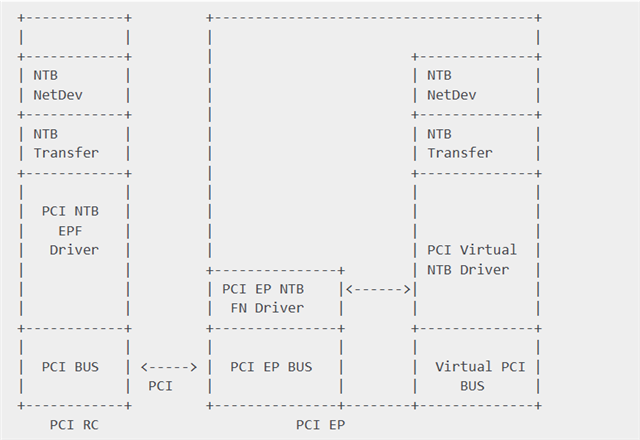
    1. We plan to configure VNTB  on the AM69 (RC) TDA4 VH (EP) as follows. Have you ever validated this configuration? If so, what is the maximum achievable network speed of VNTB when using DMA?
    2. On the RC side, is the "PCI NTB EPF Driver" implemented as ntb_hw_epf.ko?
      On the EP side, is the "PCI EP NTB FN Driver" pci-epf-vntb.ko?, and which kernel module corresponds to the "PCI virtual NTB Driver"?

    1. On both the RC and EP, we can see the network interface generated by ntb_netdev.ko . However, we cannot ping it after setting the IP address.

    [   69.693785] Software Queue-Pair Transport over NTB, version 4
    [   69.715743] pci-vntb 0000:10:00.0: NTB Transport QP 0 created
    [   69.727127] pci-vntb 0000:10:00.0: eth2 created
    

    Regards,

    Wang

  • Hi Wang,

    Glad to hear the increase in performance. 

    As for the NTB example, I have not ran this example myself. It is much rare to see a developer use this example compared to the EP/RC example. However, I am aware of the documentation for this: https://software-dl.ti.com/jacinto7/esd/processor-sdk-linux-j784s4/11_00_00_08/exports/docs/linux/Foundational_Components/Kernel/Kernel_Drivers/PCIe/PCIe_Backplane.html 

    What is the usecase needing NTB, and using a virtual PCI Bus to use the NTB example as opposed to a second physical PCIe device?

    Regards,

    Takuma

  • Since we only have two boards here, one board (TDA4) collects a large amount of video data, which needs to be sent to AM69 via PCIe.

  • Hi Wang,

    The usecase being described sounds more like a standard EP/RC usecase. The NTB example is mainly for 2 RCs that are talking with each other through a third PCIe device that has the capabilities of acting as 2 EP devices, for a total of 3 devices (2 RCs and 1 EP with two ports).

    The EP/RC example can be referenced for how to set up the devices, then applications like fio can be referenced for how the application code can optimize the transaction through queuing and parallel transactions.

    Regards,

    Takuma

  • HI, Takuma.
    Yes, that's why we prefer to use VNTB instead of NTB here. VNTB is more suitable for this scenario. We plan to encapsulate it in the form of a network interface to enable seamless transplantation of upper-layer applications.
    Regards,
    Wang
  • Hi Wang,

    Ok, understood. So the main purpose of using NTB (specifically vNTB) is to utilize the network interface built on top of the EP/RC example. 

    Can I get 1 week to look into this question?

    Regards,

    Takuma

  • Hi, Takuma.

    Sure,  I appreciate your effort, thanks. 

  • Hi Wang,

    Thank you for your patience.

    Regards,

    Takuma

  • Hi Takuma, May I ask about the progress of the research on this question since a week ago?

  • Hi Wang,

    Yes, thank you again for your patience and the reminder.

    I used a slightly different platform than your setup due to availability of boards, but flow should be the same. I was able to see ping was working as expected.

    DRA821 RC logs to show ping has worked:

    j7200-evm login: [   18.313958] platform 2830000.serial: deferred probe pending
    [   18.319536] platform 24c0000.timer: deferred probe pending
    root
    [   19.125411] kauditd_printk_skb: 1 callbacks suppressed
    [   19.126123] audit: type=1006 audit(1709062402.808:16): pid=983 uid=0 subj=kernel old-auid=4294967295 auid=0 tty=(none) old-ses=4294967295 ses=3 res=1
    [   19.146460] audit: type=1300 audit(1709062402.808:16): arch=c00000b7 syscall=64 success=yes exit=1 a0=8 a1=ffffd31f1478 a2=1 a3=1 items=0 ppid=1 pid=983 auid=0 uid=0 gid=0 euid=0 suid=0 fsuid=0 egid=0 sgid=0 fsgid=0 tty=(none) ses=3 comm="(systemd)" exe="/usr/lib/systemd/systemd-executor" subj=kernel key=(null)
    [   19.175081] audit: type=1327 audit(1709062402.808:16): proctitle="(systemd)"
    [   19.196336] audit: type=1334 audit(1709062402.880:17): prog-id=18 op=LOAD
    [   19.209742] audit: type=1300 audit(1709062402.880:17): arch=c00000b7 syscall=280 success=yes exit=8 a0=5 a1=ffffc0cee178 a2=90 a3=0 items=0 ppid=1 pid=983 auid=0 uid=0 gid=0 euid=0 suid=0 fsuid=0 egid=0 sgid=0 fsgid=0 tty=(none) ses=3 comm="systemd" exe="/usr/lib/systemd/systemd" subj=kernel key=(null)
    [   19.251031] audit: type=1327 audit(1709062402.880:17): proctitle="(systemd)"
    [   19.265409] audit: type=1334 audit(1709062402.880:18): prog-id=18 op=UNLOAD
    [   19.281382] audit: type=1300 audit(1709062402.880:18): arch=c00000b7 syscall=57 success=yes exit=0 a0=8 a1=1 a2=0 a3=ffffa79bbc60 items=0 ppid=1 pid=983 auid=0 uid=0 gid=0 euid=0 suid=0 fsuid=0 egid=0 sgid=0 fsgid=0 tty=(none) ses=3 comm="systemd" exe="/usr/lib/systemd/systemd" subj=kernel key=(null)
    [   19.307947] audit: type=1327 audit(1709062402.880:18): proctitle="(systemd)"
    [   19.315010] audit: type=1334 audit(1709062402.880:19): prog-id=19 op=LOAD
    root@j7200-evm:~# [   24.213109] xhci-hcd xhci-hcd.4.auto: can't setup: -110
    [   24.218345] xhci-hcd xhci-hcd.4.auto: USB bus 1 deregistered
    [   24.224015] xhci-hcd: probe of xhci-hcd.4.auto failed with error -110
    
    root@j7200-evm:~# lspci
    00:00.0 PCI bridge: Texas Instruments Device b00f
    01:00.0 RAM memory: Texas Instruments Device b00d
    root@j7200-evm:~# lspci -k
    00:00.0 PCI bridge: Texas Instruments Device b00f
            Kernel driver in use: pcieport
            Kernel modules: pci_endpoint_test
    01:00.0 RAM memory: Texas Instruments Device b00d
            Kernel driver in use: pci-endpoint-test
            Kernel modules: pci_endpoint_test
    root@j7200-evm:~# echo 0000:01:00.0 > /sys/bus/pci/devices/0000\:01\:00.0/driver/unbind
    root@j7200-evm:~# modprobe ntb_hw_epf
    [   99.459179] pcieport 0000:00:00.0: of_irq_parse_pci: failed with rc=-22
    root@j7200-evm:~# modprobe ntb_netdev
    [  137.548938] Software Queue-Pair Transport over NTB, version 4
    [  137.569173] ntb_hw_epf 0000:01:00.0: NTB Transport QP 0 created
    [  137.575645] ntb_hw_epf 0000:01:00.0: eth3 created
    root@j7200-evm:~#
    root@j7200-evm:~#
    root@j7200-evm:~# lspci
    00:00.0 PCI bridge: Texas Instruments Device b00f
    01:00.0 RAM memory: Texas Instruments Device b00d
    root@j7200-evm:~# lspci -k
    00:00.0 PCI bridge: Texas Instruments Device b00f
            Kernel driver in use: pcieport
            Kernel modules: pci_endpoint_test
    01:00.0 RAM memory: Texas Instruments Device b00d
            Kernel driver in use: ntb_hw_epf
            Kernel modules: pci_endpoint_test
    root@j7200-evm:~# ifconfig
    eth0: flags=4099<UP,BROADCAST,MULTICAST>  mtu 1500
            ether 34:08:e1:59:e3:b0  txqueuelen 1000  (Ethernet)
            RX packets 0  bytes 0 (0.0 B)
            RX errors 0  dropped 0  overruns 0  frame 0
            TX packets 0  bytes 0 (0.0 B)
            TX errors 0  dropped 0 overruns 0  carrier 0  collisions 0
    
    eth1: flags=4163<UP,BROADCAST,RUNNING,MULTICAST>  mtu 1500
            inet6 fe80::7234:c6ff:fea5:d084  prefixlen 64  scopeid 0x20<link>
            ether 70:34:c6:a5:d0:84  txqueuelen 1000  (Ethernet)
            RX packets 0  bytes 0 (0.0 B)
            RX errors 0  dropped 0  overruns 0  frame 0
            TX packets 30  bytes 5636 (5.5 KiB)
            TX errors 0  dropped 0 overruns 0  carrier 0  collisions 0
    
    eth2: flags=4163<UP,BROADCAST,RUNNING,MULTICAST>  mtu 1500
            inet6 fe80::728d:c5ff:fea3:982  prefixlen 64  scopeid 0x20<link>
            ether 70:8d:c5:a3:09:82  txqueuelen 1000  (Ethernet)
            RX packets 0  bytes 0 (0.0 B)
            RX errors 0  dropped 0  overruns 0  frame 0
            TX packets 31  bytes 5706 (5.5 KiB)
            TX errors 0  dropped 0 overruns 0  carrier 0  collisions 0
    
    eth3: flags=4099<UP,BROADCAST,MULTICAST>  mtu 65510
            ether 12:0d:e0:f7:b3:55  txqueuelen 1000  (Ethernet)
            RX packets 0  bytes 0 (0.0 B)
            RX errors 0  dropped 0  overruns 0  frame 0
            TX packets 0  bytes 0 (0.0 B)
            TX errors 0  dropped 0 overruns 0  carrier 0  collisions 0
    
    lo: flags=73<UP,LOOPBACK,RUNNING>  mtu 65536
            inet 127.0.0.1  netmask 255.0.0.0
            inet6 ::1  prefixlen 128  scopeid 0x10<host>
            loop  txqueuelen 1000  (Local Loopback)
            RX packets 12  bytes 1706 (1.6 KiB)
            RX errors 0  dropped 0  overruns 0  frame 0
            TX packets 12  bytes 1706 (1.6 KiB)
            TX errors 0  dropped 0 overruns 0  carrier 0  collisions 0
    
    root@j7200-evm:~# ifconfig eth3 192.168.1.242
    root@j7200-evm:~# ifconfig
    eth0: flags=4099<UP,BROADCAST,MULTICAST>  mtu 1500
            ether 34:08:e1:59:e3:b0  txqueuelen 1000  (Ethernet)
            RX packets 0  bytes 0 (0.0 B)
            RX errors 0  dropped 0  overruns 0  frame 0
            TX packets 0  bytes 0 (0.0 B)
            TX errors 0  dropped 0 overruns 0  carrier 0  collisions 0
    
    eth1: flags=4163<UP,BROADCAST,RUNNING,MULTICAST>  mtu 1500
            inet6 fe80::7234:c6ff:fea5:d084  prefixlen 64  scopeid 0x20<link>
            ether 70:34:c6:a5:d0:84  txqueuelen 1000  (Ethernet)
            RX packets 0  bytes 0 (0.0 B)
            RX errors 0  dropped 0  overruns 0  frame 0
            TX packets 35  bytes 6678 (6.5 KiB)
            TX errors 0  dropped 0 overruns 0  carrier 0  collisions 0
    
    eth2: flags=4163<UP,BROADCAST,RUNNING,MULTICAST>  mtu 1500
            inet6 fe80::728d:c5ff:fea3:982  prefixlen 64  scopeid 0x20<link>
            ether 70:8d:c5:a3:09:82  txqueuelen 1000  (Ethernet)
            RX packets 0  bytes 0 (0.0 B)
            RX errors 0  dropped 0  overruns 0  frame 0
            TX packets 35  bytes 6678 (6.5 KiB)
            TX errors 0  dropped 0 overruns 0  carrier 0  collisions 0
    
    eth3: flags=4099<UP,BROADCAST,MULTICAST>  mtu 65510
            inet 192.168.1.242  netmask 255.255.255.0  broadcast 192.168.1.255
            ether 12:0d:e0:f7:b3:55  txqueuelen 1000  (Ethernet)
            RX packets 0  bytes 0 (0.0 B)
            RX errors 0  dropped 0  overruns 0  frame 0
            TX packets 0  bytes 0 (0.0 B)
            TX errors 0  dropped 0 overruns 0  carrier 0  collisions 0
    
    lo: flags=73<UP,LOOPBACK,RUNNING>  mtu 65536
            inet 127.0.0.1  netmask 255.0.0.0
            inet6 ::1  prefixlen 128  scopeid 0x10<host>
            loop  txqueuelen 1000  (Local Loopback)
            RX packets 12  bytes 1706 (1.6 KiB)
            RX errors 0  dropped 0  overruns 0  frame 0
            TX packets 12  bytes 1706 (1.6 KiB)
            TX errors 0  dropped 0 overruns 0  carrier 0  collisions 0
    
    root@j7200-evm:~# ping 192.168.1.242
    PING 192.168.1.242 (192.168.1.242) 56(84) bytes of data.
    64 bytes from 192.168.1.242: icmp_seq=1 ttl=64 time=0.049 ms
    64 bytes from 192.168.1.242: icmp_seq=2 ttl=64 time=0.043 ms
    64 bytes from 192.168.1.242: icmp_seq=3 ttl=64 time=0.053 ms
    64 bytes from 192.168.1.242: icmp_seq=4 ttl=64 time=0.030 ms
    64 bytes from 192.168.1.242: icmp_seq=5 ttl=64 time=0.020 ms
    64 bytes from 192.168.1.242: icmp_seq=6 ttl=64 time=0.052 ms
    64 bytes from 192.168.1.242: icmp_seq=7 ttl=64 time=0.024 ms
    64 bytes from 192.168.1.242: icmp_seq=8 ttl=64 time=0.021 ms
    ^C
    --- 192.168.1.242 ping statistics ---
    8 packets transmitted, 8 received, 0% packet loss, time 7171ms
    rtt min/avg/max/mdev = 0.020/0.036/0.053/0.013 ms
    root@j7200-evm:~#
    

    TDA4VH EP logs for the commands I ran on the EP side:

    j784s4-evm login: root
    [   26.608439] audit: type=1006 audit(1709064453.640:16): pid=1117 uid=0 old-auid=4294967295 auid=0 tty=(none) old-ses=4294967295 ses=3 res=1
    [   26.620905] audit: type=1300 audit(1709064453.640:16): arch=c00000b7 syscall=64 success=yes exit=1 a0=8 a1=ffffc6b0b238 a2=1 a3=1 items=0 ppid=1 pid=1117 auid=0 uid=0 gid=0 euid=0 suid=0 fsuid=0 egid=0 sgid=0 fsgid=0 tty=(none) ses=3 comm="(systemd)" exe="/usr/lib/systemd/systemd-executor" key=(null)
    [   26.647473] audit: type=1327 audit(1709064453.640:16): proctitle="(systemd)"
    [   26.654519] audit: type=1334 audit(1709064453.656:17): prog-id=18 op=LOAD
    [   26.661316] audit: type=1300 audit(1709064453.656:17): arch=c00000b7 syscall=280 success=yes exit=8 a0=5 a1=ffffd49d06e8 a2=90 a3=0 items=0 ppid=1 pid=1117 auid=0 uid=0 gid=0 euid=0 suid=0 fsuid=0 egid=0 sgid=0 fsgid=0 tty=(none) ses=3 comm="systemd" exe="/usr/lib/systemd/systemd" key=(null)
    [   26.687095] audit: type=1327 audit(1709064453.656:17): proctitle="(systemd)"
    [   26.694145] audit: type=1334 audit(1709064453.680:18): prog-id=18 op=UNLOAD
    [   26.701104] audit: type=1300 audit(1709064453.680:18): arch=c00000b7 syscall=57 success=yes exit=0 a0=8 a1=1 a2=0 a3=ffff9935ac60 items=0 ppid=1 pid=1117 auid=0 uid=0 gid=0 euid=0 suid=0 fsuid=0 egid=0 sgid=0 fsgid=0 tty=(none) ses=3 comm="systemd" exe="/usr/lib/systemd/systemd" key=(null)
    [   26.726695] audit: type=1327 audit(1709064453.680:18): proctitle="(systemd)"
    [   26.733743] audit: type=1334 audit(1709064453.680:19): prog-id=19 op=LOAD
    root@j784s4-evm:~# mount -t configfs none /sys/kernel/config
    root@j784s4-evm:~# cd /sys/kernel/config/pci_ep/
    root@j784s4-evm:/sys/kernel/config/pci_ep# mkdir functions/pci_epf_vntb/func1
    [   52.575808] pci_epf_vntb pci_epf_vntb.0: pci-ep epf driver loaded
    root@j784s4-evm:/sys/kernel/config/pci_ep# echo 0x104c > functions/pci_epf_
    pci_epf_ntb/  pci_epf_vntb/
    root@j784s4-evm:/sys/kernel/config/pci_ep# echo 0x104c > functions/pci_epf_vntb/func1/vendorid
    root@j784s4-evm:/sys/kernel/config/pci_ep# echo 0xb00d > functions/pci_epf_vntb/func1/deviceid
    root@j784s4-evm:/sys/kernel/config/pci_ep# ls functions/pci_epf_vntb/func1/
    baseclass_code   interrupt_pin    pci_epf_vntb.0  revid          subsys_id
    cache_line_size  msi_interrupts   primary         secondary      subsys_vendor_id
    deviceid         msix_interrupts  progif_code     subclass_code  vendorid
    root@j784s4-evm:/sys/kernel/config/pci_ep# echo 4 > functions/pci_epf_vntb/func1/pci_epf_vntb.0/db_count
    root@j784s4-evm:/sys/kernel/config/pci_ep# echo 128 > functions/pci_epf_vntb/func1/pci_epf_vntb.0/spad_count
    root@j784s4-evm:/sys/kernel/config/pci_ep# echo 2 > functions/pci_epf_vntb/func1/pci_epf_vntb.0/num_mws
    root@j784s4-evm:/sys/kernel/config/pci_ep# echo 0x100000 > functions/pci_epf_vntb/func1/pci_epf_vntb.0/mw1
    root@j784s4-evm:/sys/kernel/config/pci_ep# echo 0x100000 > functions/pci_epf_vntb/func1/pci_epf_vntb.0/mw2
    root@j784s4-evm:/sys/kernel/config/pci_ep# ln -s controllers/2900000.pcie-ep/ functions/pci_epf_vntb/func1/primary/
    [  418.937877] PCI host bridge to bus 0000:ff
    [  418.942007] pci_bus 0000:ff: root bus resource [io  0x0000-0xffffff]
    [  418.948369] pci_bus 0000:ff: root bus resource [mem 0x00000000-0xffffffffffffffff]
    [  418.955943] pci_bus 0000:ff: root bus resource [bus 00-ff]
    [  418.963448] create pci bus
    root@j784s4-evm:/sys/kernel/config/pci_ep# echo 1 > controllers/2900000.pcie-ep/start
    root@j784s4-evm:/sys/kernel/config/pci_ep# history
        1  lspci
        2  cd /sys/kernel/config/pci_ep/
        3  echo 1 > controllers/d800000.pcie-ep/start
        4  echo 1 > controllers/2900000.pcie-ep/start
        5  echo 1 > controllers/2910000.pcie-ep/start
        6  reboot
        7  mount -t configfs none /sys/kernel/config
        8  cd /sys/kernel/config/pci_ep/
        9  mkdir functions/pci_epf_vntb/func1
       10  echo 0x104c > functions/pci_epf_vntb/func1/vendorid
       11  echo 0xb00d > functions/pci_epf_vntb/func1/deviceid
       12  ls functions/pci_epf_vntb/func1/
       13  echo 4 > functions/pci_epf_vntb/func1/pci_epf_vntb.0/db_count
       14  echo 128 > functions/pci_epf_vntb/func1/pci_epf_vntb.0/spad_count
       15  echo 2 > functions/pci_epf_vntb/func1/pci_epf_vntb.0/num_mws
       16  echo 0x100000 > functions/pci_epf_vntb/func1/pci_epf_vntb.0/mw1
       17  echo 0x100000 > functions/pci_epf_vntb/func1/pci_epf_vntb.0/mw2
       18  ln -s controllers/2900000.pcie-ep/ functions/pci_epf_vntb/func1/primary/
       19  echo 1 > controllers/2900000.pcie-ep/start
       20  history
    root@j784s4-evm

    Regards,

    Takuma

  • As for some troubleshooting recommendations:

    1. On EP-side, after all configuration is done for EP, run "zcat /proc/config.gz | grep -i ntb". Example logs are below:
      root@j784s4-evm:/sys/kernel/config/pci_ep# zcat /proc/config.gz | grep -i ntb
      CONFIG_PCI_EPF_NTB=y
      CONFIG_PCI_EPF_VNTB=y
      CONFIG_NTB=y
      # CONFIG_NTB_MSI is not set
      # CONFIG_NTB_IDT is not set
      CONFIG_NTB_EPF=m
      # CONFIG_NTB_SWITCHTEC is not set
      # CONFIG_NTB_PINGPONG is not set
      # CONFIG_NTB_TOOL is not set
      # CONFIG_NTB_PERF is not set
      # CONFIG_NTB_TRANSPORT is not set
      root@j784s4-evm:/sys/kernel/config/pci_ep# zcat /proc/config.gz | grep -i vntb
      CONFIG_PCI_EPF_VNTB=y
      root@j784s4-evm:/sys/kernel/config/pci_ep# zcat /proc/config.gz | grep -i ntb
      CONFIG_PCI_EPF_NTB=y
      CONFIG_PCI_EPF_VNTB=y
      CONFIG_NTB=y
      # CONFIG_NTB_MSI is not set
      # CONFIG_NTB_IDT is not set
      CONFIG_NTB_EPF=m
      # CONFIG_NTB_SWITCHTEC is not set
      # CONFIG_NTB_PINGPONG is not set
      # CONFIG_NTB_TOOL is not set
      # CONFIG_NTB_PERF is not set
      # CONFIG_NTB_TRANSPORT is not set
      root@j784s4-evm:/sys/kernel/config/pci_ep#


    2. On RC-side, after all of the configuration is done for both EP and RC, run "lspci -k". Example logs are below (note the "Kernel driver in use")
      root@j7200-evm:~# lspci -k
      00:00.0 PCI bridge: Texas Instruments Device b00f
      Kernel driver in use: pcieport
      Kernel modules: pci_endpoint_test
      01:00.0 RAM memory: Texas Instruments Device b00d
      Kernel driver in use: ntb_hw_epf
      Kernel modules: pci_endpoint_test
      root@j7200-evm:~#


    If above looks different/same on your system, then I can give suggestions on what to check next.

    Regards,

    Takuma

  • Hi Takuma, Thanks for your patient reply.

    Is there successful mutual ping between RC and EP? In the above content, I only saw RC pinging its own IP, without any record of mutual ping between RC and EP.

    If they can ping each other successfully, please share the status of ntb/vntb network interfaces checked by ethtool on both RC and EP sides.

    Regards,

    Wang

  • Hi Wang,

    Understood the issue. Let me try looking into this more. I will update in 1 more day.

    Regards,

    Takuma

  • Hi Wang,

    Will need another day for this. Apologies for the delay.

    Regards,

    Takuma

  • Hi Takuma,

    Thanks for your reply. No problem at all! Please feel free to solve it at your own pace.

    Regards,

    Wang

  • Hi Wang,

    So far, it seems the example does not work for Jacinto platform. I am seeing the same behavior as you where networks are created, but ping is failing. This example is from upstream and not from TI, so perhaps there is a missing piece for enabling virtual NTB. 

    For your purposes, the recommendation would be to reference the underlying EP/RC example and build on top of it. Otherwise, if the virtual NTB is the route you are desiring to take, then reaching out to the Linux community to gain more information of this vNTB example would be recommended.

    Regards,

    Takuma