This thread has been locked.

If you have a related question, please click the "Ask a related question" button in the top right corner. The newly created question will be automatically linked to this question.

AM620-Q1: DDR margin firmware for customized boad testing

Part Number: AM620-Q1


Tool/software:

Hello, Dear Expert

Because we suffer from thermal issues with LPDDR4 with customized board, so we consider to use "DDR margin firmware" to compare EYE diagram (T EYE) between high temperature and low temperature.

Here are some question

(1) Do we need to rebuild test app (AM62X_TEye_A53_write/read.out) when we change LPDDR4 size.

(2) This is a double check, if we use uart boot mode and run TEye test program, it does not need to flash this test app into any storage(ex:OSPI), isn't?

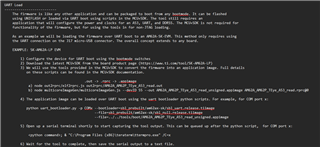
this uart boot test mode show an use case that download application to LPDDR, and run it directly, isn't?
Thank You Very Much

Gibbs

  • Greetings Gibbs,

    1) You can use the same image provided for any DDR size.

    2) Correct, it does not need to be flashed into any external storage. The firmware uses the RAM on the device to test the DRAM.

    Sincerely,

    Lucas

  • Hi, Lucas

    Follow read me, I use JTAG to load & execute DDR TEye application is ok

    But I have some problem to execute DDR TEye application w/ uart boot.

    error message,

    [STATUS] ERROR: Application load FAILED !!!ERROR:

    Could you help check it? Do I miss anything?

    Thank You,

    Gibbs

    (1) .out -> .rprc

    gibbs@gibbs-HP-ZBook-15-G5:~/work/am62_lp/mcu_plus_sdk_am62x_10_01_00_33/tools/boot$ node out2rprc/elf2rprc.js out2rprc/AM62X_TEye_A53_read.out 11 out2rprc/AM62X_TEye_A53_read.rprc
    gibbs@gibbs-HP-ZBook-15-G5:~/work/am62_lp/mcu_plus_sdk_am62x_10_01_00_33/tools/boot$ node out2rprc/elf2rprc.js out2rprc/AM62X_TEye_A53_write.out 11 out2rprc/AM62X_TEye_A53_write.rprc

    gibbs@gibbs-HP-ZBook-15-G5:~/work/am62_lp/mcu_plus_sdk_am62x_10_01_00_33/tools/boot/out2rprc$ ll
    total 1148
    drwxr-xr-x  3 gibbs gibbs   4096  六   2 16:30 ./
    drwxr-xr-x 11 gibbs gibbs   4096  六   2 16:22 ../
    -rw-rw-r--  1 gibbs gibbs 347192  五  15 11:41 AM62X_TEye_A53_read.out
    -rw-rw-r--  1 gibbs gibbs 218016  六   2 16:30 AM62X_TEye_A53_read.rprc
    -rw-rw-r--  1 gibbs gibbs 347192  五  15 11:41 AM62X_TEye_A53_write.out
    -rw-rw-r--  1 gibbs gibbs 218016  六   2 16:30 AM62X_TEye_A53_write.rprc
    -rw-r--r--  1 gibbs gibbs   4800 十二 19 12:51 elf2rprc.js
    drwxr-xr-x  4 gibbs gibbs   4096  二  18 10:31 node_modules/
    -rw-r--r--  1 gibbs gibbs    244 十二 19 12:51 package.json
    -rw-r--r--  1 gibbs gibbs   1408 十二 19 12:51 package-lock.json
    -rw-r--r--  1 gibbs gibbs   5128 十二 19 12:51 patch_exidx_for_out2rprc.pl

    (2).rprc -> .appimage

    gibbs@gibbs-HP-ZBook-15-G5:~/work/am62_lp/mcu_plus_sdk_am62x_10_01_00_33/tools/boot$ node multicoreImageGen/multicoreImageGen.js --devID 55 --out multicoreImageGen/AM62X_TEye_A53_read_unsigned.appimage multicoreImageGen//AM62X_TEye_A53_read.rprc@0
    gibbs@gibbs-HP-ZBook-15-G5:~/work/am62_lp/mcu_plus_sdk_am62x_10_01_00_33/tools/boot$ node multicoreImageGen/multicoreImageGen.js --devID 55 --out multicoreImageGen/AM62X_TEye_A53_write_unsigned.appimage multicoreImageGen//AM62X_TEye_A53_write.rprc@0

    gibbs@gibbs-HP-ZBook-15-G5:~/work/am62_lp/mcu_plus_sdk_am62x_10_01_00_33/tools/boot/multicoreImageGen$ ll
    total 1148
    drwxr-xr-x  3 gibbs gibbs   4096  六   2 16:39 ./
    drwxr-xr-x 11 gibbs gibbs   4096  六   2 16:22 ../
    -rw-rw-r--  1 gibbs gibbs 218016  六   2 16:30 AM62X_TEye_A53_read.rprc
    -rw-rw-r--  1 gibbs gibbs 218048  六   2 16:38 AM62X_TEye_A53_read_unsigned.appimage
    -rw-rw-r--  1 gibbs gibbs 218016  六   2 16:30 AM62X_TEye_A53_write.rprc
    -rw-rw-r--  1 gibbs gibbs 218048  六   2 16:39 AM62X_TEye_A53_write_unsigned.appimage
    -rwxrwxrwx  1 gibbs gibbs  13047 十二 19 12:51 MulticoreImageGen*
    -rwxrwxrwx  1 gibbs gibbs  19165 十二 19 12:51 MulticoreImageGen.exe*
    -rwxrwxrwx  1 gibbs gibbs 241047 十二 19 12:51 multicoreImageGen.js*
    drwxrwxrwx  2 gibbs gibbs   4096  二  18 10:31 src/
    gibbs@gibbs-HP-ZBook-15-G5:~/work/am62_lp/mcu_plus_sdk_am62x_10_01_00_33/tools/boot/multicoreImageGen$ 

    (3) UART Boot. (ERROR w/ execute DDR T Eye )

    gibbs@gibbs-HP-ZBook-15-G5:~/work/am62_lp/mcu_plus_sdk_am62x_10_01_00_33/tools/boot$ python3 ./uart_bootloader.py -p /dev/ttyUSB0 --bootloader=sbl_prebuilt/am62x-sk-lp/sbl_uart.release.hs_fs.tiimage --file=sbl_prebuilt/am62x-sk-lp/sbl_null.release.hs_fs.tiimage --file=multicoreImageGen/AM62X_TEye_A53_read_unsigned.appimage clear
    Sending the UART bootloader sbl_prebuilt/am62x-sk-lp/sbl_uart.release.hs_fs.tiimage ...
    Sent bootloader sbl_prebuilt/am62x-sk-lp/sbl_uart.release.hs_fs.tiimage of size 248120 bytes in 23.73s.                                                                            
    
    Sending the application multicoreImageGen/AM62X_TEye_A53_read_unsigned.appimage ...
    Sent application multicoreImageGen/AM62X_TEye_A53_read_unsigned.appimage of size 218048 bytes in 21.96s.                                                                           
    [STATUS] ERROR: Application load FAILED !!!

  • Greetings Gibbs,

    Your board looks like an HS-FS device, which will require you to sign the application image. This is not unique to the tool, any application for an HS-FS device will need to be signed (and note that the images in the SDK are the "hs_fs" versions that are signed). You can do so with a command like this from the tools directory:

    python ./signing/appimage_x509_cert_gen.py --bin AM62X_TEye_A53_read_unsigned.appimage --authtype 0 --loadaddr 84000000 --key signing/app_degenerateKey.pem --keyversion 1.5 --output AM62X_TEye_A53_read_signed_authtype0.appimage

    On a customer board, this would have to be signed with the customer's key if they have made their part secure enabled. For reference, these details are in the documentation: https://software-dl.ti.com/mcu-plus-sdk/esd/AM62X/10_00_00_14/exports/docs/api_guide_am62x/TOOLS_BOOT.html#TOOLS_BOOT_SIGNING

    Sincerely,

    Lucas

  • Hello, Lucas

    I already follow your comment to signed APP image with TI dummy key.

    It can download TEye program by uart, but we still face some error.

    gibbs@gibbs-HP-ZBook-15-G5:~/work/am62_lp/mcu_plus_sdk_am62x_10_01_00_33/tools/boot$ python3 ./uart_bootloader.py -p /dev/ttyUSB0 --bootloader=sbl_prebuilt/am62x-sk-lp/sbl_uart.release.hs_fs.tiimage --file=sbl_prebuilt/am62x-sk-lp/sbl_null.release.hs_fs.tiimage --file=multicoreImageGen/AM62X_TEye_A53_write_signed_authtype0.appimage
    Sending the UART bootloader sbl_prebuilt/am62x-sk-lp/sbl_uart.release.hs_fs.tiimage ...
    Sending sbl_prebuilt/am62x-sk-lp/sbl_uart.release.hs_fs.tiimage:   0%|                                                                            | 0/248120 [00:00<?, ?bytes/s]send error: expected NAK, CRC, EOT or CAN; got b'\x00'
    Sent bootloader sbl_prebuilt/am62x-sk-lp/sbl_uart.release.hs_fs.tiimage of size 248120 bytes in 23.35s.                                                                         
    
    Sending the application multicoreImageGen/AM62X_TEye_A53_write_signed_authtype0.appimage ...
    Sending multicoreImageGen/AM62X_TEye_A53_write_signed_authtype0.appimage: 221252bytes [00:22, 10716.91bytes/s]error_count reached 16, aborting.                                 
    Sending multicoreImageGen/AM62X_TEye_A53_write_signed_authtype0.appimage: 221254bytes [00:22, 10716.91bytes/s]
    [ERROR] XMODEM recv failed, no response OR incorrect response from EVM OR cancelled by user,
            Power cycle EVM and run this script again !!!

    ERROR : 

    Sending multicoreImageGen/AM62X_TEye_A53_write_signed_authtype0.appimage: 221252bytes [00:22, 10716.91bytes/s]error_count reached 16, aborting.
    Sending multicoreImageGen/AM62X_TEye_A53_write_signed_authtype0.appimage: 221254bytes [00:22, 10716.91bytes/s]
    [ERROR] XMODEM recv failed, no response OR incorrect response from EVM OR cancelled by user,

    QUESTION :

    (1) I think we do mot need to signed dummy key w/ "sbl_uart.release.hs_fs.tiimage" and "sbl_null.release.hs_fs.tiimage", sin't?

    (2) What reason caused "error_count reached 16" ? It seems the failed reason

    Thank You Very Much

    Gibbs

  • Greetings Gibbs,

    This is a problem with the UART scripting and not the eye tool itself from what I can see. I'd recommend trying it again or filing a ticket for the SDK folks to look into.

    Sincerely,

    Lucas

  • This is feed back form customer

    record here for recording, it seems work

    I am not very sure the reason.

    3、	AM62X_TEye_A53_read.appimage.hs_fs/ AM62X_TEye_A53_write.appimage.hs_fs 用下面的命令生成的:
    ~/ti/sysconfig_1.23.0/nodejs/node out2rprc/elf2rprc.js out2rprc/AM62X_TEye_A53_read.out 0x0B000010
    ~/ti/sysconfig_1.23.0/nodejs/node out2rprc/elf2rprc.js out2rprc/AM62X_TEye_A53_write.out 0x0B000010
    
    /home/xx/ti/sysconfig_1.23.0/nodejs/node /home/xw/ti/mcu_plus_sdk_am62x_11_00_00_16/tools/boot/multicoreImageGen/multicoreImageGen.js --devID 55 --out AM62X_TEye_A53_write.appimage AM62X_TEye_A53_write.rprc@0
    /home/xx/ti/sysconfig_1.23.0/nodejs/node /home/xw/ti/mcu_plus_sdk_am62x_11_00_00_16/tools/boot/multicoreImageGen/multicoreImageGen.js --devID 55 --out AM62X_TEye_A53_read.appimage AM62X_TEye_A53_read.rprc@0
    
    python3 /home/xx/ti/mcu_plus_sdk_am62x_11_00_00_16/tools/boot/signing/appimage_x509_cert_gen.py --bin AM62X_TEye_A53_read.appimage --authtype 0  --loadaddr 84000000 --key /home/xw/ti/mcu_plus_sdk_am62x_11_00_00_16/tools/boot/signing/app_degenerateKey.pem --output AM62X_TEye_A53_read.appimage.hs_fs --keyversion       1.5
    python3 /home/xx/ti/mcu_plus_sdk_am62x_11_00_00_16/tools/boot/signing/appimage_x509_cert_gen.py --bin AM62X_TEye_A53_write.appimage --authtype 0  --loadaddr 84000000 --key /home/xw/ti/mcu_plus_sdk_am62x_11_00_00_16/tools/boot/signing/app_degenerateKey.pem --output AM62X_TEye_A53_write.appimage.hs_fs --keyversion       1.5