


Part Number: AM62P
Tool/software:
Hi AM62P Champ !
My customer is bringing up a custom board designed with the AM62P. They've confirmed that the PMIC seems to be fully powered on after applying power to the system. They are attempting a DFU download by setting the BOOTMODE to USB Bootmode and connecting the board to a PC via USB.
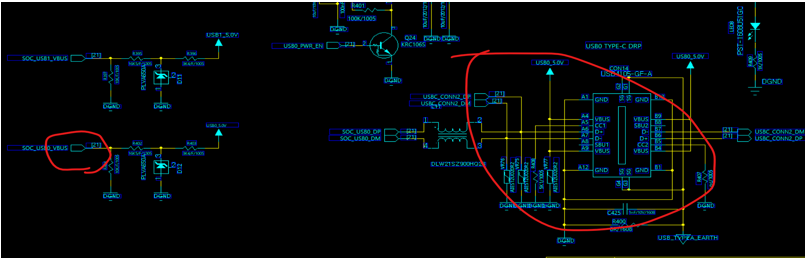
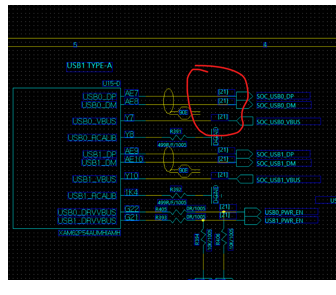
Currently, 1.7V is detected on the SOC_VBUS pin, but the PC displays a "device recognition failure" message.
They are following these steps for testing:
Verification Sequence:
-
Boot Mode Setting: (11001010)
-
Power on the product.
-
Attempt communication with the CPU's USB0 port.
-
PC Device Manager shows a USB device recognition error.
-
They are stuck at this initial stage, as the PC needs to recognize the device correctly to proceed to the next software steps.
-
Confirmed USB power input of 5.0V and SOC_USB0_VBUS at 1.7V.
-
A discrepancy with the reference schematic is that CON14's CC1 and CC2 are pulled down with 5.1K resistors. The reference schematic shows these connected to U103.
-
Confirmed that the PCB design for the USB0_DP/DM traces are shielded with ground on the top, bottom, left, and right layers, suggesting minimal noise interference.
Given this, is it possible to use JTAG to trace the cause of the USB recognition issue?

Regards,
Jack

