


Part Number: PROCESSOR-SDK-J722S
Tool/software:
some clarification wanted to get started on using Code Composer Studio (12.8.1)
following the page up to this section 8.3.1. Setup CCS target configuration I can see some "hello world" CCS created project can be debugged (eg., single step possible) on wkup R5.
but naively attempting to do the same on main and/or mcu R5 results in error.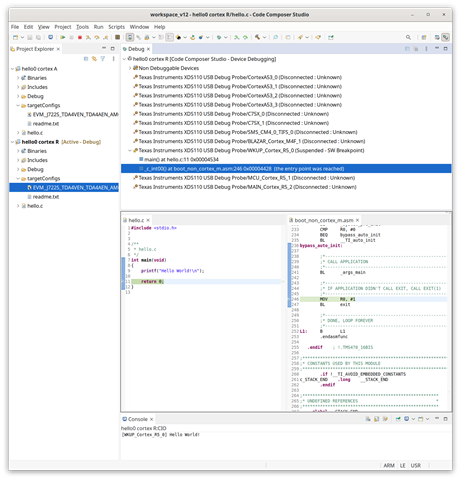 (wkup R5 is okay to be debugged)
 (but mcu & main R5 requires some steps to precede, as it seems)
Q.1
=> to be able to debug on main or mcu r5 do I only need to load the program from HLOS side as in 8.3.2. Load RTOS core firmware symbols thru CCS?
Using "rproc" stuffs from within main u-boot as in 3.1.1.13. RemoteProc is also okay for that isn't it?
(I see that with the phrase in 8.3.2 "Now you can connect to the required non-A53 core (i.e MAIN_Cortex_R5_2, C75x_0, C75x_1 etc) and load the symbols of the application binary" the debug session is loading "symbols only").
Q.2
=> what does it take to debug A53 U-boot under CCS? is the CCS operation steps going to be similar? please advise!

