This thread has been locked.

If you have a related question, please click the "Ask a related question" button in the top right corner. The newly created question will be automatically linked to this question.

AM62L: uboot-flash-writer issue

Part Number: AM62L

Tool/software:

Hi,

I am using AM62L board. I want to flash OS on board by using USB-DFU mode. I cloned uboot-flash-writer. Inside this tools/DFU_flash does not support to AM62L. 
So, I tried to flash by using am62xx-evm machine. 
To flash I did below steps: 

1. Go inside DFU_flash/bin/am62xx-evm/hsfs folder and create one folder with name images and put my images that i want to flash on board. 
2. Change path in flash-files.cfg according to images stored in images folder with \ to /. 
3. Go backward to DFU_flash folder and run: 
           $ sudo python3 dfu_flash.py -d am62xx-evm -t hsfs -c bin/am62xx-evm/hsfs/flash-files.cfg

But it gives error: 
DFU_BOOT_CONF
2025-08-26 12:08:29 INFO: Number of USB DFU devices detected: 1
2025-08-26 12:08:29 INFO: Starting flashing for 1 identified devices
2025-08-26 12:08:29 INFO: Spawning 1 parallel processes
2025-08-26 12:08:30 INFO: 1-1.4 Sent! /home/tidev/parv/uboot-flash-writer/tools/DFU_flash/bin/am62xx-evm/hsfs/tiboot3.bin
2025-08-26 12:09:00 ERROR: 1-1.4 Aborting!! Max iterations reached. DFU device not listening for `tispl.bin`

Am I preferring this folder is correct or for AM62L has different? 


Best, 
Parv 

  • Hi Parv,

    For AM62L this DFU Flash writer is not supported, we support flashing via Snagfactory tool now for newer SDK versions. We have a guide available for am62x, you can refer to the same and try to enable it for AM62L: https://software-dl.ti.com/processor-sdk-linux/esd/AM62X/11_01_05_03/exports/docs/linux/Foundational_Components/Tools/Flash_via_Fastboot.html

    Let me know if you need further help with this.

    Best Regards,

    Meet.

  • Hii Meet, 

    I installed snagboot normal and GUI by using: 

    $ python3 -m pip install --user snagboot
    $ python3 -m pip install --user snagboot[gui]

    Then put the board AM62L in USB DFU mode by 0-15 pins are: 11001010 0000 0000 

    host: $ lsusb 
    host: $ sudo dmesg 

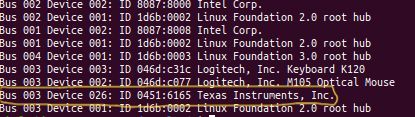
    It shows board in DFU mode in dmesg and entry comes in lsusb command.


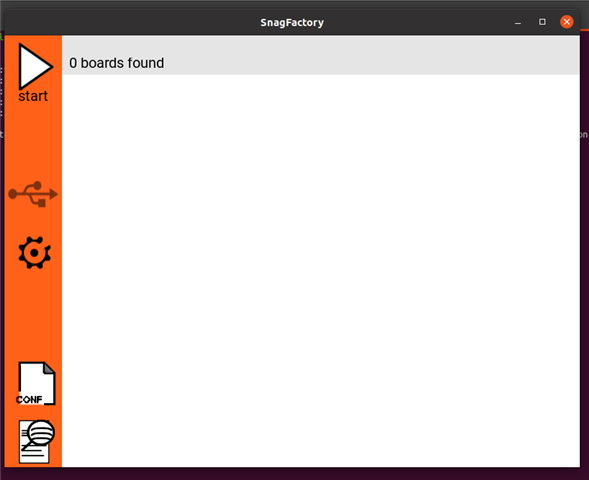
    Now when I run snagfactory in terminal it opens GUI. But it can't detect any board. 


    Is there a configuration file required for board detection—similar to Step 2 mentioned into "How to Use Snagfactory" guide in suggested link?
    Where can I find this configuration file, and do I need to load it before loading the YAML file?

    Best,
    Parv


  • Hi Parv,

    Is there a configuration file required for board detection

    The configuration file here refers to the YAML file itself, You have to create a yaml configuration file for am62l and load it, after which the snagfactory tool will be able to detect the board.

    I am attaching one configuration file to flash to eMMC for your reference.

    https://e2e.ti.com/cfs-file/__key/communityserver-discussions-components-files/791/am62l_5F00_emmc.yaml

    Best Regards,

    Meet.

  • Hi Meet, 

    I load my configure emmc.yaml file, and snagfactory detect the board. 
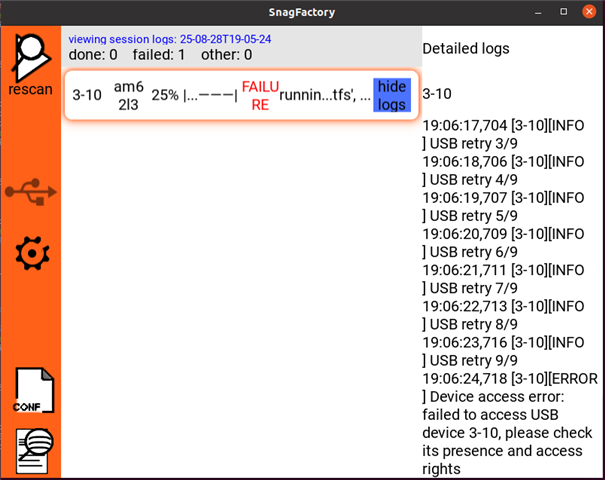
    After that I start flashing by start button. 

    After 25% it fails. 


    I also tried from command line by: 
    $ snagrecover -s am62l3 -F "{'tiboot3': {'path': 'tiboot3.bin'}}" -F "{'tispl': {'path': 'tispl.bin'}}" -F "{'u-boot': {'path': 'u-boot.img'}}"
    result: 
    2025-08-28 18:56:19,232 [INFO] Starting recovery of am62l3 board
    2025-08-28 18:56:19,237 [INFO] Installing firmware tiboot3
    2025-08-28 18:56:19,237 [INFO] Searching for partition id...
    2025-08-28 18:56:19,238 [INFO] Found DFU Functional descriptor: wTransferSize = 512
    2025-08-28 18:56:19,238 [INFO] Downloading file...
    2025-08-28 18:56:19,900 [INFO] Done manifesting firmware
    2025-08-28 18:56:19,900 [INFO] Done
    2025-08-28 18:56:19,900 [INFO] Done installing firmware tiboot3
    2025-08-28 18:56:20,905 [INFO] Installing firmware tispl
    2025-08-28 18:56:20,905 [INFO] Searching for partition id...
    2025-08-28 18:56:20,907 [INFO] Found DFU Functional descriptor: wTransferSize = 512
    2025-08-28 18:56:20,907 [INFO] Downloading file...
    2025-08-28 18:56:22,353 [INFO] Done manifesting firmware
    2025-08-28 18:56:22,354 [INFO] Done
    2025-08-28 18:56:22,354 [INFO] Done installing firmware tispl
    2025-08-28 18:56:24,356 [INFO] USB retry 1/9
    2025-08-28 18:56:25,359 [INFO] Installing firmware u-boot
    2025-08-28 18:56:25,359 [INFO] Searching for partition id...
    2025-08-28 18:56:25,360 [INFO] Found DFU Functional descriptor: wTransferSize = 4096
    2025-08-28 18:56:25,360 [INFO] Downloading file...
    2025-08-28 18:56:26,709 [INFO] Done manifesting firmware
    2025-08-28 18:56:26,710 [INFO] Done
    2025-08-28 18:56:26,710 [INFO] Sending detach command...
    2025-08-28 18:56:26,711 [INFO] Sending DFU_DETACH...
    2025-08-28 18:56:26,712 [INFO] Done installing firmware u-boot
    2025-08-28 18:56:28,712 [INFO] Done recovering am62l3 board
    2025-08-28 18:56:28,713 [INFO] Done recovering am62l3 board

    $ sudo snagflash -P fastboot-uboot -p 0451:6165 -f emmc.yaml
    result: 
    2025-08-28 19:19:26,339 [INFO] Running snagflash using protocol fastboot-uboot
    2025-08-28 19:19:26,351 [ERROR] Device access error: failed to access USB Fastboot device 0451:6165, please check its presence and access rights.

    Currently I am using prebuilt SDK image as USB-DFU uboot mode files.Is it okay?
    If not, then which configuration file I need to add in Rules.make file for TI AM62Lx board as given in AM62x board link?

  • Hi Parv,

    Currently I am using prebuilt SDK image as USB-DFU uboot mode files.Is it okay?

    Using Prebuilt binaries will not work here. To create the recovery binaries for AM62L you have to make following changes to Rules.make file: 

    UBOOT_MACHINE=am62lx_evm_defconfig am6x_a53_snagfactory.config

    After this please rebuild the bootloader images and use them for recovery.

    Please note that you have to create 2 separate sets of binary for this process, one for the recovery binaries, and one for the flashing. Recovery binaries you can create using the method I mentioned above, for flashing binaries you can use the prebuilt images.

    Best Regards,
    Meet.

  • Hii Meet, 

    I added UBOOT_MACHINE=am62lx_evm_defconfig am6x_a53_snagfactory.config in my Rules.make file. 
    I cleaned and again make the recovery binaries and copy my build binaries in one folder. 

    Then I did all above mentioned steps: 

    But I got error in snagrecover command to check recovery binaries are loading properly or not. But I got below error: 
    2025-08-29 13:11:37,892 [INFO] Starting recovery of am62l3 board
    2025-08-29 13:11:37,895 [WARNING] Failed to get configuration descriptor for device at 1-1.4!
    2025-08-29 13:11:38,896 [INFO] USB retry 1/9
    2025-08-29 13:11:38,897 [WARNING] Failed to get configuration descriptor for device at 1-1.4!
    2025-08-29 13:11:39,898 [INFO] USB retry 2/9
    2025-08-29 13:11:39,899 [WARNING] Failed to get configuration descriptor for device at 1-1.4!
    2025-08-29 13:11:40,900 [INFO] USB retry 3/9
    2025-08-29 13:11:40,901 [WARNING] Failed to get configuration descriptor for device at 1-1.4!
    2025-08-29 13:11:41,902 [INFO] USB retry 4/9
    2025-08-29 13:11:41,903 [WARNING] Failed to get configuration descriptor for device at 1-1.4!
    2025-08-29 13:11:42,904 [INFO] USB retry 5/9
    2025-08-29 13:11:42,905 [WARNING] Failed to get configuration descriptor for device at 1-1.4!
    2025-08-29 13:11:43,906 [INFO] USB retry 6/9
    2025-08-29 13:11:43,908 [WARNING] Failed to get configuration descriptor for device at 1-1.4!
    2025-08-29 13:11:44,909 [INFO] USB retry 7/9
    2025-08-29 13:11:44,911 [WARNING] Failed to get configuration descriptor for device at 1-1.4!
    2025-08-29 13:11:45,913 [INFO] USB retry 8/9
    2025-08-29 13:11:45,913 [WARNING] Failed to get configuration descriptor for device at 1-1.4!
    2025-08-29 13:11:46,915 [INFO] USB retry 9/9
    2025-08-29 13:11:46,917 [WARNING] Failed to get configuration descriptor for device at 1-1.4!
    2025-08-29 13:11:47,918 [ERROR] Device access error: failed to access USB device 1-1.4, please check its presence and access rights

    Best, 
    Parv

  • Hi Parv,

    The logs still show some issue with the recovery binary as it is not able to access the USB device in u-boot. The bootloader images after make can be found in board-support/built-images/a53, could you confirm if these were the images you used? Please also share your yaml file with me.

    Best Regards,

    Meet.

  • Hii Meet, 

    As mentioned, binary files should be generated in board-support/built-images/a53. But in my SDK, it is not generating in a53 folder inside board-support/built-images. It is directly put in board-support/built-images. when i run find command in SDK extracted folder I find this. 

    $ find . -name tiboot3.bin
    ./board-support/u-boot-build/a53/tiboot3.bin
    ./board-support/prebuilt-images/am62lxx-evm-jailhouse/tiboot3.bin
    ./board-support/prebuilt-images/am62lxx-evm/tiboot3.bin
    ./board-support/built-images/tiboot3.bin

    I just copy that tiboot3.bin tispl.bin u-boot.bin files and run snagrecover command to flash recovery files. But still, it shows above mentioned error. 

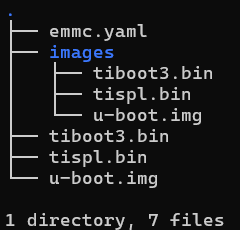
    Below I share my folder structure:

    Outside files are recovery binary files. Inside files, I want to flash on board.

    emmc.yaml:

    boards:
      "0451:6165": "am62l3"
    soc-models:
      am62l3-firmware:
        tiboot3:
          path: "<full-path-to-recovery-image-folder>/tiboot3.bin"
        tispl:
          path: "<full-path-to-recovery-image-folder>/tispl.bin"
        u-boot:
          path: "<full-path-to-recovery-image-folder>/u-boot.img"
      am62l3-tasks:
        - target-device: mmc0
          fb-buffer-addr: 0x82000000
          fb-buffer-size: 0x7000000
        - task: gpt
          args:
            - name: rootfs
              size: 1G
        - task: reset
        - task: flash
          args:
            - image: "<full-path-to-recovery-image-folder>/images/tiboot3.bin"
              image-offset: 0x0
              part: "hwpart 1"
            - image: "<full-path-to-recovery-image-folder>/images/tispl.bin"
              image-offset: 0x80000
              part: "hwpart 1"
            - image: "<full-path-to-recovery-image-folder>/images/u-boot.img"
              image-offset: 0x280000
              part: "hwpart 1"
            - image: "<full-path-to-recovery-image-folder>/images/rootfs.ext4"
              part: rootfs


    Best, 
    Parv

  • Hi Parv,

    I made a mistake in the earlier response, those are generated in board-support/u-boot-build/a53 folder, you can try once with the binaries generated here.

  • Hii meet, 

    Still having same issue about presence and access right inside board-support/u-boot-build/a53 folder binaries

    ~/ti-processor-sdk-linux-am62lxx-evm-11.00.15.05/board-support/u-boot-build/a53$ snagrecover -s am62l3 -F "{'tiboot3': {'path': 'tiboot3.bin'}}" -F "{'tispl': {'path': 'tispl.bin'}}" -F "{'u-boot': {'path': 'u-boot.img'}}"
    2025-09-01 15:46:49,989 [INFO] Starting recovery of am62l3 board
    2025-09-01 15:46:49,993 [WARNING] Failed to get configuration descriptor for device at 1-1.4!
    2025-09-01 15:46:50,994 [INFO] USB retry 1/9
    2025-09-01 15:46:50,994 [WARNING] Failed to get configuration descriptor for device at 1-1.4!
    2025-09-01 15:46:51,996 [INFO] USB retry 2/9
    2025-09-01 15:46:51,996 [WARNING] Failed to get configuration descriptor for device at 1-1.4!
    2025-09-01 15:46:52,997 [INFO] USB retry 3/9
    2025-09-01 15:46:52,998 [WARNING] Failed to get configuration descriptor for device at 1-1.4!
    2025-09-01 15:46:53,999 [INFO] USB retry 4/9
    2025-09-01 15:46:53,999 [WARNING] Failed to get configuration descriptor for device at 1-1.4!
    2025-09-01 15:46:55,001 [INFO] USB retry 5/9
    2025-09-01 15:46:55,001 [WARNING] Failed to get configuration descriptor for device at 1-1.4!
    2025-09-01 15:46:56,001 [INFO] USB retry 6/9
    2025-09-01 15:46:56,002 [WARNING] Failed to get configuration descriptor for device at 1-1.4!
    2025-09-01 15:46:57,003 [INFO] USB retry 7/9
    2025-09-01 15:46:57,004 [WARNING] Failed to get configuration descriptor for device at 1-1.4!
    2025-09-01 15:46:58,005 [INFO] USB retry 8/9
    2025-09-01 15:46:58,005 [WARNING] Failed to get configuration descriptor for device at 1-1.4!
    2025-09-01 15:46:59,006 [INFO] USB retry 9/9
    2025-09-01 15:46:59,007 [WARNING] Failed to get configuration descriptor for device at 1-1.4!
    2025-09-01 15:47:00,008 [ERROR] Device access error: failed to access USB device 1-1.4, please check its presence and access rights

    Best,
    Parv

  • Hi Parv,

    Could you share your recovery binaries with me in a zip file, I can try to test this at my end.

    Best Regards,

    Meet,

  • Hii Meet, 

    Here I attached my binaries file as zip.

    Best, 
    Parv 
     
    am62lx_binaries.zip

  • Hi Parv,

    I tested with your binaries, flashing works for me with these, so there doesn't seem to be an issue with recovery binaries. From the logs it seems to me like an access issue, could you try to once run this command with sudo.

    Best Regards,

    Meet.

  • Hi Meet, 

    Thanks to confirm my binary files. 

    What changes I need to do yaml file to run board in eMMC UDA mode after flashing?

    Raw mode yaml file (Before updation):

    boards:
      "0451:6165": "am62l3"
    soc-models:
      am62l3-firmware:
        tiboot3:
          path: "<path-to-recovery-folder-images>/tiboot3.bin"
        tispl:
          path: "<path-to-recovery-folder-images>/tispl.bin"
        u-boot:
          path: "<path-to-recovery-folder-images>/u-boot.img"
      am62l3-tasks:
        - target-device: mmc0
          fb-buffer-addr: 0x82000000
          fb-buffer-size: 0x7000000
        - task: gpt
          args:
            - name: rootfs
              size: 1G
        - task: reset
        - task: flash
          args:
            - image: "<path-to-recovery-folder-images>/images/tiboot3.bin"
              image-offset: 0x0
              part: "hwpart 1"
            - image: "<path-to-recovery-folder-images>/images/tispl.bin"
              image-offset: 0x80000
              part: "hwpart 1"
            - image: "<path-to-recovery-folder-images>/images/u-boot.img"
              image-offset: 0x280000
              part: "hwpart 1"
            - image: "<path-to-recovery-folder-images>/images/rootfs.ext4"
              part: rootfs


    UDA mode updated yaml file:
    boards:
      "0451:6165": "am62l3"
    soc-models:
      am62l3-firmware:
        tiboot3:
          path: "<path-to-recovery-folder-images>/tiboot3.bin"
        tispl:
          path: "<path-to-recovery-folder-images>/tispl.bin"
        u-boot:
          path: "<path-to-recovery-folder-images>/u-boot.img"
      am62l3-tasks:
        - target-device: mmc1
          fb-buffer-addr: 0x82000000
          fb-buffer-size: 0x7000000
        - task: gpt
          args:
            - name: boot
              size: 128M
              bootable: true
        - task: flash
          args:
            - image: "/home/einfochips/tmp_parv/images/bootfs.img"
              part: boot
        - task: reset
        - task: prompt-operator
          args:
            prompt: "UDA mode complete. Please reboot the board."
            reset-before: false


    Still, I am not able to boot. 

    Above, I shared my recovery files. 
    Here, I also shared my flashing binaries files. 
    myFlashedImage.zip

    I also tried DFU to SD card flash. To check how to partitions are done by snagfactory and check with working SD card.

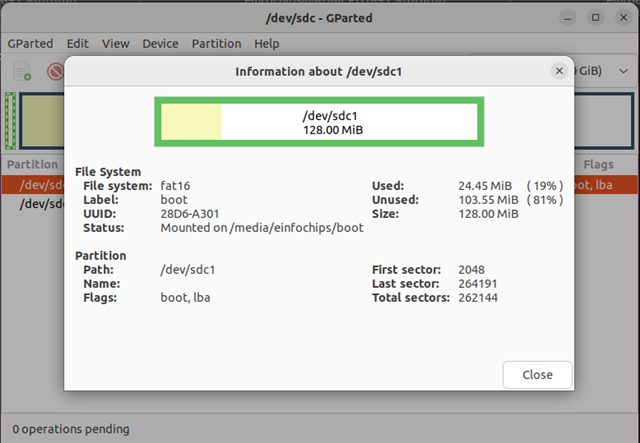
    Here, I shared working sd card disk information and I flashed Sd card by DFU. 
    1) Working SD card: 


    Here I also share my uart console log: 
    NOTICE:  Booting Trusted Firmware
    NOTICE:  BL1: v2.12.0(release):11.00.15
    NOTICE:  BL1: Built : 17:47:28, Jul  7 2025
    NOTICE:  BL1: dram_class: 11
    NOTICE:  lpddr4: post start - PI training status=0x27c0a000 
    NOTICE:  bl1_platform_setup DDR init done
    NOTICE:  k3_bl1_handoff ENTERING WFI - end of bl1
    NOTICE:  BL31: v2.12.0(release):11.00.15
    NOTICE:  BL31: Built : 17:47:29, Jul  7 2025
    NOTICE:  SYSFW ABI: 4.0 (firmware rev 0x000b '11.0.12-v11.00.12 (Fancy Rat)')
    ERROR:   Agent 0 Protocol 0x10 Message 0x7: not supported
    
    U-Boot SPL 2025.01-g1d6ba4a32cdd (Sep 02 2025 - 12:38:04 +0530)
    SPL initial stack usage: 1872 bytes
    Trying to boot from DFU
    #####DOWNLOAD ... OK
    Ctrl+C to exit ...
    ERROR:   Agent 0 Protocol 0x10 Message 0x7: not supported
    
    
    U-Boot 2025.01-g1d6ba4a32cdd (Sep 02 2025 - 12:38:04 +0530)
    
    SoC:   AM62LX SR1.0 HS-FS
    Model: Texas Instruments AM62L3 Evaluation Module
    DRAM:  2 GiB
    ERROR:   Agent 0 Protocol 0x10 Message 0x7: not supported
    Core:  80 devices, 31 uclasses, devicetree: separate
    MMC:   mmc@fa10000: 0, mmc@fa00000: 1
    Loading Environment from nowhere... OK
    In:    serial@2800000
    Out:   serial@2800000
    Err:   serial@2800000
    Net:   eth0: ethernet@8000000port@1
    Warning: ethernet@8000000port@2 (eth1) using random MAC address - 56:00:5c:ee:a4:7c
    , eth1: ethernet@8000000port@2
    Hit any key to stop autoboot:  0 
    generic_phy_get_bulk : no phys property
    Writing GPT: error!
    dwc3-generic-peripheral usb@31000000: request 00000000fdeb3c00 was not queued to ep1in-bulk
    NOTICE:  bl1_plat_arch_setup arch setup 
    NOTICE:  Booting Trusted Firmware
    NOTICE:  BL1: v2.12.0(release):11.00.15
    NOTICE:  BL1: Built : 17:47:28, Jul  7 2025
    NOTICE:  BL1: dram_class: 11
    NOTICE:  lpddr4: post start - PI training status=0x27c0a000 
    NOTICE:  bl1_platform_setup DDR init done
    NOTICE:  k3_bl1_handoff ENTERING WFI - end of bl1
    NOTICE:  BL31: v2.12.0(release):11.00.15
    NOTICE:  BL31: Built : 17:47:29, Jul  7 2025
    NOTICE:  SYSFW ABI: 4.0 (firmware rev 0x000b '11.0.12-v11.00.12 (Fancy Rat)')
    ERROR:   Agent 0 Protocol 0x10 Message 0x7: not supported
    
    U-Boot SPL 2025.01-g1d6ba4a32cdd (Sep 02 2025 - 12:38:04 +0530)
    SPL initial stack usage: 1872 bytes
    Trying to boot from DFU
    #####DOWNLOAD ... OK
    Ctrl+C to exit ...
    ERROR:   Agent 0 Protocol 0x10 Message 0x7: not supported
    
    
    U-Boot 2025.01-g1d6ba4a32cdd (Sep 02 2025 - 12:38:04 +0530)
    
    SoC:   AM62LX SR1.0 HS-FS
    Model: Texas Instruments AM62L3 Evaluation Module
    DRAM:  2 GiB
    ERROR:   Agent 0 Protocol 0x10 Message 0x7: not supported
    Core:  80 devices, 31 uclasses, devicetree: separate
    MMC:   mmc@fa10000: 0, mmc@fa00000: 1
    Loading Environment from nowhere... OK
    In:    serial@2800000
    Out:   serial@2800000
    Err:   serial@2800000
    Net:   eth0: ethernet@8000000port@1
    Warning: ethernet@8000000port@2 (eth1) using random MAC address - 4a:60:3c:21:81:d2
    , eth1: ethernet@8000000port@2
    Hit any key to stop autoboot:  0 
    generic_phy_get_bulk : no phys property
    Writing GPT: success!
    dwc3-generic-peripheral usb@31000000: request 00000000fdeb3c00 was not queued to ep1in-bulk
    
    Partition Map for mmc device 1  --   Partition Type: EFI
    
    Part    Start LBA       End LBA         Name
            Attributes
            Type GUID
            Partition GUID
      1     0x00000022      0x00040021      "boot"
            attrs:  0x0000000000000000
            type:   ebd0a0a2-b9e5-4433-87c0-68b6b72699c7
            guid:   58cc154c-7764-4846-9483-12122476640e
    dwc3-generic-peripheral usb@31000000: request 00000000fdeb3c00 was not queued to ep1in-bulk
    Starting download of 1 bytes
    dwc3-generic-peripheral usb@31000000: request 00000000fdeb3c00 was not queued to ep1in-bulk
    
    downloading of 1 bytes finished
    dwc3-generic-peripheral usb@31000000: request 00000000fdeb3c00 was not queued to ep1in-bulk
    dwc3-generic-peripheral usb@31000000: request 00000000fdeb3c00 was not queued to ep1in-bulk
    Total of 1 byte(s) were the same
    dwc3-generic-peripheral usb@31000000: request 00000000fdeb3c00 was not queued to ep1in-bulk
    dwc3-generic-peripheral usb@31000000: request 00000000fdeb3c00 was not queued to ep1in-bulk
    switch to partitions #0, OK
    mmc1 is current device
    
    Partition Map for mmc device 1  --   Partition Type: EFI
    
    Part    Start LBA       End LBA         Name
            Attributes
            Type GUID
            Partition GUID
      1     0x00000022      0x00040021      "boot"
            attrs:  0x0000000000000000
            type:   ebd0a0a2-b9e5-4433-87c0-68b6b72699c7
            guid:   58cc154c-7764-4846-9483-12122476640e
    dwc3-generic-peripheral usb@31000000: request 00000000fdeb3c00 was not queued to ep1in-bulk
    success!
    dwc3-generic-peripheral usb@31000000: request 00000000fdeb3c00 was not queued to ep1in-bulk
    dwc3-generic-peripheral usb@31000000: request 00000000fdeb3c00 was not queued to ep1in-bulk
    Starting download of 104857600 bytes
    dwc3-generic-peripheral usb@31000000: request 00000000fdeb3c00 was not queued to ep1in-bulk
    ..........................................................................
    ..........................................................................
    ..........................................................................
    ..........................................................................
    ..........................................................................
    ..........................................................................
    ..........................................................................
    ..........................................................................
    ..........................................................................
    ..........................................................................
    ............................................................
    downloading of 104857600 bytes finished
    dwc3-generic-peripheral usb@31000000: request 00000000fdeb3c00 was not queued to ep1in-bulk
    MMC write: dev # 1, block # 34, count 204800 ... 204800 blocks written: OK
    dwc3-generic-peripheral usb@31000000: request 00000000fdeb3c00 was not queued to ep1in-bulk
    resetting ...
    NOTICE:  bl1_plat_arch_setup arch setup 
    NOTICE:  Booting Trusted Firmware
    NOTICE:  BL1: v2.12.0(release):11.00.15
    NOTICE:  BL1: Built : 17:47:28, Jul  7 2025
    NOTICE:  BL1: dram_class: 11
    NOTICE:  lpddr4: post start - PI training status=0x27c0a000 
    NOTICE:  bl1_platform_setup DDR init done
    NOTICE:  k3_bl1_handoff ENTERING WFI - end of bl1
    NOTICE:  BL31: v2.12.0(release):11.00.15
    NOTICE:  BL31: Built : 17:47:29, Jul  7 2025
    NOTICE:  SYSFW ABI: 4.0 (firmware rev 0x000b '11.0.12-v11.00.12 (Fancy Rat)')
    ERROR:   Agent 0 Protocol 0x10 Message 0x7: not supported
    
    U-Boot SPL 2025.01-g1d6ba4a32cdd (Sep 02 2025 - 12:38:04 +0530)
    SPL initial stack usage: 1872 bytes
    Trying to boot from DFU
    #####DOWNLOAD ... OK
    Ctrl+C to exit ...
    ERROR:   Agent 0 Protocol 0x10 Message 0x7: not supported
    
    
    U-Boot 2025.01-g1d6ba4a32cdd (Sep 02 2025 - 12:38:04 +0530)
    
    SoC:   AM62LX SR1.0 HS-FS
    Model: Texas Instruments AM62L3 Evaluation Module
    DRAM:  2 GiB
    ERROR:   Agent 0 Protocol 0x10 Message 0x7: not supported
    Core:  80 devices, 31 uclasses, devicetree: separate
    MMC:   mmc@fa10000: 0, mmc@fa00000: 1
    Loading Environment from nowhere... OK
    In:    serial@2800000
    Out:   serial@2800000
    Err:   serial@2800000
    Net:   eth0: ethernet@8000000port@1
    Warning: ethernet@8000000port@2 (eth1) using random MAC address - d2:8b:7b:58:ee:e5
    , eth1: ethernet@8000000port@2
    Hit any key to stop autoboot:  0 
    generic_phy_get_bulk : no phys property


    Can you please provide steps that you are followed with board details?
    My board have some limitations. 

    Best, 
    Parv

  • Hi Parv,

    Are you atleast able to flash the binaries now?

    Best Regards,

    Meet.

  • Hii Meet, 

    Yes, Flashing is done properly. 
    But board is not booting up after power off the board and put board in eMMC mode without backup mode configuration. 

    Regards, 
    Parv

  • Hi Parv,

    For booting from boot0 partition you might need to add some commands if you are booting for the first time, you can add the following task in am62l3-tasks:

    - task: run
          args:
            - "oem_run: mmc partconf 0 1 1 1" #enable booting from boot0
    

    Please keep the ROM errata i2473 and i2481 while trying to boot from boot partitions of eMMC.

    UDA mode updated yaml file:

    I will have to check what changes might be needed for UDA mode, but there is another method where you can perform the flashing using SD card: https://software-dl.ti.com/processor-sdk-linux/esd/AM62LX/11_00_15_05/exports/docs/linux/How_to_Guides/Target/How_to_mmcsd_boot_emmc_uda.html

    Best Regards,

    Meet.

  • Hii Meet, 

    After adding given suggestions in yaml file, still it is not booting from UDA mode. But when I checked with working SD card I was able to see eMMC u-boot partition is properly created and mounted with vfat file systemtype. 

    updated yaml file: 

    boards:
      "0451:6165": "am62l3"
    soc-models:
      am62l3-firmware:
        tiboot3:
          path: "/home/einfochips/dfu/pp/tiboot3.bin"
        tispl:
          path: "/home/einfochips/dfu/pp/tispl.bin"
        u-boot:
          path: "/home/einfochips/dfu/pp/u-boot.img"
      am62l3-tasks:
        - target-device: mmc0
          fb-buffer-addr: 0x82000000
          fb-buffer-size: 0x7000000
        - task: gpt
          args:
            - name: boot
              size: 128M
              bootable: true
        - task: run
          args:
            - "oem_run: mmc partconf 0 1 1 1" #enable booting from boot0
        - task: flash
          args:
            - image: "/home/einfochips/tmp_parv/images/bootfs.img"
              part: boot
        - task: reset
        - task: prompt-operator
          args:
            prompt: "UDA mode complete. Please reboot the board."
            reset-before: false


    In our custom board, there is not has SD card support. 
    We are totally dependent on USB-DFU.

    Please give me your perform board details with your added yaml file. 
    It may be issue with different board.
    My board EVK part number is XAM62L32AOGHAANB.

    As ROM errata i2473 and i2481 par this, We cannot used RAW. We can be able to boot using only UDA mode for that I need to 2 partitions one for Uboot Images(tiboot3.bin, tispl.bin, u-boot.img) and other one is rootfs(kernel and filesystem).  

    So please help us for UDA mode related stuff.

    Best, 
    Parv

  • Hi Parv,

    I am testing this currently, I will get back to you once I am done.

    Best Regards,

    Meet.

  • Hii Meet, 

    Any update on this issue?

    Best, 
    Parv 

  • Hi Parv,

    Meet is still working with dev team.

    He will update you as he get some inputs.

    Regards

    Ashwani

  • Hii   &  ,

    We are also working on it. 
    Now, we are able to flash bootloader files by using below updated yaml file:

    boards:
      "0451:6165": "am62l3"
    soc-models:
      am62l3-firmware:
        tiboot3:
          path: "<path-to-recovery-files>/tiboot3.bin"
        tispl:
          path: "<path-to-recovery-files>/tispl.bin"
        u-boot:
          path: "<path-to-recovery-files>/u-boot.img"
      am62l3-tasks:
        - target-device: mmc1
          fb-buffer-addr: 0x82000000
          fb-buffer-size: 0x7000000
        - task: gpt
          args:
            - name: boot
              size: 128M
              bootable: true
    
        - task: run
          args:
            - "oem_run: mmc partconf 0 0 0 0" #enable booting from boot0
    
        - task: flash
          args:
            - image: "<path-to-my-files>/bootfs.img"
              part: boot
        - task: reset
        - task: prompt-operator
          args:
            prompt: "UDA mode complete. Please reboot the board."
            reset-before: false


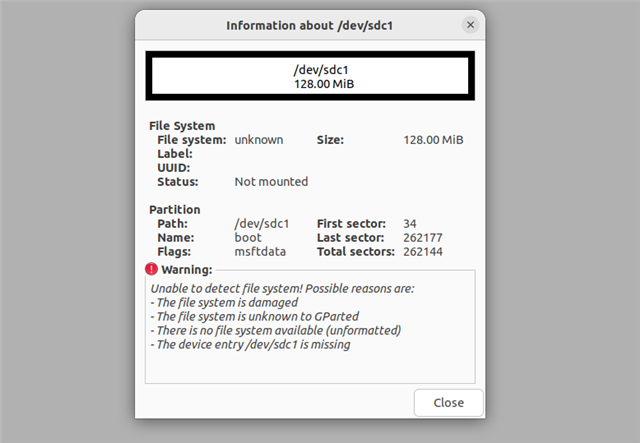
    But we can't set up the file system type of partition. 
    We got these details from running all things on SD card.
    We check file system type from gparted tool their SD card shows unknown. 


    Best, 
    Parv 

  • Hello Parv

    We regret the inconvenience the PG1.0 eMMC errata is causing for you. Our assumption was that for whatever early development you were doing , you will not need the eMMC functionality but that does not seem to be the case.

    Your account team in TI is facilitating getting you PG1.1 silicon which fixes the eMMC ROM issues. I recommend that you wait for that silicon to assemble your boards and get the functionality working. For now we may pause this debug and if you have other aspects of AM62L you want to validate please spend your energy on those function check out. 

    Thank you for the patience, we appreciate your details E2E posts , it helps us debug and resolve issues more efficiently

    Regards

    Mukul 

  • Hi  ,

    Thank you for your support.

    1. Can you please confirm if the USB-DFU flashing issue has been resolved in PG1.1?
    2. Does the same process using the snagfactory tool with a YAML file now work correctly on PG1.1?
    3. We have the capability to replace PG1.0 with PG1.1, and we are planning to make this replacement on the EVM.
    With this change, do you know any compatibility issues or other concerns when switching from PG1.0 to PG1.1 on the EVM?

    Best, 
    Parv 

  • Hi Parv

    1. Yes - we are in the process of testing it. Official SDK release with Snagfactory support etc, is in mid October 

    2. Yes , with ROM supporting fixes in PG1.1 should help make this more seamless 

    3. Will be a drop in replace from a hardware perspective.