This thread has been locked.

If you have a related question, please click the "Ask a related question" button in the top right corner. The newly created question will be automatically linked to this question.

CCSTUDIO: MSP432P4111

Part Number: CCSTUDIO
Other Parts Discussed in Thread: UNIFLASH

Tool/software:

I have big trouble unlocking my MSP432P4111

I used MSP432P4xx Security and Update tool to generate one hex file that do two things:

  1. Configure factory reset with a password
  2. Lock JTAG / SWD with a password

Then i used Uniflash to flash that hex file, so my microcontroller is locked now.

Now i want to unlock so i tried two things:

1- I generated a hex file using MSP432P4xx Security and Update tool that performs a factory reset with a password but it will not work as JTAG/SWD are locked and no way to flash it.

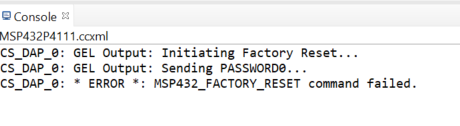
2- I opened Code composer and tried the approach explained in slau575k.pdf to do a factory reset with a password by running a gel script and putting my password in the script, but it did not work and i got this result
 
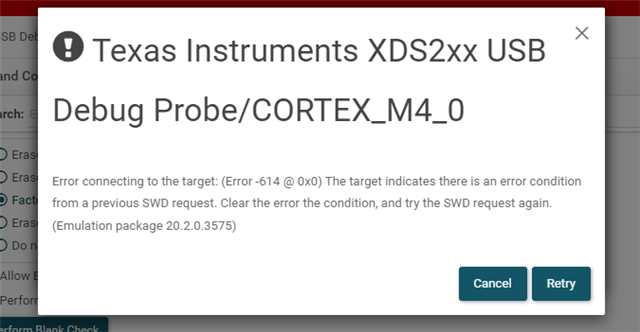
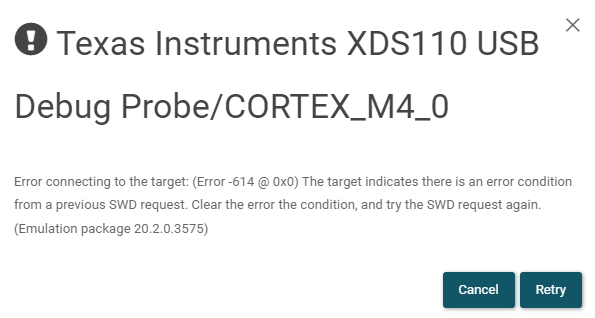
3- Tried to use Uniflash but it is impossible as i always get this result when doing any operation, and also there is no unlock with a password option.
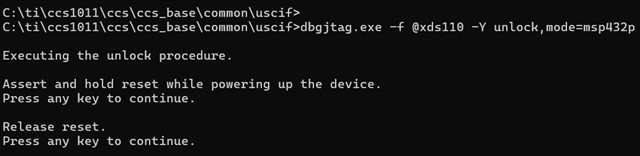
4- I tried running those commands and they dont even run and does not have an option for a password so it is probably not a solution.

    - dbgjtag -f @xds110 -Y unlock,mode=msp432p4
    - dbgjtag -f @xds110 -Y unlock,mode=msp432p4011



Note:

  • I tested on several MSP432P4111 boards and i get the same result!
  • I am not using BSL.
  • I am sure about the password as I used the same number for the whole password so no chance to be wrong.
  • I have checked on many answers on this forum and answers to my previous question and they all are not viable or did not work.
  • It is crucial to be able to unlock this microcontroller as it is part of our business and cannot be changed soon.
  • Hi,

    3- Tried to use Uniflash but it is impossible as i always get this result when doing any operation, and also there is no unlock with a password option.

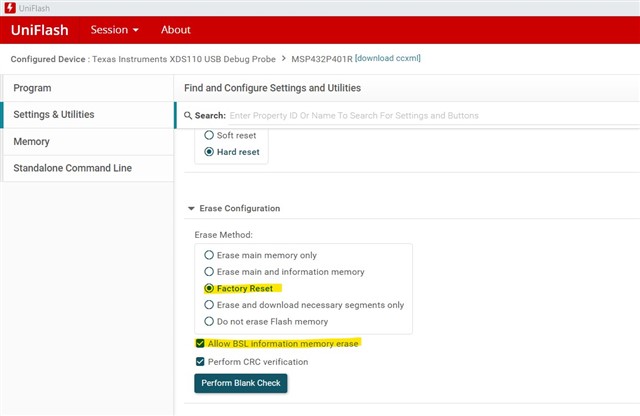
      I must say I have no experience with this device's security feature since this device is EOL for quite a while.  Having said that, I tried the Uniflash and I selected Factory Reset and it is erasing the flash. 

    4- I tried running those commands and they dont even run and does not have an option for a password so it is probably not a solution.

        - dbgjtag -f @xds110 -Y unlock,mode=msp432p4
        - dbgjtag -f @xds110 -Y unlock,mode=msp432p4011

    I also tried the dbgjtag.exe under CCS10 and it is also erasing the flash. See below. When I use CCS12, it is giving an "Error: The sub-argument for option [-f] is missing." I will suggest you use CCS10. 

  • but where to write the password?

  • i tried what you said with uniflash and it doesnt work 

  • Hi,

      I suppose you have an XDS200 debug probe, correct?

      Do you have any board that is NOT currently locked? It will be good if you have any board that has a empty flash on the MCU. If you do, can you:

      - Use the Uniflash and XDS200 to load a simple program such as a blinky program to toggle a LED or GPIO pin

      - If you can get the above the work then it means the XDS200 is working as well as the Uniflash. If you can't even load a simple program then it is meaningless to spend time on how to unlock your currently locked MCU

      - If you can use the Uniflash and XDS200 to load a simple program successfully then you can try the Factory Reset command on this simple program. Can you get the Uniflash+XDS200 to reset this MCU?

      - If you can the Factory Reset to work on the above then you can continue on the locked MCU

      I find this app note that talks about Factory Reset.

    MSP432P Security And Update Tool users guide slau690f.pdf

  • I have flashed a software on an unlocked board using XDS200 and Uniflash and it was flashed and functional than i tested the factory reset, using uniflash and XDS200 and with the correct settings you sent before, and it does the factory reset successfully without any errors and the board gets erased.

    What are the next steps? 

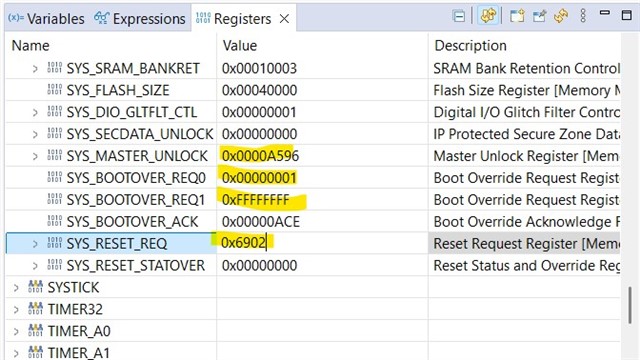
  • The Uniflash Factory Reset is supposed to perform the below operations. Why don't you manually do the same in CCS and see its effect on your locked boards. See below image. 

    1. Write 0xA596 to SYS_MASTER_UNLOCK

    2. Write 0x01 to SYS_BOOTOVER_REQ0

    3. Write 0xFFFFFFFF to SYS_BOOTOVER_REQ1

    4. Write 0x6902 to SYS_RESET_REQ

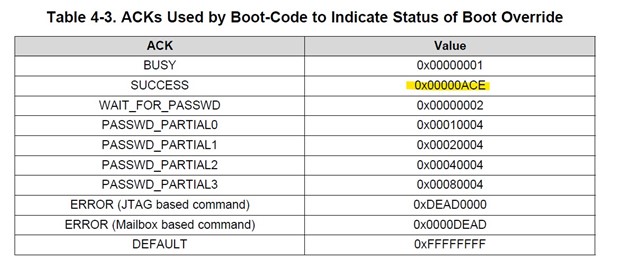
    After the above operations, the SYS_BOOTOVER_ACK will become 0xACE indicating success.