This thread has been locked.

If you have a related question, please click the "Ask a related question" button in the top right corner. The newly created question will be automatically linked to this question.

DM8168 Discrete SYNC Capture problem

Other Parts Discussed in Thread: TVP7002, TEST2

hello everyone!

I have some question about DM8168 VP0 capture.

 I use DVRRDK_01.06.00.11 SDK. Hardware is EVM8168.

I do these test:

test1:

input 720P-60 YPbPr to VP0 (decoder is TVP7002)

videoCaptureMode = VPS_CAPT_VIDEO_CAPTURE_MODE_SINGLE_CH_NON_MUX_DISCRETE_SYNC

     videoIfMode = VPS_CAPT_VIDEO_IF_MODE_16BIT

      scEnable  = FALSE;

       scOutWidth  = 1280;

      scOutHeight  = 720;

 result: data stream is can not flow.(no picture)

test2:

input 720P-60 YPbPr to VP0 (decoder is TVP7002)

videoCaptureMode = VPS_CAPT_VIDEO_CAPTURE_MODE_SINGLE_CH_NON_MUX_DISCRETE_SYNC

     videoIfMode = VPS_CAPT_VIDEO_IF_MODE_16BIT

      scEnable  = TRUE;

       scOutWidth  = 1280;

      scOutHeight  = 720;

 result: capture OK.Picture is good display on  LCD..(pictrue 2)

test3:

input 720P-60 YPbPr to VP0 (decoder is TVP7002)

videoCaptureMode = VPS_CAPT_VIDEO_CAPTURE_MODE_SINGLE_CH_NON_MUX_EMBEDDED_SYNC

     videoIfMode = VPS_CAPT_VIDEO_IF_MODE_16BIT

      scEnable  = FALSE;

       scOutWidth  = 1280;

      scOutHeight  = 720;

 result: capture OK.Picture is good display on  LCD..(pictrue 2)

test4:

input 720P-60 YPbPr to VP0 (decoder is TVP7002)

videoCaptureMode = VPS_CAPT_VIDEO_CAPTURE_MODE_SINGLE_CH_NON_MUX_EMBEDDED_SYNC

     videoIfMode = VPS_CAPT_VIDEO_IF_MODE_16BIT

      scEnable  = TURE;

       scOutWidth  = 1280;

      scOutHeight  = 720;

 result: capture OK.Picture is good display on  LCD..(pictrue 2)


then we find input 720P-60 source look good. now we chang input source res to 1280X1024@60

test5:

input 1280x1024@60 VGA  to VP0 (decoder is TVP7002)

videoCaptureMode = VPS_CAPT_VIDEO_CAPTURE_MODE_SINGLE_CH_NON_MUX_DISCRETE_SYNC

     videoIfMode = VPS_CAPT_VIDEO_IF_MODE_16BIT

      scEnable  = FALSE;

       scOutWidth  = 1280;

      scOutHeight  = 1024;

  result: data stream is can not flow.(no picture)

test6:

input 1280x1024@60 VGA  to VP0 (decoder is TVP7002)

videoCaptureMode = VPS_CAPT_VIDEO_CAPTURE_MODE_SINGLE_CH_NON_MUX_DISCRETE_SYNC

     videoIfMode = VPS_CAPT_VIDEO_IF_MODE_16BIT

      scEnable  = TURE;

       scOutWidth  = 1280;

      scOutHeight  = 1024;

  result: picture is bad.looks like skew.when display on LCD..(pictrue 1)

test7:

input 1280x1024@60 VGA  to VP0 (decoder is TVP7002)

videoCaptureMode = VPS_CAPT_VIDEO_CAPTURE_MODE_SINGLE_CH_NON_MUX_EMBEDDED_SYNC

     videoIfMode = VPS_CAPT_VIDEO_IF_MODE_16BIT

      scEnable  = FALSE;

       scOutWidth  = 1280;

      scOutHeight  = 1024;

  result: picture is good.when display on LCD..(pictrue 2)

test8:

input 1280x1024@60 VGA  to VP0 (decoder is TVP7002)

videoCaptureMode = VPS_CAPT_VIDEO_CAPTURE_MODE_SINGLE_CH_NON_MUX_EMBEDDED_SYNC

     videoIfMode = VPS_CAPT_VIDEO_IF_MODE_16BIT

      scEnable  = TURE;

       scOutWidth  = 1280;

      scOutHeight  = 1024;

  result: picture is bad.looks like skew.when display on LCD.(pictrue 1)

The good picture and bad picture as follows


Can some one help me .tell me what is wrong?

Looking forward to your reply Thank You very much!

  • Hi,

    Few questions and clarifications to sort out the issue.

    1. You have ES2.0 or ES1.1 silicon.

    2. On ES1.1 silicon we have an errata for discrete sync which is as follows. So please make sure you have taken care of it.

    "The VIP parser requires that the ACTVID signal is active for all lines of the incoming data, including the vertical blanking region."  You can refer to errata at http://www.ti.com/lit/er/sprz329a/sprz329a.pdf

    3. In case 2 where you are getting bad images, can you please crop the image by one line and try.You can use scalar to crop image.

    Regards,

    Hardik Shah

  • Hi

    Thank you for reply.

    1.I have use ES1.1 silicon I guess.(I read cpu id from addr 0x48140600)

    2.I have read that datasheet.But I do Not quite understand.that mean ES1.1 and ES1.0 silicon can not use discrete sync capture picture data?(when use some external video decoder)

    3. I had run TI Demo in DVRRDK_01.06.00.11 SDK to get that images. (capture -> SC-> H264 encode -> write H264 FILE  or capture -> H264 encode -> write H264 FILE ) the demo file is Multichhd_vcap_venc_vdis.c

    Can you help me to confirm that problem?

    Ths

    Regards


  • Hi,

    I again read your thread. How are you configuring TVP7002 for 1280X1024 resolution. I think TVP7002 driver doesn't support 1280X1024 resolution. That worked may be because of your luck. Can you please confirm with RDK team that 1280X1024 is a supported resolution over TVP7002. I guess its not.

    Regards,

    Hardik Shah

  • hi

     thank you for you reply!

     1280X1024 resolution I have confirmed before my test. The driver is supported that resolution.

    The driver code like this

    /**
     *  \brief List of values used for SXGA@60 settings.
     *  Caution: The value list order should match with the address list order.
     */
    static UInt8 gTvp7002ValueSxga60[] =
    {
        0x69u,              /* HPLL_DIVIDER_MSB         */
        0x80u,              /* HPLL_DIVIDER_LSB         */
        0xA0u,              /* HPLL_CTRL                */
        0x80u,              /* HPLL_PHASE_SELECT        */
        0x06u,              /* CLAMP_START              */
        0x10u,              /* CLAMP_WIDTH              */
        0x20u,              /* HSYNC_OUT_WIDTH          */
        0x52u,              /* SYNC_CTRL1               */
        0x01u,              /* HPLL_PRE_COAST           */
        0x00u,              /* HPLL_POST_COAST          */
        0x00u,              /* MISC_CTRL3               */
        0xAAu,              /* IN_MUX_SELECT1           */
        0x6Au,//0xC2u,//0x6Au,              /* IN_MUX_SELECT2           */
        0x08u,              /* HSOUT_OUT_START          */
        0x00u,              /* MISC_CTRL4               */
        0x50u,              /* ADC_SETUP                */
        0x18u,              /* ALC_PLACEMENT            */
        0x80u,              /* AVID_START_PIXEL_LSB     */
        0x01u,              /* AVID_START_PIXEL_MSB     */
        0x86u,              /* AVID_STOP_PIXEL_LSB      */
        0x06u,              /* AVID_STOP_PIXEL_MSB      */
        0x04u,              /* VBLK_FLD0_START_OFFSET   */
        0x00u,              /* VBLK_FLD1_START_OFFSET   */
        0x2Au,              /* VBLK_FLD0_DURATION       */
        0x00u,              /* VBLK_FLD1_DURATION       */
        0x00u,              /* FBIT_FLD0_START_OFFSET   */
        0x00u               /* FBIT_FLD1_START_OFFSET   */
    };

    thank you! 

  • SXGA is supoorted by TVP7002. 

    In the TVP7002 spec here http://www.ti.com/lit/ds/symlink/tvp7002.pdf
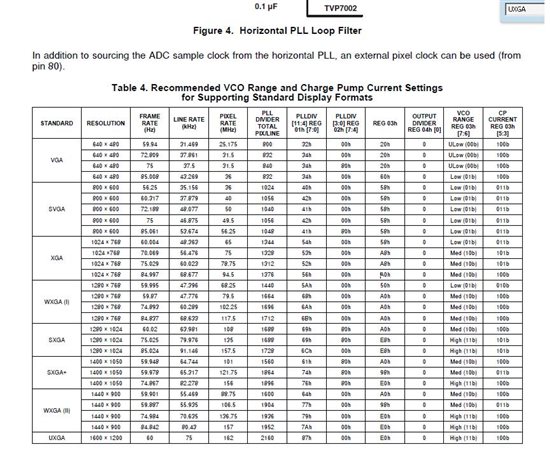
    it is written  "Supports PC Graphics Inputs up to UXGA" and in Table 4 on page 14 you can see support for SXGA 1280x1024.

  • Hi,

    TVP7002 may be supporting SXGA but i am not sure driver is configured for SXGA embedded sync. This is because V4L2 capture driver is configured for embedded sync.  If TVP7002 is outputting discrete sync then VIP capture wont received it since its configured for embedded sync reception. You can refer to following document on how to configure V4L2 capture driver for discrete sync reception. 

    http://processors.wiki.ti.com/index.php/DM81xx_AM38xx_Adding_External_Decoders_to_V4L2_Capture_Driver

    Regards,

    Hardik Shah

  • Hi HardikShah,


    Thank for your answer, but can't you give a more constructive answer instead of sending me to read the wiki of adding external decoders to V4L2?
    For example how to configure VIP capture to receive discrete sync?

    Thanks,
    Gabi 

  • Hi,

    Even if i give constructive answer it will be directly from wiki.  Thats why we have created wiki to help more people. You can read that and come up with your specific questions and i will be happy to address that.

    Regards,

    Hardik Shah

  • Hi HardikShan,


    I'll start to support capture for 1280x1024@67fps through VGA (TVP7002 chip) on DM8168, but I'm not aware if it supports that framerate is possible.

    Have you tried to capture using no standard framerate like 67Hz on DM8168?

    I'm using linux-2.6.37-psp04.04.00.01


    Best Regards
    Angel

  • Hello,

    Refer to :

    BR

    Margarita