This thread has been locked.

If you have a related question, please click the "Ask a related question" button in the top right corner. The newly created question will be automatically linked to this question.

TDA4VE-Q1: How to set PTP master clock source?

Part Number: TDA4VE-Q1

Hi TI experts,

SW:SDK9.2

HW:our own board

We need to implement PTP master functionality on our own board. In fact, PTP masters usually select the optimal clock source through BMC algorithm. If we want to specify the clock source as GTC time, how can we modify it?
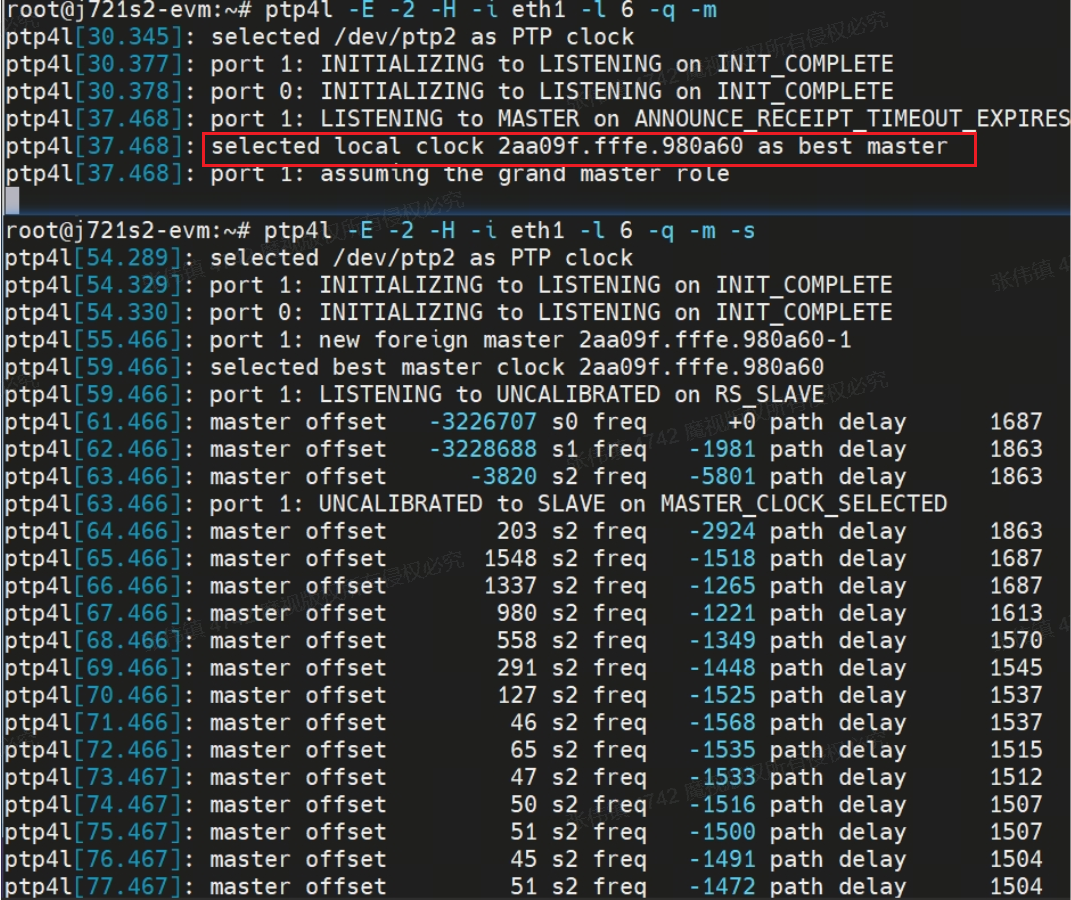
image.png

BR.

  • Hi,

    The GTC is an internal clock for A72. This would be the same CLOCK_REALTIME right. I don't think you can use it with ptp4l, you will need to use it with phc2sys utility I believe. You will need to sync it to the /dev/ptpx using phc2sys and then you can use the ptp clock as PTP master.

    Regards,
    Tanmay

  • Hi Tanmay,

    I'm not quite sure. Are you saying that I need to use the phc2sys command, such as phc2sys - s eth1- c CLOCK-RELTIME - w - m? After this command is successfully executed, what kind of result is considered normal?Is the phc2sys command setting the system clock to ptp mseter clock here?

    We chose GTC time because we want to use a stable counting clock source. If we use a system clock, we are concerned that the system time may fluctuate. Is there any way to meet our needs?

    BR.

  • Hi,

    By default, we do not have any independent clock being sourced from GTC. The "CLOCK-RELTIME" is based on ARM timers which are in turn sourced from GTC clock.


    Is the phc2sys command setting the system clock to ptp mseter clock here?

    With phc2sys, you will be able to sync the CPTS clock (this is the hardware clock use in PTP) with the CLOCK_REALTIME. So infact opposite is happening. The phc2sys command is setting CPTS clock to system clock. The ptp4l will then use this CPTS clock as its master clock. So you should use CLOCK_REALTIME with '-s' and ethx with '-c' flags.

    Regards,
    Tanmay