This thread has been locked.

If you have a related question, please click the "Ask a related question" button in the top right corner. The newly created question will be automatically linked to this question.

TDA4VEN-Q1: V4l2h265enc issue

Part Number: TDA4VEN-Q1

Hi TI experts,

SW:SDK10.0
HW:our own board

As shown in the figure below, the AB area views are the results encoded by two encoding channels created through /dev/video1, but unexpected color stripes appeared. We have confirmed through image capture that the image was normal before entering the encoder. Is there any way to determine the cause of the current color stripes and how to solve this anomaly?

image.png

  • Hello, 

    Could you share the GStreamer pipeline or application being used?

    Can you confirm what the input format is? I've seen sort of similar color lines when the input format or resolution to the encoder is not compatible.

    If you have an input stream I can test the encoding on our end to verify the output.

    Thanks,
    Sarabesh S.

  • Hi Sarabesh S,

    Could you share the GStreamer pipeline or application being used?

    Actually, we did not use gstreamer. You can refer to the screenshot below for a rough diagram. In addition, the application we are currently using is self implemented, and I understand that it may not run in your environment. Do you need us to provide the source code?

    Can you confirm what the input format is?

    All three encoding input formats are NV12.

    BR.

  • Hello,

    Let me confirm with the team internally if anyone is familiar with this issue first. Is there any way you can try to replicate this on the EVM?

    Thanks,
    Sarabesh S.

  • Hi Sarabesh S,

    Let me confirm with the team internally if anyone is familiar with this issue first.

    Thank you for your support. I hope there will be some new developments.

    Is there any way you can try to replicate this on the EVM?

    In fact, this issue does not occur consistently. During the process of automated power-on/off stress testing, we found that this anomaly occasionally emerged after a certain startup instance, but it would return to normal after a restart. No abnormal information was detected through dmesg when the anomaly occurred. On the EVM, the display link for this set of automated stress testing is incomplete, and new development efforts are required.

    BR.

  • Hi Sarabesh S,

    Is there any update?

    This matter is very urgent for our project because it was discovered on the client side.

    BR.

  • Hi,

    I uploaded an abnormal H265 encoding stream, and combined with the 4 instances of anomalies we have reproduced so far, there seem to be some regular phenomena:
    1) Every time there is an abnormality, the colored stripes appear on the right side of the image
    2) From the abnormal video, it can be seen that the content on the right side of the image, whether it is colored stripes or the original content of the image, appears to be moving downwards. However, this test scenario is mostly static, and this anomaly looks like the next line of data in the image has taken some of the content from the previous line. Is that correct?

    Are there any rules to pay attention to when applying for V4L2 buffer? For example, how many bytes are aligned?Also, are there any registers that can be read to determine certain states?

    BR.

    1216_864_160551.rar

  • Hello, 

    Could you please share the raw data input? I can try an example pipeline on our end to see if the issue is with the input data. Also what FPS are you encoding at?

    Would you be able to provide your source code so I can inspect that as well. There certainly are rules for how to handle V4L2 buffers due to hardware constraints such as stride and height alignment. I'll confirm with the IP vendor on what should be considered.

    Are you using DMA-BUF file descriptors in your application?

    Thanks,
    Sarabesh S.

  • Hi Sarabesh S,

    Could you please share the raw data input? I can try an example pipeline on our end to see if the issue is with the input data. Also what FPS are you encoding at?

    Please refer to the v4l1H265enc_comlor_block.rar file I uploaded for the raw data input.Among them, * N12 is the v4l2 input, * H256 is the encoded output.And the encoding frame rate is 30fps.

    Would you be able to provide your source code so I can inspect that as well. There certainly are rules for how to handle V4L2 buffers due to hardware constraints such as stride and height alignment. I'll confirm with the IP vendor on what should be considered.

    When it comes to outsourcing the source code, we will organize it and send it to Zhangyong or Joe via email, who will then forward it through your internal channels.

    Are you using DMA-BUF file descriptors in your application?

    Please refer to the screenshot below for details.

    v4l2h265enc_color_block1126.rar

    BR.

  • Hi Sarabesh.S.

    Would you be able to provide your source code so I can inspect that as well.

    Motovis team has provided this, sent over TIDRIVER as customer policy. Will send to you w/ key by email.

    https://tidrive.ext.ti.com/u/rKjFecSoxa2-qMVw/ac73dbea-340a-4bbb-9c18-f9fe4e3ed12d?l

    more comment from customer:

    1、After reproducing the problem, we were able to consistently save the original NV12 image before encoding normally, but the encoded H265 video was abnormal.

    2、After reproducing the problem, try to follow these steps.

       Step1:

       Stop coding and release the coding resources.

       step2:

       rmmod wave5.ko

       step3:

      insmod wave5.ko

       step4:

    Apply for resources, start coding. The H265 video is still abnormal.

    thanks a lot!

    yong

  • Hi Sarabesh S,

    This matter is very urgent now. If there is any progress, please update us as soon as possible.

    BR.

  • Hello, 

    The YUV raw data that was provided doesn't seem to be YUV420 format. When trying to read the raw data with YUVIEW the image is corrupt:

    If these are the images you are encoding that you will certainly see a corrupt final output. Are you doing any padding to the stride because the input is mis-formatted.

    Still inspecting the source code, but do you have steps to build and replicate the issue on EVM?

    Thanks,
    Sarabesh S.

  • Hi Sarabesh S,

    The YUV raw data looks correct on my end. Combined with the output result of H265, the YUV raw data should not be like the one you screenshot. Is there a problem with using the tool?

    do you have steps to build and replicate the issue on EVM?

    At present, we have not conducted any CODEC related verification on the EVM board. On the one hand, we believe that the data input and output encoding is sufficient to prove that the data has abnormal behavior after passing through Linux v4l2; On the other hand, currently this exception cannot be captured. If we want to port the application code related to CODEC on the EVM board and implement RTP/RTSP related functions on the EVM board, it will be a considerable workload for us.

    Also, is there any way to catch exceptions?

    BR.

  • If your ioctl calls from V4L2 aren't throwing any error's I'm not sure if you can catch this as an exception since this bug is visual. I'll check with the IP vendor if there are any registers that can be read to signal a visual discrepancy like this. Could you clarify if you are using Vision-Apps SDK (Linux+RTOS) or just Linux?

    Thanks,
    Sarabesh S.

  • Hi Sarabesh S,

    We are using Vision-Apps SDK (Linux+RTOS) now.

    Is there any way to obtain the image addresses of each link in V4L2? Does this mean that the raw data input of NV12 is not directly fed into the encoder? If the raw data of NV12 is not directly input to the encoder, can we further confirm whether the actual problem was actually sent in the V4L2 driver or the encoder; If the raw data of NV12 is the direct input of the encoder, can we prove from the data we provide that the abnormality is caused by the encoder?

    BR.

  • Hi Sarabesh S,

    Current Status Quick Summary:

    1. If the screen displays corrupted graphics upon system boot, it remains in that state. Conversely, if the system boots normally, it continues to function without issues.

    2. When the problem occurs, the image before encoding is normal, but the encoded output becomes corrupted. This issue appears both when encoding via our custom V4L2 interface and when using GStreamer directly.

    3. Corrupted graphics can also occur when encoding a single image. It has been confirmed that this is related to image resolution: no issues arise at resolutions ≤ 448×608, but at resolutions ≥ 512×672, corruption occurs intermittently. This pattern has been verified both through our custom V4L2 tests and direct GStreamer usage.

    4. Since the issue arises during the boot process, timing-related causes are suspected. However, experiments such as loading the encoding-related drivers with a 2-second interval or introducing a 5-second delay after driver loading still reproduced the corruption problem.

    BR.

  • Hi

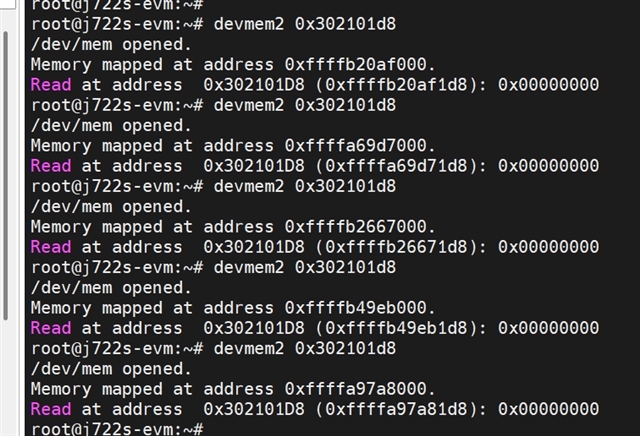
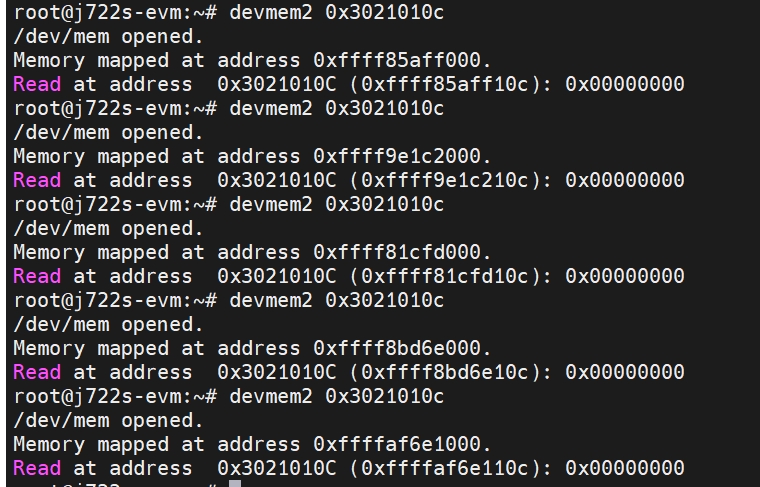
      When error happens, could you please dump the register 0x30210000UL + 0x1d8  and 0x30210000UL + 0x10c  to check the status? Thanks.

    Best regards,

    Linjun

  • Hi Linjun,

    Please view the result of the register through the screenshot below.

    In addition, we can reproduce the same exception using the gst command on the EVM board. The steps are as follows:
    1. Copy the gst_dead_test folder to the/opt directory
    2. Power on self start script/opt/gst_dead_test/nitor_gst_decode_test.sh

    3.We have created a systemd service for the operation of self starting and pulling up scripts. You can refer to it

    [Unit]
    Description=/etc/boot_script Compatibility
    ConditionPathExists=/etc/boot_script
    
    [Service]
    Type=forking
    ExecStart=/etc/boot_script
    TimeoutSec=0
    StandardOutput=tty
    RemainAfterExit=yes
    SysVStartPriority=99
    [Install]
    WantedBy=multi-user.target


    Testing principle:
    1. Use GST to read an NV12 image and encode it. Compare the result of the H265 encoding used in this startup with the result of the H265 encoding used in the previous startup. If there are more than 10 bytes that are different, stop the restart test and manually confirm whether the recording of the current encoding is normal.

    gst_read_test.rar

    BR.

  • I am not sure what' the status the register dumped.  the register 0 means no error reported in decoder or encoder. 

  • HI Linjun,


    Actually, I couldn't find any relevant descriptions for registers 0x30210000UL+0x1d8 and 0x30210000UL+0x10c in the table "J722S-excel_ppublic_combinated.xlsx".But we dumped all the registers related to the codec in both normal and abnormal situations. Do you think it helped you in any way?

    VEN_encode_Regs_dump.zip

    BR.

  • Hi Linjun & Sarabesh S,

    We have reproduced the anomaly using the gst command on the EVM board. Could you please refer to the steps we provided earlier and perform a stress test on your local EVM bench to reproduce it.

    BR.

  • Thank you for your effort to get this replicated on our EVM. I will go through these steps to replicate.

    Regards,
    Sarabesh S.

  • Hi Xie,

        The issue is easy reproduced or not?

         Could you please send command  0x0 to register 0x30210104 ,then read the register 0x30210000UL+0x10c for the result when issue happened. Thanks.

    BR,

    Linjun

  • Hi Linjin,

    Including the EVM board and our own board, we have enough test benches to reproduce the problem, and we can reproduce it almost every day.
    Are you saying that before each encoding, I need to set register 0x30210104 to 0 before starting encoding? When an exception occurs, I need the value of register 0x30210000UL+0x10c. Is that correct?

    BR.

  • Hi xie,

        Write 0x0 to 0x30210104 is to get the status info, then read the register 0x3021010c is get the info. maybe we could get codec system error if any error happened.  it's not before the encoding start; it's after the codec exception happens.  we can have an online debug if CCS connection is ready to your system. 

    BR.

    Linjun

  • Hi Linjun,

    Okay, I will try to perform the above register operations during the next exception. If there are any other actions that can be taken, please let me know.

    BR.

  • Hello, 

    I see Adam led discussions with CnM to resolve this issue. For tracking purposes I will post the solution here and anything I miss please update.

    Issue was still consistently reproducible after a backported version of firmware and source code was given to the customer below: 

    wave5_ti-linux-6.12.y-cicd.tar

    The resolution was found after disabling SRAM in the wave5 driver but can also be solved by deleting the SRAM node in the device tree as shown below: 

    Option 1. 

    #if 0
    	ret = of_property_read_u32(pdev->dev.of_node, "sram-size",
    				   &dev->sram_size);
    	if (ret) {
    		dev_warn(&pdev->dev, "sram-size not found\n");
    		dev->sram_size = 0;
    	}
    
    	dev->sram_pool = of_gen_pool_get(pdev->dev.of_node, "sram", 0);
    	if (!dev->sram_pool)
    		dev_warn(&pdev->dev, "sram node not found\n");
    #endif

    Option 2. delete the below line in k3-am62p-j722s-common-main.dtsi VPU node and recompile the binary.

    sram = <&oc_sram>;