Part Number: CCSTUDIO
Other Parts Discussed in Thread: TM4C1294NCPDT,
Please find the attached files
OS and Device Specification
Edition : Windows 11 Pro
Version : 25H2
OS build : 26200.7019
Processor : Intel(R) Core(TM) i5-8400 CPU @ 2.80GHz (2.81 GHz)
Installed RAM : 8.00 GB (7.83 GB usable)
System type : 64-bit operating system, x64-based processor
Experience : Windows Feature Experience Pack 1000.26100.265.0
I have downloaded Code Composer Studio 6.0.1 executable file from below link
Projects were developed in TM4C1294NCPDT controller using TI-RTOS in past
To maintain those projects, I installed successfully the above mentioned IDE in my system by disabling firewall and anti-virus.
On 1st time launch
- Add-ons download is successful
- Software Restarted
- Products like XDC Tool, NDK installation are failed
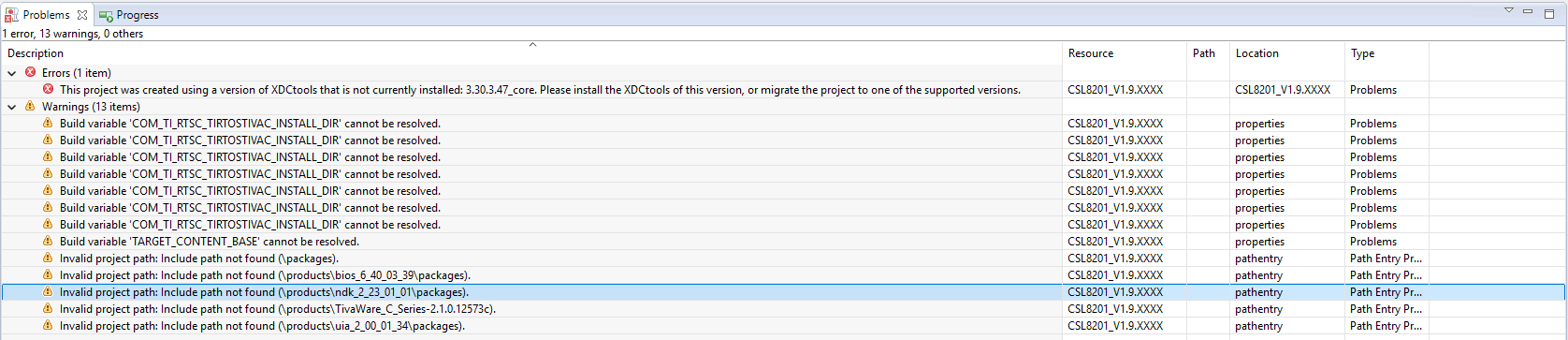
- After importing project, XDC Tool related error(s) and warning(s) are coming
All the files libraries, tools, rtos are present in the installed path
Please help me to resolve this issue as soon as possible
Thanks
Errors and Warning
Operation details
Cannot complete the install because one or more required items could not be found.
Software being installed: RTSC/XDCtools (IDE Client) 3.51.1.18 (org.eclipse.rtsc.xdctools.product.ui.feature.group 3.51.1.18)
Missing requirement: Runtime Object View Support 1.0.0.201811151652 (com.ti.rov 1.0.0.201811151652) requires 'bundle com.ti.ccstudio.webcontent 0.0.0' but it could not be found
Cannot satisfy dependency:
From: RTSC/XDCtools (IDE Client) 3.51.1.18 (org.eclipse.rtsc.xdctools.product.ui.feature.group 3.51.1.18)
To: com.ti.rov [1.0.0.201811151652]
See details below...
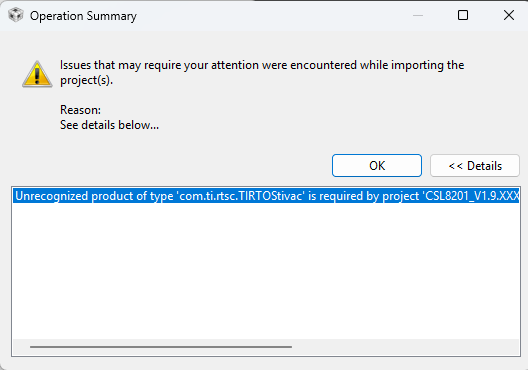
Unrecognized product of type 'com.ti.rtsc.TIRTOStivac' is required by project 'CSL8201_V1.9.XXXX' - please install at least one product of this type before building this project.
Description Resource Path Location Type
This project was created using a version of XDCtools that is not currently installed: 3.30.3.47_core. Please install the XDCtools of this version, or migrate the project to one of the supported versions. CSL8201_V1.9.XXXX CSL8201_V1.9.XXXX Problems