AM69A: Communication issues to a SSD

Part Number: AM69A
Other Parts Discussed in Thread: AM67

Hello Experts,

The am69A communication to a SDDQUGD_BGA_SSD is having issues.  
 
Notes on our Testing:
The 3 power planes to the SSD come up properly, sequencing looks correct.  The 1.2V plane is up first, then the 0.8V plane and 3.3V planes come up.  Appears to be within spec.  Have screenshots if helpful.
With our PCIe analyzer we are seeing NO upstream communication from the SSD.  Downstream communication looks good; analyzer reports valid data.  Seems like the SSD device is stuck in a reset state.  
 
The am69A controls the few control signals to the SSD.
PERST# signal high, we can and have toggled it (asserting reset) hoping to kick start the SSD
PLN#(Power Loss Notification) pin is driven high from the am69A
 
The LED1 pin from the SSD, is supposed to indicate a good status from the SSD, does NOT assert.  
We also put a differential probe on the PCIe refCLK to the SSD.  Signal quality looked good, 200mV pp, 100MHz.  
 
There aren't actually many pins going to the SSD.  PERST and PLN pins, an i2c port, and jtag.  We have verified PERST and PLN are de-asserted.  Are there any check lists for the am69A for communicating with SSD devices?  Any assistance would be greatly appreciated. 
 
Thanks
Anthony Rosensprung
  • Hi Anthony,

    The LED1 pin from the SSD, is supposed to indicate a good status from the SSD, does NOT assert.  

    That sounds to be an issue. Would be good to know where this power good status LED is connected to. 

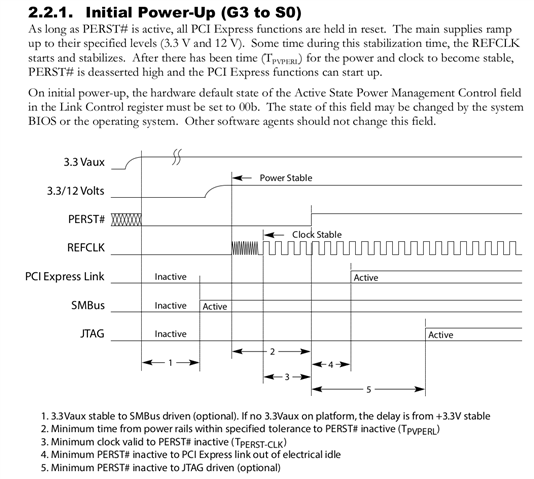
    In terms of expectation, we expect the following sequencing for the main signals involved in powering up PCIe. Diagram taken from PCI Express Card Electromechanical Specification Revision 3.0 from the PCI-SIG organization:

    From your post, it sounded like the power signal that is part of PCI-SIG specification is monitored, as well as PERST and REFCLK, so I would assume all of these are fine.

    What I would instead suspect is that there is an extra power enable pin that is either specific to the SSD or any adapter that is used with the SSD. As an example, there was a "hat" for allowing connection of a M.2 SSD card to a community board by Beagle that used the AM67 SoC. However, the hat itself had an extra PCIE_PWR_EN pin that must be manually asserted for the SSD to get powered. Reference commit: https://openbeagle.org/beagleboard/linux/-/commit/40d9e4d45e92fbae1c52ef8d6637a8cf739bcf89

    Perhaps something similar is happening and an extra power enable pin assertion is needed? So, it would be good to know where the power good status LED is connecting to.

    Regards,

    Takuma