This thread has been locked.

If you have a related question, please click the "Ask a related question" button in the top right corner. The newly created question will be automatically linked to this question.

CCSTUDIO-THEIA: No syntax highlighting in CCS 20.3.1.5

Part Number: CCSTUDIO-THEIA

Just installed the update to CCS 20.3.1.5_1.9.1 and lost all syntax highlighting.  Also not able to click on functions and go to them.  How can I revert back to the older version or get this working again in the new version?

  • Thank you for reporting this. I was able to reproduce this also. It only seems to impact an incremental update to 20.3.1 while a full 20.3.1 installation appears fine.

    A ticket has been filed: https://sir.ext.ti.com/jira/browse/EXT_EP-13037

    Thanks

    ki

  • What do I need to do to get it running again?

  • I would remove your existing installation and then install the full 20.3.1 installation.

    For some reason the plugins folder in .\ccs\theia\resources\app\plugins got deleted during the update. Due to the missing IDE plugins, all the advanced editor features from these plugins are lost. 

    If you have a backup of this plugins folder, then you could copy it to the above location. Otherwise I would recommend a full 20.3.1 install.

  • I uninstalled what was on my computer.  Then I downloaded the new installer from here

    https://www.ti.com/tool/CCSTUDIO?keyMatch=ccs&tisearch=universal_search&usecase=partmatches

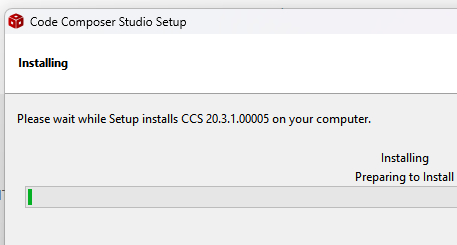
    This says it is the latest version 20.3.1, but when I run the installer it says it is installing 20.2.0.00012.

    I let the install complete and CCS loaded, but the About box says it is version 20.2.0.12__1.8.0, and I am getting prompted to install updates.

    What's going on here?  Why doesn't the installer install the latest version as stated?  Should I run the update or will that again kill all the advanced features?

    This IDE is very unstable for the MSP432.  I may have to go back to CCS12 so I can have an editor with working features again.  When is the Insert button going to be fixed?  When is the Problem window going to sync properly?  I've reported these problems, but they are never fixed.

  • What's going on here?  Why doesn't the installer install the latest version as stated?

    This is odd.

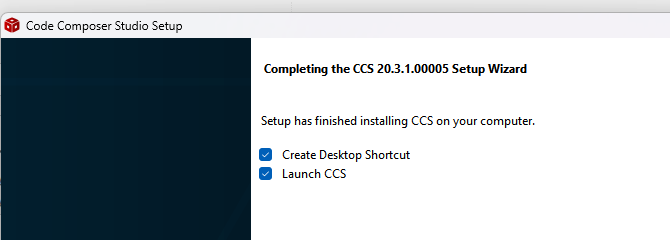
    I clicked on the link you posted and went to grab the latest CCS 20.3.1 installer and ran it:

    This says it is the latest version 20.3.1, but when I run the installer it says it is installing 20.2.0.00012.

    I only saw 20.3.1 mentioned during the whole install process:

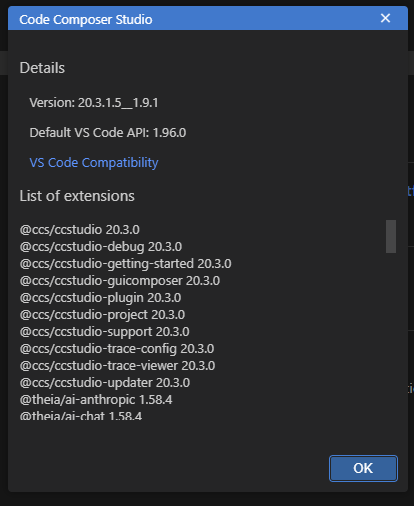
    I let the install complete and CCS loaded, but the About box says it is version 20.2.0.12__1.8.0, and I am getting prompted to install updates.

    And my About box says 20.3.1:

    Can you confirm that the installer exe you ran was "ccs_setup_20.3.1.00005.exe"?

    Are you trying to install in a directory with an existing CCS installation?

    Thanks

    ki

  • I was able to get the latest version installed.  Unfortunately nothing has changed.  The Insert button still doesn't work, the Problem window and error highlighting still doesn't synchronize properly, and there's still no way to drag a window onto a second monitor.  These are all basic editor features that worked fine in CCS 12.  What was changed in this release?

  • I was able to get the latest version installed.  Unfortunately nothing has changed. 

    There is still no syntax highlighting at all?

    The Insert button still doesn't work, the Problem window and error highlighting still doesn't synchronize properly, and there's still no way to drag a window onto a second monitor.  These are all basic editor features that worked fine in CCS 12.  What was changed in this release?

    Some features that existed in CCS 12 do not exist in CCS 20 due to changes in the IDE framework used. One example would be being able to undock a view and drag that view outside the main IDE window. Sync issues with the problems view and highlighting would need to be looked at separately. Do you have an example of this?

  • I have syntax highlighting working again.  When I say "nothing changed", I mean none of the broken features I have been waiting for fixes have been fixed.  This version runs the same as the last version.  Even the Insert button problem hasn't been fixed.  I've listed some of the problems in a previous thread here:

     RE: CCSTUDIO: CCS 20.2 Editor features not working 

    I would also add that the way CCS 20 adds names of parameters to functions calls is very annoying.  It makes it very hard to edit the file when half of the text is not my code.  It can't be selected, and deleting text is very hard because it keeps rebuilding the parameter names.

    Another big missing item in CCS 20 is the Runtime Object Viewer.  Now there is no way to look at the memory allocations of the TCP stack to optimize performance.

    When will CCS 20 support these common development features properly?

  • I've listed some of the problems in a previous thread here:

     RE: CCSTUDIO: CCS 20.2 Editor features not working 

    The tracking links I provided in that thread has the proposed fix version for those features. One is scheduled for 20.4.0 (the problems/output view sync issue) which is scheduled for release end of the month. The other is scheduled for CCS 21.0

    Another big missing item in CCS 20 is the Runtime Object Viewer.  Now there is no way to look at the memory allocations of the TCP stack to optimize performance.

    This is actually not a CCS specific issue. What you see in ROV is driven by content from the related SDK you are using for your project. 

    Thanks

    ki

  • I have syntax highlighting working again.

    Note that I will close this thread as the original issue was resolved. For the ROV issue, I suggest starting a new thread in the forum related to the device/SDK you are using to bring this issue to their attention.

    Thanks

    ki