This thread has been locked.

If you have a related question, please click the "Ask a related question" button in the top right corner. The newly created question will be automatically linked to this question.

DRA821U: Recommended Debug Workflow for DRA821U: Bootloader + R5F Firmware + Linux Integration

Part Number: DRA821U
Other Parts Discussed in Thread: DRA821

Hi team,

We are beginning to evaluate the full debug workflow for the DRA821U SoC.  
Our goal is to better understand how to debug the boot process, as well as how to develop and debug custom firmware for the R5F cores on our custom board. We also have the J7200 EVM kit, so our intention is to start experimenting there using the on-board XDS110 debugger before moving to our custom HW. 

We have reviewed the documentation in both the Processor SDK Linux and Processor SDK RTOS, but the overall process still isn’t fully clear to us.  
We would appreciate guidance on the following points:

  1. Debugging the boot process (ROM → tiboot3.bin → tispl.bin → u-boot.img → Linux) 
       - What is the recommended method to load and debug the bootloader components using CCS and the on-board XDS110 USB debugger?  
       - Is it possible to single-step through tiboot3, tispl.bin and U-Boot execution all the way until  Linux starts on the A72?  
  2. Developing and debugging custom firmware on the R5F cores
       - What is the correct workflow for loading and debugging R5F firmware during development?    
       - Can we independently load and debug R5F firmware using CCS while Linux is running on the A72?  
       - Is there any recommended method for coordinating Linux-side remoteproc with CCS debugging?
     
  3. User-space application development on A72 (Linux)  
       - Linux user-space debugging is supported with CCS?
       - If so, what is the recommended workflow? 
  4. Recommended CCS version
    - The documentation from the Linux SDK and the RTOS SDK seems to reference different CCS versions.  
    - Which CCS version do you recommend for DRA821U development today?  
    - Can we use the latest CCS release? We would like to use the VSCode based version.

Finally, if there is a more complete or step-by-step guide covering the above topics (early bootloader debug, R5F firmware development and debug, and Linux integration), we would greatly appreciate a pointer to it.

Thanks a lot for your support.

  • Hi, 

    We are looking into the request, and get back to you by end of the day with appropriate details. 

    Best Regards, 

    Sudheer

  • Hi,
    Can you give some information regarding which boot flow and boot media you want to use and what firmwares you intend to load?

  • Hi,

    At the moment, for our production system we plan to use the standard Linux boot flow:

    • tiboot3.bin (running on MCU R5F)

    • tispl.bin (SPL running on A72)

    • u-boot.img
    • Linux kernel + rootfs from eMMC

    For development/debug purposes, we also want to be able to use other boot media such as:

    • UART boot 

    • DFU boot 

    Our primary boot media on the custom board will be:

    • eMMC (boot0 partition) → tiboot3 / tispl / u-boot

    • eMMC (user area) → rootfs

    We want to develop and debug custom firmware running on the R5F cores:

    • MCU R5F0_0 / R5F0_1 

    • Main R5F cores

    We are planing to load this r5 firmware in our production system once linux is booted via remoteproc. About the firmware we intend to load, will be related with using the R5 peripherals to interact with external sensors and signals, and later comunicate this with the a72 running linux.

    At the moment we want to:

    • Load these firmwares manually during development.

    • Debug them interactively with CCS and the XDS110 debugger.

    • Understand how CCS debug interacts with Linux remoteproc once Linux is running.

  • Hi,

    Note: we haven't tried booting of this images using NOBOOT mode

    1. Boot Process Debugging

    So for debugging the boot chain (ROM → tiboot3.bin → tispl.bin → u-boot.img → Linux), here's what you can realistically do:

    You can start debugging till the u-boot stage using CCS except ROM stage.

    For tiboot3.bin, tispl.bin and u-boot.img debugging, you can modify and build these files by putting below snippet at the start of the flow of these files. so that core will reach this point and wait till you load the symbols and change the variable to 0. After that you can step in/over to debug.

    volatile int debug_halt = 1;
    while(debug_halt){

    }

    Along with loading symbols you need to give offset as well,

    CONFIG_SPL_TEXT_BASE : A72 SPL base address
    CONFIG_TEXT_BASE : u-boot base address

    you can find offsets in below file,
    {PSDKL_PATH}/board-support/ti-u-boot-2025.01+git/build/a72/.config


    2. R5F Firmware Development and Debugging

    This is well supported, and there are two main scenarios depending on what you're trying to do:

    Scenario A: R5F debugging without HLOS (no Linux on A72) Link

    If you're just running bare-metal or RTOS on the R5Fs:

    - Put the EVM in NOBOOT mode
    - Run the launch.js script through CCS - this initializes DMSC and loads the System Firmware (TIFS). You'll find this script at:
    ${PSDK_RTOS_PATH}/pdk_j7200_{version}/packages/ti/drv/sciclient/tools/ccsLoadDmsc/j7200/launch.js
    - Load your R5F firmware binary (.out file) directly through CCS
    - Start debugging

    Scenario B: Debugging R5F while Linux is running on A72 (other than NOBOOT mode) Link

    - Boot EVM normally with required BOOT mode
    - Create a CCS target configuration without GEL files
    - Connect CCS to whichever R5F core you need (MCU1_0, MCU2_0, MCU2_1 etc..)
    - Use the "Load Symbols" option (not "Load Program") to load symbols from your R5F firmware
    - Set breakpoints and start debugging

    Important note on remoteproc: In SPL boot flow When Uboot boots, it typically uses remoteproc to load R5F firmware from /lib/firmware/. The key here is to load symbols in CCS from the same binary that remoteproc loaded. This way you're just attaching to debug, not trying to load a different image.
    If you want to load any custom firmwares on R5F core (except mcur5f_0_0), you can create softlinks from /lib/firmware to your custom firmwares


    3. Linux User-Space Debugging

    - CCS doesn't support this.

    4. CCS Version Recommendation

    The officially tested and validated version for this SDK release is:
    - CCS v11.0.0.00012
    - Download: software-dl.ti.com/.../ccs_downloads.html

    Now, this is the CCS v11 classic version (before the full VSCode transition). CCS v12.x should work fine too, but since this particular SDK was validated against v11.0 .

  • Hi Vinit, 

    Thanks for the fast response and for the clarifications.

    I’ve been testing some of the things you described, especially the two R5F debugging scenarios. I now have a few follow-up questions and observations:

    2. R5F Firmware Development and Debugging

    Scenario A (NOBOOT + CCS + launch.js)

    I followed the steps you described together with the guide in the Link.

    I was able to connect to MAIN_Cortex_R5_0_0 and successfully debug a basic main.c application:

    Debug view:

    So far everything works fine.

    Issue: Unable to debug other R5F cores. The problem is that I cannot connect or debug the same code on any other R5F cores Not even on MAIN_R5_0_1 and not on any MCU R5F cores either. Only MAIN_R5_0_0 works. Is this expected behavior in NOBOOT mode? Shouldn’t the procedure to load and debug code on MAIN_R5_0_1 (or other R5Fs) be identical to MAIN_R5_0_0 after DMSC is initialized with launch.js?

    Am I missing some additional initialization step before other R5 cores can be used under NOBOOT?

    Reaching this point i also would like to ask if the proyect in CCS have to be created with some specific configuration. When creating the new proyect i just indicate that will be a DRA821 and a proyect for a Cortex R [Arm] as this image shows:


    Is this correct for debugging any MAIN_R5 core? Do I need a different project setup for MCU?

    Scenario B (Linux + remoteproc + CCS)

    I created a new CCS project with another minimal main.c (no printf, to keep it simple).

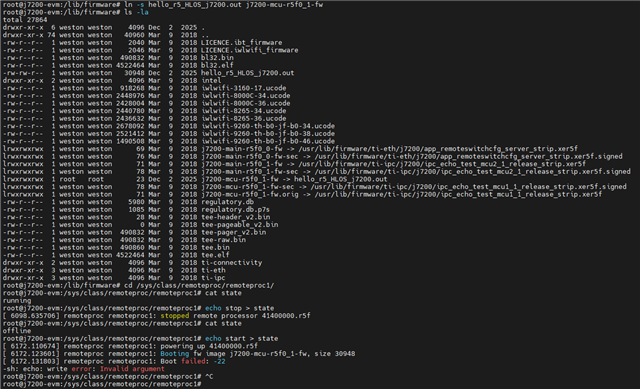
    I compiled the project and copied the resulting .out file into /lib/firmware on the target rootfs.

    I booted the evm and have the filesystem in "targetNFS" where i save the .out file into /lib/firmware, then I created the required symlink and attempted to start execution through remoteproc, but I received the following error:

    Do you know what might cause this?

    Is there any special requirement for the format of the .out file used by remoteproc on DRA821?

    Regarding 1. Boot Process Debugging could you provide a .patch to see in wich file do we have to apply the snippet you mention?

    PS: why we can load custom firmware except in MCU_r5f_0_0? Do you mean the DMSC_M3?

    If you want to load any custom firmwares on R5F core (except mcur5f_0_0)

    Thanks again for your help.

    Best regards.

    Santi

  • Hi Santi,

    Scenario A (NOBOOT + CCS + launch.js)

    Just to make sure we are on the same page,

    you need to create different app binary for different cores, you can't use the app binary used for MAIN_R5_0_0 for any other cores and same goes for other cores.

    Also, ensure that your memory mappings for each core should be different and not overlapping with other cores.

    Regarding MAIN_R5_0_1 core and other cores, you aren't be able to connect to debugger because cores are in locked step.  We created custom GEL file to configure cores in split mode,  Refer to FAQ for more details.

    Scenario B (Linux + remoteproc + CCS)

    These remoteprocs are loaded by U-BOOT instead of Linux by default,So, Linux can't start the remote cores.

    There are two ways to handle this,

    1) You reboot the SOC, as you already made softlink, it will directly load remoteproc with your updated firmware.

    2) You can crate softlink on Host machine by inserting SD card, then it will work in first boot only.

    Recommend to give absolute path (usr/lib/firmware/...) to make softlink instead of relative path from /lib/firmware. So, you need to copy your custom firmwares into /usr/lib/firmware directory.

    1. Boot Process Debugging 

    For tiboot3.bin image , you can put snippet at the start of the board_init_f() function in file {PSDKL_PATH}/board-support/ti-u-boot-2025.01+git/arch/arm/mach-k3/j721e/j721e_init.c

    For tispl.bin image , you can put snippet at the start of the board_init_f() function in file {PSDKL_PATH}/board-support/ti-u-boot-2025.01+git/arch/arm/mach-k3/j721e/j721e_init.c (same file as earlier !)

    For u-boot image, you can put snippet at the start of the board_init_f() function in file {PSDKL_PATH}/board-support/ti-u-boot-2025.01+git/common/board_f.c

  • Hi Vinit,

    Sorry, I accidentally clicked the “This resolved my issue” button — the topic is not fully resolved yet.

    About separate app binaries per core

    you need to create different app binary for different cores, you can't use the app binary used for MAIN_R5_0_0 for any other cores and same goes for other cores.

    How should I correctly handle the core selection in the CCS project?

    • When I create a new project in CCS, I just select DRA821 + Cortex-R as the target.

    • Do I need to create a separate project per core (MAIN_R5_0_0, MAIN_R5_0_1, MCU_R5F, etc.), or can this be controlled somewhere in the project settings / linker command file?

    About memory mappings

    Also, ensure that your memory mappings for each core should be different and not overlapping with other cores.

    How can I see or manage this in the CCS project? it is related also with the before question? Is CCS doing this automatically for me when compiling having the R5 core selected?

    Lockstep vs split mode / GEL

    Regarding MAIN_R5_0_1 core and other cores, you aren't be able to connect to debugger because cores are in locked step.  We created custom GEL file to configure cores in split mode,  Refer to FAQ for more details

    I will try the custom GEL for split mode as you suggest.

    Just to confirm, once the MAIN R5 cluster is set to split mode using the GEL, should the debug procedure for MAIN_R5_0_1 be exactly the same as for MAIN_R5_0_0?

    U-Boot vs Linux remoteproc

    These remoteprocs are loaded by U-BOOT instead of Linux by default,So, Linux can't start the remote cores.

    Is there a way to disable U-Boot from loading the R5F firmwares so that Linux (remoteproc) can take full control of starting/stopping/loading them?

    Issue after changing the softlink

    1) You reboot the SOC, as you already made softlink, it will directly load remoteproc with your updated firmware.

    I tried this approach: after creating the softlink to my custom firmware, I rebooted the SoC, and after that I was no longer able to connect the debugger to any core. CCS reports the following error when trying to connect:

    and here you can see the softlinks after a reset:

    If I restore the default softlinks and reboot again, then I can connect to the cores with the debugger without any problem.
    What could be happening here? Is my custom firmware image missing something that remoteproc / U-Boot expects?

    2) You can crate softlink on Host machine by inserting SD card, then it will work in first boot only.

    In my case I’m using a targetNFS root filesystem, which is very convenient for iterating quickly (copying new .out files, updating links, etc.). I would like to keep this NFS-based workflow if possible.

    Request for examples / step-by-step flow

    I’m still a bit confused about the full workflow. Could you please confirm if there is any CCS example project (e.g. a simple hello_world) to start testing and debugging the R5 cores in both scenarios (NOBOOT + CCS, and Linux + remoteproc + CCS attach)?

    I couldn’t find such examples in either the Linux SDK or the RTOS SDK. I’m missing a step-by-step guide that explains:

    • how to create a CCS project for R5F on DRA821,

    • how to select the target core correctly,

    • how to configure the memory map,

    • and how to integrate this with remoteproc and U-Boot for debugging.

    Any pointers or example projects would be extremely helpful.

    Thanks again for your support,
    Santi

  • Is there a way to disable U-Boot from loading the R5F firmwares so that Linux (remoteproc) can take full control of starting/stopping/loading them?

    In your SD card, there will be a file named uEnv.txt in BOOT partition.

    there will be variable named dorprocboot, set it to 0.

    like below,

    # Setting the right U-Boot environment variables

    dorprocboot=0

    Now U-boot won't load the firmwares and those will be loaded by Linux.

    This might resolve the issue of CCS error you are getting after creating softlink.

    Try this and update me if there is any problem  with this.

    Meanwhile, i am working on other problems you are facing.

    Thanks for your patience.

    -Vinit

  • Just to confirm, once the MAIN R5 cluster is set to split mode using the GEL, should the debug procedure for MAIN_R5_0_1 be exactly the same as for MAIN_R5_0_0?

    Yes, it would be the same.

    How should I correctly handle the core selection in the CCS project?

    • When I create a new project in CCS, I just select DRA821 + Cortex-R as the target.

    • Do I need to create a separate project per core (MAIN_R5_0_0, MAIN_R5_0_1, MCU_R5F, etc.), or can this be controlled somewhere in the project settings / linker command file?

    I would ask you to build the examples / custom firmwares in SDK on host machine itself instead of making ccs project for it, then load it using some BOOT media. it would be easy for you as you want to just explore the degugging and also you might not get these linker error. 

    while buidling , you should use the option BUILD_PROFILE=debug , so you get smooth debugging experience without any compilation optimization.

    if i get any specific information regarding using ccs project, i would share it with you.

    Below is the guide on using ccs,

    https://software-dl.ti.com/ccs/esd/documents/users_guide_12.4.0/index_getting-started.html

    Hope it helps.

    - Vinit

  • Hi Vinit,

    Thanks for the suggestion

    In your SD card, there will be a file names uEnv.txt in BOOT partition.

    there will be variable named dorprocboot, set it to 0.

    like below,

    # Setting the right U-Boot environment variables

    dorprocboot=0

    Now U-boot won't load the firmwares and those will be loaded by Linux.

    This might resolve the issue of CCS error you are getting after creating softlink.

    You can see here all the boot logs configuring also dorprocboot=0 when booting and also trying to start the remoteproc, but still not working. After rebooting with the softlink seems to be "offline" the remote core... (i put in .txt file becouse dont let me put in "insert code" format)

    boot_and_remoteproc_logs.txt

    Im also attaching the project of CCS im using for generate this .out file:

    hello_r5_HLOS_j7200.zip

  • I would ask you to build the examples / custom firmwares in SDK on host machine itself instead of making ccs project for it, then load it using some BOOT media. it would be easy for you as you want to just explore the degugging and also you might not get these linker error. 

    while buidling , you should use the option BUILD_PROFILE=debug , so you get smooth debugging experience without any compilation optimization.

    Could you please point us to the appropriate documentation for doing this with our own custom R5F firmware? Should we do this in the SDK_Linux or SDK_RTOS?

    We would like to start with a very simple hello_world application running on one of the R5F cores, where a counter is printed to a console and comunicate this with linux in some way. Ideally, we want to be able to debug this firmware while Linux is running on the A72.

    Later on, our goal is to expand this to start using peripherals such as UART, GPIO, and others directly from the R5F firmware.

    Any guidance or references to the correct manuals or examples would be greatly appreciated.

    Thanks

  • Hi santi,

    Sorry for the delay in reply, it was the weekend. i am on it now.

    - Vinit

  • Hi Vinit,

    Any news about this?

  • Hi santi,

    It seems like this query was tagged as "Resolved"from your side.

    No worries , i had already prepared the solution.

    i believe that you have already modified the uEnv.txt file in sd card - BOOT partition.


    Apart from that, you mentioned earlier that you want to put custom firmware on MAIN_R5_0_1 (which is mcu2_0), but you are stopping and starting the R5F_MCU0_1 (which is mcu1_0). NO issue with that but the soft link you made is from j7200-main-r5f0_0-fw.mine, which is not correct. You should have created soft link from j7200-main-r5f0_0-fw . also the remoteproc number you use while doing stop and start you need to make sure that remoteproc number is matching with the core's firmware name. this remoteproc numbers are dynamic so you need to verify them everytime linux boots. Below is the mapping core to firmware name.

    Enumeration ID -> Device Name 
    R5F_MCU0_0 -> 41000000.r5f
    R5F_MCU0_1 -> 41400000.r5f
    R5F_MAIN0_0 ->  5c00000.r5f 
    R5F_MAIN0_1 -> 5d00000.r5f
    R5F_MAIN1_0 -> 5e00000.r5f 
    R5F_MAIN1_1 -> 5f00000.r5f 
    DSP_C66_0 -> 4d80800000.dsp 
    DSP_C66_1 -> 4d81800000.dsp 
    DSP_c71_0 -> 64800000.dsp
    DSP_c71_1 ->  65800000.dsp 

    Apart from that, it seems like you are making softlink from mcu_r5f0_1 and main_r5f0_0 to the same .out file . As i said before both Cores will expect core specific firmwares.

    Also, talking about the custom firmware. So, lets first understand that fore each core's firmware, linux has sepearate memory space, which is already defined in linker file (.lds file). So, whenever you make any custom firmware it needs to be followed.

    So, when you make custom firmwares you have to make sure memory space is not overlapping with any other core and for that you need to use different .lds file for each core with dedicated memory mapping . You can use already existing examples (i.e IPC examples) from sdk, modify them according to your need and build those examples with makefile with SOC and CORE flag with CLI and not with CCS project.

    If you want more details about how to build examples from sdk using CLI, you can go through SDK documentation, if needed you can create new query for that as this thread is only for debug purpose.

    -Vinit

  • Hi Vinit 

    It seems like this query was tagged as "Resolved"from your side.

    First of all, sorry again for the accidental “Resolved” click

    The environment variable is correctly set in U-Boot during boot, as you can see in the logs I attached earlier in the .txt file.

    Apart from that, you mentioned earlier that you want to put custom firmware on MAIN_R5_0_1 (which is mcu2_0), but you are stopping and starting the R5F_MCU0_1 (which is mcu1_0). NO issue with that but the soft link you made is from j7200-main-r5f0_0-fw.mine, which is not correct. You should have created soft link from j7200-main-r5f0_0-fw . also the remoteproc number you use while doing stop and start you need to make sure that remoteproc number is matching with the core's firmware name. this remoteproc numbers are dynamic so you need to verify them everytime linux boots. Below is the mapping core to firmware name.

    Understood. yes, I was testing on different cores.

    From the LINK reference I understood that each core has its own dedicated memory region, its own DMA channel for RPMsg and therefore must use a different firmware binary. This is clear now.

    Regarding remoteproc numbering. Even after multiple resets, I am consistently seeing the same mapping (e.g. remoteproc1 always corresponds to j7200-mcu-r5f0_1-fw, with 41400000.r5f appearing in the "name" field).

    Related with this .lds files for linker files:

    • Are they included somewhere in the RTOS SDK? In which directory?

    • Do I always need to use these linker files when building firmware that will be loaded by remoteproc?

    • Is there a specific .lds per core?

    • Are there different linker files depending on whether IPC is used or not?

    • When building via the PDK makefiles using CORE=<core>, does the correct linker file get selected automatically?

    Related with building IPC example, i am trying to build the IPC example you referenced, i followed this Getting Started Guide from RTOS SDK and this Getting Started Guide from the PDK.

    Then I attempted to build the example ipc_rtos_echo_test_freertos, which I assume corresponds to the firmware included in the EVM filesystem named ipc_echo_test_mcu1_1_release_strip.xer5f (I'm not sure why the names differ.)

    Then i tried to compile the example ipc_rtos_echo_test_freertos that i hope is the same as the one is in the evm called "ipc_echo_test_mcu1_1_release_strip.xer5f" (i dont know why they have different names). 

    I ran the following command:

    ~/ti-processor-sdk-rtos-j7200-evm-11_01_00_02/pdk_j7200_11_01_00_17/packages/ti/build$ make -s ipc_rtos_echo_test_freertos BOARD=j7200_evm CORE=mcu1_1
    

    But I get this error:

    /home/ubun/ti-processor-sdk-rtos-j7200-evm-11_01_00_02/pdk_j7200_11_01_00_17/packages/ti/build/makerules/common.mk:365: *** gcc-arm compiler not found. Please refer user guide to download the same. Stop.
    make: *** [makefile:328: ipc_rtos_echo_test_freertos] Error 2

    How should i resolve this?

    Thanks again for your support,

  • Hello santi,

    The environment variable is correctly set in U-Boot during boot, as you can see in the logs I attached earlier in the .txt file.

    If you are setting the variable during boot then also do saveenv at the end to save your variable values for booting. If you've modified uEnv.txt directly in the BOOT partition, then it's persistent and you don't need saveenv. Good!

    Regarding the compiler error, you need to install those tools (gcc arm compiler) and then set variable "TOOLS_INSTALL_PATH" to the directory of tools installed, variable will be at <PSDKR_PATH>/pdk_SOC_<version>/packages/ti/build/Rules.make

    Regarding remoteproc numbering. Even after multiple resets, I am consistently seeing the same mapping (e.g. remoteproc1 always corresponds to j7200-mcu-r5f0_1-fw, with 41400000.r5f appearing in the "name" field).

    If that is the case for you then its good, but i would still suggest to check it once every time.

    • Are they included somewhere in the RTOS SDK? In which directory?

    • Do I always need to use these linker files when building firmware that will be loaded by remoteproc?

    • Is there a specific .lds per core?

    • Are there different linker files depending on whether IPC is used or not?

    • When building via the PDK makefiles using CORE=<core>, does the correct linker file get selected automatically?

    So, lets understand with IPC example, you would find .lds file for each core in IPC directory, as you have already understood that each core has its own memory mapping.

    If you modify already existing examples like IPC for your custom firmwares then you don't need to worry about .lds file as makefile takes care of it automatically, you need to just modify the c file and then build the example.

    I would suggest to use flag DISABLE_RECURSE_DEPS=no as well while building.

    Thanks for being patient.

    i would ask to create separate query for build related issue, as this thread should be limited to debug flow.

    - Vinit

  • Hi Vinit,

    Regarding the compiler error, you need to install those tools (gcc arm compiler)

    Is this documented somewhere? I couldn’t find any clear reference in the documentation.

    I assumed this information should be under 2.1.2. Software Dependencies (not included in SDK) , but I couldn’t find any mention of the required GCC ARM compiler there. Which exact ARM GCC version should be installed? Is there an official or recommended version for this RTOS SDK? Could you please provide a reference or documentation link for this?

    I found this script "setup_psdk_rtos.sh" under "ti-processor-sdk-rtos-j7200-evm-11_01_00_02/sdk_builder/scripts". Should this script be used to properly set up the RTOS SDK environment? I tried running it, but it seems to expect a rootfs image or some additional inputs, , which i dont understand, and I’m not fully sure how it is supposed to be used. Are these step also documented? I couldnt find anything related.

    If you modify already existing examples like IPC for your custom firmwares then you don't need to worry about .lds file as makefile takes care of it automatically, you need to just modify the c file and then build the example.

    Understood. However, we would also like to be able to create custom R5 projects from scratch, not always based on modifying existing examples.

    From what I’ve seen, the example projects include a lot of build logic for multiple SoCs and configurations, which makes them a bit complex to use as a starting point.

    Are there any references or guidelines for creating a minimal custom R5 project (linker file, memory map, makefile, etc.)?

    Is there a “hello world”–style bare-metal or RTOS example intended as a clean starting point?

    Any guidance here would be greatly appreciated.

    i would ask to create separate query for build related issue, as this thread should be limited to debug flow.

    You suggested creating a separate thread for build-related issues, which makes sense. However, due to the current build/toolchain issues, I haven’t been able to fully test the debug workflow with Linux running on the A72 yet. My understanding is that once remoteproc loads and runs the R5 firmware:

    1. I should launch the CCS target configuration

    2. Connect to the desired R5 core

    3. Load symbols only

    4. And then debug the running firmware

    Unfortunately, I haven’t been able to complete this flow successfully yet because of the issues discussed above.

  • I found this script "setup_psdk_rtos.sh" under "ti-processor-sdk-rtos-j7200-evm-11_01_00_02/sdk_builder/scripts". Should this script be used to properly set up the RTOS SDK environment? I tried running it, but it seems to expect a rootfs image or some additional inputs, , which i dont understand, and I’m not fully sure how it is supposed to be used. Are these step also documented? I couldnt find anything related.

    I though you must have run script as its a part of setting up the rtos sdk,

    follow this below link

    https://software-dl.ti.com/jacinto7/esd/processor-sdk-rtos-jacinto7/latest/exports/docs/vision_apps/docs/user_guide/ENVIRONMENT_SETUP.html

    and regarding the error, share the errors you are getting.

    remoteproc loads and runs the R5 firmware:

    1. I should launch the CCS target configuration

    2. Connect to the desired R5 core

    3. Load symbols only

    yes you understood perfectly.

    Are there any references or guidelines for creating a minimal custom R5 project (linker file, memory map, makefile, etc.)?

    Not that i am aware of, if find any i will share with you right away.

    Regarding GCC compiler issue, we will try to run setup_psdk_rtos.sh and see if that error persists. for that share me that error you are facing while running the script.

    -Vinit

  • Hi Vinit,

    Thanks for the clarification.

    I though you must have run script as its a part of setting up the rtos sdk,

    I hadn’t run that script before, mainly because I wasn’t aware it was required as part of the RTOS SDK setup.

    This step doesn’t seem to be mentioned in the Getting Started guide of the RTOS SDK we are using, so I assumed the environment was already ready after extracting the SDK. Is this documentation outdated? Or am i missing the correct reference? I also couldn’t find the reference you linked in the RTOS SDK documentation for this version.

    I’ll follow your suggestion and run the setup script to properly configure the RTOS SDK environment. I’ll update the thread once I’ve tried this and (hopefully) managed to build the example successfully.

    Thanks again for your support.

    Best regards,
    Santi

  • Hi santi,

    This step doesn’t seem to be mentioned in the Getting Started guide of the RTOS SDK we are using,

    ohh, i can see that.

    I’ll follow your suggestion and run the setup script to properly configure the RTOS SDK environment. I’ll update the thread once I’ve tried this and (hopefully) managed to build the example successfully.

    Yes, feel free to ask if you come across any error, also give errors logs as well.

    - Vinit

  • If required, after running that script, you will need to set the path to those installed tools so that makefile can use those tools.

    for that,

    in file <PSDKR_PATH>/pdk_*/packages/ti/build/Rules.make

    you need to set the variable TOOLS_INSTALL_PATH ?=<path_to_installed_tools> ,

    the path will be most likely /home/<user>/ti 

    - Vinit

  • Hi Vinit,

    After running the setup_psdk_rtos.sh i found some new erros that i could solve.

    After running setup_psdk_rtos.sh, I encountered several new issues. I wanted to summarize the steps and problems I found, in case I’m missing something in the expected setup flow.

    When running the script for the first time:

    ubun@geode-ti-sdk:~/ti-processor-sdk-rtos-j7200-evm-11_01_00_02$ ./sdk_builder/scripts/setup_psdk_rtos.sh
    SOC env variable set as j7200
    TISDK_IMAGE env variable set as default
    [sudo] password for ubun:
    
    Get:1 http://security.ubuntu.com/ubuntu jammy-security InRelease [129 kB]
    Hit:2 http://es.archive.ubuntu.com/ubuntu jammy InRelease
    Get:3 http://es.archive.ubuntu.com/ubuntu jammy-updates InRelease [128 kB]
    Get:4 http://security.ubuntu.com/ubuntu jammy-security/main amd64 Packages [2.853 kB]
    Get:5 http://security.ubuntu.com/ubuntu jammy-security/main i386 Packages [741 kB]
    Get:6 http://security.ubuntu.com/ubuntu jammy-security/main Translation-en [412 kB]
    Hit:7 http://es.archive.ubuntu.com/ubuntu jammy-backports InRelease
    Fetched 4.263 kB in 1s (4.675 kB/s)
    Reading package lists... Done
    
    j7200: [glbce] Creating/Updating system link to libApicalSIM.so.1 ...
    
    Reading package lists... Done
    Building dependency tree... Done
    Reading state information... Done
    Note, selecting 'libgraphviz-dev' instead of 'graphviz-dev'
    autoconf is already the newest version (2.71-2).
    bison is already the newest version (2:3.8.2+dfsg-1build1).
    build-essential is already the newest version (12.9ubuntu3).
    flex is already the newest version (2.6.4-8build2).
    python3-pyelftools is already the newest version (0.27-1).
    mono-runtime is already the newest version (6.8.0.105+dfsg-3.2).
    mono-runtime set to manually installed.
    swig is already the newest version (4.0.2-1ubuntu1).
    cmake is already the newest version (3.22.1-1ubuntu1.22.04.2).
    curl is already the newest version (7.81.0-1ubuntu1.21).
    file is already the newest version (1:5.41-3ubuntu0.1).
    git is already the newest version (1:2.34.1-1ubuntu1.15).
    libgbm-dev is already the newest version (23.2.1-1ubuntu3.1~22.04.3).
    libgbm-dev set to manually installed.
    libprotobuf-dev is already the newest version (3.12.4-1ubuntu7.22.04.4).
    python3-distutils is already the newest version (3.10.8-1~22.04).
    python3-setuptools is already the newest version (59.6.0-1.2ubuntu0.22.04.3).
    python3-setuptools set to manually installed.
    u-boot-tools is already the newest version (2022.01+dfsg-2ubuntu2.6).
    unzip is already the newest version (6.0-26ubuntu3.2).
    graphviz is already the newest version (2.42.2-6ubuntu0.1).
    libncurses5 is already the newest version (6.3-2ubuntu0.1).
    libtinfo5 is already the newest version (6.3-2ubuntu0.1).
    protobuf-compiler is already the newest version (3.12.4-1ubuntu7.22.04.4).
    python3-pip is already the newest version (22.0.2+dfsg-1ubuntu0.7).
    
    ...
    
    [psdk linux tisdk-default-image-j7200-evm.tar.xz] Checking ...
    ERROR: Missing /home/ubun/ti-processor-sdk-rtos-j7200-evm-11_01_00_02/tisdk-default-image-j7200-evm.tar.xz.
    Download and try again
    

    At some point, the script asks for a rootfs image, but this image does not seem to be included in the RTOS SDK.

    To work around this, I copied the default rootfs image from the Linux SDK "tisdk-default-image-j7200-evm.rootfs.tar.xz" (from ti-processor-sdk-linux-j7200-evm-11_00_10_01/filesystem) into the RTOS SDK directory, and updated the script to match the image name. 

    After that, running the script again, it also requested a boot image:

    ubun@geode-ti-sdk:~/ti-processor-sdk-rtos-j7200-evm-11_01_00_02$ ./sdk_builder/scripts/setup_psdk_rtos.sh
    SOC env variable set as j7200
    TISDK_IMAGE env variable set as default
    
    Hit:1 http://security.ubuntu.com/ubuntu jammy-security InRelease
    Hit:2 http://es.archive.ubuntu.com/ubuntu jammy InRelease
    Hit:3 http://es.archive.ubuntu.com/ubuntu jammy-updates InRelease
    Hit:4 http://es.archive.ubuntu.com/ubuntu jammy-backports InRelease
    Reading package lists... Done
    
    j7200: [glbce] Creating/Updating system link to libApicalSIM.so.1 ...
    
    Reading package lists... Done
    Building dependency tree... Done
    Reading state information... Done
    Note, selecting 'libgraphviz-dev' instead of 'graphviz-dev'
    
    autoconf is already the newest version (2.71-2).
    bison is already the newest version (2:3.8.2+dfsg-1build1).
    build-essential is already the newest version (12.9ubuntu3).
    flex is already the newest version (2.6.4-8build2).
    libtool is already the newest version (2.4.6-15build2).
    libyaml-cpp-dev is already the newest version (0.7.0+dfsg-8build1).
    python3-pyelftools is already the newest version (0.27-1).
    libopenexr-dev is already the newest version (2.5.7-1).
    mono-runtime is already the newest version (6.8.0.105+dfsg-3.2).
    ninja-build is already the newest version (1.10.1-1).
    pkgconf is already the newest version (1.8.0-1).
    swig is already the newest version (4.0.2-1ubuntu1).
    cmake is already the newest version (3.22.1-1ubuntu1.22.04.2).
    curl is already the newest version (7.81.0-1ubuntu1.21).
    file is already the newest version (1:5.41-3ubuntu0.1).
    git is already the newest version (1:2.34.1-1ubuntu1.15).
    libgbm-dev is already the newest version (23.2.1-1ubuntu3.1~22.04.3).
    libgles2-mesa-dev is already the newest version (23.2.1-1ubuntu3.1~22.04.3).
    libprotobuf-dev is already the newest version (3.12.4-1ubuntu7.22.04.4).
    libprotoc-dev is already the newest version (3.12.4-1ubuntu7.22.04.4).
    python3-distutils is already the newest version (3.10.8-1~22.04).
    python3-setuptools is already the newest version (59.6.0-1.2ubuntu0.22.04.3).
    u-boot-tools is already the newest version (2022.01+dfsg-2ubuntu2.6).
    unzip is already the newest version (6.0-26ubuntu3.2).
    libc6:i386 is already the newest version (2.35-0ubuntu3.11).
    graphviz is already the newest version (2.42.2-6ubuntu0.1).
    libavformat-dev is already the newest version (7:4.4.2-0ubuntu0.22.04.1).
    libgraphviz-dev is already the newest version (2.42.2-6ubuntu0.1).
    libncurses5 is already the newest version (6.3-2ubuntu0.1).
    libtinfo5 is already the newest version (6.3-2ubuntu0.1).
    protobuf-compiler is already the newest version (3.12.4-1ubuntu7.22.04.4).
    python3-pip is already the newest version (22.0.2+dfsg-1ubuntu0.7).
    libpng-dev is already the newest version (1.6.37-3ubuntu0.1).
    
    0 upgraded, 0 newly installed, 0 to remove and 31 not upgraded.
    
    [psdk linux tisdk-default-image-j7200-evm.rootfs.tar.xz] Checking ...
    [psdk linux tisdk-default-image-j7200-evm.rootfs.tar.xz] Installing files ...
    [psdk linux tisdk-default-image-j7200-evm.rootfs.tar.xz] Done
    
    [psdk linux boot-default-j7200-evm.tar.gz] Checking ...
    ERROR: Missing /home/ubun/ti-processor-sdk-rtos-j7200-evm-11_01_00_02/boot-default-j7200-evm.tar.gz.
    Download and try again
    

    Same steps here as before. I copied a default boot image "boot-default-j7200-evm.tar.gz" from "ti-processor-sdk-linux-j7200-evm-11_00_10_01/board-support/prebuilt-images" into the RTOS SDK.

    Next, the script failed again, indicating that ./linux-devkit.sh was missing:

    ubun@geode-ti-sdk:~/ti-processor-sdk-rtos-j7200-evm-11_01_00_02$ ./sdk_builder/scripts/setup_psdk_rtos.sh
    SOC env variable set as j7200
    TISDK_IMAGE env variable set as default
    
    Hit:1 http://es.archive.ubuntu.com/ubuntu jammy InRelease
    Hit:2 http://es.archive.ubuntu.com/ubuntu jammy-updates InRelease
    Hit:3 http://es.archive.ubuntu.com/ubuntu jammy-backports InRelease
    Hit:4 http://security.ubuntu.com/ubuntu jammy-security InRelease
    Reading package lists... Done
    
    j7200: [glbce] Creating/Updating system link to libApicalSIM.so.1 ...
    
    Reading package lists... Done
    Building dependency tree... Done
    Reading state information... Done
    Note, selecting 'libgraphviz-dev' instead of 'graphviz-dev'
    
    autoconf is already the newest version (2.71-2).
    bison is already the newest version (2:3.8.2+dfsg-1build1).
    build-essential is already the newest version (12.9ubuntu3).
    flex is already the newest version (2.6.4-8build2).
    libtool is already the newest version (2.4.6-15build2).
    libyaml-cpp-dev is already the newest version (0.7.0+dfsg-8build1).
    python3-pyelftools is already the newest version (0.27-1).
    libopenexr-dev is already the newest version (2.5.7-1).
    mono-runtime is already the newest version (6.8.0.105+dfsg-3.2).
    ninja-build is already the newest version (1.10.1-1).
    pkgconf is already the newest version (1.8.0-1).
    swig is already the newest version (4.0.2-1ubuntu1).
    cmake is already the newest version (3.22.1-1ubuntu1.22.04.2).
    curl is already the newest version (7.81.0-1ubuntu1.21).
    file is already the newest version (1:5.41-3ubuntu0.1).
    git is already the newest version (1:2.34.1-1ubuntu1.15).
    libgbm-dev is already the newest version (23.2.1-1ubuntu3.1~22.04.3).
    libgles2-mesa-dev is already the newest version (23.2.1-1ubuntu3.1~22.04.3).
    libprotobuf-dev is already the newest version (3.12.4-1ubuntu7.22.04.4).
    libprotoc-dev is already the newest version (3.12.4-1ubuntu7.22.04.4).
    python3-distutils is already the newest version (3.10.8-1~22.04).
    python3-setuptools is already the newest version (59.6.0-1.2ubuntu0.22.04.3).
    u-boot-tools is already the newest version (2022.01+dfsg-2ubuntu2.6).
    unzip is already the newest version (6.0-26ubuntu3.2).
    libc6:i386 is already the newest version (2.35-0ubuntu3.11).
    graphviz is already the newest version (2.42.2-6ubuntu0.1).
    libavformat-dev is already the newest version (7:4.4.2-0ubuntu0.22.04.1).
    libgraphviz-dev is already the newest version (2.42.2-6ubuntu0.1).
    libncurses5 is already the newest version (6.3-2ubuntu0.1).
    libtinfo5 is already the newest version (6.3-2ubuntu0.1).
    protobuf-compiler is already the newest version (3.12.4-1ubuntu7.22.04.4).
    python3-pip is already the newest version (22.0.2+dfsg-1ubuntu0.7).
    libpng-dev is already the newest version (1.6.37-3ubuntu0.1).
    
    0 upgraded, 0 newly installed, 0 to remove and 31 not upgraded.
    
    [psdk linux tisdk-default-image-j7200-evm.rootfs.tar.xz] Checking ...
    [psdk linux tisdk-default-image-j7200-evm.rootfs.tar.xz] Done
    
    [psdk linux boot-default-j7200-evm.tar.gz] Checking ...
    [psdk linux boot-default-j7200-evm.tar.gz] Installing files ...
    [psdk linux boot-default-j7200-evm.tar.gz] Done
    
    [psdk linux toolchain] Installing ...
    ./sdk_builder/scripts/setup_psdk_rtos.sh: line 261: cd: toolchain: No such file or directory
    ./sdk_builder/scripts/setup_psdk_rtos.sh: line 264: ./linux-devkit.sh: No such file or directory
    [psdk linux toolchain] Done
    
    /home/ubun/ti-processor-sdk-rtos-j7200-evm-11_01_00_02/pdk_j7200_11_01_00_17
    realpath: ./sdk_builder/scripts/setup_psdk_rtos.sh: No such file or directory
    dirname: missing operand
    Try 'dirname --help' for more information.
    make: *** SOC=j7200: No such file or directory.  Stop.
    
    [ti-cgt-armllvm_] Checking ...
    --2025-12-11 12:11:41-- https://dr-download.ti.com/software-development/ide-configuration-compiler-or-debugger/MD-ayxs93eZNN//ti_cgt_armllvm__linux-x64_installer.bin
    Resolving dr-download.ti.com (dr-download.ti.com)... 23.223.86.147, ...
    Connecting to dr-download.ti.com (dr-download.ti.com)|23.223.86.147|:443... connected.
    HTTP request sent, awaiting response... 404 Not Found
    2025-12-11 12:11:42 ERROR 404: Not Found.
    
    chmod: cannot access '/home/ubun/ti/ti_cgt_armllvm__linux-x64_installer.bin': No such file or directory
    ./sdk_builder/scripts/setup_psdk_rtos.sh: line 299: /home/ubun/ti/ti_cgt_armllvm__linux-x64_installer.bin: No such file or directory
    rm: cannot remove '/home/ubun/ti/ti_cgt_armllvm__linux-x64_installer.bin': No such file or directory
    [ti-cgt-armllvm_] Done
    
    [gcc-arm--x86_64-aarch64-none-elf] Checking ...
    --2025-12-11 12:11:42-- https://developer.arm.com/-/media/Files/downloads/gnu-a//binrel/gcc-arm--x86_64-aarch64-none-elf.tar.xz
    HTTP request sent, awaiting response... 404 Not Found
    tar: /home/ubun/ti/gcc-arm--x86_64-aarch64-none-elf.tar.xz: Cannot open: No such file or directory
    tar: Error is not recoverable: exiting now
    rm: cannot remove '/home/ubun/ti/gcc-arm--x86_64-aarch64-none-elf.tar.xz': No such file or directory
    [gcc-arm--x86_64-aarch64-none-elf] Done
    
    [gcc-arm--x86_64-arm-none-linux-gnueabihf] Checking ...
    --2025-12-11 12:11:43-- https://developer.arm.com/-/media/Files/downloads/gnu-a//binrel/gcc-arm--x86_64-arm-none-linux-gnueabihf.tar.xz
    HTTP request sent, awaiting response... 404 Not Found
    tar: /home/ubun/ti/gcc-arm--x86_64-arm-none-linux-gnueabihf.tar.xz: Cannot open: No such file or directory
    tar: Error is not recoverable: exiting now
    rm: cannot remove '/home/ubun/ti/gcc-arm--x86_64-arm-none-linux-gnueabihf.tar.xz': No such file or directory
    [gcc-arm--x86_64-arm-none-linux-gnueabihf] Done
    
    [protobuf-3.21.12] Checking ...
    --2025-12-11 12:11:43-- https://github.com/protocolbuffers/protobuf/archive/refs/tags/v3.21.12.tar.gz
    Saving to: ‘v3.21.12.tar.gz’
    [v3.21.12 build Done]
    [protobuf-3.21.12] Done
    
    [core secdev] Checking ...
    Cloning into 'core-secdev-k3'...
    [core secdev] Checking ... Done
    
    [ATF] Checking ...
    Cloning into 'trusted-firmware-a'...
    HEAD is now at 00f1ec6b8
    [ATF] Checking ... Done
    
    [OPTEE] Checking ...
    Cloning into 'optee_os'...
    HEAD is now at 12d7c4ee4
    [OPTEE] Checking ... Done
    
    [opkg-utils] Checking ...
    Saving to: ‘opkg-utils-d179a334f7bfbe55dec4839607dac2c38f6b7c8f.tar.gz’
    [opkg-utils] Done
    
    [glm] Checking ...
    Saving to: ‘glm-0.9.8.0.zip’
    [glm] Done
    
    [pip] Checking ...
    Defaulting to user installation because normal site-packages is not writeable
    Requirement already satisfied: pip
    [pip] Installing dependant python packages ...
    [pip] Installing dependant python packages ... Done
    
    Packages installed successfully
    

    To proceed, I copied the linux-devkit directory from /ti-processor-sdk-linux-j7200-evm-11_00_10_01/" into the RTOS SDK directory.

    After these steps, the script finally completed successfully:

    ubun@geode-ti-sdk:~/ti-processor-sdk-rtos-j7200-evm-11_01_00_02$ ./sdk_builder/scripts/setup_psdk_rtos.sh
    SOC env variable set as j7200
    TISDK_IMAGE env variable set as default
    
    Hit:1 http://security.ubuntu.com/ubuntu jammy-security InRelease
    Hit:2 http://es.archive.ubuntu.com/ubuntu jammy InRelease
    Hit:3 http://es.archive.ubuntu.com/ubuntu jammy-updates InRelease
    Hit:4 http://es.archive.ubuntu.com/ubuntu jammy-backports InRelease
    Reading package lists... Done
    
    j7200: [glbce] Creating/Updating system link to libApicalSIM.so.1 ...
    
    Reading package lists... Done
    Building dependency tree... Done
    Reading state information... Done
    Note, selecting 'libgraphviz-dev' instead of 'graphviz-dev'
    
    autoconf is already the newest version (2.71-2).
    bison is already the newest version (2:3.8.2+dfsg-1build1).
    build-essential is already the newest version (12.9ubuntu3).
    flex is already the newest version (2.6.4-8build2).
    libtool is already the newest version (2.4.6-15build2).
    libyaml-cpp-dev is already the newest version (0.7.0+dfsg-8build1).
    python3-pyelftools is already the newest version (0.27-1).
    libopenexr-dev is already the newest version (2.5.7-1).
    mono-runtime is already the newest version (6.8.0.105+dfsg-3.2).
    ninja-build is already the newest version (1.10.1-1).
    pkgconf is already the newest version (1.8.0-1).
    swig is already the newest version (4.0.2-1ubuntu1).
    cmake is already the newest version (3.22.1-1ubuntu1.22.04.2).
    curl is already the newest version (7.81.0-1ubuntu1.21).
    file is already the newest version (1:5.41-3ubuntu0.1).
    git is already the newest version (1:2.34.1-1ubuntu1.15).
    libgbm-dev is already the newest version (23.2.1-1ubuntu3.1~22.04.3).
    libgles2-mesa-dev is already the newest version (23.2.1-1ubuntu3.1~22.04.3).
    libprotobuf-dev is already the newest version (3.12.4-1ubuntu7.22.04.4).
    libprotoc-dev is already the newest version (3.12.4-1ubuntu7.22.04.4).
    python3-distutils is already the newest version (3.10.8-1~22.04).
    python3-setuptools is already the newest version (59.6.0-1.2ubuntu0.22.04.3).
    u-boot-tools is already the newest version (2022.01+dfsg-2ubuntu2.6).
    unzip is already the newest version (6.0-26ubuntu3.2).
    libc6:i386 is already the newest version (2.35-0ubuntu3.11).
    graphviz is already the newest version (2.42.2-6ubuntu0.1).
    libavformat-dev is already the newest version (7:4.4.2-0ubuntu0.22.04.1).
    libgraphviz-dev is already the newest version (2.42.2-6ubuntu0.1).
    libncurses5 is already the newest version (6.3-2ubuntu0.1).
    libtinfo5 is already the newest version (6.3-2ubuntu0.1).
    protobuf-compiler is already the newest version (3.12.4-1ubuntu7.22.04.4).
    python3-pip is already the newest version (22.0.2+dfsg-1ubuntu0.7).
    libpng-dev is already the newest version (1.6.37-3ubuntu0.1).
    
    0 upgraded, 0 newly installed, 0 to remove and 31 not upgraded.
    
    [psdk linux tisdk-default-image-j7200-evm.rootfs.tar.xz] Checking ...
    [psdk linux tisdk-default-image-j7200-evm.rootfs.tar.xz] Done
    
    [psdk linux boot-default-j7200-evm.tar.gz] Checking ...
    [psdk linux boot-default-j7200-evm.tar.gz] Done
    
    [psdk linux toolchain] Installing ...
    ./sdk_builder/scripts/setup_psdk_rtos.sh: line 264: ./linux-devkit.sh: No such file or directory
    [psdk linux toolchain] Done
    
    /home/ubun/ti-processor-sdk-rtos-j7200-evm-11_01_00_02
    export BIOS_VERSION=
    export XDC_VERSION=
    export GCC_ARCH64_VERSION=9.2-2019.12
    export CGT_C6X_VERSION=8.3.7
    export CGT_C7X_VERSION=5.0.0.LTS
    export CGT_ARM_VERSION=
    export CGT_ARMLLVM_VERSION=4.0.1.LTS
    export NDK_VERSION=
    export NS_VERSION=
    export SYSCONFIG_VERSION=
    export SYSCONFIG_BUILD=
    
    [ti-cgt-armllvm_4.0.1.LTS] Checking ...
    [ti-cgt-armllvm_4.0.1.LTS] Done
    
    [gcc-arm-9.2-2019.12-x86_64-aarch64-none-elf] Checking ...
    --2025-12-11 12:24:17-- https://developer.arm.com/-/media/Files/downloads/gnu-a/9.2-2019.12/binrel/gcc-arm-9.2-2019.12-x86_64-aarch64-none-elf.tar.xz
    Location: https://armkeil.blob.core.windows.net/developer/Files/downloads/gnu-a/9.2-2019.12/binrel/gcc-arm-9.2-2019.12-x86_64-aarch64-none-elf.tar.xz
    Saving to: ‘/home/ubun/ti/gcc-arm-9.2-2019.12-x86_64-aarch64-none-elf.tar.xz’
    [gcc-arm-9.2-2019.12-x86_64-aarch64-none-elf] Done
    
    [gcc-arm-9.2-2019.12-x86_64-arm-none-linux-gnueabihf] Checking ...
    --2025-12-11 12:24:29-- https://developer.arm.com/-/media/Files/downloads/gnu-a/9.2-2019.12/binrel/gcc-arm-9.2-2019.12-x86_64-arm-none-linux-gnueabihf.tar.xz
    Location: https://armkeil.blob.core.windows.net/developer/Files/downloads/gnu-a/9.2-2019.12/binrel/gcc-arm-9.2-2019.12-x86_64-arm-none-linux-gnueabihf.tar.xz
    Saving to: ‘/home/ubun/ti/gcc-arm-9.2-2019.12-x86_64-arm-none-linux-gnueabihf.tar.xz’
    [gcc-arm-9.2-2019.12-x86_64-arm-none-linux-gnueabihf] Done
    
    [protobuf-3.21.12] Checking ...
    [protobuf-3.21.12] Done
    
    [core secdev] Checking ...
    [core secdev] Checking ... Done
    
    [ATF] Checking ...
    HEAD is now at 00f1ec6b8
    [ATF] Checking ... Done
    
    [OPTEE] Checking ...
    HEAD is now at 12d7c4ee4
    [OPTEE] Checking ... Done
    
    [opkg-utils] Checking ...
    [opkg-utils] Done
    
    [glm] Checking ...
    [glm] Done
    
    [pip] Checking ...
    Defaulting to user installation because normal site-packages is not writeable
    Requirement already satisfied: pip in /home/ubun/.local/lib/python3.10/site-packages (25.3)
    [pip] Checking ... Done
    
    [pip] Installing dependant python packages ...
    Requirement already satisfied: pycryptodomex in /usr/lib/python3/dist-packages (3.11.0)
    Requirement already satisfied: meson in /home/ubun/.local/lib/python3.10/site-packages (1.10.0)
    Requirement already satisfied: jsonschema in /home/ubun/.local/lib/python3.10/site-packages (4.24.0)
    Requirement already satisfied: attrs>=22.2.0 (25.3.0)
    Requirement already satisfied: jsonschema-specifications>=2023.03.6 (2025.4.1)
    Requirement already satisfied: referencing>=0.28.4 (0.36.2)
    Requirement already satisfied: rpds-py>=0.7.1 (0.25.1)
    Requirement already satisfied: typing-extensions>=4.4.0 (4.14.0)
    Requirement already satisfied: yamllint (1.37.1)
    Requirement already satisfied: pathspec>=0.5.3 (0.12.1)
    Requirement already satisfied: pyyaml (5.4.1)
    
    [pip] Installing dependant python packages ... Done
    
    Packages installed successfully
    

    Is this the expected setup flow? Or should these components already be provided or documented as prerequisites for the RTOS SDK?

    Once the setup script completed, I was able to build the PDK libraries with the command "make -s pdk_libs_allcores BOARD=j7200_evm".

    Then I built the ipc_rtos_echo_test_freertos example for MCU R5F 0_1 in debug mode:

    make -s ipc_rtos_echo_test_freertos BOARD=j7200_evm CORE=mcu1_1 BUILD_PROFILE=debug
    # Compiling j7200_evm:j7200:mcu1_1:debug:ipc_rtos_echo_test_freertos:ipc_rtos_echo_test.c
    # Compiling j7200_evm:j7200:mcu1_1:debug:ipc_rtos_echo_test_freertos:../../common/src/main_rtos.c
    # Compiling j7200_evm:j7200:mcu1_1:debug:ipc_rtos_echo_test_freertos:../../common/src/ipc_testsetup.c
    # Compiling j7200_evm:j7200:mcu1_1:debug:ipc_rtos_echo_test_freertos:../../common/src/ipc_trace.c
    # Compiling j7200_evm:j7200:mcu1_1:debug:ipc_rtos_echo_test_freertos:../../common/src/r5f_mpu_j7200_default.c
    # Linking into /home/ubun/ti-processor-sdk-rtos-j7200-evm-11_01_00_02/pdk_j7200_11_01_00_17/packages/ti/binary/ipc_rtos_echo_test_freertos/bin/j7200_evm/ipc_rtos_echo_test_freertos_mcu1_1_debug.xer5f...
    #
    #
    # /home/ubun/ti-processor-sdk-rtos-j7200-evm-11_01_00_02/pdk_j7200_11_01_00_17/packages/ti/binary/ipc_rtos_echo_test_freertos/bin/j7200_evm/ipc_rtos_echo_test_freertos_mcu1_1_debug.xer5f created.
    #
    ~/ti-processor-sdk-rtos-j7200-evm-11_01_00_02/pdk_j7200_11_01_00_17/packages/ti/drv/ipc/examples/rtos/ipc_rtos_echo_test ~/ti-processor-sdk-rtos-j7200-evm-11_01_00_02/pdk_j7200_11_01_00_17/packages/ti/drv/ipc/examples/rtos/ipc_rtos_echo_test
    R5 Certificate being generated :
            X509_CFG = ./x509-temp.cfg
            KEY = /home/ubun/ti-processor-sdk-rtos-j7200-evm-11_01_00_02/pdk_j7200_11_01_00_17/packages/ti/build/makerules/k3_dev_mpk.pem
            BIN = /home/ubun/ti-processor-sdk-rtos-j7200-evm-11_01_00_02/pdk_j7200_11_01_00_17/packages/ti/binary/ipc_rtos_echo_test_freertos/bin/j7200_evm/ipc_rtos_echo_test_freertos_mcu1_1_debug.appimage
            CERT TYPE = R5, 1
            CORE ID = 16
            LOADADDR = 0x41c00100
            IMAGE_SIZE = 246060
            BOOT_OPTIONS = 0
    Certificate being generated :
    SUCCESS: Image /home/ubun/ti-processor-sdk-rtos-j7200-evm-11_01_00_02/pdk_j7200_11_01_00_17/packages/ti/binary/ipc_rtos_echo_test_freertos/bin/j7200_evm/ipc_rtos_echo_test_freertos_mcu1_1_debug.appimage.signed generated. Good to boot
    ~/ti-processor-sdk-rtos-j7200-evm-11_01_00_02/pdk_j7200_11_01_00_17/packages/ti/drv/ipc/examples/rtos/ipc_rtos_echo_test ~/ti-processor-sdk-rtos-j7200-evm-11_01_00_02/pdk_j7200_11_01_00_17/packages/ti/drv/ipc/examples/rtos/ipc_rtos_echo_test
    R5 Certificate being generated :
            X509_CFG = ./x509-temp.cfg
            KEY = /home/ubun/ti-processor-sdk-rtos-j7200-evm-11_01_00_02/pdk_j7200_11_01_00_17/packages/ti/build/makerules/rom_degenerateKey.pem
            BIN = /home/ubun/ti-processor-sdk-rtos-j7200-evm-11_01_00_02/pdk_j7200_11_01_00_17/packages/ti/binary/ipc_rtos_echo_test_freertos/bin/j7200_evm/ipc_rtos_echo_test_freertos_mcu1_1_debug.appimage
            CERT TYPE = R5, 1
            CORE ID = 16
            LOADADDR = 0x41c00100
            IMAGE_SIZE = 246060
            BOOT_OPTIONS = 0
    Certificate being generated :
    SUCCESS: Image /home/ubun/ti-processor-sdk-rtos-j7200-evm-11_01_00_02/pdk_j7200_11_01_00_17/packages/ti/binary/ipc_rtos_echo_test_freertos/bin/j7200_evm/ipc_rtos_echo_test_freertos_mcu1_1_debug.appimage.hs_fs generated. Good to boot
    # SBL App image /home/ubun/ti-processor-sdk-rtos-j7200-evm-11_01_00_02/pdk_j7200_11_01_00_17/packages/ti/binary/ipc_rtos_echo_test_freertos/bin/j7200_evm/ipc_rtos_echo_test_freertos_mcu1_1_debug.appimage and /home/ubun/ti-processor-sdk-rtos-j7200-evm-11_01_00_02/pdk_j7200_11_01_00_17/packages/ti/binary/ipc_rtos_echo_test_freertos/bin/j7200_evm/ipc_rtos_echo_test_freertos_mcu1_1_debug_BE.appimage created.
    #

    The build completed successfully, and I copied the generated binary from "~/ti-processor-sdk-rtos-j7200-evm-11_01_00_02/pdk_j7200_11_01_00_17/packages/ti/binary/ipc_rtos_echo_test_freertos/bin/j7200_evm" to the J7200 EVM filesystem.

    I then created the soft link for the corresponding R5F core firmware and rebooted the board:

    However, after boot, the remoteproc state remains offline, and when I try to start it, I get the following error:

    I see the same behavior even if I directly assign the binary to the firmware attribute of the remoteproc:

    Could you please help clarify what might be missing here?

    Best regards,

    Santi

  • Is this the expected setup flow? Or should these components already be provided or documented as prerequisites for the RTOS SDK?

    This SDk tar ball is missing these required tar files to run this script. 

    The steps you followed are correct.

    Regarding the error, i assume that variable of uEnv.txt is already set to 0 as we discussed earlier.

    Also, instead of using ipc_rtos_echo_test_freertos, use ipc_echo_test_freertos . so that it can communicate with linux for IPC related stuff.

    Instead of debug profile, use release, we have validated with release build profile firmware. Don't worry, you would be still able to debug, just it will be having some compiler optimization.

    If it still doesn't work then try to build ipc_echo_test_freertos for core different than mcu1_0 and mcu1_1. as by default these two might be in lockstep mode and for that reason you would be getting that error.

    if you want those two in split mode instead of lockstep mode, you can refer to this FAQ .

    for now, if this error occur then just go for different core to at least see that your purpose of debug is fulfilled.

    Let me know what happens.

    Regards.

    - Vinit

  • Hi Vinit,

    This SDk tar ball is missing these required tar files to run this script. 

    The steps you followed are correct.

    Thanks for confirming. In that case, the setup process was not very intuitive, and it seems the RTOS SDK documentation might be outdated or incomplete. Please let me know if I’m missing any official reference that describes these additional dependencies.

    Also, instead of using ipc_rtos_echo_test_freertos, use ipc_echo_test_freertos . so that it can communicate with linux for IPC related stuff.

    Instead of debug profile, use release, we have validated with release build profile firmware. Don't worry, you would be still able to debug, just it will be having some compiler optimization

    I followed your recommendation and successfully built and executed the ipc_echo_test_freertos firmware, as shown in the screenshot below:

    After confirming that the firmware is running via remoteproc, I tried to attach CCS to debug it using the following steps:

    1. Launch the CCS target configuration without GEL files
    2. Connect to the correct core (MCU_Cortex_R5_1)

    After connecting, the R5F core appears in suspended state.

    3. Load symbols:

    At this step, I selected the same binary that is loaded by remoteproc that is in this path "/home/ubun/ti-processor-sdk-rtos-j7200-evm-11_01_00_02/pdk_j7200_11_01_00_17/packages/ti/binary/ipc_echo_test_freertos/bin/j7200_evm/ipc_echo_test_freertos_mcu1_1_release.xer5f"

    The Code Offset and Data Offset fields were left empty.

    After pressing OK, I get the following error:

    Am I missing any required step here?

    Thanks again for your help.

    Best regards,
    Santi

  • In that case, the setup process was not very intuitive, and it seems the RTOS SDK documentation might be outdated or incomplete.

    Yes, Thanks to you, we have already raised this request to update the documentation.

    So. now i can see that your firmware is working good.

    Just a reminder that you need to put debug while loop at the start of ipc example as i mentioned earlier so that it gets blocked at the while loop and you get the time to connect ccs then you can put breakpoint in the code and change the variable to 0 so now your code will run till breakpoint.

    Also, now that we know that the issue was regarding using ipc_rtos_echo_test_freertos and you changed it to ipc_echo_test_freertos, you can now use debug BUILD_PROFILE to build firmware binary and use that binary, so you get all the debug information in CCS.

    Regards

    - Vinit