AM6442: AM64x EVM HSR packet order error

Part Number: AM6442


Hi,

We are using TI AM64x EVM and latest TI SDK 11.01.05.03 

Setup is lik eon next image

Test case scenario is next:

  • on the PC we did command : iperf3 -c 192.168.1.2 -l 300 -u -t 1 -b 100M 
  • on the server board from picture we did command : iperf3 -s -B 192.168.1.2
  •  on same server board from the picture : tcpdump -i hsr0 -p -w /tmp/capture.pcap & 

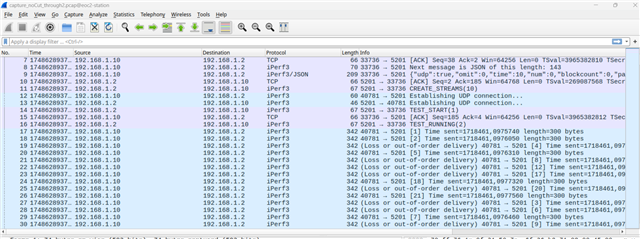
We noticed in capture.pcap wrong order of packages. 

   17  22.637991 192.168.1.100 → 192.168.1.2  iPerf3 342 (Loss or out-of-order delivery) 34671 → 5201 [4] Time sent=1454188,4972730 length=300 bytes
   18  22.637993 192.168.1.100 → 192.168.1.2  iPerf3 342 (Loss or out-of-order delivery) 34671 → 5201 [1] Time sent=1454188,4972120 length=300 bytes
   19  22.638036 192.168.1.100 → 192.168.1.2  iPerf3 342 34671 → 5201 [2] Time sent=1454188,4972560 length=300 bytes
   20  22.638037 192.168.1.100 → 192.168.1.2  iPerf3 342 (Loss or out-of-order delivery) 34671 → 5201 [7] Time sent=1454188,4972950 length=300 bytes
   21  22.638046 192.168.1.100 → 192.168.1.2  iPerf3 342 (Loss or out-of-order delivery) 34671 → 5201 [3] Time sent=1454188,4972640 length=300 bytes
   22  22.638047 192.168.1.100 → 192.168.1.2  iPerf3 342 (Loss or out-of-order delivery) 34671 → 5201 [8] Time sent=1454188,4973020 length=300 bytes
   23  22.638052 192.168.1.100 → 192.168.1.2  iPerf3 342 (Loss or out-of-order delivery) 34671 → 5201 [5] Time sent=1454188,4972810 length=300 bytes
   24  22.638057 192.168.1.100 → 192.168.1.2  iPerf3 342 34671 → 5201 [6] Time sent=1454188,4972880 length=300 bytes
 

Our understanding is that "Frames going to wrong order is allowed with HSR and PRP when link breaks occur, but not in fully functional network. "


  • Hi Milan, 

    What PRU Firmware version are you currently using? I believe one way to check is to use "readelf -p .version_string /lib/firmware/ti-pruss/am64x-sr2*"

    Also, just for clarity, which script are you using to set up HSR? Is it exactly the one in https://software-dl.ti.com/processor-sdk-linux/esd/AM64X/latest/exports/docs/linux/Foundational_Components/Kernel/Kernel_Drivers/Network/HSR_Offload.html ?

    -Daolin

  • Some additional information

    * redBox is Hirschman rsp35

    * if we remove one line during the test, packet start to come in correct order

    * our script is very similar, we have just next line additionaly

    devlink dev param set "$device" name cut_thru value 257 cmode runtime

    * PRU firmware is 

    readelf -p .version_string /lib/firmware/ti-pruss/am64x-sr2*


    File: /lib/firmware/ti-pruss/am64x-sr2-pru0-prueth-fw.elf


    String dump of section '.version_string':
      [     0]  Version REL.PRU-ICSS-ETHERNET-SWITCH_02.02.15.09


    File: /lib/firmware/ti-pruss/am64x-sr2-pru0-pruhsr-fw.elf


    String dump of section '.version_string':
      [     0]  Version REL.HSR_1G_01.02.03.05


    File: /lib/firmware/ti-pruss/am64x-sr2-pru0-prusw-fw.elf


    String dump of section '.version_string':
      [     0]  Version REL.PRU-ICSS-ETHERNET-SWITCH_02.02.15.09


    File: /lib/firmware/ti-pruss/am64x-sr2-pru1-prueth-fw.elf


    String dump of section '.version_string':
      [     0]  Version REL.PRU-ICSS-ETHERNET-SWITCH_02.02.15.09


    File: /lib/firmware/ti-pruss/am64x-sr2-pru1-pruhsr-fw.elf


    String dump of section '.version_string':
      [     0]  Version REL.HSR_1G_01.02.03.05


    File: /lib/firmware/ti-pruss/am64x-sr2-pru1-prusw-fw.elf


    String dump of section '.version_string':
      [     0]  Version REL.PRU-ICSS-ETHERNET-SWITCH_02.02.15.09


    File: /lib/firmware/ti-pruss/am64x-sr2-rtu0-prueth-fw.elf


    String dump of section '.version_string':
      [     0]  Version REL.PRU-ICSS-ETHERNET-SWITCH_02.02.15.09


    File: /lib/firmware/ti-pruss/am64x-sr2-rtu0-pruhsr-fw.elf


    String dump of section '.version_string':
      [     0]  Version REL.HSR_1G_01.02.03.05


    File: /lib/firmware/ti-pruss/am64x-sr2-rtu0-prusw-fw.elf


    String dump of section '.version_string':
      [     0]  Version REL.PRU-ICSS-ETHERNET-SWITCH_02.02.15.09


    File: /lib/firmware/ti-pruss/am64x-sr2-rtu1-prueth-fw.elf


    String dump of section '.version_string':
      [     0]  Version REL.PRU-ICSS-ETHERNET-SWITCH_02.02.15.09


    File: /lib/firmware/ti-pruss/am64x-sr2-rtu1-pruhsr-fw.elf


    String dump of section '.version_string':
      [     0]  Version REL.HSR_1G_01.02.03.05


    File: /lib/firmware/ti-pruss/am64x-sr2-rtu1-prusw-fw.elf


    String dump of section '.version_string':
      [     0]  Version REL.PRU-ICSS-ETHERNET-SWITCH_02.02.15.09


    File: /lib/firmware/ti-pruss/am64x-sr2-txpru0-prueth-fw.elf


    String dump of section '.version_string':
      [     0]  Version REL.PRU-ICSS-ETHERNET-SWITCH_02.02.15.09


    File: /lib/firmware/ti-pruss/am64x-sr2-txpru0-pruhsr-fw.elf


    String dump of section '.version_string':
      [     0]  Version REL.HSR_1G_01.02.03.05


    File: /lib/firmware/ti-pruss/am64x-sr2-txpru0-prusw-fw.elf


    String dump of section '.version_string':
      [     0]  Version REL.PRU-ICSS-ETHERNET-SWITCH_02.02.15.09


    File: /lib/firmware/ti-pruss/am64x-sr2-txpru1-prueth-fw.elf


    String dump of section '.version_string':
      [     0]  Version REL.PRU-ICSS-ETHERNET-SWITCH_02.02.15.09


    File: /lib/firmware/ti-pruss/am64x-sr2-txpru1-pruhsr-fw.elf


    String dump of section '.version_string':
      [     0]  Version REL.HSR_1G_01.02.03.05


    File: /lib/firmware/ti-pruss/am64x-sr2-txpru1-prusw-fw.elf


    String dump of section '.version_string':
      [     0]  Version REL.PRU-ICSS-ETHERNET-SWITCH_02.02.15.09


  • Hi Milan, 

    Please share with us the original Wireshark capture with the issue

    Please try updating to the latest firmware (this version will be integrated into the next SDK release 11.2) https://git.ti.com/cgit/processor-firmware/ti-linux-firmware/commit/?h=ti-linux-firmware&id=dccce744ba744783ced6ffd031d50b54cf5e787e 

    Summary of suggestions to test out below:

    1. Try the same test without Redbox

    2. Try the same test without cut-through

    -Daolin

  • Hi Daolin 

    We will provide message by message for different tests. 

    TC01 : AM64x + WITH RedBox + SDK Version PRU Firmware + without cut-through enable

    Output : 

    - Order is still not good (see attached file)

    - We notice this up/down multiple times on EVM1 the cable attached to RedBox 

    root@EVM1:~# # Before UDP
    root@EVM1:~# [ 3813.988928] icssg-prueth icssg1-eth eth2: Link is Down
    [ 3815.013697] icssg-prueth icssg1-eth eth2: Link is Up - 1Gbps/Full - flow controf
    [ 3817.060963] icssg-prueth icssg1-eth eth2: Link is Down
    [ 3818.085717] icssg-prueth icssg1-eth eth2: Link is Up - 1Gbps/Full - flow controf
    [ 3819.108972] icssg-prueth icssg1-eth eth2: Link is Down
    [ 3820.133854] icssg-prueth icssg1-eth eth2: Link is Up - 1Gbps/Full - flow controf
    [ 3822.180984] icssg-prueth icssg1-eth eth2: Link is Down
    [ 3823.205841] icssg-prueth icssg1-eth eth2: Link is Up - 1Gbps/Full - flow controf
    [ 3824.228954] icssg-prueth icssg1-eth eth2: Link is Down
    [ 3825.253740] icssg-prueth icssg1-eth eth2: Link is Up - 1Gbps/Full - flow contro

    tc01.zip

  • TC02 : AM64x + WITHOUT RedBox + SDK Version PRU Firmware + without cut-through enable

    Output : 

    - Order is good (see attached file)
    tc02.zip

    I would suspect that the use case : 

    When a device that is

    - not in HSR Ring,

    - try to communicate with device in UDP in HSR Ring 

    - Packet Order is good 


    How can u on your side to test this use case ? 

    - Tianyi 

  • Hi Tianyi,

    TC02 : AM64x + WITHOUT RedBox + SDK Version PRU Firmware + without cut-through enable

    I'm trying to set up a test WITHOUT RedBox + WITH Cut-through enable + New PRU Firmware but I have question about your setup. In your test WITHOUT RedBox, what device was serving as the iperf3 client and server? Without the RedBox, the PC cannot be inserted into the ring so I'm guessing it cannot be the client.

    Additionally, since you see the order is good with AM64x + WITHOUT RedBox + SDK Version PRU Firmware + without cut-through enable, do you see the same with cut-through enabled?

    When I set one of the AM64x EVMs as client and another one as server, I see the order is correct (below). This is with WITHOUT RedBox + WITH Cut-through enable + New PRU Firmware.

    I currently can only test cases WITHOUT RedBox since I don't have a RedBox to test with. One sanity check I can think of is to double check if the RedBox works with another known good network of HSR devices (not AM64x) to see if the order of packets is correct or not. This is to isolate the RedBox behavior from any behavior of the AM64x devices.

    -Daolin

  • Hi Daolin, 

    Sorry for the typo. About TC02 : AM64x + WITHOUT RedBox + SDK Version PRU Firmware + without cut-through enable I find same behavior than you. Packets order are good


    Based on the observation, I suspect either the Root Cause comes from

    ==> 1 - Redbox behavior which can mix packets order as u mentioned earlier. 
    ==> 2 - how AM64x handle packets that are not in HSR Ring. 

    To eliminate 1, do you have a Profishark on your side to do the following set up ?

    PC (iperf client)--> RedBox--> Profishark --> HSR device 

    And check : 
    1 - Profishark output for packet order 
    2 - HSR device  tcpdump output for packet order 

    - Tianyi

  • Hi Daolin I did quick test on this setup : 


    PC (iperf client)--> RedBox--> Profishark --> AM64x (with tcpdump)
    Profishark output : 

    Packet order is good

    AM64x:

    Packet order is not good

    Tianyi

  • Hi Tianyi,

    To eliminate 1, do you have a Profishark on your side to do the following set up ?

    PC (iperf client)--> RedBox--> Profishark --> HSR device 

    Is there a way to test this without a RedBox? I do have a Profishark, however as I have mentioned, I don't have access to a RedBox.

    Sorry for the typo. About TC02 : AM64x + WITHOUT RedBox + SDK Version PRU Firmware + without cut-through enable I find same behavior than you. Packets order are good

    Can you clarify which device was the client and server in this setup WITHOUT RedBox?

    -Daolin

  • Hi Daolin,

    yes sure : 

    EVM1 = client 
    EVM3 = server 

    Tianyi 

  • Hi Tianyi,

    Thanks for confirming which is the client and server.

    A couple more suggestions based on the call

    1. Can you also check if the same issue occurs with 100M? 

    2. Can you capture the Profishark pcaps on both sides of the RedBox connection?

    -Daolin

  • Hi Daolin , 

    Here are some outputs : 

    1 On 100 M : I have observed a couple with the set up, like 3 ou 4 time : 

    PC (iperf client)--> RedBox--> Profishark --> AM64x


    5531.zip

    As u can see, no packet lost : i send 300B for 10M in UDP 

    For the second test, we don't have 2 Hardware Sniffer. I will try to borrow one for the next week 

    Tianyi  

  • Hi Tianyi, 

    1 On 100 M : I have observed a couple with the set up, like 3 ou 4 time : 

    PC (iperf client)--> RedBox--> Profishark --> AM64x

    Your attached pcap for this test case is from the Profishark? From the pcap I can only see the below, where can I view the HSR sequence number? Do I need to enable a setting on Wireshark?

    Also, from your test with 100M, did you see out of orderness from the AM64x side?

    For the second test, we don't have 2 Hardware Sniffer. I will try to borrow one for the next week 

    In the meantime, can you share the pcaps captures (both Profishark and AM64x pcap) from this test case?  RE: AM6442: AM64x EVM HSR packet order error 

    -Daolin