Part Number: TDA4VEN-Q1
Hi,
Please provide the operation manual for the keywriter of this platform.
Regards,
Cesar
This thread has been locked.
If you have a related question, please click the "Ask a related question" button in the top right corner. The newly created question will be automatically linked to this question.
Part Number: TDA4VEN-Q1
Hi,
Please provide the operation manual for the keywriter of this platform.
Regards,
Cesar
Hi Sudheer,
The supplementary information is as follows:
device model: J722S SR1.0 HS-FS
log:
U-Boot 2025.01-ti (Oct 14 2025 - 20:39:15 +0800) SoC: J722S SR1.0 HS-FS Model: Texas Instruments J722S EVM
Regards,
Cesar
Hi Diwakar,
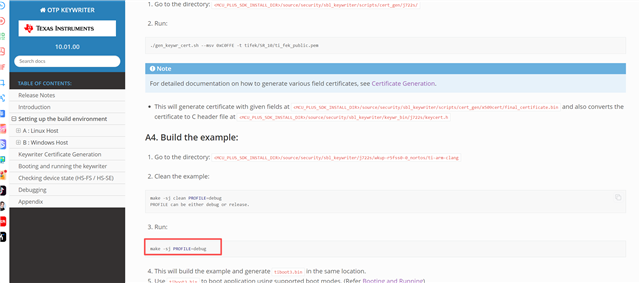
download:
https://www.ti.com/secureresources/J7X-RESTRICTED-SECURITY

make -sj PROFILE=debug
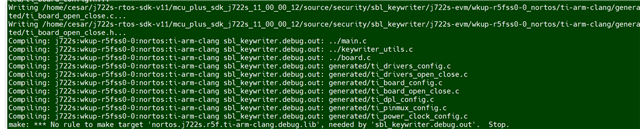
compile error:

Regards,
Cesar
Hi Diwakar,
1.Our product has been mass-produced and is using the sdk11 version. It is impossible to switch back to version 10.01
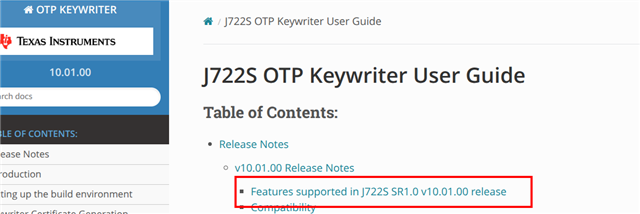
2.The latest update date for keywriter is

Could you please test it? This error might have nothing to do with the sdk version.
Regards,
Cesar
Hi Cesar,
I tried building it with default 11.0 SDK at my end and haven't faced any issue while building it. I could see keywriter image being getting generated.
ti-processor-sdk-rtos-j722s-evm-11_00_00_06/mcu_plus_sdk_j722s_11_00_00_12/source/security/sbl_keywriter/j722s-evm/wkup-r5fss0-0_nortos/ti-arm-clang$ make -sj
Generating SysConfig files ...
Running script...
Validating...
Generating Code (example.syscfg)...
Writing /home/<abc>/Desktop/j722s/ti-processor-sdk-rtos-j722s-evm-11_00_00_06/mcu_plus_sdk_j722s_11_00_00_12/source/security/sbl_keywriter/j722s-evm/wkup-r5fss0-0_nortos/ti-arm-clang/generated/ti_dpl_config.c...
Writing /home/<abc>/Desktop/j722s/ti-processor-sdk-rtos-j722s-evm-11_00_00_06/mcu_plus_sdk_j722s_11_00_00_12/source/security/sbl_keywriter/j722s-evm/wkup-r5fss0-0_nortos/ti-arm-clang/generated/ti_dpl_config.h...
Writing /home/<abc>/Desktop/j722s/ti-processor-sdk-rtos-j722s-evm-11_00_00_06/mcu_plus_sdk_j722s_11_00_00_12/source/security/sbl_keywriter/j722s-evm/wkup-r5fss0-0_nortos/ti-arm-clang/generated/ti_drivers_config.c...
Writing /home/<abc>/Desktop/j722s/ti-processor-sdk-rtos-j722s-evm-11_00_00_06/mcu_plus_sdk_j722s_11_00_00_12/source/security/sbl_keywriter/j722s-evm/wkup-r5fss0-0_nortos/ti-arm-clang/generated/ti_drivers_config.h...
Writing /home/<abc>/Desktop/j722s/ti-processor-sdk-rtos-j722s-evm-11_00_00_06/mcu_plus_sdk_j722s_11_00_00_12/source/security/sbl_keywriter/j722s-evm/wkup-r5fss0-0_nortos/ti-arm-clang/generated/ti_drivers_open_close.c...
Writing /home/<abc>/Desktop/j722s/ti-processor-sdk-rtos-j722s-evm-11_00_00_06/mcu_plus_sdk_j722s_11_00_00_12/source/security/sbl_keywriter/j722s-evm/wkup-r5fss0-0_nortos/ti-arm-clang/generated/ti_drivers_open_close.h...
Writing /home/<abc>/Desktop/j722s/ti-processor-sdk-rtos-j722s-evm-11_00_00_06/mcu_plus_sdk_j722s_11_00_00_12/source/security/sbl_keywriter/j722s-evm/wkup-r5fss0-0_nortos/ti-arm-clang/generated/ti_pinmux_config.c...
Writing /home/<abc>/Desktop/j722s/ti-processor-sdk-rtos-j722s-evm-11_00_00_06/mcu_plus_sdk_j722s_11_00_00_12/source/security/sbl_keywriter/j722s-evm/wkup-r5fss0-0_nortos/ti-arm-clang/generated/ti_power_clock_config.c...
Writing /home/<abc>/Desktop/j722s/ti-processor-sdk-rtos-j722s-evm-11_00_00_06/mcu_plus_sdk_j722s_11_00_00_12/source/security/sbl_keywriter/j722s-evm/wkup-r5fss0-0_nortos/ti-arm-clang/generated/ti_board_config.c...
Writing /home/<abc>/Desktop/j722s/ti-processor-sdk-rtos-j722s-evm-11_00_00_06/mcu_plus_sdk_j722s_11_00_00_12/source/security/sbl_keywriter/j722s-evm/wkup-r5fss0-0_nortos/ti-arm-clang/generated/ti_board_config.h...
Writing /home/<abc>/Desktop/j722s/ti-processor-sdk-rtos-j722s-evm-11_00_00_06/mcu_plus_sdk_j722s_11_00_00_12/source/security/sbl_keywriter/j722s-evm/wkup-r5fss0-0_nortos/ti-arm-clang/generated/ti_board_open_close.c...
Writing /home/<abc>/Desktop/j722s/ti-processor-sdk-rtos-j722s-evm-11_00_00_06/mcu_plus_sdk_j722s_11_00_00_12/source/security/sbl_keywriter/j722s-evm/wkup-r5fss0-0_nortos/ti-arm-clang/generated/ti_board_open_close.h...
Compiling: j722s:wkup-r5fss0-0:nortos:ti-arm-clang sbl_keywriter.release.out: ../main.c
Compiling: j722s:wkup-r5fss0-0:nortos:ti-arm-clang sbl_keywriter.release.out: ../keywriter_utils.c
Compiling: j722s:wkup-r5fss0-0:nortos:ti-arm-clang sbl_keywriter.release.out: ../board.c
Compiling: j722s:wkup-r5fss0-0:nortos:ti-arm-clang sbl_keywriter.release.out: generated/ti_drivers_config.c
Compiling: j722s:wkup-r5fss0-0:nortos:ti-arm-clang sbl_keywriter.release.out: generated/ti_drivers_open_close.c
Compiling: j722s:wkup-r5fss0-0:nortos:ti-arm-clang sbl_keywriter.release.out: generated/ti_board_config.c
Compiling: j722s:wkup-r5fss0-0:nortos:ti-arm-clang sbl_keywriter.release.out: generated/ti_board_open_close.c
Compiling: j722s:wkup-r5fss0-0:nortos:ti-arm-clang sbl_keywriter.release.out: generated/ti_dpl_config.c
Compiling: j722s:wkup-r5fss0-0:nortos:ti-arm-clang sbl_keywriter.release.out: generated/ti_pinmux_config.c
Compiling: j722s:wkup-r5fss0-0:nortos:ti-arm-clang sbl_keywriter.release.out: generated/ti_power_clock_config.c
.
Linking: j722s:wkup-r5fss0-0:nortos:ti-arm-clang sbl_keywriter.release.out ...
Linking: j722s:wkup-r5fss0-0:nortos:ti-arm-clang sbl_keywriter.release.out Done !!!
.
Boot image: j722s:wkup-r5fss0-0:nortos:ti-arm-clang /home/<abc>/Desktop/j722s/ti-processor-sdk-rtos-j722s-evm-11_00_00_06/mcu_plus_sdk_j722s_11_00_00_12/source/security/sbl_keywriter/j722s-evm/wkup-r5fss0-0_nortos/ti-arm-clang/sbl_keywriter.release.tiimage ...
Boot image: j722s:wkup-r5fss0-0:nortos:ti-arm-clang /home/<abc>/Desktop/j722s/ti-processor-sdk-rtos-j722s-evm-11_00_00_06/mcu_plus_sdk_j722s_11_00_00_12/source/security/sbl_keywriter/j722s-evm/wkup-r5fss0-0_nortos/ti-arm-clang/sbl_keywriter.release.tiimage Done !!
Regards,
Diwakar
Hi Diwakar,
I re-downloaded the sdk and the compilation was successful;
1.Generate a certificate
./gen_keywr_cert.sh -t tifek/SR_10/ti_fek_public.pem -b keys_devel/v15/bmpk.pem --bmek keys_devel/bmek.key -s keys_devel/v15/smpk.pem --smek keys_devel/smek.key --keycnt 2 --keyrev 1
2.Successful burning

3. it's a boot card that uses spl for boot, but it fails to start. No information is printed on the serial port
uses the same dummy keys;
The private key used for the signature certificate is the same as that used for the U-BOOT firmware

Regards,
Cesar
Hi Cesar,
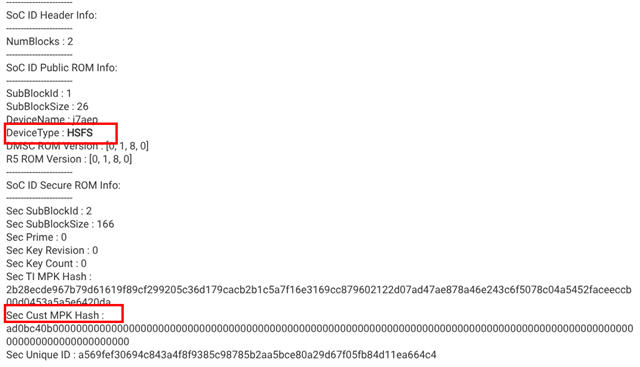
As a first step, we will confirm whether the device is successfully transitioned to HS-SE or not, after burning the root trust keys into the effuses. For this, we can follow steps mentioned in this FAQ.
We are more interested in this information:

Next Step would be to verify the boot images you are using for HS-SE device. Share the binary details which used to boot the device.
Note: tiboot3-j722s-hs-evm.bin is the binary need to be used of HS-SE, whereas tiboot3-j722s-hs-fs-evm.bin for HS-FS.
Regards
Diwakar
Hi Diwakar,
1. How to sign the mcu1_0 firmware

2.Does wakeup core also require a signature,the default compiled one does not have signed firmware
ti-dm/j722s/ipc_echo_testb_mcu1_0_release_strip.xer5f

Regards,
Cesar
Hi Cesar,
1. How to sign the mcu1_0 firmware
You can use above package for signing the firmware, unzip it and follow signing steps mentioned in this link.
Does wakeup core also require a signature,the default compiled one does not have signed firmware
ti-dm/j722s/ipc_echo_testb_mcu1_0_release_strip.xer5f
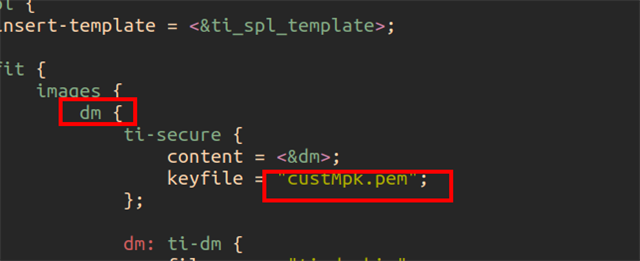
DM get signed with root trust keys and packaged with the tispl.bin as a part of binman build flow, you don't have to explicitly sign the dm firmware.

Regards
Diwakar
Hi Diwakar,
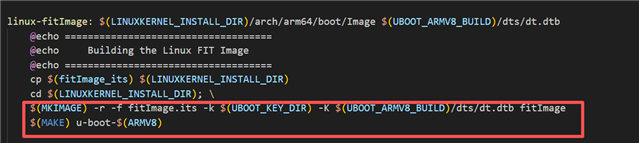
SOC_TYPE=hs make linux

It was found that the file size of dt.dtb increased after each compilation:

This will cause the size of the u-boot.img file to increase accordingly.
May I ask if this is a bug.
Regards,
Cesar
HI Cesar,
It is expected to increase the size of uboot dtb when you create fit image, reason being key to validate the fit image gets embedded into the uboot dtb.
Please go through uboot public documentation to get more insigets on fitimage.
Regards
Diwkaar
Hi Diwakar,


2.How to encrypt eMMC, prevent the EMMC from being disassembled to crack the programs inside.
Regards,
Cesar
Hi Cesar
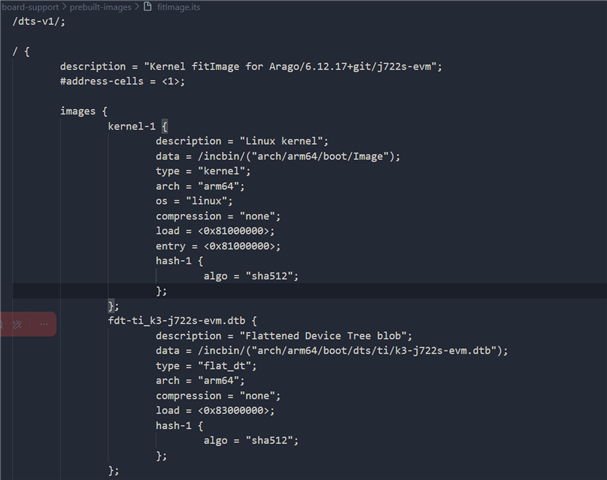
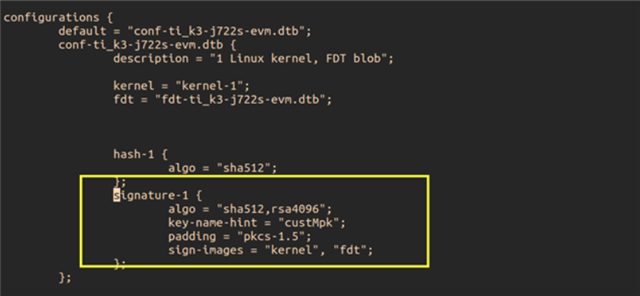
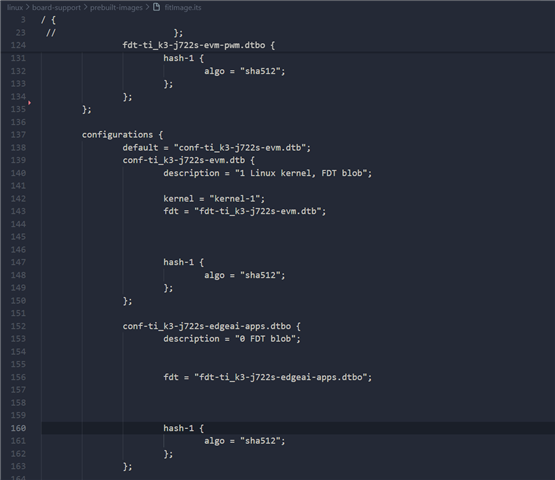
1.fitImage.its has no signature mark. When the system starts up, only hash value verification is carried out, without signature verification
I could see the default fitimage.it has signature mark in that, are you using default value?

Also, the command used to create fitimage does package key in the uboot dtb

2.How to encrypt eMMC, prevent the EMMC from being disassembled to crack the programs inside.
I would recommend you to raise new thread for this as it is deviating from the original thread. It helps us to streamline the issue. Thanks for understanding.
Regards,
Diwakar
Hi Diwakar,
1. The first question you answered was that the picture you sent failed;
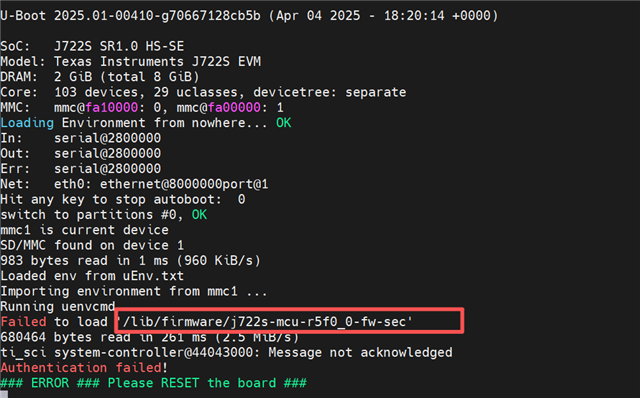
2. spl boot, Which firmware should be used as j722s-mcu-r5f0_0-fw-sec

Regards,
Cesar
Hi Cesar
1. The first question you answered was that the picture you sent failed;
Updated the images, please check now.
2. spl boot, Which firmware should be used as j722s-mcu-r5f0_0-fw-sec
I don't see vt_mcu10_app folder at my end, is this something custom?
How did you create the sd card? There is a script (ti-processor-sdk-linux-adas-j722s-evm-10_01_00_04/bin/create-sdcard.sh) inside the Linux sdk which prepare the sd card with default boot binaries along with rootfs.
The rootfs does have signed image for j722s-mcu-r5f0_0-fw-sec you can try with that. Note, you still need to replace the binaries present in boot folder with the binaries of HS-SE device, default script copies the binary of HS-FS device.

Regards,
Diwakar
Hi Diwakar,
1.The sdk on my side doesn't come with a signature field by default

2. j722s-mcu-r5f0_0-fw-sec, how compile
Regards,
Cesar
Hi
1.The sdk on my side doesn't come with a signature field by default
I checked internally on this, we have some known issue related to mkimage bloat the dtb size. We are working on this issue.
2. j722s-mcu-r5f0_0-fw-sec, how compile
This depends on what firmware you want to run on MCU10, j722s-mcu-r5f0_0-fw-sec is just a soft link to desired firmware. If you just want to validate the boot flow you can use the prebuild image as suggested in this response.
Regards,
Diwakar
Hi Diwakar,
Please provide the corresponding patch once the repair is completed.
Regards,
Cesar
Hi Diwakar,
Now, HS-SE has identified the issue that the watchdog is not functioning properly; The watchdog of HS-FS works;
Test cmd: echo 123 >/dev/watchdog
One minute after the HS-FS timeout, the system will restart, but the HS-SE timeout does not cause the system to restart.
Please also test whether the watchdog function of the HS-SE device is activated.
Regards,
Cesar