This thread has been locked.

If you have a related question, please click the "Ask a related question" button in the top right corner. The newly created question will be automatically linked to this question.

SK-AM62B-P1: CCS Debug error "Unknown module: file"

Part Number: SK-AM62B-P1

Hello,

I'm trying to setup CCS to debug my application running on M4F core of AM62X board. I installed CCS-20.4.1 and trying to run the hello_world example for M4F with FreeRTOS. I'm able to build the project but when I start the Debug session, I get this error "Unknown module: file". Any idea what this is pointing to? I went to the CCS installation folder and found that log coming from the file "ccs_base/cloudagent/src/module.js". Should I be running the cloudagent? I believe I installed everything by default and didn't see install options about cloudagent.

When I looked at the code logging that error, the comment there says to create the submodule if it hasn't been created but I don't see the code doing that:

                // This sub module has not been created yet
                const moduleID = moduleUniqueID++;
                log(`Creating new module (module id: ${moduleID})`);
                if (!(subModuleName in moduleObj.subModules)) {
                    throw new Error("Unknown module: " + subModuleName);
                }

Am I missing something in my config? I'm attaching the launch.json file and the ccxml file I'm using (extension renamed to allow upload). Thanks in advance.

-Ayman

launch_json.txt 

AM62X_ccxml.txt 

  • Hello,

    I've assigned this ticket to the right expert. Please ping back if you don't receive a response in the next 24 hours.

    Regards,

    Jianzhong

  • Hi,

    The assigned expert is out of office, please expect delayed responses.

    Regards,

    Vaibhav

  • Hi Ayman,

    Please follow the steps mentioned at CCS_LAUNCH.

    If you still face issue, please provide screen record of the CCS.

    Regards,

    Tushar

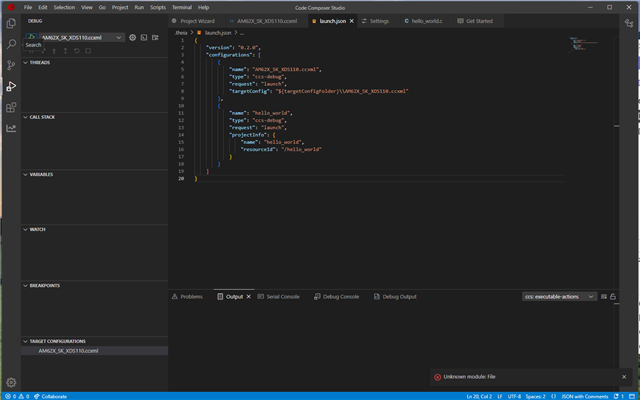
  • I think I followed the documented steps but still something is missing and still get that error when I start a debug session. One thing I'm noticing is that after I created my AM62X_SK_XDS110 config (attached), then went to "Start project-less Debug", I don't see anything under the THREADS tab (see attached screen shot) and get the "Unknown module: file" error when I try to run. So, what else am I missing? Is my ccxml file missing something? I just followed the documentation selecting the connection and the board.

    Thanks.

    -Ayman

    <?xml version="1.0" encoding="UTF-8" standalone="no"?>
    <configurations XML_version="1.2" id="configurations_0">
        <configuration XML_version="1.2" id="configuration_0">
            <instance XML_version="1.2" desc="Texas Instruments XDS110 USB Debug Probe" href="connections/TIXDS110_Connection.xml" id="Texas Instruments XDS110 USB Debug Probe" xml="TIXDS110_Connection.xml" xmlpath="connections"/>
            <connection XML_version="1.2" id="Texas Instruments XDS110 USB Debug Probe">
                <instance XML_version="1.2" href="drivers/tixds510cs_dap.xml" id="drivers" xml="tixds510cs_dap.xml" xmlpath="drivers"/>
                <instance XML_version="1.2" href="drivers/tixds510cortexA53.xml" id="drivers" xml="tixds510cortexA53.xml" xmlpath="drivers"/>
                <instance XML_version="1.2" href="drivers/tixds510cortexM.xml" id="drivers" xml="tixds510cortexM.xml" xmlpath="drivers"/>
                <instance XML_version="1.2" href="drivers/tixds510cortexR.xml" id="drivers" xml="tixds510cortexR.xml" xmlpath="drivers"/>
                <instance XML_version="1.2" href="drivers/tixds510pru.xml" id="drivers" xml="tixds510pru.xml" xmlpath="drivers"/>
                <instance XML_version="1.2" href="drivers/tixds510csstm.xml" id="drivers" xml="tixds510csstm.xml" xmlpath="drivers"/>
                <instance XML_version="1.2" href="drivers/tixds510ctset2.xml" id="drivers" xml="tixds510ctset2.xml" xmlpath="drivers"/>
                <instance XML_version="1.2" href="drivers/tixds510etbcs.xml" id="drivers" xml="tixds510etbcs.xml" xmlpath="drivers"/>
                <platform XML_version="1.2" id="platform_0">
                    <instance XML_version="1.2" desc="AM62x_SK_EVM" href="boards/AM62x_SK_EVM.xml" id="AM62x_SK_EVM" xml="AM62x_SK_EVM.xml" xmlpath="boards"/>
                    <board XML_version="1.2" description="AM62x StarterKit Evaluation Module with DDR4" id="AM62x_SK_EVM">
                        <device HW_revision="1.0" XML_version="1.2" description="AM62x - Cortex A53 Sitara(tm) Embedded Processor" id="AM62x_0" partnum="AM62x">
                            <router HW_revision="1.0" XML_version="1.2" description="CS_DAP Router" id="CS_DAP_0" isa="CS_DAP">
                                <subpath id="SMS_CM4_0_TIFS">
                                    <cpu HW_revision="1.0" XML_version="1.2" desc="SMS_CM4_0_TIFS_0" description="Cortex_M4F CPU" id="SMS_CM4_0_TIFS" isa="Cortex_M4F"/>
                                </subpath>
                                <subpath id="SMS_CM4_1_HSM">
                                    <cpu HW_revision="1.0" XML_version="1.2" desc="SMS_CM4_1_HSM_0" description="Cortex_M4F CPU" id="SMS_CM4_1_HSM" isa="Cortex_M4F"/>
                                </subpath>
                            </router>
                        </device>
                    </board>
                </platform>
            </connection>
        </configuration>
    </configurations>
    {
        "version": "0.2.0",
        "configurations": [
            {
                "name": "AM62X_SK_XDS110.ccxml",
                "type": "ccs-debug",
                "request": "launch",
                "targetConfig": "${targetConfigFolder}\\AM62X_SK_XDS110.ccxml"
            },
            {
                "name": "hello_world",
                "type": "ccs-debug",
                "request": "launch",
                "projectInfo": {
                    "name": "hello_world",
                    "resourceId": "/hello_world"
                }
            }
        ]
    }

  • The configuration files provided looks okay. Let me check this on my setup.

    I have CCS v20.4.0 installed and had not faced any issues. I will check with latest version and update the thread.

  • I have tried this on latest version of CCS v20.4.1 and it works for me. Please try reinstalling the CCS once.

    Also confirm that you are not copying the CCS folder from one machine to another, instead installing CCS via the installer.

  • The trick for me was to run CCS as administrator. Is this how it should be run? I don't believe I saw a note on that in the documentation, but the error was consistent if not running as administrator and I don't get the error if running as administrator.

  • You might have run the CCS installer as administrator during installation, or you system requires administration rights to connect with external components.

    Is there any restriction on your system to connect with external devices?

    I am routing this thread to CCS team for further comments.

    Regards,

    Tushar

  • You might have run the CCS installer as administrator during installation,

    Aymen - can you confirm this? More specifically, was CCS installed with a different administrator account than the account you are using to run CCS?

  • When I was installing CCS (as a user not admin), I got the usual prompt from Windows if I trust the publisher and I agreed, then the installation proceeded. What I can confirm is that after the installer completed and launched CCS for me, I was able to run the debugger and connect to my target. However, once I exit CCS and start it again (as a user not admin), then it will consistently fail with that error. It was only when I started to run it as admin that the error went away.

    I reported this problem on another thread a couple months ago (was running 20.3 back then), but it was the same behavior. This is the earlier thread. Check step 10 in the procedure I described. Please let me know if you need additional information.

    e2e.ti.com/.../sk-am62b-p1-setting-up-ccs-for-m4-debugging-profiling

    -Ayman

  • In your other thread you mentioned that it did not like the two comment lines in the launch.json. Those should not cause an issue. I see them generated in my environment and it does not impact debug launch. What were the errors you were seeing with those lines?

    Can you generate another launch.json with those lines and then rename the file to txt and attach to this thread?

  • I can't remember the exact error I was getting with comments in the json file, but like I described in my procedure in the other thread I was able to go further after I removed them. That was running ccs20.3. The comment lines are still generated with 20.4 but it doesn't complain about them.

    Regardless, the main issue I was stuck on was the "Unknown module: file" error (steps 7-9 in my other thread) and that's what I continued to experience earlier this week when I went to 20.4. Basically, the first debug session after the installer launched CCS worked, but when I exit and restart CCS I get the error every time when I start debug. Starting CCS as admin fixed it for me.

  • Can you provide the CCS Server Log and Theia Log as mentioned in the below document:

    https://software-dl.ti.com/ccs/esd/documents/ccs_diagnostic-logs.html

    and also can you enable cloud agent logging, reproduce the issue, and provide the generated my_ticld.log file?

     RE: CCSTUDIO-THEIA: CCS error starting the debug session 

    Thanks

    ki

  • I will work on getting you those logs in the next day or two. Thanks.

    Ayman