This thread has been locked.

If you have a related question, please click the "Ask a related question" button in the top right corner. The newly created question will be automatically linked to this question.

LAUNCHXL-F28P65X: ccs20.4 fails to launch

Part Number: LAUNCHXL-F28P65X

I have installed two ccs 20.4.0 environments in windows and connected two launchxl-f28p65x boards and set up unique xds110 debugger idetifiers. I can launch and start debuging the first board. Starting a debug session with the second board gives "usb device not found" error. 

It does not matter the starting order. The second launch always fails.

  • Hi Arif,

    Thank you for your question. How are you connecting the two launchpads? Are you using a USB hub or 2 separate USB ports? Also have you enabled the "select by serial number option in Target Configuration -> Advanced options 

    Thanks,

    Ira

  • i am already doing this.

  • Are you able to see both the devices when you run the xdsdfu command in command prompt?

    Go to C:\ti\ccs2024\ccs\ccs_base\common\uscif\xds110 (inside your CCS folder) and open it in command prompt. Then run the command xdsdfu -e.

    Are you able to see both the devices there with the correct serial number? 

    Also I would suggest using 2 different USB ports to connect the launchpads to your system instead of a usb hub (in case you are using that)

    Thanks and Regards,

    Ira

  • Hello Ira,

    I got sidetracked. Yes I am able to see both boards when i run the "xdsdfu -e" command.

    Rgds

  • Hello Arif,

    Can you try this:-

    1. Open only one CCS instance.

    2. Import your project as usual but delete your existing target config file.

    3. Create a new target config file -> just create a new file and give it the extension .ccxml and the target config GUI should pop up.

    4. Now manually click on New connection and manually add both your boards (make sure to select the map by serial number) option. Save this target config.

    5. Set this target config as the active target config.

    6. Right click on this target config and choose "Start Project-Less Debug"

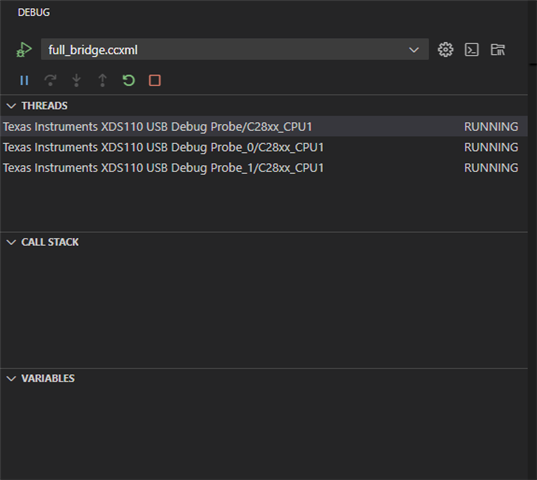
    7. Now in the debug window, all your boards (CPUs) will appear, you can go to Run ->Load whatever .out you want to load on each of them (it can be the same or different)

    In this way you can debug on both boards simultaneously.

    Thanks and Regards,

    Ira

  • I did as you suggested but now I am stuck. 

    I had two projects in two different work spaces. And it seems everyhting is all jumbled up. You have workspaces,  folders, projects, different config files. It is just a whole lot of mess. Is this the best TI can do ? 

    Can you not make it simple intuitive and straight forward?

    I will have to use two computers to get around this garbage.

  • Hi Arif,

    I apologize for the confusion and frustration. I'll take your feedback regarding the complicated process to the team. Meanwhile could you answer these questions for me, it'll make it easier to understand the issue you're facing after implementing what I suggested.

    1. Can you tell me if you were able to launch your custom created target config file? What do you see when you start a project less debug? Could you share a screenshot with me?

    2. You will have to build your 2 projects individually (before starting any debug session) and generate the .out files. Then you should be able to connect to and load both of these files to your individual devices respectively. It does not matter if they are in different workspaces, you just have to navigate to the .out files in your file browser in order to load them. For your reference it will look something like this (Mine has 3, but you'll see 2 debug probes in the threads window). Were you able to see this?

    3. Once you have loaded the .out files, you'll see (on clicking on each of the individual probes) that the program will be halted at main() as usual.

    And it seems everyhting is all jumbled up.

    Can you be specific as to what is jumbled up? Were you not able to load the .out files or did the programs not work as expected? I'd appreciate the details so I can understand the issue better.

    Once again, I'm sorry about the bad experience. 

    Thanks,

    Ira