A related question is a question created from another question. When the related question is created, it will be automatically linked to the original question.
If you have a related question, please click the "Ask a related question" button in the top right corner. The newly created question will be automatically linked to this question.
SDIO mode is NOT supported in the MCU+SDK and must be tested by making changes to the examples based on the requirements.
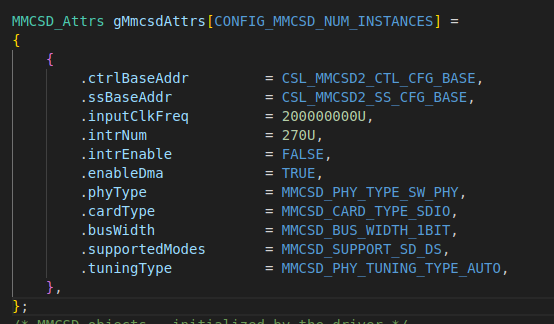
For the SDIO configuration, you would need to manually setup the required MMCSD instance and the pinmux configurations. This can be implemented in a similar way to what happens in the System_init() API that is given. Instead of the default MMCSD_init() API, you can make a custom API with the changes required for SDIO. In this setup itself, you would be able to setup the attributes for the SDIO including 1 bit or 4 bit mode.
Note: You could also take reference from the Linux implementation of SDIO on the Processor SDK.
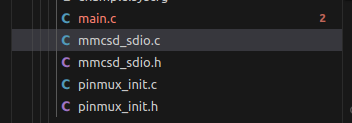
If you modify inside the MMCSD_init() API which is present in the System_init API - it will get overwritten - as that is generated code. You would need to create seperate files similar to the image:
The files would also need to be added to the makefile of the example, so its compiled.
Additionally, do make sure the MMCSD instance in that is opened in the default MCU+SDK flow is closed or removed such that there is no error in opening this instance.
The init API in itself does not need modification, rather the configurations that are being used in the init:
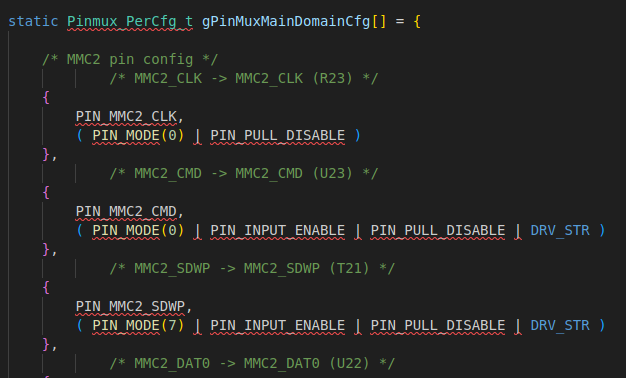
Along with above configurations, the pinmux is also configured seperately like below:
Please verify the correct pinmux configurations from the AM243 Datasheet as SDIO is not tested.
In addition to above, for AM243x and AM64x, to set up SDIO for CC33XX, you need to use the CC33XX RTOS MCU+SDK and refer to the documentation: CC33XX RTOS MCU User’s Guide. This will give further details and steps depending on the EVM and the WiFi Chip being used.