This thread has been locked.

If you have a related question, please click the "Ask a related question" button in the top right corner. The newly created question will be automatically linked to this question.

AM2732: CCS 20.2 debugging problems

Part Number: AM2732

Hi,

I am trying to place breakpoints inside the mibspi driver of my AM2732 SDK v11.02.00.25.

The problems I am randomly facing are the following 2.

1) Sometimes I get that my breakpoint is unverified like the following screenshot:


2) Some other times I get that there is no code associated with this line of code in the loaded .out file. These problems happen with both types of processors in the EVM, R5 and DSP.

You should know that optimizations are turned off in all processors, so I don't have any pieces of code that dont get compiled due to optimization reasons. I also know this isn't my fault since after multiple trials sometime at random the breakpoints decide to work normally again without me changing anything. All I do sometimes to make it work is after lots of trials of restarting the debugging process and the CCS or even my computer the breakpoints decide to work. No changes in the code whatsoever. They just decide to work normally. This is getting very annoying for my development and is unacceptable. Would I have the same behaviour if I switched back to CCS v12.7?

Best regards.

K.

  • Hi,

    1) Sometimes I get that my breakpoint is unverified like the following screenshot:

    Make sure you have opened the correct file and the SDK path is added to the CCS environment.

    2) Some other times I get that there is no code associated with this line of code in the loaded .out file. These problems happen with both types of processors in the EVM, R5 and DSP.

    This generally happens when you have changed in the drivers source file and forgot to rebuild the libraries or either the application project. Make sure you rebuild the library for either debug or release profile and application project for the same profile as library build.

    Lib build for release profile and application build for debug profile and vice versa will result in same issue. 

    I can see the recommended version for CCS tool is CCS v20.3.0. Use the recommended version of tools as specified in the SDK docs. 

    Please refer RELEASE_NOTES for details.

    Regards,

    Tushar

  • H Tushar,

    Thank you for all your good intended advice but I wouldn’t be posting about this in the forum if I hadn’t already checked that I am obviously inside the correct file.

    I have checked and the SDK path is added to the environment. It always is anyway by default. But I also checked.

    of course I also rebuild the SDK libraries drivers and freertos every time I make a change obviously to be aligned and of course they both are at the same profile.

    I have tried this also with CCS 20.3 20.4 and all the in between versions.

    I myself have to the conclusion that your new style CCS IDE is completely unstable and cannot have a predictable behavior. I suppose I am going to have to live with that.

    Best regards,

    K.

  • Hi,

    Can you please check, does you launch.json file also has the path added for file on which you are adding breakpoint?

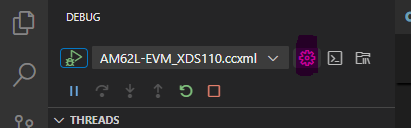
    To open launch.json file, Navigate to Debug and click on settings icon as highlighted in red below.

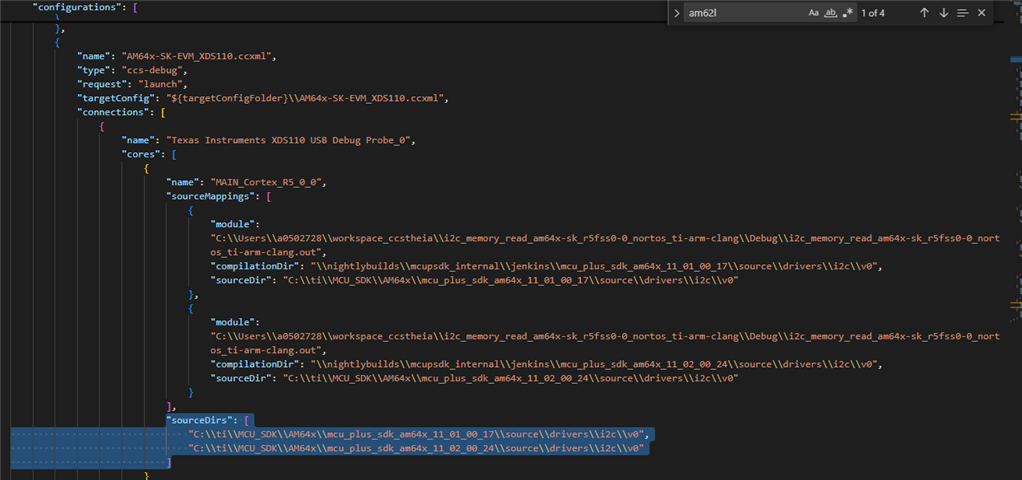
    The file should look like below.

    Check for the sourceDirs for your application project.

    Regards,

    Tushar

  • Hi again,

    Here is my launch.json file. I dont have those "sourceDirs" you have at all.

    {
        "version": "0.2.0",
        "configurations": [
            {
                "name": "mibspi_tx",
                "type": "ccs-debug",
                "request": "launch",
                "projectInfo": {
                    "name": "mibspi_tx",
                    "resourceId": "/mibspi_tx"
                }
            },
            {
                "name": "mibspi_rx",
                "type": "ccs-debug",
                "request": "launch",
                "projectInfo": {
                    "name": "mibspi_rx",
                    "resourceId": "/mibspi_rx"
                }
            },
            {
                "name": "gpio_input_interrupt_am273x-evm_r5fss0-0_nortos_ti-arm-clang",
                "type": "ccs-debug",
                "request": "launch",
                "projectInfo": {
                    "name": "gpio_input_interrupt_am273x-evm_r5fss0-0_nortos_ti-arm-clang",
                    "resourceId": "/gpio_input_interrupt_am273x-evm_r5fss0-0_nortos_ti-arm-clang"
                }
            },
            {
                "name": "R50_intr_RTOS",
                "type": "ccs-debug",
                "request": "launch",
                "projectInfo": {
                    "name": "R50_intr_RTOS",
                    "resourceId": "/R50_intr_RTOS"
                }
            },
            {
                "name": "empty_am273x-evm_r5fss0-0_freertos_ti-arm-clang",
                "type": "ccs-debug",
                "request": "launch",
                "projectInfo": {
                    "name": "empty_am273x-evm_r5fss0-0_freertos_ti-arm-clang",
                    "resourceId": "/empty_am273x-evm_r5fss0-0_freertos_ti-arm-clang"
                }
            },
            {
                "name": "empty_am273x-evm_r5fss0-0_nortos_ti-arm-clang",
                "type": "ccs-debug",
                "request": "launch",
                "projectInfo": {
                    "name": "empty_am273x-evm_r5fss0-0_nortos_ti-arm-clang",
                    "resourceId": "/empty_am273x-evm_r5fss0-0_nortos_ti-arm-clang"
                }
            },
            {
                "name": "mibspi_loopback_dma_am273x-evm_c66ss0_nortos_ti-c6000",
                "type": "ccs-debug",
                "request": "launch",
                "projectInfo": {
                    "name": "mibspi_loopback_dma_am273x-evm_c66ss0_nortos_ti-c6000",
                    "resourceId": "/mibspi_loopback_dma_am273x-evm_c66ss0_nortos_ti-c6000"
                }
            }
        ]
    }

    Why don't I have them? How do I add them?

    Thanks.

    K.

  • Hi,

    This should automatically come once you debug the application step by step. Once it tries to access code from the files located in SDK. The file path are not added by default. You will need to locate the file path and it will be added to launch.json file.

    Please refer below attached video.

    Once the source dir is updated in launch.json, you should be able to put a breakpoint and debug.

    Regards,

    Tushar

  • Hi,

    Understood. Here is my launch.json when i go inside the uart_echo() function like you did with breakpoints.

    {
      // Use IntelliSense to learn about possible attributes.
      // Hover to view descriptions of existing attributes.
      "version": "0.2.0",
      "configurations": [
        {
          "name": "uart_echo_am273x-evm_r5fss0-0_freertos_ti-arm-clang",
          "type": "ccs-debug",
          "request": "launch",
          "projectInfo": {
            "name": "uart_echo_am273x-evm_r5fss0-0_freertos_ti-arm-clang",
            "resourceId": "/uart_echo_am273x-evm_r5fss0-0_freertos_ti-arm-clang"
          }
        }
      ]
    }
    

    I still don't have what you have. Furthermore when I Ctrl+CLICK on the function UART_Transaction_init it automatically opens a file called uart_sci.h which lies inside the SDK folder like so: C:\ti\mcu_plus_sdk_am273x_11_02_00_25\source\drivers\uart\v1

    So to sum up: When I reach your second breakpoint and click STEP INTO from the debugger it indeed AUTOMATICALLY opens that function (AS IT SHOULD) and I am also able to place breakpoints inside there. It doesn't say NOT FOUND like in your setup. Furthermore, shouldn't your debugger also open the function since it is included in the launch.json file and you not having to open it manually? What you are showing is counter-intuitive. It really undoes the whole purpose of existence of the sourceDirs inside the launch.json file.


    Regards,

    K.

  • Hi

    Furthermore, shouldn't your debugger also open the function since it is included in the launch.json file and you not having to open it manually?

    For the first time when the entry is not updated in the launch.json file, I have to manually locate it. Once the entry is updated now for the second run I am able to open the function directly.

    Regards,

    Tushar

  • Okay let us assume that it works that way.

    You still didn't reply to my issue. Why doesn't my launch.json automatically have those sourceDir lines like yours does?

    Shouldn't these lines be there?

    K.

  • I am using CCS v20.4.0. Can you also try with the same version?

    Also I manually located that file due to which this entry is added to lauch.json file. For you it was not the case, so this may be the reason.

    Are you able to put breakpoint in that file?

    The file which are not opening directly or the files on which breakpoints are not working. Try to located those files by step debugging as I did in the above video.

    Regards,

    Tushar

  • Same thing with 20.4.0. Maybe it is because my CCS installation has these directories discovered and added in the Products inside the CCS Settings?

  • If the files are discovered by the CCS launch.json file, then you should be able to put breakpoint in it. There should be no issue.

    Try keeping the breakpoint in files opened by CCS instead of manually opening the files.