TDA4VE-Q1: PCIe Debugging

Part Number: TDA4VE-Q1

Hello,

My customer is working on debugging PCIe link issues. They are trying to understand what CTLE and/or DFE settings are being used in the RX (within the TDA4). However, they currently only have the means to use a scope and see what the TX negotiates over the link

Is there a method for reading out post-training equalization settings that the PCIe RX is applying?

Best,

Ryan

  • Hi Ryan,

    Thanks for reaching out about your customer's PCIe link issues on the TDA4VE-Q1.

    In my experience debugging PCIe links, RX equalization issues are rarely the root cause of link problems - the adaptive algorithms in modern SerDes are quite robust and typically handle equalization automatically. Link issues are usually related to other factors that we can more easily diagnose and fix.

    To help your customer more effectively, could you provide some details about what they're experiencing?

    1. Does the link train at all? If so, at what Gen? (Gen1/2/3?)

    2. What symptoms are they seeing?
    - Link training failure? (What LTSSM state is it stuck in?)
    - Link trains but experiences errors/drops?
    - Works intermittently?

    3. What have they verified so far?
    - Reference clock present and clean? (100 MHz, proper amplitude/jitter)
    - TX eye diagram quality measured?
    - Does it work at Gen1 or Gen2 if forcing lower speed?

    4. Hardware setup:
    - PCB trace length and quality?
    - Using connectors/cables?
    - What's the link partner device?

    Understanding these details will help us quickly identify the actual root cause. Common culprits include:
    - Reference clock issues (most common)
    - Configuration errors (PCIe controller setup, device tree)
    - Power supply problems
    - Signal integrity (PCB, connectors)

    Once I understand what they're seeing, I can provide targeted guidance to resolve the issue.

    Looking forward to hearing back!

    Regards,
    Jeff

  • Jeff,

    Ryan was asking this question on my behalf. I'll include some more details below.

    We are seeing 1-bit CRC errors on a number of units and in debugging register settings we found the only setting we could change to fix it so far is by changing the GDTXP register field in the PCIE_CORE_LM_I_GEN3_DEFAULT_PRESET_REG register. By default this register field i 0x0 which indicates P0 is used by default. And we've been able to stop the crc errors (i believe - need to confirm with SW engineers that the long-term stress testing is still going well) by changing this register field to practically any other value besides 0. For now I'm using 0x3 which i believe should translate to P3 instead.

    I'll briefly answer the questions below:

    1/2. Link trains successfully and works but occasionally gets 1-bit errors. Some units get often errors, some don't. We have seen both correctable and uncorrectable errors.

    3/4. Link is between the TDA-4VE and an ethernet switch. No cables/connectors, the trace is very short (2-3"). With P0 there is obvious de-emphasis still present on the signal with it arrives at the switch receiver. I've confirmed the switch is using P4 by default for its transmitter. Both sides look like they use 000 for the default receiver preset hint. Per PCIe spec that seems to translate to 6dB CTLE setting. (I also assume there is some 1-tap DFE applied, though not sure how that preset hint from the PCIe controller translates to what the SERDES does since the PCIe spec does not dictate SERDES implementation). 

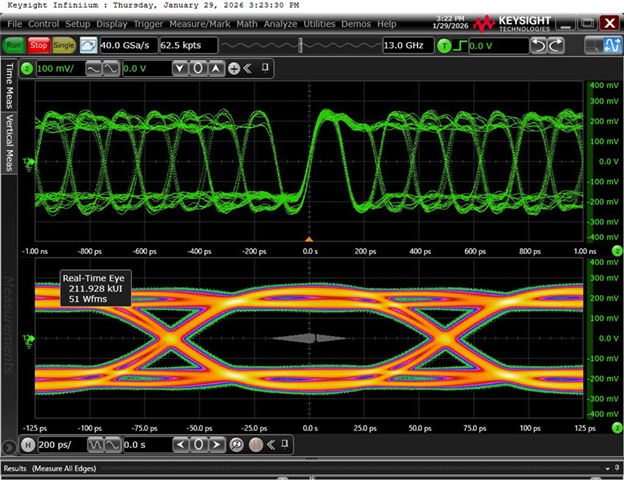
    I think the issue is likely that P0 is too aggressive de-emphasis for the short trace and it is getting over-equalized by the receiver. I'm having trouble proving that without knowing exactly what the SERDES are implementing with regards to equalization on the signal. Without that, i'm just guessing that 6dB equalization is close when i try to apply in-place equalization on the high-speed scope to simulate what the "re-opened" eye looks like based on what the receiver is receiving at it's input pads. 

    This is what that signal would look like if 6dB equalization is being applied:

    I understand that that portion would be controlled by the ethernet switch's receiver (and so receiver settings are not your jurisdiction), but I'm trying to prove out I know what both ends of the link are doing with their respective receivers currently. Otherwise I'm just shooting in the dark on what the actual signal ends up looking like.

    We have changed to preset 3 which looks like this isntead:

    And the default 6dB equalization warps the signal much less:

    Ideally we would be able to just disable the link equalization using the Bypass23 register field to bypass phase 2 and phase 3 of the link training, but I don't know for sure if that means the links will just go their respective preset hint settings and not try to further tune results beyond the default transmitter/receiver hints. I'd need to be able to translate SERDES register settings to something more readable. 

  • Hi Evan,
    Thank you for the detailed write-up and those scope captures. I agree with your assessment. For your short 2-3" trace, P0 definitely seems too aggressive and it appears that you're seeing over-equalization as a result. Short traces tend to have low insertion loss and your scope shots show a clear improvement in the eye diagram with less de-emphasis being applied.
    On the Bypass23 Register:
    The register you're asking about does exist in the J721E PCIe controller. Here are the specific details:

    Register: `PCIE_CORE_USER_CFG_USER_CFG_INITCFG`
    Offset: 0x700C (from your PCIe Core base address)
    Bit 14: `BYPASS_PHASE23` (R/W, resets to 0)

    Function:
    - When BYPASS_PHASE23 = 1: Phase 2 AND Phase 3 of Link Equalization are bypassed
    - When BYPASS_PHASE23 = 0: Phase 2 AND Phase 3 of Link Equalization are performed (default)

    Important notes:
    - This register should be programmed during system boot or initialization
    - Used only in Root Port Mode of the PCIe Core
    - Reset source: cba_mod_g_rst_n

    On the RX Equalization Readback Question:

    I understand you're trying to validate what both ends are actually doing with their receivers. It makes total sense that you don't want to be "shooting in the dark" with assumptions. For reading the actual SerDes RX equalization settings, I'd recommend reviewing the J721 SerDes register documentation to see what readback capabilities are available. You can view them in the SerDes page of registers in the excel file below:
    Regards,
    Jeff