AM6421: Debugging error -1170 when using external xds110 debugger from msp432 launchpad

Part Number: AM6421

Hi team,

I am using MSP432 xds110 debugger to debug r5 core of Am64x evm (green) board. This i am doing for testing purpose so that i can use this on my custom AM64 board.

I have removed all jumpers from msp432 launchpad disconnecting xd110 debugger from onboard controller & powered with USB

my hardware connection is as below

Launchpad ------------------> AM64x evm

TCK-----------------> TCK

TMS-----------------> TMS

TDI-------------------> TDI

TDO------------------> TDO

GND-------------------> GND

Currently, not able to connect to r5 core, getting below error

image.png


I tried changing tclk to 1MHZ, getting below error
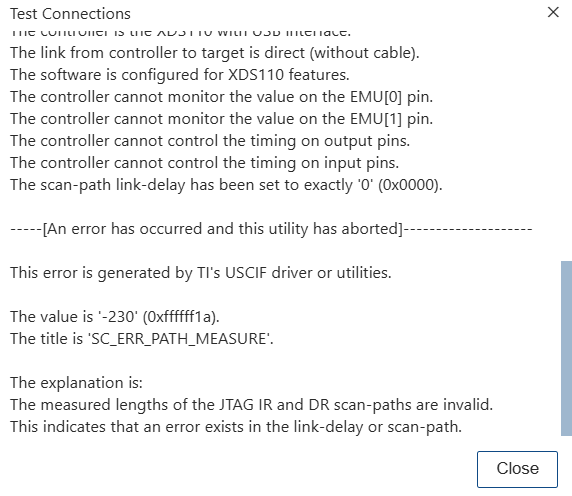
image.png


Regards

Shraddha


  • Hi Shraddha,

    Currently, not able to connect to r5 core, getting below error

    The error is coming because either you don't have your EVM initialized properly or the cable is not connected properly.

    Please refer EVM_FLASH_SOC_INIT to initialize SOC. 

    Please refer TROUBLESHOOT_ISSUES for details.

  • HI,

    I have already done Soc Initilaization,

    But getting above error on AM64 EVM board

  • I tried changing tclk to 1MHZ, getting below error

    The error code -230 as shown in above screenshot is coming because the JTAG cannot find a consistent number of bits when trying to determine the length of the JTAG scan chain. This error varies depending on the target device configured, its status (locked, halted, running without control) or if the configured TCLK is too high.

    Please refer https://software-dl.ti.com/ccs/esd/documents/ccs_debugging_jtag_connectivity_issues.html#path-measure for details.

    Please change to clock setting to default instead of 1MHz. 

    Also for error -1170 check the cable connection and connect JTAG after EVM is powered up. Try using the new *.ccxml file if the error persist.

  • HI,

    I have received the XDS110 debugger & i tried to debug the AM64x EVM board (green). In this case i tried 

    1. AM64x soc initialization done via UART & then put the switch boot mode to OSPI

    & tried to debug the r5 core. Getting same error -1170, Unable to access DAP

    As trouble shooting steps i tried

    1. Changing TCLK to 1MHz & 100kHZ

    2. Changed the target to AM64x & also tried with AM64x_GP_EVM.

    3. Tried powering on the board first, & then connected XDS debugger.

    4. Also checked this with AM64 starter kit SK board (red)- same error i get

    On board XDS debugger works fine, This issue comes if i connect to external debugger to connector J25.

    Is there any jumper change to be done to connect external debugger?

    Regards,

    Shraddha

  • Hi Shraddha,

    Is the test connection passing for JTAG?

    Are you able to see similar output?

    Regards,

    Tushar

  • Hi,

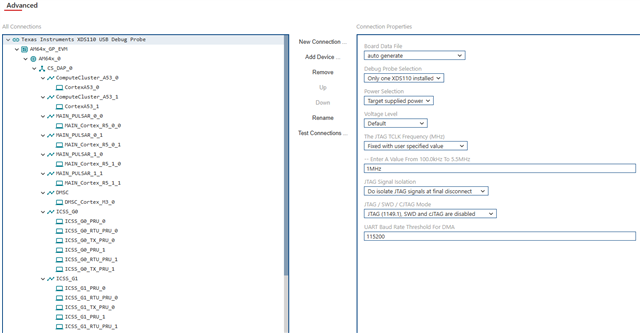
    This are my target config


    From AM64x from J25 connector we have connected to Debug port of XDS110 debug probe. And XDS110 debug probe to Host pc via USB. Only 1 led on debug probe  ie. D1 is glowing. & D2 is blinking when i do test connection


  • Hi Shraddha,

    I have tried on the TI AM64x EVM PROC101C(001) (REV. C) and the external XDS200 works there.

    I have checked the above target configuration files as you mentioned that you are using XDS560 and the target configuration shows XDS110 Debug Probe. Please change the field to XDS560 debug probe and try again.

    Below is the video record of step I did to connect XDS200 to the EVM.

    The CCS version is v20.4.0.

    Regards,

    Tushar