J784S4XEVM: bootApp & IPC Fail Issue

Part Number: J784S4XEVM

Hello,

I have a question regarding an IPC-related issue while testing with the J784S4_EVM.

RTOS, Linux SDK Version : 11.01

I am booting the system using bootApp with the following stages:

  • app (mcu1_0)

  • stage1 (mcu2_0, mcu2_1)

  • stage2 (mcu3_0, mcu3_1, mcu4_0, mcu4_1)

  • stage3 (mpu1) — using a pre-built image

Additionally, I implemented IPC communication between MCU cores and between MCU and MPU cores by referencing the IPC examples (bootApp + IPC example).

The overall flow is as follows:

  1. Wait until bootApp image loading is completed.

  2. After image loading is finished, start the IPC task (at this time, the Linux kernel is still booting).

  3. Call Ipc_mpSetConfig, IpcInitPrms_init, and Ipc_init.

  4. Call Ipc_loadResourceTable and Ipc_initVirtIO.

  5. Call RPMessageParams_init and RPMessage_init.

  6. Create RPMessage receive tasks per core (ti.ipc4.ping-pong, rpmsg_chrdev).

  7. Create RPMessage send tasks according to the number of cores.

  8. Create rpmsg_vdevMonitorFxn task:

    • Call Ipc_lateVirtioCreate and RPMessage_lateInit

    • Announce the ti.ipc4.ping-pong service to IPC_MPU1_0 using RPMessage_announce.

/*------------------------------------------------*/
/* Size of various Memory Locations for each core */ 
/*------------------------------------------------*/
#define DMA_SPACE_SIZE  0x00100000 /*  1MB */
#define IPC_DATA_SIZE   0x00100000 /*  1MB */
#define EXT_DATA_SIZE   0x00100000 /*  1MB */
#define MEM_TEXT_SIZE   0x00100000 /*  1MB */
#define MEM_DATA_SIZE   0x00100000 /*  1MB */
#define DDR_SPACE_SIZE  0x00B00000 /* 12MB */

#define CORE_TOTAL_SIZE 0x01000000 /* 16MB (IPC_DATA_SIZE + R5F_MEM_TEXT_SIZE + R5F_MEM_DATA_SIZE + DDR_SPACE_SIZE) */

/*-----------------------------*/
/* Start address for each core */ 
/*-----------------------------*/

#define MCU1_0_ALLOCATED_START   DDR0_ALLOCATED_START                     /* 0xA0000000 */  
#define MCU1_1_ALLOCATED_START   MCU1_0_ALLOCATED_START + CORE_TOTAL_SIZE /* 0xA1000000 */ 
#define MCU2_0_ALLOCATED_START   MCU1_1_ALLOCATED_START + CORE_TOTAL_SIZE /* 0xA2000000 */
#define MCU2_1_ALLOCATED_START   MCU2_0_ALLOCATED_START + CORE_TOTAL_SIZE /* 0xA3000000 */
#define MCU3_0_ALLOCATED_START   MCU2_1_ALLOCATED_START + CORE_TOTAL_SIZE /* 0xA4000000 */
#define MCU3_1_ALLOCATED_START   MCU3_0_ALLOCATED_START + CORE_TOTAL_SIZE /* 0xA5000000 */
#define MCU4_0_ALLOCATED_START   MCU3_1_ALLOCATED_START + CORE_TOTAL_SIZE /* 0xA6000000 */
#define MCU4_1_ALLOCATED_START   MCU4_0_ALLOCATED_START + CORE_TOTAL_SIZE /* 0xA7000000 */

(The IPC memory regions defined in the Linux device tree and the linker.cmd memory layout are configured identically.)

I am facing two issues:

First, MCU2_1, MCU3_1, and MCU4_1 do not operate at all.
Is there any special configuration required to enable or start these cores?

7bff0593-cd62-4def-8430-d3396790ba48.png


   /* Initialize the param */
    RPMessageParams_init(&cntrlParam);

    /* Set memory for HeapMemory for control task */
    cntrlParam.buf         = pCntrlBuf;
    cntrlParam.bufSize     = rpmsgDataSize;
    cntrlParam.stackBuffer = pTaskBuf;
    cntrlParam.stackSize   = IPC_TASK_STACKSIZE;
    cntrlParam.ctrlTaskPriority   = IPC_CTRL_TASK_PRIORITY;
    RPMessage_init(&cntrlParam);             

    run_rpmsg_receiver();

    run_rpmsg_sender();

#if !defined(BUILD_MPU1_0) && defined(A72_LINUX_OS) && defined(A72_LINUX_OS_IPC_ATTACH)
    TaskP_sleepInMsecs(30000);
    /* Respond to messages coming in to endPt ENDPT_PING */
    TaskP_Params_init(&taskParams);
    taskParams.priority = 10;
    taskParams.stacksize = 0x1000;
    taskParams.arg0 = 0;

    if (NULL == TaskP_create(&rpmsg_vdevMonitorFxn, &taskParams))
    {
        Ipc_Trace_printf("IPC VDEV Monitor task creation failed!!!");
    }
    //RecvRPMessage_lateannounce();
#endif /* !defined(BUILD_MPU1_0) && defined(A72_LINUX_OS) && defined(A72_LINUX_OS_IPC_ATTACH) */

Second, in the code described above, if TaskP_sleepInMsecs(30000); is not set to a sufficiently long delay, a kernel panic occurs along with the error shown below.
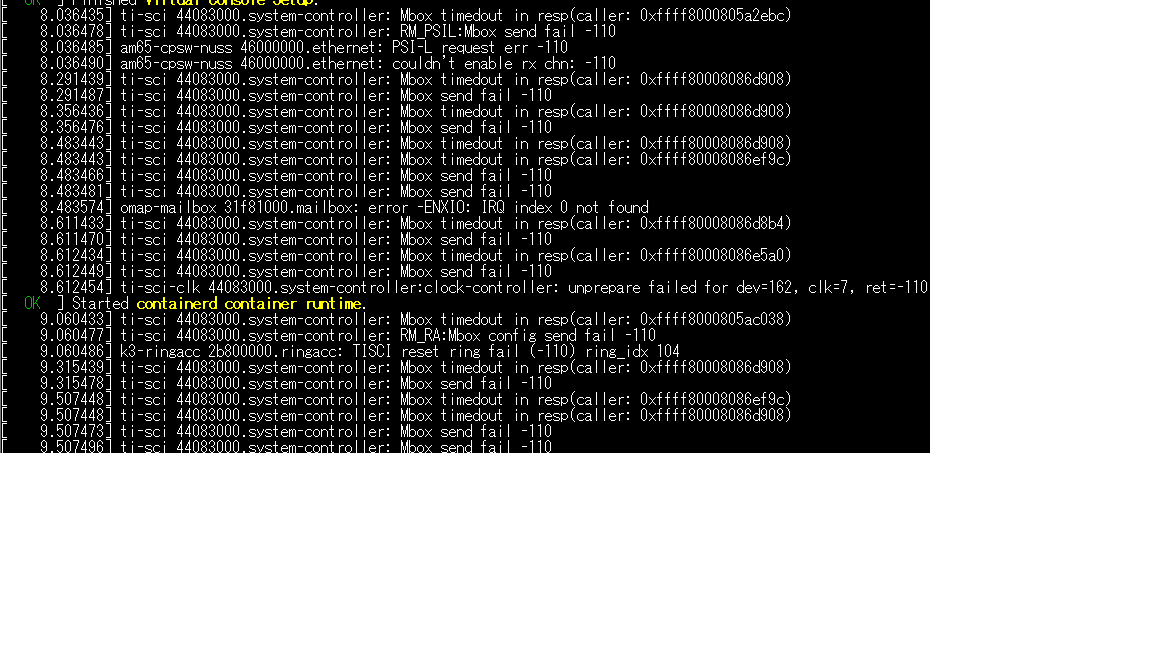
ti-sci_fail.png

Even when the delay is increased, the virtio devices are registered as shown below, but after some time an error still occurs on MCU1_0.
(MCU2_0, MCU3_0, and MCU4_0 continue to operate normally.)
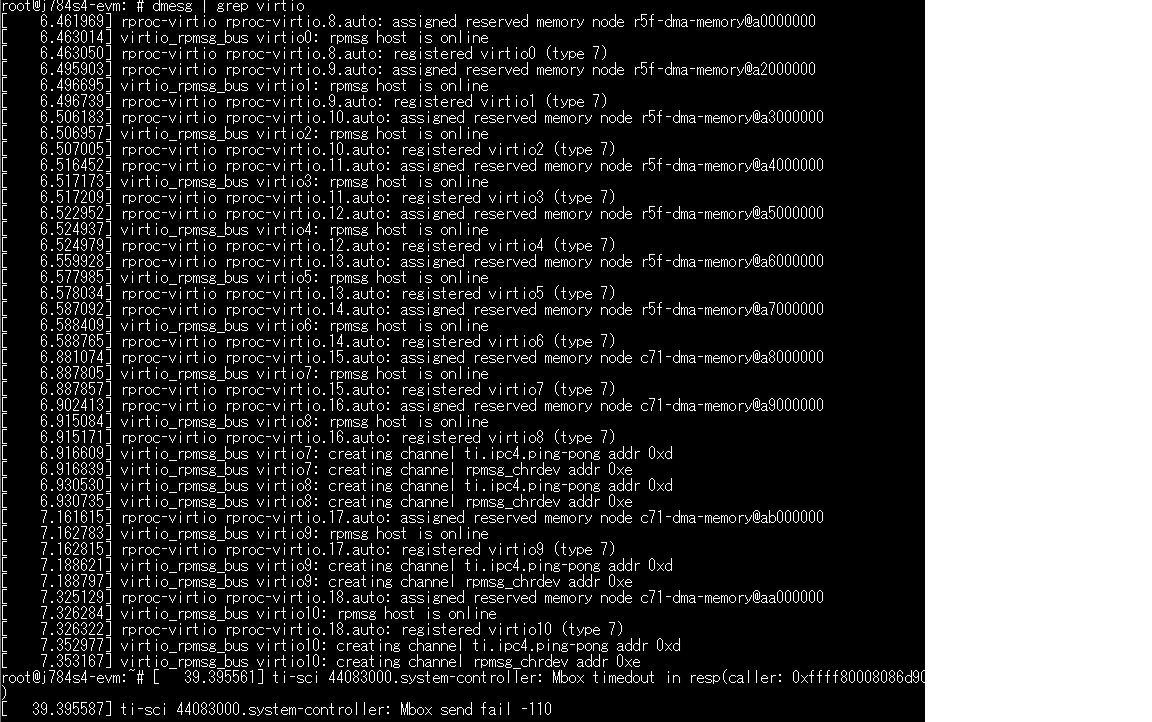
virtio_list.png

I would appreciate your help with this issue.

thank you.


  • const CSL_ArmR5MpuRegionCfg  gCslR5MpuCfg[CSL_ARM_R5F_MPU_REGIONS_MAX] =
    {
        {
            /* Region 0 configuration: complete 32 bit address space = 4Gbits */
            .regionId         = 0U,
            .enable           = 1U,
            .baseAddr         = 0x0U,
            .size             = CSL_ARM_R5_MPU_REGION_SIZE_4GB,
            .subRegionEnable  = CSL_ARM_R5_MPU_SUB_REGION_ENABLE_ALL,
            .exeNeverControl  = 1U,
            .accessPermission = CSL_ARM_R5_ACC_PERM_PRIV_USR_RD_WR,
            .shareable        = 0U,
            .cacheable        = (uint32_t)FALSE,
            .cachePolicy      = 0U,
            .memAttr          = 0U,
        },
        {
            /* Region 1 configuration: ATCM memory */
            .regionId         = 1U,
            .enable           = 1U,
            .baseAddr         = 0x0U,
    #if defined(BUILD_MCU1_0) || defined(BUILD_MCU2_0) || defined(BUILD_MCU3_0) || defined(BUILD_MCU4_0)
            /* Use 64KB, for Core 0, to cover Lock-step mode where TCMs are combined */
            .size             = CSL_ARM_R5_MPU_REGION_SIZE_64KB,
    #elif defined(BUILD_MCU1_1) || defined(BUILD_MCU2_1) || defined(BUILD_MCU3_1) || defined(BUILD_MCU4_1)
            .size             = CSL_ARM_R5_MPU_REGION_SIZE_32KB,
    #endif
            .subRegionEnable  = CSL_ARM_R5_MPU_SUB_REGION_ENABLE_ALL,
            .exeNeverControl  = 0U,
            .accessPermission = CSL_ARM_R5_ACC_PERM_PRIV_USR_RD_WR,
            .shareable        = 0U,
            .cacheable        = (uint32_t)TRUE,
            .cachePolicy      = CSL_ARM_R5_CACHE_POLICY_WB_WA,
            .memAttr          = 0U,
        },
        {
            /* Region 2 configuration: 1 MB OCMC RAM */
            .regionId         = 2U,
            .enable           = 1U,
            .baseAddr         = 0x41C00000,
            .size             = CSL_ARM_R5_MPU_REGION_SIZE_1MB,
            .subRegionEnable  = CSL_ARM_R5_MPU_SUB_REGION_ENABLE_ALL,
            .exeNeverControl  = 0U,
            .accessPermission = CSL_ARM_R5_ACC_PERM_PRIV_USR_RD_WR,
            .shareable        = 0U,
            .cacheable        = (uint32_t)TRUE,
            .cachePolicy      = CSL_ARM_R5_CACHE_POLICY_WB_WA,
            .memAttr          = 0U,
        },
        {
            /* Region 3 configuration: 8 MB MSMC3 RAM */
            .regionId         = 3U,
            .enable           = 1U,
            .baseAddr         = 0x70000000,
    #if defined(SOC_J784S4)
            .size             = CSL_ARM_R5_MPU_REGION_SIZE_8MB,
    #elif defined(SOC_J742S2)
            .size             = CSL_ARM_R5_MPU_REGION_SIZE_4MB,
    #endif
            .subRegionEnable  = CSL_ARM_R5_MPU_SUB_REGION_ENABLE_ALL,
            .exeNeverControl  = 0U,
            .accessPermission = CSL_ARM_R5_ACC_PERM_PRIV_USR_RD_WR,
            .shareable        = 0U,
            .cacheable        = (uint32_t)TRUE,
            .cachePolicy      = CSL_ARM_R5_CACHE_POLICY_WB_WA,
            .memAttr          = 0U,
        },
        {
            /* Region 4 configuration: 2 GB DDR RAM */
            .regionId         = 4U,
            .enable           = 1U,
            .baseAddr         = 0x80000000,
            .size             = CSL_ARM_R5_MPU_REGION_SIZE_2GB,
            .subRegionEnable  = CSL_ARM_R5_MPU_SUB_REGION_ENABLE_ALL,
            .exeNeverControl  = 0U,
            .accessPermission = CSL_ARM_R5_ACC_PERM_PRIV_USR_RD_WR,
            .shareable        = 0U,
            .cacheable        = (uint32_t)TRUE,
            .cachePolicy      = CSL_ARM_R5_CACHE_POLICY_WB_WA,
            .memAttr          = 0U,
        },
        {
            /* Region 5 configuration: 32 KB BTCM */
            /* Address of ATCM/BTCM are configured via MCU_SEC_MMR registers
               It can either be '0x0' or '0x41010000'. Application/Boot-loader shall
               take care this configurations and linker command file shall be
               in sync with this. For either of the above configurations,
               MPU configurations will not changes as both regions will have same
               set of permissions in almost all scenarios.
               Application can chose to overwrite this MPU configuration if needed.
               The same is true for the region corresponding to ATCM. */
            .regionId         = 5U,
            .enable           = 1U,
            .baseAddr         = 0x41010000,
    #if defined(BUILD_MCU1_0) || defined(BUILD_MCU2_0) || defined(BUILD_MCU3_0) || defined(BUILD_MCU4_0)
            /* Use 64KB, for Core 0, to cover Lock-step mode where TCMs are combined */
            .size             = CSL_ARM_R5_MPU_REGION_SIZE_64KB,
    #elif defined(BUILD_MCU1_1) || defined(BUILD_MCU2_1) || defined(BUILD_MCU3_1) || defined(BUILD_MCU4_1)
            .size             = CSL_ARM_R5_MPU_REGION_SIZE_32KB,
    #endif
            .subRegionEnable  = CSL_ARM_R5_MPU_SUB_REGION_ENABLE_ALL,
            .exeNeverControl  = 0U,
            .accessPermission = CSL_ARM_R5_ACC_PERM_PRIV_USR_RD_WR,
            .shareable        = 0U,
            .cacheable        = (uint32_t)TRUE,
            .cachePolicy      = CSL_ARM_R5_CACHE_POLICY_NON_CACHEABLE,
            .memAttr          = 0U,
        },
        {
            /* Region 6 configuration: 128 MB FSS DAT */
            .regionId         = 6U,
            .enable           = 0U,
            .baseAddr         = 0x50000000,
            .size             = CSL_ARM_R5_MPU_REGION_SIZE_128MB,
            .subRegionEnable  = CSL_ARM_R5_MPU_SUB_REGION_ENABLE_ALL,
            .exeNeverControl  = 0U,
            .accessPermission = CSL_ARM_R5_ACC_PERM_PRIV_USR_RD_WR,
            .shareable        = 0U,
            .cacheable        = (uint32_t)TRUE,
            .cachePolicy      = CSL_ARM_R5_CACHE_POLICY_WB_WA,
            .memAttr          = 0U,
        },
        {
            /* Region 7 configuration: Ring buffer */
            .regionId         = 7U,
            .enable           = 1U,
    #if defined(BUILD_MCU1_0)
            .baseAddr         = 0xA0000000,
    #elif defined(BUILD_MCU1_1)
            .baseAddr         = 0xA1000000,
    #elif defined(BUILD_MCU2_0)
            .baseAddr         = 0xA2000000,
    #elif defined(BUILD_MCU2_1)
            .baseAddr         = 0xA3000000,
    #elif defined(BUILD_MCU3_0)
            .baseAddr         = 0xA4000000,
    #elif defined(BUILD_MCU3_1)
            .baseAddr         = 0xA5000000,
    #elif defined(BUILD_MCU4_0)
            .baseAddr         = 0xA6000000,
    #elif defined(BUILD_MCU4_1)
            .baseAddr         = 0xA7000000,
    #endif
            .size             = CSL_ARM_R5_MPU_REGION_SIZE_2MB,
            .subRegionEnable  = CSL_ARM_R5_MPU_SUB_REGION_ENABLE_ALL,
            .exeNeverControl  = 1U,
            .accessPermission = CSL_ARM_R5_ACC_PERM_PRIV_USR_RD_WR,
            .shareable        = 0U,
            .cacheable        = (uint32_t)FALSE,
            .cachePolicy      = CSL_ARM_R5_CACHE_POLICY_NON_CACHEABLE,
            .memAttr          = 0U,
        },
        {
            /* Region 8 configuration: Ring buffer */
            .regionId         = 8U,
            .enable           = 1U,
            .baseAddr         = 0xAC000000,
            .size             = CSL_ARM_R5_MPU_REGION_SIZE_64MB,
            .subRegionEnable  = CSL_ARM_R5_MPU_SUB_REGION_ENABLE_ALL,
            .exeNeverControl  = 1U,
            .accessPermission = CSL_ARM_R5_ACC_PERM_PRIV_USR_RD_WR,
            .shareable        = 0U,
            .cacheable        = (uint32_t)FALSE,
            .cachePolicy      = CSL_ARM_R5_CACHE_POLICY_NON_CACHEABLE,
            .memAttr          = 0U,
        },
    };
    

    The CSL_ArmR5MpuRegionCfg configuration is set as shown above, and dorprocboot in the uEnv.txt file is also set to 0.

  • Hello ,

    Can you please share the full log and code instead of snippets?

    and how are you testing to communicate with MCU1-0 and MPU1-0 ?

    you should use rpmsg_char_simple command the Linux has to initiate the communication instead of MCU1_0

    Regards

    Tarun Mukesh 

  • j784s4_evm_test.tar.gzDear Tarun Mukesh,
    I am attaching the source code and the boot logs as requested.
    You can start by reviewing the boot_app/boot_app_main.c file.
    In the case of the rpmsg_char_simple test, if a channel creation message appears on virtio and no TI-SCI error occurs on the corresponding remoteproc, it operates normally.
     
    thank you.
    root@j784s4-evm:~# rpmsg_char_simple -r0 -n10
    file_deref_link: readlink failed for /sys/bus/platform/devices/41000000.r5f
    Can't create an endpoint device: No such file or directory
    TEST STATUS: FAILED
    root@j784s4-evm:~# rpmsg_char_simple -r1 -n10
    file_deref_link: readlink failed for /sys/bus/platform/devices/41400000.r5f
    Can't create an endpoint device: No such file or directory
    TEST STATUS: FAILED
    root@j784s4-evm:~# rpmsg_char_simple -r2 -n10
    _rpmsg_char_find_ctrldev: could not find the matching rpmsg_ctrl device for virtio2.rpmsg_chrdev.-1.14
    Can't create an endpoint device: Invalid argument
    TEST STATUS: FAILED
    root@j784s4-evm:~# rpmsg_char_simple -r3 -n10
    _rpmsg_char_find_ctrldev: could not find the matching rpmsg_ctrl device for virtio3.rpmsg_chrdev.-1.14
    Can't create an endpoint device: Invalid argument
    TEST STATUS: FAILED
    root@j784s4-evm:~# rpmsg_char_simple -r4 -n10
    _rpmsg_char_find_ctrldev: could not find the matching rpmsg_ctrl device for virtio4.rpmsg_chrdev.-1.14
    Can't create an endpoint device: Invalid argument
    TEST STATUS: FAILED
    root@j784s4-evm:~# rpmsg_char_simple -r5 -n10
    _rpmsg_char_find_ctrldev: could not find the matching rpmsg_ctrl device for virtio5.rpmsg_chrdev.-1.14
    Can't create an endpoint device: Invalid argument
    TEST STATUS: FAILED
    root@j784s4-evm:~# rpmsg_char_simple -r6 -n10
    _rpmsg_char_find_rproc: SoC doesn't have rproc id 6
    Can't create an endpoint device: Success
    TEST STATUS: FAILED
    root@j784s4-evm:~# rpmsg_char_simple -r7 -n10
    _rpmsg_char_find_rproc: SoC doesn't have rproc id 7
    Can't create an endpoint device: Success
    TEST STATUS: FAILED
    root@j784s4-evm:~# rpmsg_char_simple -r8 -n10
    Created endpt device rpmsg-char-8-1275, fd = 3 port = 1025
    Exchanging 10 messages with rpmsg device rpmsg-char-8-1275 on rproc id 8 ...
    
    Sending message #0: hello there 0!
    Received message #0: round trip delay(usecs) = 98035
    hello there 0!
    Sending message #1: hello there 1!
    Received message #1: round trip delay(usecs) = 59470
    hello there 1!
    Sending message #2: hello there 2!
    Received message #2: round trip delay(usecs) = 65430
    hello there 2!
    Sending message #3: hello there 3!
    Received message #3: round trip delay(usecs) = 58115
    hello there 3!
    Sending message #4: hello there 4!
    Received message #4: round trip delay(usecs) = 57170
    hello there 4!
    Sending message #5: hello there 5!
    Received message #5: round trip delay(usecs) = 55610
    hello there 5!
    Sending message #6: hello there 6!
    Received message #6: round trip delay(usecs) = 58915
    hello there 6!
    Sending message #7: hello there 7!
    Received message #7: round trip delay(usecs) = 54585
    hello there 7!
    Sending message #8: hello there 8!
    Received message #8: round trip delay(usecs) = 56135
    hello there 8!
    Sending message #9: hello there 9!
    Received message #9: round trip delay(usecs) = 56980
    hello there 9!
    
    Communicated 10 messages successfully on rpmsg-char-8-1275
    
    TEST STATUS: PASSED
    root@j784s4-evm:~# cat /sys/kernel/debug/remoteproc/remoteproc8/trace0
    IPC_Setup (core : mcu3_0) .....
    mcu3_0 <--> mcu2_0, Ping- 1000, pong - 1000 completed
    mcu3_0 <--> mcu4_0, Ping- 1000, pong - 1000 completed
    mcu3_0 <--> mcu1_0, Ping- 1000, pong - 1000 completed
    root@j784s4-evm:~# cat /sys/kernel/debug/remoteproc/remoteproc0/trace0
    IPC_Setup (core : mcu2_0) .....
    mcu2_0 <--> mcu3_0, Ping- 1000, pong - 1000 completed
    mcu2_0 <--> mcu4_0, Ping- 1000, pong - 1000 completed
    mcu2_0 <--> mcu1_0, Ping- 1000, pong - 1000 completed
    root@j784s4-evm:~# cat /sys/kernel/debug/remoteproc/remoteproc1/trace0
    IPC_Setup (core : mcu4_0) .....
    mcu4_0 <--> mcu2_0, Ping- 1000, pong - 1000 completed
    mcu4_0 <--> mcu3_0, Ping- 1000, pong - 1000 completed
    mcu4_0 <--> mcu1_0, Ping- 1000, pong - 1000 completed
    root@j784s4-evm:~# cat /sys/kernel/debug/remoteproc/remoteproc2/trace0
    root@j784s4-evm:~# cat /sys/kernel/debug/remoteproc/remoteproc3/trace0
    root@j784s4-evm:~# cat /sys/kernel/debug/remoteproc/remoteproc4/trace0
    cat: can't open '/sys/kernel/debug/remoteproc/remoteproc4/trace0': No such file or directory
    root@j784s4-evm:~# cat /sys/kernel/debug/remoteproc/remoteproc8/trace0
    IPC_Setup (core : mcu3_0) .....
    mcu3_0 <--> mcu2_0, Ping- 1000, pong - 1000 completed
    mcu3_0 <--> mcu4_0, Ping- 1000, pong - 1000 completed
    mcu3_0 <--> mcu1_0, Ping- 1000, pong - 1000 completed
    root@j784s4-evm:~# dmesg | grep virtio
    dmesg | grep remoteproc
    [    6.525465] rproc-virtio rproc-virtio.8.auto: assigned reserved memory node r5f-dma-memory@a0000000
    [    6.543983] virtio_rpmsg_bus virtio0: rpmsg host is online
    [    6.544022] rproc-virtio rproc-virtio.8.auto: registered virtio0 (type 7)
    [    6.546789] rproc-virtio rproc-virtio.9.auto: assigned reserved memory node r5f-dma-memory@a6000000
    [    6.550338] virtio_rpmsg_bus virtio1: rpmsg host is online
    [    6.550380] rproc-virtio rproc-virtio.9.auto: registered virtio1 (type 7)
    [    6.559746] rproc-virtio rproc-virtio.8.auto: assigned reserved memory node r5f-dma-memory@a7000000
    [    6.562644] virtio_rpmsg_bus virtio0: rpmsg host is online
    [    6.562679] rproc-virtio rproc-virtio.8.auto: registered virtio0 (type 7)
    [    6.748590] rproc-virtio rproc-virtio.10.auto: assigned reserved memory node r5f-dma-memory@a2000000
    [    6.749201] virtio_rpmsg_bus virtio2: rpmsg host is online
    [    6.749235] rproc-virtio rproc-virtio.10.auto: registered virtio2 (type 7)
    [    6.754588] rproc-virtio rproc-virtio.11.auto: assigned reserved memory node r5f-dma-memory@a3000000
    [    6.755463] virtio_rpmsg_bus virtio3: rpmsg host is online
    [    6.755530] rproc-virtio rproc-virtio.11.auto: registered virtio3 (type 7)
    [    6.992341] rproc-virtio rproc-virtio.12.auto: assigned reserved memory node r5f-dma-memory@a4000000
    [    6.993292] virtio_rpmsg_bus virtio4: rpmsg host is online
    [    6.993323] rproc-virtio rproc-virtio.12.auto: registered virtio4 (type 7)
    [    6.996612] rproc-virtio rproc-virtio.13.auto: assigned reserved memory node r5f-dma-memory@a5000000
    [    6.997299] virtio_rpmsg_bus virtio5: rpmsg host is online
    [    6.997324] rproc-virtio rproc-virtio.13.auto: registered virtio5 (type 7)
    [    7.194533] rproc-virtio rproc-virtio.14.auto: assigned reserved memory node c71-dma-memory@a8000000
    [    7.195718] virtio_rpmsg_bus virtio6: rpmsg host is online
    [    7.195752] rproc-virtio rproc-virtio.14.auto: registered virtio6 (type 7)
    [    7.228389] virtio_rpmsg_bus virtio6: creating channel ti.ipc4.ping-pong addr 0xd
    [    7.228582] virtio_rpmsg_bus virtio6: creating channel rpmsg_chrdev addr 0xe
    [    7.281478] rproc-virtio rproc-virtio.15.auto: assigned reserved memory node c71-dma-memory@a9000000
    [    7.282560] virtio_rpmsg_bus virtio7: rpmsg host is online
    [    7.282599] rproc-virtio rproc-virtio.15.auto: registered virtio7 (type 7)
    [    7.290220] rproc-virtio rproc-virtio.16.auto: assigned reserved memory node c71-dma-memory@aa000000
    [    7.291537] virtio_rpmsg_bus virtio8: rpmsg host is online
    [    7.291570] rproc-virtio rproc-virtio.16.auto: registered virtio8 (type 7)
    [    7.310308] virtio_rpmsg_bus virtio7: creating channel ti.ipc4.ping-pong addr 0xd
    [    7.310451] virtio_rpmsg_bus virtio7: creating channel rpmsg_chrdev addr 0xe
    [    7.311523] rproc-virtio rproc-virtio.17.auto: assigned reserved memory node c71-dma-memory@ab000000
    [    7.313215] virtio_rpmsg_bus virtio9: rpmsg host is online
    [    7.313254] rproc-virtio rproc-virtio.17.auto: registered virtio9 (type 7)
    [    7.319366] virtio_rpmsg_bus virtio8: creating channel ti.ipc4.ping-pong addr 0xd
    [    7.319559] virtio_rpmsg_bus virtio8: creating channel rpmsg_chrdev addr 0xe
    [    7.340544] virtio_rpmsg_bus virtio9: creating channel ti.ipc4.ping-pong addr 0xd
    [    7.340721] virtio_rpmsg_bus virtio9: creating channel rpmsg_chrdev addr 0xe
    cat /sys/class/remoteproc/remoteproc*/state
    cat /sys/class/remoteproc/remoteproc*/name
    cat /sys/kernel/debug/remoteproc/remoteproc3/trace0
    root@j784s4-evm:~# dmesg | grep remoteproc
    [    6.472853] remoteproc remoteproc0: releasing 41000000.r5f
    [    6.491158] remoteproc remoteproc0: releasing 5c00000.r5f
    [    6.506991] remoteproc remoteproc0: releasing 5e00000.r5f
    [    6.523632] remoteproc remoteproc0: 41000000.r5f is available
    [    6.523724] remoteproc remoteproc0: attaching to 41000000.r5f
    [    6.544028] remoteproc remoteproc0: remote processor 41000000.r5f is now attached
    [    6.544136] remoteproc remoteproc1: 5900000.r5f is available
    [    6.544199] remoteproc remoteproc1: attaching to 5900000.r5f
    [    6.547224] remoteproc remoteproc2: 41400000.r5f is available
    [    6.547597] remoteproc remoteproc2: attaching to 41400000.r5f
    [    6.547617] remoteproc remoteproc2: Carveout already associated to resource table
    [    6.547621] remoteproc remoteproc2: Failed to process resources: -12
    [    6.550386] remoteproc remoteproc1: remote processor 5900000.r5f is now attached
    [    6.558462] remoteproc remoteproc0: detached remote processor 41000000.r5f
    [    6.559297] remoteproc remoteproc3: 5a00000.r5f is available
    [    6.559382] remoteproc remoteproc3: attaching to 5a00000.r5f
    [    6.562685] remoteproc remoteproc3: remote processor 5a00000.r5f is now attached
    [    6.738906] remoteproc remoteproc2: releasing 41400000.r5f
    [    6.739038] remoteproc remoteproc0: releasing 41000000.r5f
    [    6.747698] remoteproc remoteproc0: 5c00000.r5f is available
    [    6.747786] remoteproc remoteproc0: attaching to 5c00000.r5f
    [    6.749242] remoteproc remoteproc0: remote processor 5c00000.r5f is now attached
    [    6.753735] remoteproc remoteproc2: 5d00000.r5f is available
    [    6.753806] remoteproc remoteproc2: attaching to 5d00000.r5f
    [    6.755538] remoteproc remoteproc2: remote processor 5d00000.r5f is now attached
    [    6.768795] k3-dsp-rproc 64800000.dsp: configured DSP for remoteproc mode
    [    6.769391] remoteproc remoteproc4: 64800000.dsp is available
    [    6.778632] k3-dsp-rproc 65800000.dsp: configured DSP for remoteproc mode
    [    6.779463] remoteproc remoteproc5: 65800000.dsp is available
    [    6.783721] k3-dsp-rproc 66800000.dsp: configured DSP for remoteproc mode
    [    6.784013] remoteproc remoteproc6: 66800000.dsp is available
    [    6.788467] k3-dsp-rproc 67800000.dsp: configured DSP for remoteproc mode
    [    6.789177] remoteproc remoteproc7: 67800000.dsp is available
    [    6.991813] remoteproc remoteproc8: 5e00000.r5f is available
    [    6.991876] remoteproc remoteproc8: attaching to 5e00000.r5f
    [    6.993352] remoteproc remoteproc8: remote processor 5e00000.r5f is now attached
    [    6.996174] remoteproc remoteproc9: 5f00000.r5f is available
    [    6.996235] remoteproc remoteproc9: attaching to 5f00000.r5f
    [    6.997329] remoteproc remoteproc9: remote processor 5f00000.r5f is now attached
    [    7.193220] remoteproc remoteproc4: powering up 64800000.dsp
    [    7.193244] remoteproc remoteproc4: Booting fw image j784s4-c71_0-fw, size 10489000
    [    7.193594] remoteproc remoteproc4: unsupported resource 65538
    [    7.195757] remoteproc remoteproc4: remote processor 64800000.dsp is now up
    [    7.280036] remoteproc remoteproc5: powering up 65800000.dsp
    [    7.280055] remoteproc remoteproc5: Booting fw image j784s4-c71_1-fw, size 10489000
    [    7.280459] remoteproc remoteproc5: unsupported resource 65538
    [    7.282604] remoteproc remoteproc5: remote processor 65800000.dsp is now up
    [    7.288813] remoteproc remoteproc6: powering up 66800000.dsp
    [    7.288832] remoteproc remoteproc6: Booting fw image j784s4-c71_2-fw, size 10489000
    [    7.289247] remoteproc remoteproc6: unsupported resource 65538
    [    7.291577] remoteproc remoteproc6: remote processor 66800000.dsp is now up
    [    7.310119] remoteproc remoteproc7: powering up 67800000.dsp
    [    7.310138] remoteproc remoteproc7: Booting fw image j784s4-c71_3-fw, size 10489000
    [    7.310486] remoteproc remoteproc7: unsupported resource 65538
    [    7.313261] remoteproc remoteproc7: remote processor 67800000.dsp is now up
    root@j784s4-evm:~# cat /sys/class/remoteproc/remoteproc*/state
    attached
    attached
    attached
    attached
    running
    running
    running
    running
    attached
    attached
    root@j784s4-evm:~# cat /sys/class/remoteproc/remoteproc*/name
    5c00000.r5f
    5900000.r5f
    5d00000.r5f
    5a00000.r5f
    64800000.dsp
    65800000.dsp
    66800000.dsp
    67800000.dsp
    5e00000.r5f
    5f00000.r5f
    root@j784s4-evm:~# cat /sys/kernel/debug/remoteproc/remoteproc3/trace0
    root@j784s4-evm:~#
    a72_boot_log.txt
    LIG Accuver SBL Revision: 01.00.10.01 (Feb 24 2026 - 07:16:05)
    TIFS  ver: 11.1.8--v11.01.08 (Fancy Rat)
    runLockStep: 0
    Starting Sciserver..... PASSED
    Starting GTC Counter
    GTC frequency : 200 MHz
    MCU R5F App started at 6433 usecs
    Loading BootImage
    
     BootApp_MMCBootImageLate: fp 0x 0xa0632680, fileName is 0:/lateapp1
    
     Called SBL_MulticoreImageParse, status = 0
    BootImage completed, status = 0
    Boot completed for Core ID#10, Entry point is 0x0
    Boot completed for Core ID#11, Entry point is 0x41010000
    Loading BootImage
    
     BootApp_MMCBootImageLate: fp 0x 0xa0632680, fileName is 0:/lateapp2
    
     Called SBL_MulticoreImageParse, status = 0
    BootImage completed, status = 0
    Boot completed for Core ID#12, Entry point is 0x0
    Boot completed for Core ID#13, Entry point is 0x41010000
    Boot completed for Core ID#14, Entry point is 0x0
    Boot completed for Core ID#15, Entry point is 0x41010000
    Loading BootImage
    
     BootApp_MMCBootImageLate: fp 0x 0xa0632680, fileName is 0:/atf_optee.appimage
    
     Called SBL_MulticoreImageParse, status = 0
    
     BootApp_MMCBootImageLate: fp 0x 0xa0632680, fileName is 0:/tikernelimage_linux.appimage
    
     Called SBL_MulticoreImageParse, status = 0
    
     BootApp_MMCBootImageLate: fp 0x 0xa0632680, fileName is 0:/tidtb_linux.appimage
    
     Called SBL_MulticoreImageParse, status = 0
    BootImage completed, status = 0
    Boot completed for Core ID#0, Entry point is 0x70000000
    Boot App: Started at 6653 usec
    Boot App: Booted Core ID #10 at 104181 usecs
    Boot App: Booted Core ID #11 at 104681 usecs
    Boot App: Booted Core ID #12 at 258321 usecs
    Boot App: Booted Core ID #13 at 258811 usecs
    Boot App: Booted Core ID #14 at 259805 usecs
    Boot App: Booted Core ID #15 at 260288 usecs
    Boot App: Booted Core ID #0 at 1211746 usecs
    MCU Boot Task started at 6653 usecs and finished at 1283265 usecs
    Event Group Wait Done..start ipc task
    IPC_Setup (core : mcu1_0) .....
    
    mcu1_0 <--> mcu2_0, Ping- 1000, pong - 1000 completed
    
    mcu1_0 <--> mcu3_0, Ping- 1000, pong - 1000 completed
    
    mcu1_0 <--> mcu4_0, Ping- 1000, pong - 1000 completed


  • Hello,

    I was out of office last friday.

    Let me analyse the log and get back to you.

    Regards

    Tarun Mukesh

  • Hello,

    The errors are due to sciserver not able to address your sciclient calls from A72

    what if you increase the priorities sciserver task below , more than boot app task function which is 5 

    appPrms.taskPriority[SCISERVER_TASK_USER_LO] = 1;
    appPrms.taskPriority[SCISERVER_TASK_USER_HI] = 4;

    Regards

    Tarun Mukesh

  • Thank you for your response. The response was delayed because March 1st was a public holiday. I apologize for the delay.

    I changed the task priorities as shown below,

        appPrms.taskPriority[SCISERVER_TASK_USER_LO] = 4;
        appPrms.taskPriority[SCISERVER_TASK_USER_HI] = 5;
        ipc task = 3, ipc recv task = 3, send task=3

    and as a result, I was able to confirm that MCU2_1 and MCU3_1 are now operating correctly. However, communication with the MPU is still not working.

    (TI-SCI error no longer occurs as before)

    Event Group Wait Done..start ipc task
    IPC_Setup (core : mcu1_0) .....

    mcu1_0 <--> mcu2_0, Ping- 1000, pong - 1000 completed

    mcu1_0 <--> mcu2_1, Ping- 1000, pong - 1000 completed

    mcu1_0 <--> mcu3_0, Ping- 1000, pong - 1000 completed

    mcu1_0 <--> mcu3_1, Ping- 1000, pong - 1000 completed

    mcu1_0 <--> mcu4_0, Ping- 1000, pong - 1000 completed

    mcu1_0 <--> mcu4_1, Ping- 1000, pong - 1000 completed

    Additionally, if I remove TaskP_sleepInMsecs, the Ping-Pong log is not printed at all. Even if communication with MPU1 is not established, Ping-Pong messages with the other cores should still be printed, but they are not.

        run_rpmsg_receiver();
    
        run_rpmsg_sender();
    
    #if !defined(BUILD_MPU1_0) && defined(A72_LINUX_OS) && defined(A72_LINUX_OS_IPC_ATTACH)
        TaskP_sleepInMsecs(30000);
        /* Respond to messages coming in to endPt ENDPT_PING */
        TaskP_Params_init(&taskParams);
        taskParams.priority = 3;
        taskParams.stacksize = 0x1000;
        taskParams.arg0 = 0;
    
        if (NULL == TaskP_create(&rpmsg_vdevMonitorFxn, &taskParams))
        {
            Ipc_Trace_printf("IPC VDEV Monitor task creation failed!!!");
        }

    It seems that the rpmsg_vdevMonitorFxn task is running before the Linux remoteproc driver is loaded, so I added TaskP_sleepInMsecs to delay it. Could you please provide some guidance on this?

    thank you.

  • Hello,

    I would like to share an observation I discovered during testing.

    When the rpmsg_vdevMonitorFxn task is not executed, and I simply move and paste the related source code into the run_rpmsg_receiver() function after creating the receive task, the system operates normally. (It operates normally even without TaskP_sleepInMsecs.)

    void rpmsg_vdevMonitorFxn(void* arg0void* arg1)

    {
        int32_t status;

        /* Wait for Linux VDev ready... */
        while(!Ipc_isRemoteReady(IPC_MPU1_0))
        {
            TaskP_sleep(10);
        }

        Ipc_Trace_printf("IPC_MPU1_0 Start...\n");
        /* Create the VRing now ... */
        status = Ipc_lateVirtioCreate(IPC_MPU1_0);
        if(status != IPC_SOK)
        {
            Ipc_Trace_printf("%s: Ipc_lateVirtioCreate failed\n", __func__);
            return;
        }

        status = RPMessage_lateInit(IPC_MPU1_0);
        if(status != IPC_SOK)
        {
            Ipc_Trace_printf("%s: RPMessage_lateInit failed\n", __func__);
            return;
        }

        TaskP_sleep(200);
        status = RPMessage_announce(IPC_MPU1_0, RecvServiceEndPt[0], pRecvServiceName[0]);
        if(status != IPC_SOK)
        {
            Ipc_Trace_printf("rpmsg_vdevMonitorFxn: RPMessage_announce() failed\n");
        }
    }

    In other words, if I place the source code inside run_rpmsg_receiver() after the receive task is created, RPMsg communication works as expected.

    void run_rpmsg_receiver()
    {
        TaskP_Params      params;
        uint32_t          cnt;

        if(pRecvTaskBuf == NULL)
        {
            Ipc_Trace_printf("RecvTask: buffer allocation failed\n");
           return;
        }

        for(cnt = 0cnt < IPC_RECV_TASK_NUM++cnt)
        {
            RPmessage_RecvRegister(cnt);
            TaskP_Params_init(&params);
            params.priority   = IPC_RECV_TASK_PRI;
            params.stack      = g_recvTaskStackBuf[cnt];
            params.stacksize  = IPC_TASK_STACKSIZE;
            params.arg0       = (void *)handle[cnt];
            params.arg1       = (void *)&cnt;
            if (NULL == TaskP_create(&rpmsg_responderFxn&params))
            {
                Ipc_Trace_printf("IPC Responder task creation failed!!!");
            }
        }

            int32_t status; //Add rpmsg_vdevMonitorFxn source code here!!

        /* Wait for Linux VDev ready... */
        while(!Ipc_isRemoteReady(IPC_MPU1_0))
        {
            TaskP_sleep(10);
        }

        Ipc_Trace_printf("IPC_MPU1_0 Start...\n");
        /* Create the VRing now ... */
        status = Ipc_lateVirtioCreate(IPC_MPU1_0);
        if(status != IPC_SOK)
        {
            Ipc_Trace_printf("%s: Ipc_lateVirtioCreate failed\n", __func__);
            return;
        }

        status = RPMessage_lateInit(IPC_MPU1_0);
        if(status != IPC_SOK)
        {
            Ipc_Trace_printf("%s: RPMessage_lateInit failed\n", __func__);
            return;
        }

        TaskP_sleep(200);
        status = RPMessage_announce(IPC_MPU1_0, RecvServiceEndPt[0], pRecvServiceName[0]);
        if(status != IPC_SOK)
        {
            Ipc_Trace_printf("rpmsg_vdevMonitorFxn: RPMessage_announce() failed\n");
        }
        status = RPMessage_announce(IPC_MPU1_0, RecvServiceEndPt[1], pRecvServiceName[1]);
        if(status != IPC_SOK)
        {
            Ipc_Trace_printf("rpmsg_vdevMonitorFxn: RPMessage_announce() failed\n");
        }

    However, I am unable to clearly understand why the behavior changes depending on whether rpmsg_vdevMonitorFxn is executed or not.

    Could you please help explain why this difference occurs and what internal mechanism might be causing this behavior?

    ------------- Normal operation RTOS ---------

    MCU Boot Task started at 6655 usecs and finished at 594028 usecs
    Event Group Wait Done..start ipc task
    IPC_Setup (core : mcu1_0) .....

    IPC_MPU1_0 Start...

    IPC_Setup done .....

    mcu1_0 <--> mcu4_1, Ping- 100, pong - 100 completed

    mcu1_0 <--> mcu2_0, Ping- 100, pong - 100 completed

    mcu1_0 <--> mcu2_1, Ping- 100, pong - 100 completed

    mcu1_0 <--> mcu3_0, Ping- 100, pong - 100 completed

    mcu1_0 <--> mcu3_1, Ping- 100, pong - 100 completed

    mcu1_0 <--> mcu4_0, Ping- 100, pong - 100 completed

    mcu1_0 <--> mpu1_0 : hello there 0! recvd

    mcu1_0 <--> mpu1_0 : hello there 1! recvd

    mcu1_0 <--> mpu1_0 : hello there 2! recvd

    mcu1_0 <--> mpu1_0 : hello there 3! recvd

    mcu1_0 <--> mpu1_0 : hello there 4! recvd

    mcu1_0 <--> mpu1_0 : hello there 5! recvd

    mcu1_0 <--> mpu1_0 : hello there 6! recvd

    mcu1_0 <--> mpu1_0 : hello there 7! recvd

    mcu1_0 <--> mpu1_0 : hello there 8! recvd

    mcu1_0 <--> mpu1_0 : hello there 9! recvd

    ------------- Normal operation Linux ---------

    root@j784s4-evm:~# cat /sys/kernel/debug/remoteproc/remoteproc10/trace0
    IPC_Setup (core : mcu4_0) .....
    IPC_MPU1_0 Start...
    IPC_Setup done .....
    mcu4_0 <--> mcu2_0, Ping- 100, pong - 100 completed
    mcu4_0 <--> mcu2_1, Ping- 100, pong - 100 completed
    mcu4_0 <--> mcu3_1, Ping- 100, pong - 100 completed
    mcu4_0 <--> mcu3_0, Ping- 100, pong - 100 completed
    mcu4_0 <--> mcu1_0, Ping- 100, pong - 100 completed
    mcu4_0 <--> mcu4_1, Ping- 100, pong - 100 completed
    mcu4_0 <--> mpu1_0 : hello there 0! recvd
    mcu4_0 <--> mpu1_0 : hello there 1! recvd
    mcu4_0 <--> mpu1_0 : hello there 2! recvd
    mcu4_0 <--> mpu1_0 : hello there 3! recvd
    mcu4_0 <--> mpu1_0 : hello there 4! recvd
    mcu4_0 <--> mpu1_0 : hello there 5! recvd
    mcu4_0 <--> mpu1_0 : hello there 6! recvd
    mcu4_0 <--> mpu1_0 : hello there 7! recvd
    mcu4_0 <--> mpu1_0 : hello there 8! recvd
    mcu4_0 <--> mpu1_0 : hello there 9! recvd
    root@j784s4-evm:~# cat /sys/kernel/debug/remoteproc/remoteproc11/trace0
    IPC_Setup (core : mcu4_1) .....
    IPC_MPU1_0 Start...
    IPC_Setup done .....
    mcu4_1 <--> mcu2_0, Ping- 100, pong - 100 completed
    mcu4_1 <--> mcu3_1, Ping- 100, pong - 100 completed
    mcu4_1 <--> mcu2_1, Ping- 100, pong - 100 completed
    mcu4_1 <--> mcu3_0, Ping- 100, pong - 100 completed
    mcu4_1 <--> mcu1_0, Ping- 100, pong - 100 completed
    mcu4_1 <--> mcu4_0, Ping- 100, pong - 100 completed
    mcu4_1 <--> mpu1_0 : hello there 0! recvd
    mcu4_1 <--> mpu1_0 : hello there 1! recvd
    mcu4_1 <--> mpu1_0 : hello there 2! recvd
    mcu4_1 <--> mpu1_0 : hello there 3! recvd
    mcu4_1 <--> mpu1_0 : hello there 4! recvd
    mcu4_1 <--> mpu1_0 : hello there 5! recvd
    mcu4_1 <--> mpu1_0 : hello there 6! recvd
    mcu4_1 <--> mpu1_0 : hello there 7! recvd
    mcu4_1 <--> mpu1_0 : hello there 8! recvd
    mcu4_1 <--> mpu1_0 : hello there 9! recvd
    root@j784s4-evm:~#

  • Hello,

    Let me explain . It is all about the sequence and priorities of tasks.

    When you run rpmsg_vdevMonitorFxn as its own task, it starts executing immediately upon task creation. If that task has a higher priority (or even the same priority) as your receiver tasks, it might call RPMessage_announce() before the rpmsg_responderFxn (the receiver task) is actually scheduled and ready to listen.
    By moving the code inside run_rpmsg_receiver() after the TaskP_create loop, you are guaranteeing a specific sequence:
    1. The receiver task is created.
    2. The endpoint is registered.
    3. Only then is the MPU (Linux) notified via RPMessage_announce that the service exists.
    In your modified version, the code runs in a single thread of execution. You are forcing the MCU to finish setting up its local receiver infrastructure before it attempts to establish the Virtio handshake (Ipc_lateVirtioCreate) and announce itself to Linux.
    In the original multi-tasking version, rpmsg_vdevMonitorFxn and rpmsg_responderFxn are competing for CPU cycles. If Linux receives the announcement but the MCU receiver task hasn't fully initialised its stack or internal handles yet, the first few messages from Linux might be dropped or cause a sync failure.
    I hope you are able to understand this .
    Regards
    Tarun Mukesh
  • It was very helpful. Thank you.