This thread has been locked.

If you have a related question, please click the "Ask a related question" button in the top right corner. The newly created question will be automatically linked to this question.

AM625: How to Add Openclaw

Part Number: AM625

Hi TI Experts,

Customer is working on AM625 SDK9.2. They have SOP already.

Recently Openclaw becomes very popular, and our competitor like RK all support the customers to integrate Openclaw into the SOC.

Therefore, customer also wants to integrate Openclaw into AM625 running on ARM.

They have done some experiments below but failed gitting the contents:
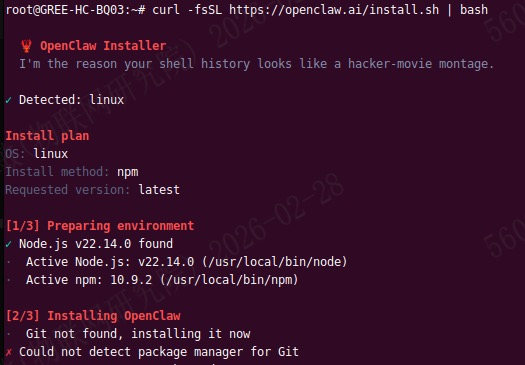
image.png

Could you please provide some guidance to help customer add openclaw feature please?

Thanks,

Kevin

  • The expert assigned to this is out of office this week. Expect responses next week. 

  • Hi Kevin,

    As Mukul mentioned the expert is currently out of office, but since the issue seems to be about missing git package in the SDK, here is my comment:

    You can configure Yocto to include the git package and rebuild the Linux root filesystem, though I am unable to provide instructions since I know little about Yocto.

    Or you can use the Debian package in the Processor SDK, then use "apt install git" on your board to install git into the root filesystem.

    Another important notice, not related to your query, is that you should NOT use SDK9.2 for production because it has a PLL configuration issue. The issue is fixed in SDK10.0. 

  • Hi Kevin,

    Openclaw currently doesn't have a recipe for Yocto.

    If it's just for testing, runtime installation on a Debian based image, as mentioned by Bin would be better.

    Or you can use the Debian package in the Processor SDK, then use "apt install git" on your board to install git into the root filesystem.

    I've tried installing Openclaw on the latest Debian Trixie-based Armbian image on AM62x.
    ( Refer: https://software-dl.ti.com/processor-sdk-linux/esd/AM62X/11_02_08_02_Debian/exports/docs/devices/AM62X/debian/Getting_Started_Guide.html
    https://www.ti.com/tool/download/PROCESSOR-SDK-LINUX-AM62X/11.02.08.02 )

    I could successfully install openClaw. Sharing the logs below.

        _             _    _                             __  __ _    _      _ 
       /_\  _ _ _ __ | |__(_)__ _ _ _ ___ _  _ _ _  ___ / _|/ _(_)__(_)__ _| |
      / _ \| '_| '  \| '_ \ / _` | ' \___| || | ' \/ _ \  _|  _| / _| / _` | |
     /_/ \_\_| |_|_|_|_.__/_\__,_|_||_|   \_,_|_||_\___/_| |_| |_\__|_\__,_|_|
                                                                              
     v26.02 rolling for SK-AM62B running Armbian Linux 6.12.57-vendor-k3
    
     Packages:     Debian stable (trixie)
     Support:      DIY (custom image)
     IPv4:         (LAN) 192.168.38.140 (WAN) 122.167.184.192 
    
     Performance:  
    
     Load:         18%           	 Uptime:       4 minutes	
     Memory usage: 8% of 1.88G  	
     CPU temp:     51°C           	 Usage of /:   9% of 29G    	
    
     Commands: 
    
     Monitoring : htop
    
    root@sk-am62b:~# 
    root@sk-am62b:~# 
    root@sk-am62b:~# curl -fsSL https://openclaw.ai/install.sh | bash
    
      🦞 OpenClaw Installer
      Give me a workspace and I'll give you fewer tabs, fewer toggles, and more oxygen.
    
    ✓ Detected: linux
    
    Install plan
    OS: linux
    Install method: npm
    Requested version: latest
    
    [1/3] Preparing environment
    · Node.js not found, installing it now
    · Installing Node.js via NodeSource
    · Installing Linux build tools (make/g++/cmake/python3)
    ✓ Build tools installed
    ✓ Node.js v22 installed
    · Active Node.js: v22.22.0 (/usr/bin/node)
    · Active npm: 10.9.4 (/usr/bin/npm)
    
    [2/3] Installing OpenClaw
    · Git not found, installing it now
    ✓ Git installed
    · Installing OpenClaw v2026.3.2
    ✓ OpenClaw npm package installed
    ✓ OpenClaw installed
    
    [3/3] Finalizing setup
    
    🦞 OpenClaw installed successfully (2026.3.2)!
    All done! I promise to only judge your code a little bit.
    
    · Starting setup
    
    
    🦞 OpenClaw 2026.3.2 (85377a2) — Claws out, commit in—let's ship something mildly responsible.
    
    ▄▄▄▄▄▄▄▄▄▄▄▄▄▄▄▄▄▄▄▄▄▄▄▄▄▄▄▄▄▄▄▄▄▄▄▄▄▄▄▄▄▄▄▄▄▄▄▄▄▄▄▄
    ██░▄▄▄░██░▄▄░██░▄▄▄██░▀██░██░▄▄▀██░████░▄▄▀██░███░██
    ██░███░██░▀▀░██░▄▄▄██░█░█░██░█████░████░▀▀░██░█░█░██
    ██░▀▀▀░██░█████░▀▀▀██░██▄░██░▀▀▄██░▀▀░█░██░██▄▀▄▀▄██
    ▀▀▀▀▀▀▀▀▀▀▀▀▀▀▀▀▀▀▀▀▀▀▀▀▀▀▀▀▀▀▀▀▀▀▀▀▀▀▀▀▀▀▀▀▀▀▀▀▀▀▀▀
                      🦞 OPENCLAW 🦞                    
     
    T  OpenClaw onboarding
    |
    o  Security ---------------------------------------------------------------------------------+
    |                                                                                            |
    |  Security warning — please read.                                                           |
    |                                                                                            |
    |  OpenClaw is a hobby project and still in beta. Expect sharp edges.                        |
    |  By default, OpenClaw is a personal agent: one trusted operator boundary.                  |
    |  This bot can read files and run actions if tools are enabled.                             |
    |  A bad prompt can trick it into doing unsafe things.                                       |
    |                                                                                            |
    |  OpenClaw is not a hostile multi-tenant boundary by default.                               |
    |  If multiple users can message one tool-enabled agent, they share that delegated tool      |
    |  authority.                                                                                |
    |                                                                                            |
    |  If you’re not comfortable with security hardening and access control, don’t run           |
    |  OpenClaw.                                                                                 |
    |  Ask someone experienced to help before enabling tools or exposing it to the internet.     |
    |                                                                                            |
    |  Recommended baseline:                                                                     |
    |  - Pairing/allowlists + mention gating.                                                    |
    |  - Multi-user/shared inbox: split trust boundaries (separate gateway/credentials, ideally  |
    |    separate OS users/hosts).                                                               |
    |  - Sandbox + least-privilege tools.                                                        |
    |  - Shared inboxes: isolate DM sessions (`session.dmScope: per-channel-peer`) and keep      |
    |    tool access minimal.                                                                    |
    |  - Keep secrets out of the agent’s reachable filesystem.                                   |
    |  - Use the strongest available model for any bot with tools or untrusted inboxes.          |
    |                                                                                            |
    |  Run regularly:                                                                            |
    |  openclaw security audit --deep                                                            |
    |  openclaw security audit --fix                                                             |
    |                                                                                            |
    |  Must read: https://docs.openclaw.ai/gateway/security                                      |
    |                                                                                            |
    +--------------------------------------------------------------------------------------------+
    |
    o  I understand this is personal-by-default and shared/multi-user use requires lock-down. Continue?
    |  Yes
    |
    o  Onboarding mode
    |  QuickStart
    |
    o  QuickStart -------------------------+
    |                                      |
    |  Gateway port: 18789                 |
    |  Gateway bind: Loopback (127.0.0.1)  |
    |  Gateway auth: Token (default)       |
    |  Tailscale exposure: Off             |
    |  Direct to chat channels.            |
    |                                      |
    +--------------------------------------+
    |
    o  Model/auth provider
    |  OpenAI
    |
    o  OpenAI auth method
    |  Back
    |
    *  Model/auth provider
    |  > OpenAI (Codex OAuth + API key)
    |    Anthropic
    |    Chutes
    |    vLLM
    |    MiniMax
    |    Moonshot AI (Kimi K2.5)
    |    Google
    |    xAI (Grok)
    |    Mistral AI
    |    Volcano Engine
    |    BytePlus
    |    OpenRouter
    |    Kilo Gateway
    |    Qwen
    |    Z.AI
    |    Qianfan
    |    Copilot
    |    Vercel AI Gateway
    |    OpenCode Zen
    |    Xiaomi
    |    Synthetic
    |    Together AI
    |    Hugging Face
    |    Venice AI
    |    LiteLLM
    |    Cloudflare AI Gateway
    |    Custom Provider
    |    Skip for now


    Regards,
    Vinu