This thread has been locked.

If you have a related question, please click the "Ask a related question" button in the top right corner. The newly created question will be automatically linked to this question.

TDA4VM: fastbev model application and it's onnx file usage

Part Number: TDA4VM
Other Parts Discussed in Thread: TDA4VH

I have found that FastBEV has been successfully applied on the TDA4 board, and I also want to try this. However, I failed at the first step of converting fastbev.pt to an ONNX file. I cannot convert fastbev.pt to a single ONNX file; I can only generate multiple ONNX files, which are difficult to import with TIDL.
So, is there any way to obtain the script for converting fastbev.pt to a single ONNX file?
If the script is unavailable, could I get the original FastBEV ONNX file that has already been imported and deployed on the TDA4 board?
  • Hi,

    I would suggest you to use the edgeai-tensorlab to train and export the model.

    https://github.com/TexasInstruments/edgeai-tensorlab

    You can find the fastbev model inside,

    https://github.com/TexasInstruments/edgeai-tensorlab/tree/main/edgeai-mmdetection3d

    https://github.com/TexasInstruments/edgeai-tensorlab/tree/main/edgeai-mmdetection3d/projects_edgeai/FastBEV

    This will have a optimized model that works on TIDL.

    could I get the original FastBEV ONNX file that has already been imported and deployed on the TDA4 board?

    We have the demo enabled in the latest 11.2 sdk in j784s4 (TDA4VH) device. You can check that out.
    https://software-dl.ti.com/jacinto7/esd/processor-sdk-rtos-j784s4/11_02_00_06/exports/docs/vision_apps/docs/user_guide/group_apps_dl_demos_app_tidl_bev.html
    This demo will have the compiled artifacts. You can generate the onnx model from the edgeai-tensorlab repo.

    Regards,
    Gokul

  • Hi

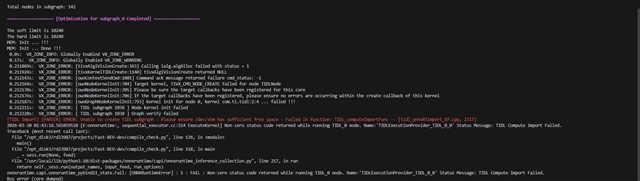
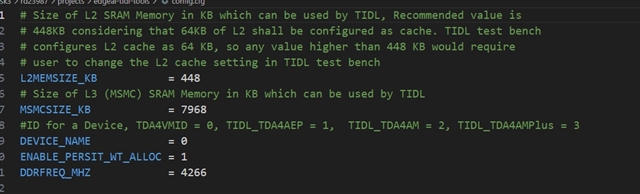
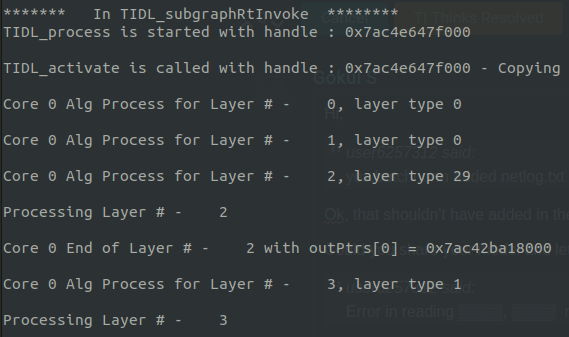
       I have successful transfer the bev model to onnx file according to https://github.com/TexasInstruments/edgeai-tensorlab/tree/main/edgeai-mmdetection3d/projects_edgeai/FastBEV ,but failed in TIDL import.Images uploaded are errors and related settings.Is there any suggestions to solve this problem?

    Ths

  • Hi,

    Can you set degug_level to 2 and share the logs,

    Also can your try with the latest sdk version 11_02_04_00

    I can see still 2 layers are not supported, can you share the model here. and refer to https://github.com/TexasInstruments/edgeai-tidl-tools/blob/master/docs/od_meta_arch.md and add the od_meta_arch during compilation.

    Regards,
    Gokul

  • Dear Gokul.

    upload the model from customer.

    LH_BEV_files.zip

    thanks a lot!

    yong

  • Hi Yong,

    The model you shared is different from the one in edgeai-tensorlab, where did the customer get the model, is it from the original fastbev repo ?

    I will share the steps to use the fastbev model validated in tda4 device.

    1. clone the edgeai-tidl-tools,  https://github.com/TexasInstruments/edgeai-tidl-tools

    2. checkout to branch 11_02_07_00,

    cd edgeai-tidl-tools
    git checkout 11_02_07_00
    

    3. setup the edgeai-tidl-tools by following the docs, github.com/.../edgeai-tidl-tools

    4. Download the model and the prototxt file,
    http://software-dl.ti.com/jacinto7/esd/modelzoo/11_02_00/models/vision/detection_3d/pandaset/mmdet3d/fastbev_mod_pandaset_nms_r18_f1_256x704_20251215.onnx

    place the downloaded model inside /edgeai-tidl-tools/runtimes/examples/data/models/fastbev_mod_pandaset_nms_r18_f1_256x704_20251215.onnx

    http://software-dl.ti.com/jacinto7/esd/modelzoo/11_02_00/models/vision/detection_3d/pandaset/mmdet3d/fastbev_mod_pandaset_nms_r18_f1_256x704_20251215.prototxt

    place the downloaded file inside edgeai-tidl-tools/runtimes/examples/data/prototxt/fastbev_mod_pandaset_nms_r18_f1_256x704_20251215.prototxt

    There links are available in the edgeai-modelzoo, https://github.com/TexasInstruments/edgeai-tensorlab/tree/main/edgeai-modelzoo
    https://github.com/TexasInstruments/edgeai-tensorlab/blob/main/edgeai-modelzoo/models/vision/detection_3d/pandaset/mmdet3d/fastbev_mod_pandaset_nms_r18_f1_256x704_20251215.onnx.link

    5. edit the config.yaml file to add the fastbev model, refer the below patch

    diff --git a/runtimes/examples/python/basic_example/config.yaml b/runtimes/examples/python/basic_example/config.yaml
    index fc6e618..bcd3dcc 100644
    --- a/runtimes/examples/python/basic_example/config.yaml
    +++ b/runtimes/examples/python/basic_example/config.yaml
    @@ -22,6 +22,20 @@ infer_options:
     
     models:
       # ONNX Models
    +  fastbev:
    +    path: ../../data/models/fastbev_mod_pandaset_nms_r18_f1_256x704_20251215.onnx
    +    inputs: ../../data/inputs/fast_bev_valid_input.bin  # add your custom input file here
    +    compile_options:
    +      "object_detection:meta_layers_names_list" : ../../data/prototxt/fastbev_mod_pandaset_nms_r18_f1_256x704_20251215.prototxt
    +      "object_detection:meta_arch_type" : 7
    +    pre_process_info:
    +      input_mean : [123.675, 116.28, 103.53]
    +      input_scale : [0.017125, 0.017507, 0.017429]
    +    post_process_info:
    +      task_type: "detection"
    +      labels: ../../data/inputs/labels.txt
    +      label_offset: 1
    +    runtime: onnxrt
       cl-ort-resnet18-v1:
         path: ../../data/models/resnet18_opset9.onnx
         inputs: ../../data/inputs/airshow.jpg

    6. compile the model,

    cd edgeai-tidl-tools/runtimes/examples/python/basic_example;
    python3 basic_example.py -m fastbev -c

    Regards,
    Gokul

  • where did the customer get the model, is it from the original fastbev repo

    yes,I get the model from original fasebev github repo,follow your edgeai-tensorlab fastbev export onnx code,tranfer the origilnal pth bev model to onnx

    file,the main differences is just here

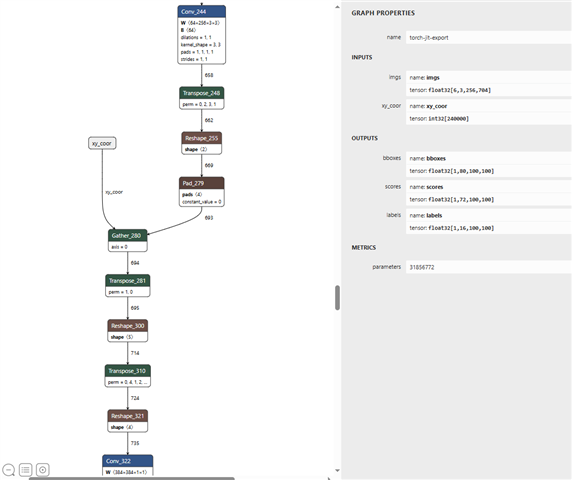
    which caused by extract_feat_neck3d in onnx_network.py,which len(mlvl_feat_split)=4,input img shape=[24,3,256,704],xy_coor shape = [4,375000],we use 4 frames as input to train nuscens dataset.Except these,it's almost the same process.Then why it occures erros in tidl transfer:
    | Node | Node Name | Reason |
    -------------------------------------------------------------------------------------------------------
    | Concat | Concat_522 | Layer 167 - op type Concat, Unknown input dimension, not supported by TIDL |
    | Reshape | Reshape_525 | Layer 168 - op type Reshape, Unknown input dimension, not supported by TIDL
    in fast,the concat and reshape are quite common nodes.

    Please do not ask me to make things go from zero on build edgeai tools,could you please tell me why the onnx model failed on the concat reshape nodes,or they are not the real reason.Could you try to tranfer the onnx model in
    LH_BEV_files.zip

    under tidl_11_01_06_00 and 11_02_04_00 versions.

    Hope for answers and suggestions.

    Ths

  • Hi,

    Due to the osrt model optimization the transpose node between concat and reshape is removed but after removal the output of concat and input of reshape is not handled properly that's why there is a unknown dimensions error.

    Can you disable onnxruntime optimization.

    Add your model name in the if condition or add the following code at line 70 inside onnxrt_ep.py,
    so.graph_optimization_level = rt.GraphOptimizationLevel.ORT_DISABLE_ALL

    Regards,
    Gokul

  • Hi

       In edgeai-tidl-tools/examples/osrt_python/ort/onnxrt_ep.py,I have tried add 

    so.graph_optimization_level = rt.GraphOptimizationLevel.ORT_DISABLE_ALL  at line 71,
    commet # if model == "cl-ort-deit-tiny":
            # so.graph_optimization_level = rt.GraphOptimizationLevel.ORT_DISABLE_ALL at line 295,
    then try conver onnx with TIDL 11.1.6.00,but nothing changed with the same two nodes unknown input dimensions

      The second way about add model name in if condition,which as what I do  at line 297
    if model == "fastbev_result202601010908_simple.onnx":
            so.graph_optimization_level = rt.GraphOptimizationLevel.ORT_DISABLE_ALL  ,comment #so.graph_optimization_level = rt.GraphOptimizationLevel.ORT_DISABLE_ALL at line 72
     but,still nothing changed.
      Anything I do wrong, or can you try convert the onnx success?
      Hope for your reply
    Ths
  • Hi,

    I have tried add 

    so.graph_optimization_level = rt.GraphOptimizationLevel.ORT_DISABLE_ALL  at line 71,

    Just adding this line should work,

    if model == "fastbev_result202601010908_simple.onnx":
            so.graph_optimization_level = rt.GraphOptimizationLevel.ORT_DISABLE_ALL  ,comment #so.graph_optimization_level =

    You have to give the model name from your model_config.py file, in the if condition,
      

    give your corresponding model name from your model_config.py

    By doing this you should just solve the unsupported layer, I am using tools version 11_02_04_00

    But I am also facing this error,

    This is because the some intermediate layer outputs size comes to 270MB and there are 2-3 layer outputs that require such memory which is not practical to have in the evm. Typically we allocate 128 or 256MB for scratch memory in evm.

    The reason your model is taking more memory is your input is 24x3x256x704, we have validated only with input 6x3x256x704, which is 6 input images for the model. In your case its 24 image which i think you are trying to do batch processing with 4 batches. This would require more memory footprint. So i would suggest you to remove the batch input and just give 6 input images for your model.

    Still my recommendation is to use the model available in edgeai-modelzoo which is already validated on tda4 device.

    Regards,
    Gokul

  • Hi

       I still can't understand how to give the model name from model_config.py file in the if condition,can you show me how you add model name with my onnx model?

       Discussion with my ‌colleague,24 image training for high accuracy,but now is weak,whatever 6 image.It seems it's time to get edgeai-tidl-tools  setup to do the bev training and onnx export

    Ths

  • Hi,

       Discussion with my ‌colleague,24 image training for high accuracy,but now is weak,whatever 6 image.It seems it's time to get edgeai-tidl-tools  setup to do the bev training and onnx export

    ok.

     I still can't understand how to give the model name from model_config.py file in the if condition,can you show me how you add model name with my onnx model?

    I am using the 11_02_04_00 tools where the interface has changed to .yaml files, i have shared my configs,

    5. edit the config.yaml file to add the fastbev model, refer the below patch

    Can you share your model_config.py file and i will point you the right string to add in if condition.

    Regards,
    Gokul

  • Hi

        For some reasons,we can't using tidl11.2 version to do engineer development currently,but tidl11.1.6.0 is the one we are developing on.

    Can you share your model_config.py file

    we are using python onnxruntime and set tidl as enviroment to do tidl import. I found that you are you using config.yaml in ti edgeai-tool,what I doing is based on  the original importer way https://software-dl.ti.com/jacinto7/esd/processor-sdk-rtos-jacinto7/08_00_00_12/exports/docs/tidl_j7_08_00_00_10/ti_dl/docs/user_guide_html/md_tidl_model_import.html.   So,can you give me some suggestions on  how to do importer with my onnx model?

    Ths

  • Hi,

        For some reasons,we can't using tidl11.2 version to do engineer development currently,but tidl11.1.6.0 is the one we are developing on.

    ok.

    I would still recommend to use the python based tool to import from edgeai-tidl-tools

    Anyway if you want to use the old import method, then follow the step 4 to download the model from edgeai-modelzoo

    4. Download the model and the prototxt file,

    and then refer the following config file and modify as per your requirement,

    modelType          = 2
    numParamBits       = 8
    inElementType      = 1 5
    rawDataInElementType = 6 5
    inputNetFile      = "../../test/testvecs/models/public/onnx/fastbev_mod_pandaset_nms_r18_f1_256x704_20251215.onnx"
    outputNetFile      = "../../test/testvecs/config/tidl_models/onnx/tidl_net_fast_bev.bin"
    outputParamsFile   = "../../test/testvecs/config/tidl_models/onnx/tidl_io_fast_bev_"
    inDIM1 = 1 1
    inDIM2 = 6 1
    inWidth  = 704 160000
    inHeight =  256 1
    inNumChannels = 3 1
    inDataNamesList =  "imgs, xy_coor"
    #outDataNamesList =  "/Sigmoid_output_0, /Reshape_6_output_0, /Reshape_8_output_0"
    inData = "../../test/testvecs/largeInputs/fast_bev_valid_input.bin"
    inDataFormat = 1 
    inFileFormat = 1
    metaArchType = 7
    metaLayersNamesList =  "../../test/testvecs/config/import/public/onnx/tidl_import_fast_bev_metaarch.prototxt"
    # 3d od post processing
    postProcDataId = 1
    postProcType    = 6

    Regards,
    Gokul

  • Hi

        I have transfer the onnx model to bin with tidl_11_01_06_00,and I want to check if I converted right. 

    PC_dsp_test_dl_algo.out s:subgraph_0_tidl_io_.qunat_stats_config.txt is the way I used to test the output bins with single image inputs,but now the model inputs requires 6 images(6,3,256,704) and xy_coors,which I have never deal with.Can you show me how to test the bins correctly with PC_dsp_test_dl_algo.out,or is there any other ways?
       Hope for you advices.
    ths
  • Hi,

    s:subgraph_0_tidl_io_.qunat_stats_config.txt is the way I used to test the output bins with single image inputs

    No, that's not the config file for inference.

    model inputs requires 6 images(6,3,256,704) and xy_coors,which I have never deal with.Can you show me how to test the bins correctly

    You should have given the inputs to the model during compilation correct ? then only the scale values will be updated properly during qunatization phase.

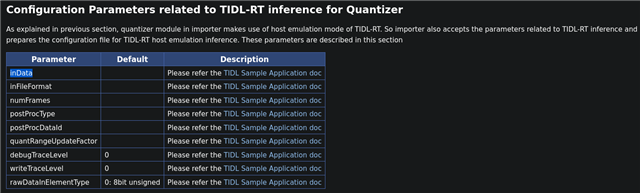
    the inData file specifies the input data. If you are using rawdatainput format then store the 6 images followed by xy_coors in .bin file and give that file as input during the import/inference process. Dump 6 frames with dimensions (6,3,256,704) and dump xy_coors with appropriate dimensions. You should also check your rawDataInElementType based on that you have to dump, if rawDataInElementType == 6 for images then its a float32 type data, so the data you dump should be of float32 type and if rawDataInElementType == 5 for xy_coors the data you dump should be of int32 type.

    Or if you use the python based tool you can load the image and xy_coors as numpy object and give it to model. It would be easy if you have python based tools else you have to generate the .bin file for input.

    Regards,
    Gokul

  • Hi

       This is my config.txt   combined_data.bin is simplely generated by:

    float32_tensor = np.random.randn(6, 3, 256, 704).astype(np.float32)
    int32_tensor = np.random.randint(0, 10000, size=(240000,), dtype=np.int32).reshape(1, 1, 240000, 1)
    float32_bytes = float32_tensor.tobytes()
    int32_bytes = int32_tensor.tobytes()
    bin_file = "combined_data.bin"
    with open(bin_file, 'wb') as f:
        f.write(float32_bytes)
        f.write(int32_bytes)

    With tidl_model_import.out config.txt to tranfer onnx to tidl bins. It compiled and get error:
    ------------------------- Network Compiler Traces ------------------------------
    Wrong data type for layer input 3, 8
    Error : Error Code = <ERR_UNSUPPORTED_DATA_TYPE>
    [TIDL Import] FATAL ERROR: Network Compiler failed to execute - Memory planning failed with return code - 65280 -- [tidl_import_core.cpp, 1061]
    [TIDL Import] Aborting
    I think  is's caused by int64 type data in onnx model,but int64 is only exist in Resize,Split and Reshape nodes,which your fastbev_mod_pandaset_nms_r18_f1_256x704_20251215.onnx exists too.So,what is the problem?
    Besides,what if tidl transfer suceced and generate net.bin io.bin,how can I test the bins is right ro inference?PC_dsp_test_dl_algo.out s:subgraph_0_tidl_io_.qunat_stats_config.txt is the way I used to test the bins on PC
  • Hi,

       This is my config.txt   combined_data.bin is simplely generated by:

    ok.

    Wrong data type for layer input 3, 8

    Based on the error int32 bit input is given for a batchNorm layer which is not supported. From your model there is no such layer, but during the compilation process there can be chances that the layer is added for optimization.
    I am suspecting on reason where your xy_coors dimension is 240000 wherein the edgeai mode the dimension is 160000. Though I cannot confirm if this is the reason without your model. Can you share your latest model or check your intermediate results by looking into this file subgraph_0_tidl_net.bin.html to see if any batchnorm layer is added.

    Besides,what if tidl transfer suceced and generate net.bin io.bin,how can I test the bins is right ro inference?

    You can create a different config.txt for inference and use the below config as reference for inference, and run PC_dsp_test_dl_algo.out with that config file.

    netBinFile = "testvecs/config/tidl_models/onnx/tidl_net_fast_bev.bin"
    ioConfigFile   = "testvecs/config/tidl_models/onnx/tidl_io_fast_bev_1.bin"
    outData =   testvecs/output/fast_bev_out.bin
    inFileFormat = 1
    inData = testvecs/largeInputs/fast_bev_valid_input.bin  # add your input file here
    postProcType    = 5

    Regards,
    Gokul

  • 确认其中是否添加了 batchNorm 层

    yes,batchnorm added netlog.txt as below

    Num of Layer Detected : 123
    --------------------------------------------------------------------------------------------------------------------------------------------------------------------------------------------
    Num|TIDL Layer Name |Out Data Name |Group |#Ins |#Outs |Inbuf Ids |Outbuf Id |In NCHW |Out NCHW |MACS |
    --------------------------------------------------------------------------------------------------------------------------------------------------------------------------------------------
    0|TIDL_DataLayer |imgs_original | 0| -1| 1| x x x x x x x x | 0 | 0 0 0 0 0 0 | 6 1 1 3 256 704 | 0 |
    1|TIDL_DataLayer |xy_coor_original | 0| -1| 1| x x x x x x x x | 1 | 0 0 0 0 0 0 | 1 1 1 1 1 240000 | 0 |
    2|TIDL_ConvolutionLayer |404 | 0| 1| 1| 0 x x x x x x x | 2 | 6 1 1 3 256 704 | 6 1 1 64 128 352 |2543321088 |
    3|TIDL_BatchNormLayer |xy_coor | 0| 1| 1| 1 x x x x x x x | 3 | 1 1 1 1 1 240000 | 1 1 1 1 1 240000 | 240000 |
    4|TIDL_PoolingLayer |405 | 0| 1| 1| 2 x x x x x x x | 4 | 6 1 1 64 128 352 | 6 1 1 64 64 176 | 38928384 |
    5|TIDL_ConvolutionLayer |408 | 0| 1| 1| 4 x x x x x x x | 5 | 6 1 1 64 64 176 | 6 1 1 64 64 176 |2491416576 |
    6|TIDL_ConvolutionLayer |409 | 0| 1| 1| 5 x x x x x x x | 6 | 6 1 1 64 64 176 | 6 1 1 64 64 176 |2491416576 |
    7|TIDL_EltWiseLayer |412 | 0| 2| 1| 6 4 x x x x x x | 7 | 6 1 1 64 64 176 | 6 1 1 64 64 176 | 4325376 |
    8|TIDL_ConvolutionLayer |415 | 0| 1| 1| 7 x x x x x x x | 8 | 6 1 1 64 64 176 | 6 1 1 64 64 176 |2491416576 |
    9|TIDL_ConvolutionLayer |416 | 0| 1| 1| 8 x x x x x x x | 9 | 6 1 1 64 64 176 | 6 1 1 64 64 176 |2491416576 |
    10|TIDL_EltWiseLayer |419 | 0| 2| 1| 9 7 x x x x x x | 10 | 6 1 1 64 64 176 | 6 1 1 64 64 176 | 4325376 |
    11|TIDL_ConvolutionLayer |422 | 0| 1| 1| 10 x x x x x x x | 11 | 6 1 1 64 64 176 | 6 1 1 64 64 176 |2491416576 |
    12|TIDL_ConvolutionLayer |423 | 0| 1| 1| 11 x x x x x x x | 12 | 6 1 1 64 64 176 | 6 1 1 64 64 176 |2491416576 |
    13|TIDL_EltWiseLayer |426 | 0| 2| 1| 12 10 x x x x x x | 13 | 6 1 1 64 64 176 | 6 1 1 64 64 176 | 4325376 |
    14|TIDL_ConvolutionLayer |524 | 0| 1| 1| 13 x x x x x x x | 14 | 6 1 1 64 64 176 | 6 1 1 64 64 176 | 276824064 |
    15|TIDL_ConvolutionLayer |432 | 0| 1| 1| 13 x x x x x x x | 15 | 6 1 1 64 64 176 | 6 1 1 128 32 88 | 138412032 |
    16|TIDL_ConvolutionLayer |429 | 0| 1| 1| 13 x x x x x x x | 16 | 6 1 1 64 64 176 | 6 1 1 128 32 88 |1245708288 |
    17|TIDL_ConvolutionLayer |430 | 0| 1| 1| 16 x x x x x x x | 17 | 6 1 1 128 32 88 | 6 1 1 128 32 88 |2491416576 |
    18|TIDL_EltWiseLayer |435 | 0| 2| 1| 17 15 x x x x x x | 18 | 6 1 1 128 32 88 | 6 1 1 128 32 88 | 2162688 |
    19|TIDL_ConvolutionLayer |438 | 0| 1| 1| 18 x x x x x x x | 19 | 6 1 1 128 32 88 | 6 1 1 128 32 88 |2491416576 |
    20|TIDL_ConvolutionLayer |439 | 0| 1| 1| 19 x x x x x x x | 20 | 6 1 1 128 32 88 | 6 1 1 128 32 88 |2491416576 |
    21|TIDL_EltWiseLayer |442 | 0| 2| 1| 20 18 x x x x x x | 21 | 6 1 1 128 32 88 | 6 1 1 128 32 88 | 2162688 |
    22|TIDL_ConvolutionLayer |445 | 0| 1| 1| 21 x x x x x x x | 22 | 6 1 1 128 32 88 | 6 1 1 128 32 88 |2491416576 |
    23|TIDL_ConvolutionLayer |446 | 0| 1| 1| 22 x x x x x x x | 23 | 6 1 1 128 32 88 | 6 1 1 128 32 88 |2491416576 |
    24|TIDL_EltWiseLayer |449 | 0| 2| 1| 23 21 x x x x x x | 24 | 6 1 1 128 32 88 | 6 1 1 128 32 88 | 2162688 |
    25|TIDL_ConvolutionLayer |452 | 0| 1| 1| 24 x x x x x x x | 25 | 6 1 1 128 32 88 | 6 1 1 128 32 88 |2491416576 |
    26|TIDL_ConvolutionLayer |453 | 0| 1| 1| 25 x x x x x x x | 26 | 6 1 1 128 32 88 | 6 1 1 128 32 88 |2491416576 |
    27|TIDL_EltWiseLayer |456 | 0| 2| 1| 26 24 x x x x x x | 27 | 6 1 1 128 32 88 | 6 1 1 128 32 88 | 2162688 |
    28|TIDL_ConvolutionLayer |526 | 0| 1| 1| 27 x x x x x x x | 28 | 6 1 1 128 32 88 | 6 1 1 64 32 88 | 138412032 |
    29|TIDL_ConvolutionLayer |462 | 0| 1| 1| 27 x x x x x x x | 29 | 6 1 1 128 32 88 | 6 1 1 256 16 44 | 138412032 |
    30|TIDL_ConvolutionLayer |459 | 0| 1| 1| 27 x x x x x x x | 30 | 6 1 1 128 32 88 | 6 1 1 256 16 44 |1245708288 |
    31|TIDL_ConvolutionLayer |460 | 0| 1| 1| 30 x x x x x x x | 31 | 6 1 1 256 16 44 | 6 1 1 256 16 44 |2491416576 |
    32|TIDL_EltWiseLayer |465 | 0| 2| 1| 31 29 x x x x x x | 32 | 6 1 1 256 16 44 | 6 1 1 256 16 44 | 1081344 |
    33|TIDL_ConvolutionLayer |468 | 0| 1| 1| 32 x x x x x x x | 33 | 6 1 1 256 16 44 | 6 1 1 256 16 44 |2491416576 |
    34|TIDL_ConvolutionLayer |469 | 0| 1| 1| 33 x x x x x x x | 34 | 6 1 1 256 16 44 | 6 1 1 256 16 44 |2491416576 |
    35|TIDL_EltWiseLayer |472 | 0| 2| 1| 34 32 x x x x x x | 35 | 6 1 1 256 16 44 | 6 1 1 256 16 44 | 1081344 |
    36|TIDL_ConvolutionLayer |475 | 0| 1| 1| 35 x x x x x x x | 36 | 6 1 1 256 16 44 | 6 1 1 256 16 44 |2491416576 |
    37|TIDL_ConvolutionLayer |476 | 0| 1| 1| 36 x x x x x x x | 37 | 6 1 1 256 16 44 | 6 1 1 256 16 44 |2491416576 |
    38|TIDL_EltWiseLayer |479 | 0| 2| 1| 37 35 x x x x x x | 38 | 6 1 1 256 16 44 | 6 1 1 256 16 44 | 1081344 |
    39|TIDL_ConvolutionLayer |482 | 0| 1| 1| 38 x x x x x x x | 39 | 6 1 1 256 16 44 | 6 1 1 256 16 44 |2491416576 |
    40|TIDL_ConvolutionLayer |483 | 0| 1| 1| 39 x x x x x x x | 40 | 6 1 1 256 16 44 | 6 1 1 256 16 44 |2491416576 |
    41|TIDL_EltWiseLayer |486 | 0| 2| 1| 40 38 x x x x x x | 41 | 6 1 1 256 16 44 | 6 1 1 256 16 44 | 1081344 |
    42|TIDL_ConvolutionLayer |489 | 0| 1| 1| 41 x x x x x x x | 42 | 6 1 1 256 16 44 | 6 1 1 256 16 44 |2491416576 |
    43|TIDL_ConvolutionLayer |490 | 0| 1| 1| 42 x x x x x x x | 43 | 6 1 1 256 16 44 | 6 1 1 256 16 44 |2491416576 |
    44|TIDL_EltWiseLayer |493 | 0| 2| 1| 43 41 x x x x x x | 44 | 6 1 1 256 16 44 | 6 1 1 256 16 44 | 1081344 |
    45|TIDL_ConvolutionLayer |496 | 0| 1| 1| 44 x x x x x x x | 45 | 6 1 1 256 16 44 | 6 1 1 256 16 44 |2491416576 |
    46|TIDL_ConvolutionLayer |497 | 0| 1| 1| 45 x x x x x x x | 46 | 6 1 1 256 16 44 | 6 1 1 256 16 44 |2491416576 |
    47|TIDL_EltWiseLayer |500 | 0| 2| 1| 46 44 x x x x x x | 47 | 6 1 1 256 16 44 | 6 1 1 256 16 44 | 1081344 |
    48|TIDL_ConvolutionLayer |528 | 0| 1| 1| 47 x x x x x x x | 48 | 6 1 1 256 16 44 | 6 1 1 64 16 44 | 69206016 |
    49|TIDL_ConvolutionLayer |506 | 0| 1| 1| 47 x x x x x x x | 49 | 6 1 1 256 16 44 | 6 1 1 512 8 22 | 138412032 |
    50|TIDL_ConvolutionLayer |503 | 0| 1| 1| 47 x x x x x x x | 50 | 6 1 1 256 16 44 | 6 1 1 512 8 22 |1245708288 |
    51|TIDL_ConvolutionLayer |504 | 0| 1| 1| 50 x x x x x x x | 51 | 6 1 1 512 8 22 | 6 1 1 512 8 22 |2491416576 |
    52|TIDL_EltWiseLayer |509 | 0| 2| 1| 51 49 x x x x x x | 52 | 6 1 1 512 8 22 | 6 1 1 512 8 22 | 540672 |
    53|TIDL_ConvolutionLayer |512 | 0| 1| 1| 52 x x x x x x x | 53 | 6 1 1 512 8 22 | 6 1 1 512 8 22 |2491416576 |
    54|TIDL_ConvolutionLayer |513 | 0| 1| 1| 53 x x x x x x x | 54 | 6 1 1 512 8 22 | 6 1 1 512 8 22 |2491416576 |
    55|TIDL_EltWiseLayer |516 | 0| 2| 1| 54 52 x x x x x x | 55 | 6 1 1 512 8 22 | 6 1 1 512 8 22 | 540672 |
    56|TIDL_ConvolutionLayer |519 | 0| 1| 1| 55 x x x x x x x | 56 | 6 1 1 512 8 22 | 6 1 1 512 8 22 |2491416576 |
    57|TIDL_ConvolutionLayer |520 | 0| 1| 1| 56 x x x x x x x | 57 | 6 1 1 512 8 22 | 6 1 1 512 8 22 |2491416576 |
    58|TIDL_EltWiseLayer |523 | 0| 2| 1| 57 55 x x x x x x | 58 | 6 1 1 512 8 22 | 6 1 1 512 8 22 | 540672 |
    59|TIDL_ConvolutionLayer |530 | 0| 1| 1| 58 x x x x x x x | 59 | 6 1 1 512 8 22 | 6 1 1 64 8 22 | 34603008 |
    60|TIDL_ConvolutionLayer |592 | 0| 1| 1| 59 x x x x x x x | 60 | 6 1 1 64 8 22 | 6 1 1 64 8 22 | 38928384 |
    61|TIDL_ResizeLayer |548 | 0| 1| 1| 59 x x x x x x x | 61 | 6 1 1 64 8 22 | 6 1 1 64 16 44 | 1081344 |
    62|TIDL_ResizeLayer |656_TIDL_0 | 0| 1| 1| 60 x x x x x x x | 62 | 6 1 1 64 8 22 | 6 1 1 64 32 88 | 4325376 |
    63|TIDL_EltWiseLayer |549 | 0| 2| 1| 48 61 x x x x x x | 63 | 6 1 1 64 16 44 | 6 1 1 64 16 44 | 270336 |
    64|TIDL_ResizeLayer |656 | 0| 1| 1| 62 x x x x x x x | 64 | 6 1 1 64 32 88 | 6 1 1 64 64 176 | 17301504 |
    65|TIDL_ConvolutionLayer |590 | 0| 1| 1| 63 x x x x x x x | 65 | 6 1 1 64 16 44 | 6 1 1 64 16 44 | 155713536 |
    66|TIDL_ResizeLayer |566 | 0| 1| 1| 63 x x x x x x x | 66 | 6 1 1 64 16 44 | 6 1 1 64 32 88 | 4325376 |
    67|TIDL_ResizeLayer |635 | 0| 1| 1| 65 x x x x x x x | 67 | 6 1 1 64 16 44 | 6 1 1 64 64 176 | 17301504 |
    68|TIDL_EltWiseLayer |567 | 0| 2| 1| 28 66 x x x x x x | 68 | 6 1 1 64 32 88 | 6 1 1 64 32 88 | 1081344 |
    69|TIDL_ConvolutionLayer |588 | 0| 1| 1| 68 x x x x x x x | 69 | 6 1 1 64 32 88 | 6 1 1 64 32 88 | 622854144 |
    70|TIDL_ResizeLayer |584 | 0| 1| 1| 68 x x x x x x x | 70 | 6 1 1 64 32 88 | 6 1 1 64 64 176 | 17301504 |
    71|TIDL_ResizeLayer |614 | 0| 1| 1| 69 x x x x x x x | 71 | 6 1 1 64 32 88 | 6 1 1 64 64 176 | 17301504 |
    72|TIDL_EltWiseLayer |585 | 0| 2| 1| 14 70 x x x x x x | 72 | 6 1 1 64 64 176 | 6 1 1 64 64 176 | 4325376 |
    73|TIDL_ConvolutionLayer |586 | 0| 1| 1| 72 x x x x x x x | 73 | 6 1 1 64 64 176 | 6 1 1 64 64 176 |2491416576 |
    74|TIDL_ConcatLayer |657 | 0| 4| 1| 73 71 67 64 x x x x | 74 | 6 1 1 64 64 176 | 6 1 1 256 64 176 | 17301504 |
    75|TIDL_ConvolutionLayer |658 | 0| 1| 1| 74 x x x x x x x | 75 | 6 1 1 256 64 176 | 6 1 1 64 64 176 |9965666304 |
    76|TIDL_ReshapeLayer |658_0 | 0| 1| 1| 75 x x x x x x x | 76 | 6 1 1 64 64 176 | 1 1 1 384 64 176 | 4325376 |
    77|TIDL_SliceLayer |660_1 | 0| 1| 1| 76 x x x x x x x | 77 | 1 1 1 384 64 176 | 1 1 1 384 64 176 | 0 |
    78|TIDL_ReshapeLayer |660 | 0| 1| 1| 77 x x x x x x x | 78 | 1 1 1 384 64 176 | 1 1 6 64 64 176 | 4325376 |
    79|TIDL_TransposeLayer |664 | 0| 1| 1| 78 x x x x x x x | 79 | 1 1 6 64 64 176 | 1 1 6 64 176 64 | 4325376 |
    80|TIDL_ReshapeLayer |671 | 0| 1| 1| 79 x x x x x x x | 80 | 1 1 6 64 176 64 | 1 1 1 1 67584 64 | 0 |
    81|TIDL_PadLayer |695 | 0| 1| 1| 80 x x x x x x x | 81 | 1 1 1 1 67584 64 | 1 1 1 1 67585 64 | 0 |
    82|TIDL_GatherLayer |696 | 0| 2| 1| 81 3 x x x x x x | 82 | 1 1 1 1 67585 64 | 1 1 1 1 240000 64 | 0 |
    83|TIDL_TransposeLayer |697 | 0| 1| 1| 82 x x x x x x x | 83 | 1 1 1 1 240000 64 | 1 1 1 1 64 240000 | 15360000 |
    84|TIDL_ReshapeLayer |716 | 0| 1| 1| 83 x x x x x x x | 84 | 1 1 1 1 64 240000 | 1 1 64 200 200 6 | 0 |
    85|TIDL_TransposeLayer |726 | 0| 1| 1| 84 x x x x x x x | 85 | 1 1 64 200 200 6 | 1 1 6 64 200 200 | 15360000 |
    86|TIDL_ReshapeLayer |737 | 0| 1| 1| 85 x x x x x x x | 86 | 1 1 6 64 200 200 | 1 1 1 384 200 200 | 0 |
    87|TIDL_ConvolutionLayer |738 | 0| 1| 1| 86 x x x x x x x | 87 | 1 1 1 384 200 200 | 1 1 1 384 200 200 |5898240000 |
    88|TIDL_ConvolutionLayer |741 | 0| 1| 1| 87 x x x x x x x | 88 | 1 1 1 384 200 200 | 1 1 1 384 200 200 |53084160000 |
    89|TIDL_ConvolutionLayer |742 | 0| 1| 1| 88 x x x x x x x | 89 | 1 1 1 384 200 200 | 1 1 1 384 200 200 |53084160000 |
    90|TIDL_EltWiseLayer |745 | 0| 2| 1| 87 89 x x x x x x | 90 | 1 1 1 384 200 200 | 1 1 1 384 200 200 | 15360000 |
    91|TIDL_ConvolutionLayer |748 | 0| 1| 1| 90 x x x x x x x | 91 | 1 1 1 384 200 200 | 1 1 1 256 100 100 |8847360000 |
    92|TIDL_ConvolutionLayer |751 | 0| 1| 1| 91 x x x x x x x | 92 | 1 1 1 256 100 100 | 1 1 1 256 100 100 |5898240000 |
    93|TIDL_ConvolutionLayer |752 | 0| 1| 1| 92 x x x x x x x | 93 | 1 1 1 256 100 100 | 1 1 1 256 100 100 |5898240000 |
    94|TIDL_EltWiseLayer |755 | 0| 2| 1| 91 93 x x x x x x | 94 | 1 1 1 256 100 100 | 1 1 1 256 100 100 | 2560000 |
    95|TIDL_ConvolutionLayer |758 | 0| 1| 1| 94 x x x x x x x | 95 | 1 1 1 256 100 100 | 1 1 1 256 100 100 |5898240000 |
    96|TIDL_ConvolutionLayer |761 | 0| 1| 1| 95 x x x x x x x | 96 | 1 1 1 256 100 100 | 1 1 1 256 100 100 |5898240000 |
    97|TIDL_ConvolutionLayer |762 | 0| 1| 1| 96 x x x x x x x | 97 | 1 1 1 256 100 100 | 1 1 1 256 100 100 |5898240000 |
    98|TIDL_EltWiseLayer |765 | 0| 2| 1| 95 97 x x x x x x | 98 | 1 1 1 256 100 100 | 1 1 1 256 100 100 | 2560000 |
    99|TIDL_ConvolutionLayer |768 | 0| 1| 1| 98 x x x x x x x | 99 | 1 1 1 256 100 100 | 1 1 1 256 100 100 |5898240000 |
    100|TIDL_ConvolutionLayer |771 | 0| 1| 1| 99 x x x x x x x |100 | 1 1 1 256 100 100 | 1 1 1 256 100 100 |5898240000 |
    101|TIDL_ConvolutionLayer |772 | 0| 1| 1|100 x x x x x x x |101 | 1 1 1 256 100 100 | 1 1 1 256 100 100 |5898240000 |
    102|TIDL_EltWiseLayer |775 | 0| 2| 1| 99 101 x x x x x x |102 | 1 1 1 256 100 100 | 1 1 1 256 100 100 | 2560000 |
    103|TIDL_ConvolutionLayer |778 | 0| 1| 1|102 x x x x x x x |103 | 1 1 1 256 100 100 | 1 1 1 256 100 100 |5898240000 |
    104|TIDL_ConvolutionLayer |781 | 0| 1| 1|103 x x x x x x x |104 | 1 1 1 256 100 100 | 1 1 1 256 100 100 |5898240000 |
    105|TIDL_ConvolutionLayer |782 | 0| 1| 1|104 x x x x x x x |105 | 1 1 1 256 100 100 | 1 1 1 256 100 100 |5898240000 |
    106|TIDL_EltWiseLayer |785 | 0| 2| 1|103 105 x x x x x x |106 | 1 1 1 256 100 100 | 1 1 1 256 100 100 | 2560000 |
    107|TIDL_ConvolutionLayer |788 | 0| 1| 1|106 x x x x x x x |107 | 1 1 1 256 100 100 | 1 1 1 256 100 100 |5898240000 |
    108|TIDL_ConvolutionLayer |791 | 0| 1| 1|107 x x x x x x x |108 | 1 1 1 256 100 100 | 1 1 1 256 100 100 |5898240000 |
    109|TIDL_ConvolutionLayer |792 | 0| 1| 1|108 x x x x x x x |109 | 1 1 1 256 100 100 | 1 1 1 256 100 100 |5898240000 |
    110|TIDL_EltWiseLayer |795 | 0| 2| 1|107 109 x x x x x x |110 | 1 1 1 256 100 100 | 1 1 1 256 100 100 | 2560000 |
    111|TIDL_ConvolutionLayer |798 | 0| 1| 1|110 x x x x x x x |111 | 1 1 1 256 100 100 | 1 1 1 256 100 100 |5898240000 |
    112|TIDL_ConvolutionLayer |801 | 0| 1| 1|111 x x x x x x x |112 | 1 1 1 256 100 100 | 1 1 1 256 100 100 |5898240000 |
    113|TIDL_ConvolutionLayer |802 | 0| 1| 1|112 x x x x x x x |113 | 1 1 1 256 100 100 | 1 1 1 256 100 100 |5898240000 |
    114|TIDL_EltWiseLayer |805 | 0| 2| 1|111 113 x x x x x x |114 | 1 1 1 256 100 100 | 1 1 1 256 100 100 | 2560000 |
    115|TIDL_ConvolutionLayer |808 | 0| 1| 1|114 x x x x x x x |115 | 1 1 1 256 100 100 | 1 1 1 256 100 100 |5898240000 |
    116|TIDL_TransposeLayer |809 | 0| 1| 1|115 x x x x x x x |116 | 1 1 1 256 100 100 | 1 1 1 256 100 100 | 2560000 |
    117|TIDL_ConvolutionLayer |bboxes | 0| 1| 1|116 x x x x x x x |117 | 1 1 1 256 100 100 | 1 1 1 80 100 100 | 204800000 |
    118|TIDL_ConvolutionLayer |scores | 0| 1| 1|116 x x x x x x x |118 | 1 1 1 256 100 100 | 1 1 1 72 100 100 | 184320000 |
    119|TIDL_ConvolutionLayer |labels | 0| 1| 1|116 x x x x x x x |119 | 1 1 1 256 100 100 | 1 1 1 16 100 100 | 40960000 |
    120|TIDL_DataLayer |bboxes | 0| 1| -1|117 x x x x x x x | 0 | 1 1 1 80 100 100 | 0 0 0 0 0 0 | 0 |
    121|TIDL_DataLayer |scores | 0| 1| -1|118 x x x x x x x | 0 | 1 1 1 72 100 100 | 0 0 0 0 0 0 | 0 |
    122|TIDL_DataLayer |labels | 0| 1| -1|119 x x x x x x x | 0 | 1 1 1 16 100 100 | 0 0 0 0 0 0 | 0 |
    --------------------------------------------------------------------------------------------------------------------------------------------------------------------------------------------
    Total Giga Macs : 320.5005

    edgeai 模式下的维度为 160000

    for n_voxels=[[200, 200, 6]]  and tidl tools n_voxels=[[200,200,4]]

    with onnxruntime,tidl as system environment

    tranfer onnx to io.bin and net.bin,by PC_dsp_test_dl_algo.out s:config.txt for infernce on PC

    netBinFile = "/opt_disk3/rd23987/projects/Fast-BEV-dev/tifastbev_fresult/result/subgraph_0_tidl_net.bin"
    ioConfigFile = "/opt_disk3/rd23987/projects/Fast-BEV-dev/tifastbev_fresult/result/subgraph_0_tidl_io_1.bin"
    outData = /opt_disk3/rd23987/projects/Fast-BEV-dev/tifastbev_fresult/dumpbins/fast_bev_out.bin
    inFileFormat = 2
    inData = /opt_disk3/rd23987/projects/Fast-BEV-dev/combined_data.bin # add your input file here
    writeTraceLevel = 3
    debugTraceLevel = 3
    traceDumpBaseName = /opt_disk3/rd23987/projects/Fast-BEV-dev/tifastbev_fresult/dumpbins/
    flowCtrl = 33

    Freeing memory for user provided Net

    Instance created for /opt_disk3/rd23987/projects/Fast-BEV-dev/tifastbev_fresult/postproc/inference_config.txt

    Processing Cnt : 0, InstCnt : 0 /opt_disk3/rd23987/projects/Fast-BEV-dev/tifastbev_fresult/result/subgraph_0_tidl_net.bin!

    Processing config file #0 : /opt_disk3/rd23987/projects/Fast-BEV-dev/tifastbev_fresult/postproc/inference_config.txt
    Input : dataId=0, name=imgs, elementType 6, scale=1.000000, zero point=0, layout=0
    Input : dataId=1, name=xy_coor, elementType 5, scale=1.000000, zero point=0, layout=0
    Ouput : dataId=125, name=labels, elementType 6, scale=1.000000, zero point=0, layout=0
    Ouput : dataId=124, name=scores, elementType 6, scale=1.000000, zero point=0, layout=0
    Ouput : dataId=123, name=bboxes, elementType 6, scale=1.000000, zero point=0, layout=0
    74273164, 70.832 0x7fe4e3906010
    worstCaseDelay for Pre-emption is 450.8637390
    Network File Read done
    Calling algAlloc
    TIDL_initDebugTraceParams Done

    --------------------------------------------
    TIDL Memory size requiement (record wise):
    MemRecNum , Space , Attribute , Alignment , Size(KBytes), BasePtr
    0 , DDR Cacheable , Persistent , 128, 19.28 , 0x00000000
    1 , DDR Cacheable , Persistent , 128, 0.66 , 0x00000000
    2 , DDR Cacheable , Scratch , 128, 16.00 , 0x00000000
    3 , DDR Cacheable , Scratch , 128, 448.00 , 0x00000000
    4 , DDR Cacheable , Scratch , 128, 7968.00 , 0x00000000
    5 , DDR Cacheable , Persistent , 128, 1128.47 , 0x00000000
    6 , DDR Cacheable , Scratch , 128, 8572.50 , 0x00000000
    7 , DDR Cacheable , Scratch , 128, 91443.62, 0x00000000
    8 , DDR Cacheable , Scratch , 128, 413280.12, 0x00000000
    9 , DDR Cacheable , Scratch , 128, 175248.00, 0x00000000
    10 , DDR Cacheable , Persistent , 128, 4971.03 , 0x00000000
    11 , DDR Cacheable , Scratch , 128, 4096.25 , 0x00000000
    12 , DDR Cacheable , Persistent , 128, 0.12 , 0x00000000
    13 , DDR Cacheable , Persistent , 128, 72532.52, 0x00000000
    14 , DDR Cacheable , Persistent , 128, 0.00 , 0x00000000
    15 , DDR Cacheable , Persistent , 128, 70284.75, 0x00000000
    --------------------------------------------
    Total memory size requirement (space wise):
    Mem Space , Size(KBytes)
    DDR Cacheable, 850009.31
    --------------------------------------------
    NOTE: Memory requirement in host emulation can be different from the same on EVM
    To get the actual TIDL memory requirement make sure to run on EVM with
    debugTraceLevel = 2

    --------------------------------------------
    Num, Space, SizeinBytes, SineInMB
    0, 17, 19744, 0.019 0x557f9b969500
    1, 17, 672, 0.001 0x557f9b96e280
    2, 17, 16384, 0.016 0x7fe4e7fdc080
    3, 17, 458752, 0.438 0x7fe4e7fe0080
    4, 17, 8159232, 7.781 0x7fe4e8050080
    5, 17, 1155552, 1.102 0x7fe4e37eb080
    6, 17, 8778240, 8.372 0x7fe4e8818080
    7, 17, 93638272, 89.300 0x7fe4e9077280
    8, 17, 423198848, 403.594 0x7fe4ee9c4100
    9, 17, 179453952, 171.141 0x7fe507d5c180
    10, 17, 5090336, 4.855 0x7fe4e3310080
    11, 17, 4194560, 4.000 0x7fe512880180
    12, 17, 128, 0.000 0x557f9b951180
    13, 17, 74273292, 70.833 0x7fe4dec3a080
    14, 17, 1, 0.000 0x557f9b951280
    15, 17, 71971584, 68.637 0x7fe4da796080
    Total External Memory (DDR) Size = 870409549, 830.087
    TIDL init call from ivision API

    --------------------------------------------
    TIDL Memory size requiement (record wise):
    MemRecNum , Space , Attribute , Alignment , Size(KBytes), BasePtr
    0 , DDR Cacheable , Persistent , 128, 19.28 , 0x9b969500
    1 , DDR Cacheable , Persistent , 128, 0.66 , 0x9b96e280
    2 , DDR Cacheable , Scratch , 128, 16.00 , 0xe7fdc080
    3 , DDR Cacheable , Scratch , 128, 448.00 , 0xe7fe0080
    4 , DDR Cacheable , Scratch , 128, 7968.00 , 0xe8050080
    5 , DDR Cacheable , Persistent , 128, 1128.47 , 0xe37eb080
    6 , DDR Cacheable , Scratch , 128, 8572.50 , 0xe8818080
    7 , DDR Cacheable , Scratch , 128, 91443.62, 0xe9077280
    8 , DDR Cacheable , Scratch , 128, 413280.12, 0xee9c4100
    9 , DDR Cacheable , Scratch , 128, 175248.00, 0x07d5c180
    10 , DDR Cacheable , Persistent , 128, 4971.03 , 0xe3310080
    11 , DDR Cacheable , Scratch , 128, 4096.25 , 0x12880180
    12 , DDR Cacheable , Persistent , 128, 0.12 , 0x9b951180
    13 , DDR Cacheable , Persistent , 128, 72532.52, 0xdec3a080
    14 , DDR Cacheable , Persistent , 128, 0.00 , 0x9b951280
    15 , DDR Cacheable , Persistent , 128, 70284.75, 0xda796080
    --------------------------------------------
    Total memory size requirement (space wise):
    Mem Space , Size(KBytes)
    DDR Cacheable, 850009.31
    --------------------------------------------
    NOTE: Memory requirement in host emulation can be different from the same on EVM
    To get the actual TIDL memory requirement make sure to run on EVM with
    debugTraceLevel = 2

    ...

    Alg Init for Layer # - 99
    Alg Init for Layer # - 100
    Alg Init for Layer # - 101
    Alg Init for Layer # - 102
    Alg Init for Layer # - 103
    Alg Init for Layer # - 104
    Alg Init for Layer # - 105
    Alg Init for Layer # - 106
    Alg Init for Layer # - 107
    Alg Init for Layer # - 108
    Alg Init for Layer # - 109
    Alg Init for Layer # - 110
    Alg Init for Layer # - 111
    Alg Init for Layer # - 112
    Alg Init for Layer # - 113
    Alg Init for Layer # - 114
    Alg Init for Layer # - 115
    Alg Init for Layer # - 116
    Alg Init for Layer # - 117
    Alg Init for Layer # - 118
    Alg Init for Layer # - 119
    Alg Init for Layer # - 120
    Alg Init for Layer # - 123
    Alg Init for Layer # - 121
    Alg Init for Layer # - 124
    Alg Init for Layer # - 122
    Alg Init for Layer # - 125


    TIDL_RT: Set default TIDLRT tensor done
    TIDL_RT: Set default TIDLRT tensor done
    TIDL_RT: Set default TIDLRT tensor done
    TIDL_RT: Set default TIDLRT tensor done
    TIDL_RT: Set default TIDLRT tensor done
    ▒▒▒▒
    Error in reading ▒▒▒▒, ▒▒▒▒  nothing known about the unkonow block? may be net.bin io.bin transfer wrong?

    Besides,I'm also trying TIdl_11.2, python3 basic_example.py -infer,get bboxes.bin,labels.bin,scores.bin,which is just inference onnx file. Is there any way to do inference like PC_dsp_test_dl_algo.out config.txt?

    python3 basic_example.py -compile is still processing

  • Hi,

    yes,batchnorm added netlog.txt as below

    Ok, that shouldn't have added in the beginning where data is coming in as int32 or a dataconvert layer should have been added before the batchnorm layer.

    Could you share your model and let me check why it is added. Or you could also try to adding dataconvert layer.

    Error in reading ▒▒▒▒, ▒▒▒▒  nothing known about the unkonow block? may be net.bin io.bin transfer wrong?

    Con you check if the model if compiled properly without any issue, if the model compilation is not complete this can cause issue. Can you share the compilation logs to verify the model is compiled completely.

    Besides,I'm also trying TIdl_11.2, python3 basic_example.py -infer,get bboxes.bin,labels.bin,scores.bin,which is just inference onnx file. Is there any way to do inference like PC_dsp_test_dl_algo.out config.txt?

    Besides this have you added your model in config.yaml file and you can verify the model is running on c7x by setting debug_level to 2 and enabling remote core logs on target by running "source /opt/vision_apps/vision_apps_init.sh"

    5. edit the config.yaml file to add the fastbev model, refer the below patch

    This will print inference logs from c7x that you can use to confirm the inference is happening on c7x.

    On host side also you should be see some inference logs like below after setting the debug level.

    Regards,
    Gokul

  • fastbev.rar

    Hi

    Could you share your model and let me check why it is added

    Refer to upload file,fixed_fastbev_result202504091503_simple.onnx is the model I'm using, 

    the compilation logs to verify the model is compiled completely

    fixedbevcompile(add .log to read)  the log 

    rest files are import config.txt and inference.txt that used to do tidl import and inference under tidl 11.1

    Besides, compile bins under tidl11.2 is unexpectly slow slow slow slow

    int this step which has took almost 8 hours! And now it's still not completed. Any params can help accelerate this? Configs show below

    If compiled success,how can I test the net.bin,io.bin is right imported? under tidl11.1,I can use PC_dsp_test_dl_algo.out s:config.txt to test,but under tidl 11.2 python envs,how to test?python3 basic_example.py -infer seems not the right way, or the config I set wrong.

    Hope foe your  replies

    Ths

  • Hi,

    Refer to upload file,fixed_fastbev_result202504091503_simple.onnx is the model I'm using, 

    Let me check this and update you.

    int this step which has took almost 8 hours! And now it's still not completed. Any params can help accelerate this? Configs show below

    This should not take long time, can you specify the model name while compiling,

    "python3 basic_example.py -m fastbev -c"

    If compiled success,how can I test the net.bin,io.bin is right imported? under tidl11.1,I can use PC_dsp_test_dl_algo.out s:config.txt to test,but under tidl 11.2 python envs,how to test?python3 basic_example.py -infer seems not the right way, or the config I set wrong.

    After successful compilation set debug_level to 2 in  the infer_options

    and run,
    "python3 basic_example.py -m fastbev"

    Share the logs after this, the logs should be similar to how you test model with PC_dsp_test_dl_algo.out.
    Let me check the logs and confirm if the inference is happening correctly or not.

    Regards,
    Gokul

  • Hi

    python3 basic_example.py -m fastbev

       In this inference,how to set the models.fastbev.path?The same to compile as **.onnx,or I should use net.bin,io.bin? What I think is **.onnx is absolutely incorrect

    this is the compile log under tidl11.2,which is quite similar to my own solution of compile by onnxtuntime.

    Regards

    Ji

  • Hi,

       In this inference,how to set the models.fastbev.path?The same to compile as **.onnx,or I should use net.bin,io.bin? What I think is **.onnx is absolutely incorrect

    You don't have to specify the patch for net.bin and io.bin you have to set the onnx path itself. So the script will generate the compiled artifacts inside runtimes/examples/model-artifacts/fastbev/artifacts whenever you run inference it will take the net.bin and io.bin from inside this file. 

    What I think is **.onnx is absolutely incorrect

    No, the scripts works in that way. If you still have doubts try deleting the .bin files inside runtimes/examples/model-artifacts/fastbev/artifacts folder and you should see error during inference that it couldn't find the files.

    After successful compilation set debug_level to 2 in  the infer_options

    and run,
    "python3 basic_example.py -m fastbev"

    Can you try this and share the logs.

    Regards,
    Gokul

  • Hi,

    Looking at your fastbev_config file, there seems to be different config from what I have shared,

    and then refer the following config file and modify as per your requirement,

    this inDataNorm parameter is adding the batchnorm layer at the input where there is int32 data type, currently int32 bit input to batchnorm is not supported so remove this config parameter from your file and try to compile again. Instead of this batchnorm layer do the normalization in your preproc node.
    Anyway I will raise a internal Jira to report this error in the import phase.

    Regards,
    Gokul

  • so remove this config parameter from your file and try to compile again

    yes,I comment the inDataNorm=1,and it compile success

    python3 basic_example.py -m fastbev

    nothing changed,it still takes a quite long long long time to compile,which makes me dislike the tidl11.2 to do something development.Something wrong when I setup environment?Could you try compile my onnx file to test if it is the problem of onnx model or sys environment? 

  • Hi,

    It is taking more time from my side as well,

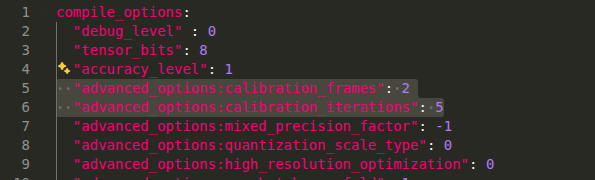
    If you just want to check if the model is compiling successfully then you can reduce calibration_frames and calibration_iterations to 1. This might affect the accuracy but you can confirm that model is running fine in hardware.

    This will make the model compile faster but not recommended for final deployment. Once you know the model successfully compiles and running without any issue then increase the calibration_frames and iterations and let it compile for longer duration.

    Regards,
    Gokul

  • And I would still suggest you to try the fastbev model from edgeai-modelzoo as mentioned in the previous reply. That will have optimized post processing and will result in less number of nodes in the final compiled model.

    I will share the steps to use the fastbev model validated in tda4 device.

    Regards,
    Gokul

  • the fastbev model from edgeai-modelzoo as mentioned in the previous reply

    The model compiled quite fast in just minutes,

     calibration_frames and calibration_iterations to 1

    This still cost almost 4 hours,anyway,its better than 10 hours before.

    I'll try using edgeai-tensorlab to train fastbev with nuscens dataset.

    TIDL11.1 compiled and inferenced has also succeed,which compiled in less than 20 minutes.

    Ths

  • Hi,

    Thanks for the update.

    Should you need more info or can I close this thread if this issue is solved.

    Regards,
    Gokul