This thread has been locked.

If you have a related question, please click the "Ask a related question" button in the top right corner. The newly created question will be automatically linked to this question.

AM3358: tilcdc DRM FAILURE

Part Number: AM3358

Hi ,

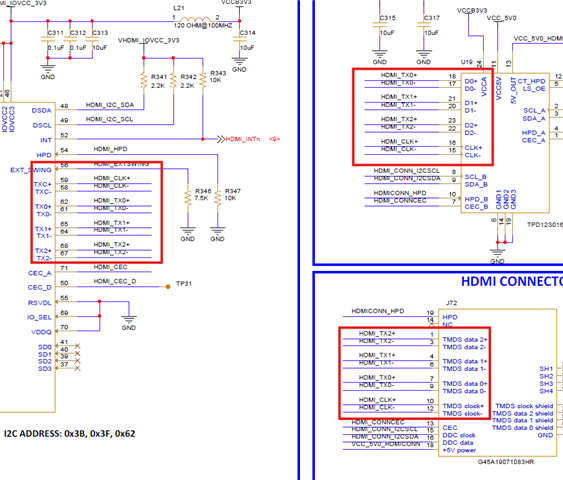
We are working on AM3358 based board with HDMI, used SiI9022ACNU chipset, I2c prob is good, all hardware configurations are good.

But, insmod tilcdc.ko seems having an issue with drm, please refer below crash report, What we expect is irrespective of I2c probe tilcdc module must load. Attached the dtsi file which is modified from beaglebone black.

[  143.780424] ------------[ cut here ]------------
[  143.785155] WARNING: CPU: 0 PID: 209 at drivers/gpu/drm/drm_atomic_state_helper.c:174 drm_atomic_helper_crtc_duplicate_state+0x60
[  143.797408] Modules linked in: tilcdc(+)
[  143.801548] CPU: 0 PID: 209 Comm: insmod Not tainted 6.6.58 #20
[  143.807510] Hardware name: Generic AM33XX (Flattened Device Tree)
[  143.813649]  unwind_backtrace from show_stack+0x18/0x1c
[  143.818930]  show_stack from dump_stack_lvl+0x40/0x4c
[  143.824019]  dump_stack_lvl from __warn+0x80/0x14c
[  143.828847]  __warn from warn_slowpath_fmt+0x184/0x1fc
[  143.834019]  warn_slowpath_fmt from drm_atomic_helper_crtc_duplicate_state+0x68/0x70
[  143.841814]  drm_atomic_helper_crtc_duplicate_state from drm_atomic_get_crtc_state+0x70/0x110
[  143.850395]  drm_atomic_get_crtc_state from drm_atomic_helper_disable_all+0x98/0x1d0
[  143.858186]  drm_atomic_helper_disable_all from drm_atomic_helper_shutdown+0x90/0x144
[  143.866064]  drm_atomic_helper_shutdown from tilcdc_fini+0x58/0xe0 [tilcdc]
[  143.873142]  tilcdc_fini [tilcdc] from tilcdc_init.constprop.0+0x234/0x610 [tilcdc]
[  143.880893]  tilcdc_init.constprop.0 [tilcdc] from tilcdc_pdev_probe+0x58/0xac [tilcdc]
[  143.888990]  tilcdc_pdev_probe [tilcdc] from platform_probe+0x64/0xb8
[  143.895500]  platform_probe from really_probe+0xd8/0x3d0
[  143.900857]  really_probe from __driver_probe_device+0x94/0x1e8
[  143.906821]  __driver_probe_device from driver_probe_device+0x38/0xc8
[  143.913307]  driver_probe_device from __driver_attach+0xe0/0x1b8
[  143.919358]  __driver_attach from bus_for_each_dev+0x84/0xd4
[  143.925060]  bus_for_each_dev from bus_add_driver+0xf8/0x21c
[  143.930759]  bus_add_driver from driver_register+0x84/0x11c
[  143.936374]  driver_register from do_one_initcall+0x50/0x2ac
[  143.942079]  do_one_initcall from do_init_module+0x5c/0x20c
[  143.947690]  do_init_module from init_module_from_file+0x9c/0xd8
[  143.953733]  init_module_from_file from sys_finit_module+0x170/0x34c
[  143.960125]  sys_finit_module from ret_fast_syscall+0x0/0x54
[  143.965817] Exception stack(0xe1515fa8 to 0xe1515ff0)
[  143.970898] 5fa0:                   1256e800 00000063 00000003 0124e190 00000000 bedc7f42
[  143.979117] 5fc0: 1256e800 00000063 bedc7f42 0000017b 00000003 b6f8dcd8 00000000 0053b82c
[  143.987333] 5fe0: bedc7c70 bedc7c60 004905ec b6ec28f0
[  143.992567] ---[ end trace 0000000000000000 ]---


# i2cdetect -y -r 0
     0  1  2  3  4  5  6  7  8  9  a  b  c  d  e  f
00:          -- -- -- -- -- -- -- -- -- -- -- -- -- 
10: -- -- -- -- -- -- -- -- UU -- -- -- -- -- -- -- 
20: -- -- -- -- UU -- -- -- -- -- -- -- -- -- -- -- 
30: -- -- -- -- -- -- -- -- -- -- -- 3b -- -- -- 3f 
40: -- -- -- -- -- -- -- -- -- -- -- -- -- -- -- -- 
50: -- -- -- -- -- -- -- -- -- -- -- -- -- -- -- -- 
60: -- -- 62 -- -- -- -- -- -- -- -- -- -- -- -- -- 
70: -- -- -- -- -- -- -- --


Rgds

Chandra

  • Hi Chandra,

    I am routing your query to our Display expert for comments.

  • Hi Chandra,
    There have been multiple patches to the linux 6.6 tilcdc driver. The latest one on TI SDK 11.02 has linux 6.12.
    But even that may not be sufficient. Please take a look this linux next branch:  
    https://gitlab.com/linux-kernel/linux-next/-/commits/master/drivers/gpu/drm/tilcdc?ref_type=heads 

    These commits may not get incorparated in the upcoming linux release. You may need to use upstream linux and then port these patches back to upstream linux.

  • Hi Divyansh,

    Now we are able to detect the HDMI and issue was found to be tilcdc.ko needs to be wait till si drivers load, after that if we insmod it works, and we can see data on LCD.

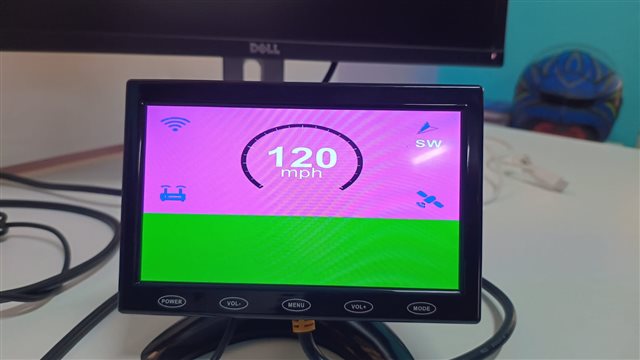
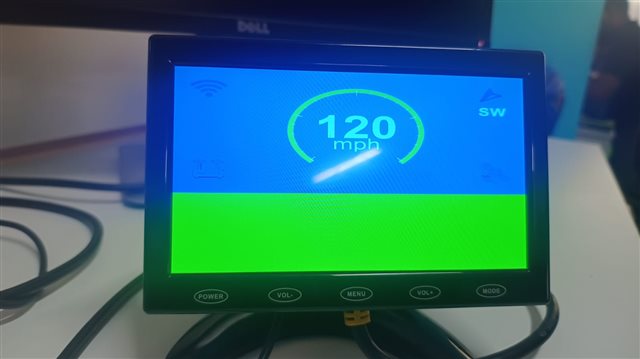
    Now new issue is, color seems to be wrong not sure is there any kernel drivers fixed this, In our dts file we must set crossed, since it is 24bit  RGB interface interface

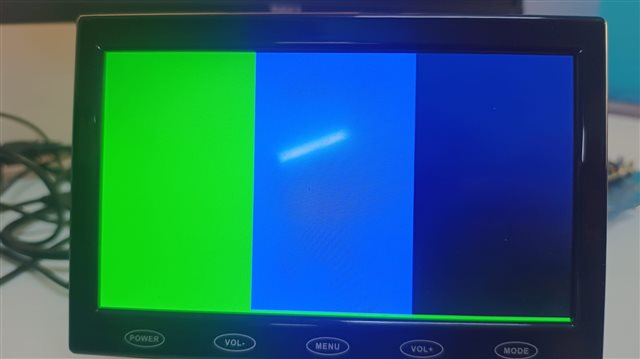
    Below is the image how we are getting the data on screen,

    With Crossed:

    With straight,

    Below are dts settings:

    &lcdc {
          status = "okay";
          blue-and-red-wiring = "crossed"; // Adjust based on your PCB routing


          port {
              lcdc_out_hdmi: endpoint {
                  remote-endpoint = <&hdmi_in>;
                  bus-width = <24>; // Explicitly set 24-bit
        data-mapping = "rgb888";
              };
          };
    };

    &i2c0 {
          sil9022: sil9022a@3b {
              compatible = "sil,sii9022";
              reg = <0x3B>; // Standard I2C address for SiI9022A, since CI2CA = HIGH, 0x3B, LOW = 0x39

        iovcc-supply = <&v3v3_reg_hdmi>;   /* I/O Supply: 1.8V or 3.3V */
              cvcc12-supply = <&v1v2_reg_hdmi>;  /* Digital Core Supply: 1.2V */
              reset-gpios = <&gpio0 6 GPIO_ACTIVE_LOW>; 
              interrupt-parent = <&gpio1>;
              interrupts = <25 IRQ_TYPE_EDGE_FALLING>;

        pinctrl-names = "default", "off";
        pinctrl-0 = <&si_hdmi_smarthud_pins>;
        pinctrl-1 = <&si_hdmi_smarthud_off_pins>;

              status = "okay";


              // Define ports for video input (from LCDC) and output (HDMI)
              ports {
                    #address-cells = <1>;
                    #size-cells = <0>;


                    port@0 {
                        reg = <0>;
                        hdmi_in: endpoint {
                              remote-endpoint = <&lcdc_out_hdmi>;
                        };  
                    };


          port@1 {
                        reg = <1>;
                        hdmi_out: endpoint {
                              remote-endpoint = <&hdmi_con_in>;
                        };
          };
              };
          };
    };

    si_hdmi_smarthud_pins: si_hdmi_smarthud_pins {
        pinctrl-single,pins = <
          AM33XX_PADCONF(AM335X_PIN_LCD_DATA0, PIN_OUTPUT, MUX_MODE0)
          AM33XX_PADCONF(AM335X_PIN_LCD_DATA1, PIN_OUTPUT, MUX_MODE0)
          AM33XX_PADCONF(AM335X_PIN_LCD_DATA2, PIN_OUTPUT, MUX_MODE0)
          AM33XX_PADCONF(AM335X_PIN_LCD_DATA3, PIN_OUTPUT, MUX_MODE0)
          AM33XX_PADCONF(AM335X_PIN_LCD_DATA4, PIN_OUTPUT, MUX_MODE0)
          AM33XX_PADCONF(AM335X_PIN_LCD_DATA5, PIN_OUTPUT, MUX_MODE0)
          AM33XX_PADCONF(AM335X_PIN_LCD_DATA6, PIN_OUTPUT, MUX_MODE0)
          AM33XX_PADCONF(AM335X_PIN_LCD_DATA7, PIN_OUTPUT, MUX_MODE0)
          AM33XX_PADCONF(AM335X_PIN_LCD_DATA8, PIN_OUTPUT, MUX_MODE0)
          AM33XX_PADCONF(AM335X_PIN_LCD_DATA9, PIN_OUTPUT, MUX_MODE0)
          AM33XX_PADCONF(AM335X_PIN_LCD_DATA10, PIN_OUTPUT, MUX_MODE0)
          AM33XX_PADCONF(AM335X_PIN_LCD_DATA11, PIN_OUTPUT, MUX_MODE0)
          AM33XX_PADCONF(AM335X_PIN_LCD_DATA12, PIN_OUTPUT, MUX_MODE0)
          AM33XX_PADCONF(AM335X_PIN_LCD_DATA13, PIN_OUTPUT, MUX_MODE0)
          AM33XX_PADCONF(AM335X_PIN_LCD_DATA14, PIN_OUTPUT, MUX_MODE0)
          AM33XX_PADCONF(AM335X_PIN_LCD_DATA15, PIN_OUTPUT, MUX_MODE0)
          AM33XX_PADCONF(AM335X_PIN_GPMC_AD15, PIN_OUTPUT, MUX_MODE1)
          AM33XX_PADCONF(AM335X_PIN_GPMC_AD14, PIN_OUTPUT, MUX_MODE1)
          AM33XX_PADCONF(AM335X_PIN_GPMC_AD13, PIN_OUTPUT, MUX_MODE1)
          AM33XX_PADCONF(AM335X_PIN_GPMC_AD12, PIN_OUTPUT, MUX_MODE1)
          AM33XX_PADCONF(AM335X_PIN_GPMC_AD11, PIN_OUTPUT, MUX_MODE1)
          AM33XX_PADCONF(AM335X_PIN_GPMC_AD10, PIN_OUTPUT, MUX_MODE1)
          AM33XX_PADCONF(AM335X_PIN_GPMC_AD9, PIN_OUTPUT, MUX_MODE1)
          AM33XX_PADCONF(AM335X_PIN_GPMC_AD8, PIN_OUTPUT, MUX_MODE1)
          AM33XX_PADCONF(AM335X_PIN_LCD_VSYNC, PIN_OUTPUT_PULLDOWN, MUX_MODE0)
          AM33XX_PADCONF(AM335X_PIN_LCD_HSYNC, PIN_OUTPUT_PULLDOWN, MUX_MODE0)
          AM33XX_PADCONF(AM335X_PIN_LCD_PCLK, PIN_OUTPUT_PULLDOWN, MUX_MODE0)
          AM33XX_PADCONF(AM335X_PIN_LCD_AC_BIAS_EN, PIN_OUTPUT_PULLDOWN, MUX_MODE0)

          /* HDMI RESET and HDMI INTERRUPT*/  
          AM33XX_PADCONF(AM335X_PIN_SPI0_CS1, PIN_OUTPUT_PULLUP, MUX_MODE7)/*spi0_cs1.gpio0_6*/
          AM33XX_PADCONF(AM335X_PIN_GPMC_A9, PIN_INPUT_PULLUP, MUX_MODE7) /*gpmc_a9.gpio1_25*/
    >;
      };

    Rgds

    Chandra

  • In our dts file we must set crossed, since it is 24bit  RGB interface interface

    Not sure I understand, setting crossed resolves your issue?

  • No , screen come as pinkish.

  • What is the expected output? The blue one, where you do not specify blue-and-red-wiring = "crossed"?

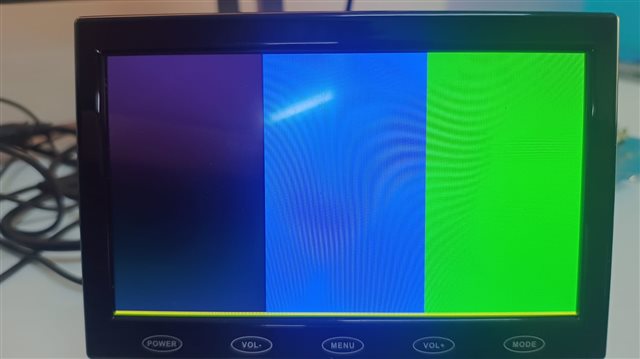
  • No , screen come as pinkish. Here below what is expected and what we are getting,

    Expected:

    What we are getting is,

  • What you are getting is with 'crossed', 'straight', or both?

  • What we are getting is,

    This is with crossed. 

    &lcdc {
          status = "okay";
          blue-and-red-wiring = "crossed"; // Adjust based on your PCB routing


          port {
              lcdc_out_hdmi: endpoint {
                  remote-endpoint = <&hdmi_in>;
                  bus-width = <24>; // Explicitly set 24-bit
        data-mapping = "rgb888";
              };
          };
    };

  • Hi Divyansh,

    It looks like we rootcaused the problem, it seems AM3358 sending data in RGB565 format, when we fill the data in 16 bit format, we are getting proper display.

    Where do I look in to driver code, or any parameters I can change to set to 24bit data , RGB888 format?

    Rgds

    Chandra

  • Hi Chandrashekhar,
    I am not sure if you have seen this Silicon errata, let me know if this helps: https://www.ti.com/lit/er/sprz360i/sprz360i.pdf (Section 3.1.1)

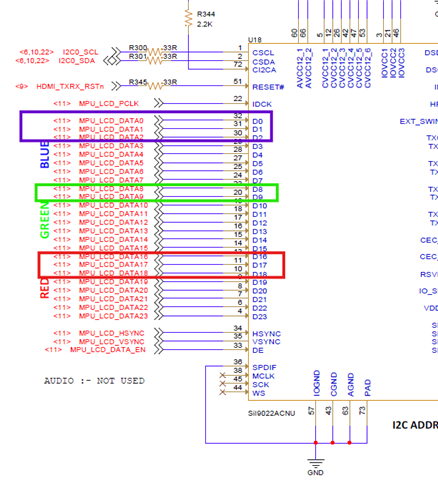
  • You mean in hardware we need to physically switch the lines to match your errata? Can you please check schematics what I shared. I think we are missing something.

  • Hi Chandra,
    Yes, you'll need to change data line routing in your hardware. Please check the following routing used on our EVMs:

  • Hi ,

    As per the errata If I go, Still we are fine with 16bit data output if we ignore, Lower bit colors correct, From Am3358 we configure it as Crossed, BGA888 data will output on

    Data7 to Data0 = Blue7 to Blue0

    Data15 to Data8 = Green7 to Green0

    Data23 to Data16 = Red7 to Red0

  • Hi Chandra,
    No, Simply ignoring the LSB data lines won't solve the issue since the lines would need to be shifted. Please check reference 16-bit implementation in BeagleBone Black  schematics: https://github.com/beagleboard/beaglebone-black/blob/master/BBB_SCH.pdf 

  • I still be operating with 24bits framebuffer only, Beaglebone is 16bit framebuffer. 

  • Hi Chandra,
    Even if you are operating in 24-bit RGB888 with crossed flag enabled, you would need the following connection routing:
    Data[15:11] => LCD[R7:R3] -> LCD[23:19]
    Data[10:5] => LCD[G7:G2] -> LCD[15:10]
    Data[4:0] => LCD[B7:B3] -> LCD[7:3]

    But currently in your setup, Data[23:16] contain LSB from all 3 colors directed to the Red color section of your LCD.

  • It seems Chip errata made us to redesign the board. Not sure we can fix this in tilcdc_crtc file where we do write the each pixel data. Any fix around in drivers?. By mean time our new board are coming up with hardware fix.

  • Hi Chandra, 
    Unfortunately, there is no driver level fix.