AM623: cgt-pru cannot execute binary file: Exec format error

Part Number: AM623

Hi, I'm tring to program the PRUSS in our AM623.
I succesfully installed the compiler cgt-pru-2.3.3 on a debian Distro and succesfully compiled a program. 

However, I had to move the folder to the location where I installed it and, after moving it, the make file threw this error: 

cgt-pru/usr/bin/clpru: cannot execute binary file
make: *** [Makefile:89: gen/main.object] Error 126

I try to launch the binary directly but it gave me another error:

cgt-pru/usr/bin/clpru: cannot execute binary file: Exec format error

I already try to delete and re-install the compiler but the error is always the same. 

Before changing the folder of the compiler I updated the distro. Can updates "breack" the compiler?

More information about my distro:
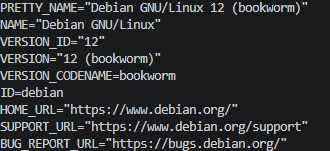
immagine.png

NOTE: maybe is nothing but I saw that the clpru file is for a 32-bit processor but the distro is on a x86_64 processor.

  • Hello Ettore,

    Just to clarify, you are unable to run the clpru executable after "moving the folder to the location where [you] installed it," yes?

    It is not clear to me exactly what the state of your file system is before and after moving the folder. Can you please clarify that?

    It sounds like the clpru executable is being corrupted somehow by the act of moving the folder. Does the clpru get modified during the move or during interactions with the Debian distro?

    It'd be useful if we can verify whether the clrpu file is being corrupted and if it is, identifying the source of the corruption.

    Regards,

    Todd Snider

  • Hi Ettore,

    A suggestion from a colleague for detecting whether the clpru executable has been modified is to run a file command. For example, this is the output that I get when running the file command on my linux installation of the PRU 2.3.3 compiler tools:

    %> file /path/to/install/bin/clpru

    /path/to/install/bin/clpru: ELF 64-bit LSB executable, x86-64, version 1 (SYSV), statically linked, for GNU/Linux 2.6.24, not stripped

    Can you try that and see if the output is something reasonable just after installation and then after moving the folder?

    Regards,

    Todd Snider

  • Hi Todd, 

    Sorry for my bad english, I installed the cgt in a test folder. After that I created a cgt-pru directory in the "ti" folder and move the compiler there.

    When I saw the makefile could not run I deteted file in the directory just created and reinstalled the compiler there.

    I also tried to reinstall in the old test folder but still when I try to launch the "clpru" the error is still "cannot execute binary file: Exec format error"

    Also I looked at the checksum of the installer and it's not corrupted.

    When i launch file clpru this is the outcome:
    clpru: ELF 32-bit LSB executable, ARM, EABI5 version 1 (GNU/Linux), statically linked, for GNU/Linux 2.6.32, BuildID[sha1]=9a690909f90bb46d4b9714215ed610a4ecbdb52c, not stripped

    Can the problem be that I have a 64bit machine and the clpru is for a 32bit machine?

    Thank you for your time,
    Ettore

  • Hi Ettore,

    I would not anticipate that a 64bit machine would have a problem running a 32-bit executable. I'm wondering whether your "path" environment variable is out of sync with where your PRU installation ends up after the move.

    Can you invoke the clpru executable using a full pathname? For example,

    %> /path/to/where/install/has/moved/bin/clpru -version

    ~ Todd 

  • Hi Todd,

    Here are the results

    %> /home/efavari/ti/cgt-pru/usr/bin/clpru -version
    bash: /home/efavari/ti/cgt-pru/usr/bin/clpru: cannot execute binary file: Exec format error

    Even if I try to reinstall it in the old folder and invoke it directly it gaves the same error

    %> /home/efavari/ti/TEST/usr/bin/clpru -version
    bash: /home/efavari/ti/TEST/usr/bin/clpru: cannot execute binary file: Exec format error

    One thing that I did not mention before is that this problem occurred between work days: the day before I get everything working and the day after opened the distro, update it and then moved the files. After that every invocation retured "cannot execute binary file: Exec format error". I don't know if the compiler worked between the update and the moving.

    __Ettore__

  • Hi Ettore,

    Does a fresh installation outside of the Debian distro function properly? The only hypothesis that comes to mind is that the inability to run the clpru executable is related to the presence of the Debian distro environment. If you can successfully execute a freshly installed clpru in a native OS environment without involving the Debian distro in any way, I would have to rule out the PRU compiler tools as the source of the issue.

    Doing a search on the "cannot execute binary file: Exec format error" diagnostic message suggests the following potential resolutions:

    • check "file" command output to verify the binary file's architecture
    • check system architecture compatibility - given clpru is a 32-bit executable and your system is 64-bit, there may be some 32-bit compatibility libraries that may need to be installed (e.g. ia32-libs on Linux). Note that the version 2.3.3 pru compiler tools release was made in 2019, which is quite a while ago. Could this be a problem for the OS environment that you are using?
    • check file integrity - check freshly installed checksum vs. one that moved (I think you mentioned this check earlier in this thread)
    • check file permissions - specifically ability to execute
    • check environment compatibility - clpru is intended to be run in a native or native-compatible OS environment
    • see if clpru can be run within the bin directory that it is installed via "./clpru"

    It may be worth your while to search the web via the "cannot execute binary file: Exec format error" string. There are a few different websites that claim to have useful information about how to resolve this issue.

    Can you try some of the suggestions above that you haven't already tried? I don't have the means to reproduce your environment and/or the circumstances that are causing this issue, so I am at a loss as far as trying to reproduce the issue you are seeing.

    ~ Todd