A related question is a question created from another question. When the related question is created, it will be automatically linked to the original question.
If you have a related question, please click the "Ask a related question" button in the top right corner. The newly created question will be automatically linked to this question.
Yes, PCIe will work on your custom board without the TCA9543APWR — but there are a couple of things to be aware of.
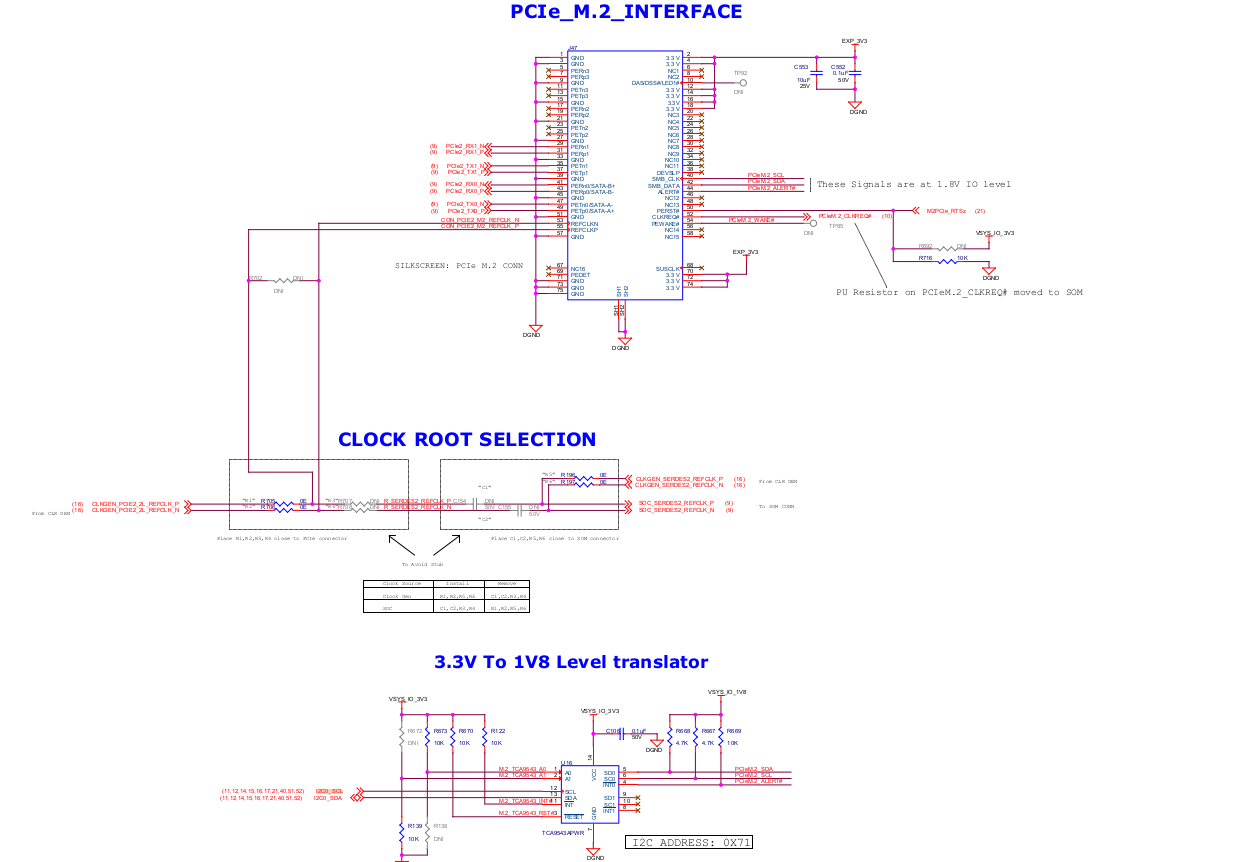
Background: the EVM has two TCA9543APWRs
The TDA4VM EVM uses two of these devices on SoC_I2C0:
| I2C Address | Function |
|------------------|-------------|
| 0x70 | SMBus MUX for the x1-lane and x2-lane PCIe card connectors |
| 0x71 | SMBus MUX / level translator for the M.2 PCIe connector (SERDES2) |
The one connected to the M.2 slot (0x71) is a voltage level translator for the M.2 SMBus signals — per the EVM User Guide, it "changes the I/O level of SMBUS signals to 1.8V." It has no involvement in PCIe link training, lane initialization, or data transfer.
PCIe operates entirely over the differential TX/RX data lanes and the reference clock — the SMBus lines on the M.2 connector are sideband signals that carry no PCIe traffic.
What you lose without the M.2 TCA9543APWR (0x71):
- The SMBus path to the M.2 device. SMBus is sometimes used by M.2 modules for out-of-band management functions such as temperature reporting or firmware update, but this is device-specific. Whether your M.2 device requires SMBus depends on what module you are using (see questions below).
What is unaffected:
- PCIe link training and LTSSM operation
- PCIe enumeration and BAR configuration
- PCIe data transfer
If your custom board also has PCIe card connectors (x1 or x2 lane slots): the 0x70 mux serves those connectors and is a separate device. Removing it would similarly have no effect on PCIe operation but would remove the SMBus path to those slots.
SDK/PDK board initialization — important note:
If you are using the TI SDK/PDK, the board initialization code may attempt to communicate with the TCA9543APWR at address 0x71 on SoC_I2C0 during startup. If the device is absent and the code does not handle the missing device gracefully, you may see I2C errors at boot. PCIe itself would still function, but you should audit your board-specific initialization code and disable any I2C probes targeting 0x71 if you remove this device.
A couple of questions that will help confirm the above applies to your situation:
1. What M.2 device are you planning to use? (e.g., NVMe SSD, WiFi module, cellular modem, or a custom device?) The answer determines whether SMBus is needed at all for your specific module.
2. Are you starting from the TI SDK/PDK for TDA4VM, or using custom software?
Great — with NVMe SSD and the TI SDK/PDK, the situation becomes clearer.
Regarding PCIe functionality:
In typical implementations, NVMe SSDs communicate over PCIe lanes and do not require SMBus for basic operation. However, to be completely certain, you should verify with your specific NVMe SSD vendor documentation — confirm that SMBus is not required for initialization or firmware operations on your particular drive. Assuming your drive does not require SMBus, you can safely remove the TCA9543APWR (0x71) from your custom board. If SMBus is needed, it would typically be for optional out-of-band features (like temperature monitoring).
Regarding the TI SDK/PDK:
Since you are using the SDK/PDK, you should verify whether your board initialization code attempts to communicate with the I2C MUX at address 0x71 on SoC_I2C0. If it does and the device is absent, the probe may fail or generate I2C errors at boot.
To be safe:
1.Check your PDK board-support codefor any I2C probes or initialization targeting address 0x71 on SoC_I2C0.
2.If such a probe exists, comment it out or add a conditional to skip it for your board variant.
3.Test PCIe enumeration and NVMe detection to confirm the drive is recognized and functional.
If you find I2C errors related to address 0x71 during boot after removing the device, that confirms the probe exists and needs to be disabled.