A related question is a question created from another question. When the related question is created, it will be automatically linked to the original question.
If you have a related question, please click the "Ask a related question" button in the top right corner. The newly created question will be automatically linked to this question.
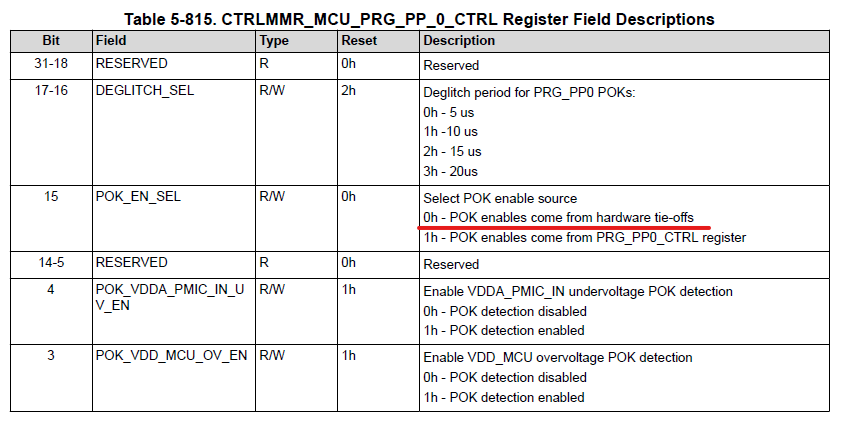
A HW tie-off is basically a forced 1 or 0 as part of the design that cannot be changed. This is used for statically configuring states or inputs to an IP when the user is not enabled to modify them. In this case, there are two different ways to set the enable signal for a POK. there is a HW based tie off and an MMR that can be used as the enable source to the POK.
In practice for AM6442 POKs, this hardware tie off state is zero (disabled) in design. So in order to enable the POK, this POK_EN_SEL needs to be set to '1' to route the POK enable signal to point to the PRG_PP0_CTRL MMR and the enable needs to be set in the PRG_PP0_CTRL MMR (same register) for the desired POKs.
In this case the reset value for the individual POK OV/UV EN in the same registers is '1' so setting POK_EN_SEL to '1' will enable all of the POKs included in that register.