This thread has been locked.

If you have a related question, please click the "Ask a related question" button in the top right corner. The newly created question will be automatically linked to this question.

AM62A7-Q1: ECC error after enabling inline DDR ECC

Part Number: AM62A7-Q1

Hi, TI expert

Environment: 
SOC: AM62A7-Q1
SDK: mcu_plus_sdk_am62ax_10_01_00_33
DDR cfg: 1865MHz ddr_cfg(am62a7_2GB_1865_MT).zip 

Question: 
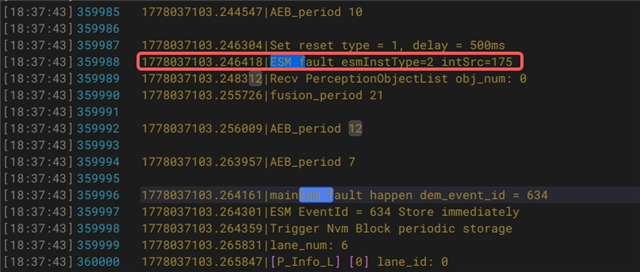
After enabling inline DDR ECC, we conducted stress test and encountered an ECC error interrupt,
When inline DDR ECC is disabled, there are no abnormalities when using memtester. May I ask if the margin is insufficient, or if the timings are too aggressive?
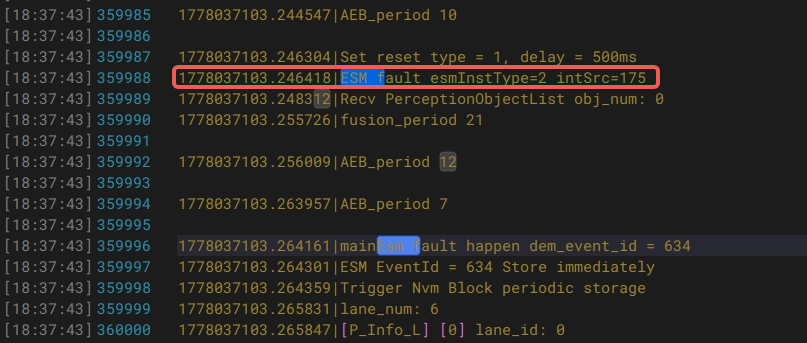
image.png


DDR Enable Procedure: 
1. Set DDR ECC config in SBL1
image.png
2. Apply the patch

/cfs-file/__key/communityserver-discussions-components-files/791/ddr_5F00_11_5F00_1.patch

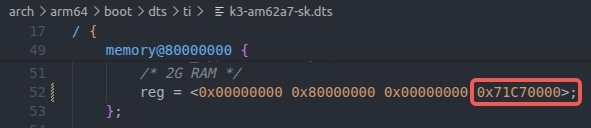
3. Update dtb in u-boot-spl & u-boot & kernel
20260518-171254.jpg
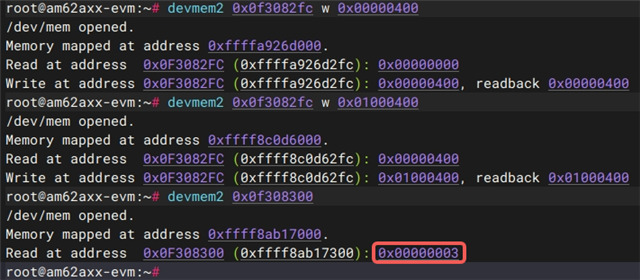
4. Reading register 0x0f300120 shows that ECC is enabled.
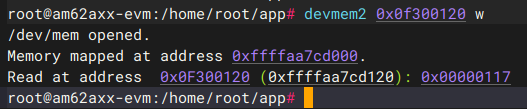
image.png


memtester test method:
root@am62axx-evm:/userdata# devmem2 0x0f300120 w
/dev/mem opened.
Memory mapped at address 0xffff8dcbd000.
Read at address  0x0F300120 (0xffff8dcbd120): 0x00000117
root@am62axx-evm:/userdata# cat /proc/iomem 
000f4000-000f425b : pinctrl-single
00600000-006000ff : 600000.gpio gpio@600000
00601000-006010ff : 601000.gpio gpio@601000
00a40000-00a407ff : pinctrl-single
00b00000-00b003ff : b00000.temperature-sensor temperature-sensor@b00000
00b01000-00b013ff : b00000.temperature-sensor temperature-sensor@b00000
01800000-0180ffff : GICD
01880000-0193ffff : GICR
02400000-024003ff : 2400000.timer timer@2400000
02410000-024103ff : 2410000.timer timer@2410000
02430000-024303ff : 2430000.timer timer@2430000
02440000-024403ff : 2440000.timer timer@2440000
02450000-024503ff : 2450000.timer timer@2450000
02460000-024603ff : 2460000.timer timer@2460000
02470000-024703ff : 2470000.timer timer@2470000
02800000-0280001f : serial
04084000-04084087 : pinctrl-single
04201000-042010ff : 4201000.gpio gpio@4201000
08000000-081fffff : 8000000.ethernet cpsw_nuss
0e000000-0e0000ff : e000000.watchdog watchdog@e000000
0e010000-0e0100ff : e010000.watchdog watchdog@e010000
0e020000-0e0200ff : e020000.watchdog watchdog@e020000
0e030000-0e0300ff : e030000.watchdog watchdog@e030000
0f300000-0f3001ff : f300000.ddr-diag ddr-diag@f300000
0f900000-0f9007ff : f900000.dwc3-usb dwc3-usb@f900000
0f908000-0f9083ff : f900000.dwc3-usb dwc3-usb@f900000
0fa10000-0fa1025f : fa10000.mmc mmc@fa10000
0fa18000-0fa18133 : fa10000.mmc mmc@fa10000
0fd20000-0fd200ff : fd20000.jpeg-encoder core
0fd20200-0fd203ff : fd20000.jpeg-encoder mmu
20000000-200000ff : 20000000.i2c i2c@20000000
20020000-200200ff : 20020000.i2c i2c@20020000
20030000-200300ff : 20030000.i2c i2c@20030000
20701000-207011ff : 20701000.can m_can
29000000-290001ff : 29000000.mailbox mailbox@29000000
29010000-290101ff : 29010000.mailbox mailbox@29010000
29020000-290201ff : 29020000.mailbox mailbox@29020000
2a000000-2a000fff : 2a000000.spinlock spinlock@2a000000
2b1f0000-2b1f00ff : 2b1f0000.rtc rtc@2b1f0000
30101000-30101fff : 30101000.csi-bridge csi-bridge@30101000
30102000-30102fff : 30102000.ticsi2rx ticsi2rx@30102000
30110000-301110ff : 30110000.phy phy@30110000
30210000-3021ffff : 30210000.video-codec video-codec@30210000
30300000-30300fff : 30300000.crc crc@30300000
3100c100-3104ffff : 31000000.usb usb@31000000
40900000-409011ff : 40900000.crypto crypto@40900000
44043000-44043fdf : 44043000.system-controller debug_messages
48000000-480fffff : 48000000.interrupt-controller interrupt-controller@48000000
485c0000-485c00ff : 485c0000.dma-controller gcfg
485c0100-485c01ff : 485c0100.dma-controller gcfg
4a400000-4a47ffff : 4d000000.mailbox scfg
4a600000-4a67ffff : 4d000000.mailbox rt
4a800000-4a81ffff : 485c0000.dma-controller rchanrt
4a820000-4a83ffff : 485c0100.dma-controller rchanrt
4aa00000-4aa3ffff : 485c0000.dma-controller tchanrt
4aa40000-4aa5ffff : 485c0100.dma-controller tchanrt
4b800000-4bbfffff : 485c0000.dma-controller ringrt
4bc00000-4bcfffff : 485c0100.dma-controller ringrt
4c000000-4c01ffff : 485c0100.dma-controller bchanrt
4d000000-4d07ffff : 4d000000.mailbox target_data
4e0a0000-4e0a7fff : 4e0a0000.interrupt-controller interrupt-controller@4e0a0000
4e100000-4e10ffff : 4e230000.dma-controller ringrt
4e180000-4e187fff : 4e230000.dma-controller rchanrt
4e230000-4e2300ff : 4e230000.dma-controller gcfg
70000000-7000ffff : 70000000.sram sram@70000000
78000000-78007fff : 78000000.r5f
78100000-78107fff : 78000000.r5f
79000000-79007fff : 79000000.r5f
79020000-79027fff : 79000000.r5f
79100000-7917ffff : 79100000.sram sram@79100000
7e000000-7e0fffff : 7e000000.dsp
80000000-8007ffff : reserved
80080000-919fffff : System RAM
  82010000-8312ffff : Kernel code
  83130000-833affff : reserved
  833b0000-8359ffff : Kernel data
  87fff000-87ffffff : reserved
  88000000-88010fff : reserved
91a00000-9e6fffff : reserved
9e700000-9e7fffff : System RAM
9e800000-a33fffff : reserved
a3400000-bcbfffff : System RAM
  a3400000-bcbfffff : reserved
bcc00000-bcd00fff : reserved
bcd01000-f1c6ffff : System RAM
  ef600000-f17fffff : reserved
  f18b6000-f18b8fff : reserved
  f18b9000-f18b9fff : reserved
  f18ba000-f1909fff : reserved
  f190c000-f190cfff : reserved
  f190d000-f190ffff : reserved
  f1910000-f1920fff : reserved
  f1921000-f1c6ffff : reserved
root@am62axx-evm:/userdata# 
root@am62axx-evm:/userdata# free
               total        used        free      shared  buff/cache   available
Mem:         1107048      277960      706340       11488      204828      829088
Swap:              0           0           0
root@am62axx-evm:/userdata# 
root@am62axx-evm:/userdata# ./memtester 512M 999999
memtester version 4.5.1 (64-bit)
Copyright (C) 2001-2020 Charles Cazabon.
Licensed under the GNU General Public License version 2 (only).

pagesize is 4096
pagesizemask is 0xfffffffffffff000
want 512MB (536870912 bytes)
got  512MB (536870912 bytes), trying mlock ...locked.
Loop 1/999999:


memtester.log

Best regards!

XUE Fadong

  • What is the full part number of the AM62A device you are using?  You need to check the speed grade of the processor, because some speed grades only have a max of 1600MHz for DDR

    Refer to the following sections in the datasheet:

    Regards,

    James

  • Hi James


    We are using speed grade V, which theoretically supports 1866MHz.


    Best regards!

    XUE Fadong

  • Ok, that confirms you can run the DDR interface up to 1866MHz. 

    Please try without changing these parameters:

    DDRSS.lpddr4.config_dram_tREFIpb_ns = 488;
    DDRSS.lpddr4.config_dram_tREFIab_ns = 3906;
    DDRSS.lpddr4.config_dram_tRASmax_ns = 35154;

    These parameters automatically change when choosing an operating temp range. 

    As a second experiment, try running at 1600MHz.

    When you said you are getting ECC interrupt, are you getting correctable ECC errors, or uncorrectable ones? 

    Regards,

    James

  • Hi James

    Our parameter configuration is as follows:


    And we tested enabling DDR ECC at 1600MHz and encountered ECC errors.

    When an ECC interrupt occurs, it can be a correctable ECC error or an uncorrectable error, both of which have been encountered.

    Best regards!

    XUE Fadong

  • Please try with the attached configuration.  This has just minimal changes in the config.  

    /cfs-file/__key/communityserver-discussions-components-files/791/ddr_5F00_cfg_5F00_simplified.zip

    When you ran memtester with ECC disabled, how many loops did you run?  And did you run across your operating temp range, especially at high temp?  What you are encountering seems to be an infrequent marginality issue, which may be revealed in a memtester run at high temps.

    Can you also use https://www.ti.com/tool/download/DDR-MARGIN-FW/1.9.0 (instructions are in the tool).  This is a virtual eye tool which will give you an idea of the marginality in your design.

    Regards,

    James

  • Hi James


    We conducted tests based on the configuration file you provided

    /cfs-file/__key/communityserver-discussions-components-files/791/ddr_5F00_cfg_5F00_simplified.zip

    However, an illegal access interrupt occurred; the cause is currently unknown.


    We also conducted eye diagram testing on this; the test results are as follows.
    Teye_micron_2GB_1600.pdf


    We also tested the configuration currently in use (1865 MHz); the eye diagram is shown below:
    Teye_micron_2GB_1865.pdf
    Based on this eye diagram, the margins for DQ26 through DQ29 appear to be very low. Could this be the cause of the DDR ECC errors? How should we go about optimizing this?

    When the ECC error occurred, the SoC temperature was approximately 70+ degrees Celsius.

    Furthermore, based on our current configuration, simply changing the frequency to 1600 MHz also results in ECC errors.

    Best regards!

    XUE Fadong

  • Hi XUE,

    The Teye_micron_2GB_1600.pdf show much wider eyes on each of the bits than Teye_micron_2GB_1865.pdf.  Although it is difficult to determine if this is because of the frequency difference or a configuration difference.  

    I would recommend continuing to debug with the configuration i gave you, and try to figure out the illegal access interrupt.  It looks like is that something to do with an ESM event, although i don't know why you would his this error with the DDR config i gave you, it should not have mattered.  Maybe you can disable this event for now or somehow determine why you are getting this interrupt.  If you can provide a full log, maybe our software team can help.

    Regards,

    James

  • Hi James


    We conducted tests based on the configuration file you provided and disabled other ESM interrupts; the result was that the R-core hung, regardless of whether DDR ECC was enabled.

    The R-core hangs unless `tREFlab` is changed to 3906. We checked the DDR MR4 register and found it is currently in 1× Refresh mode, whereas we had set `tREFlab` for 4× Refresh. Could this discrepancy be the cause of the issue?


    DDR ECC enablement tests were conducted with only the tREFlab parameter modified to 3906, yet ECC errors still occurred.

    Best regards!

    XUE Fadong

  • Hi XUE,

    the fact that you can get things working by reducing the refresh rate indicates that there maybe some bandwidth limitation that may be hit with a high refresh rate.

    Try using the configuration below, which is configured for 85C max, this will keep the refresh rate at 1x

    /cfs-file/__key/communityserver-discussions-components-files/791/ddr_5F00_config_5F00_simplified_5F00_1600MHz_5F00_85C.zip

    If the board boots with this config, try the memtester tests.  If you can get the tests to pass, then at least we have a baseline configuration that works with ECC enabled.  

    Then we can work on increasing frequency.  Will you application need to run greater than 85C?  

    Regards,

    James

  • Hi James

    Reducing the frequency does not solve the problem; it merely reduces the probability.
    /cfs-file/__key/communityserver-discussions-components-files/791/ddr_5F00_config_5F00_simplified_5F00_1600MHz_5F00_85C.zip
    We still encounter ECC errors with this configuration, and even though we are continuously cooling the SoC, the interrupts occur at temperatures below 60°C.
    Our product has high temperature requirements and needs to be able to operate at 105 degrees.

    Are there any other configurations we can modify and test? Currently, we do not have a configuration that avoids ECC errors.

    Best regards!

    XUE Fadong

  • Hi XUE,

    let me ask a few more questions to get some context:

    -it appears you are using SBL to boot into linux.  What is this log from?  It doesn't look like a linux log.  Is this some monitoring log running from R5?

    -This snippet is from the u-boot dtb, but that is irrelevant since you are using SBL.  Can you show the change you made in the kernel dtb?

    3. Update dtb in u-boot-spl & u-boot & kernel
    20260518-171254.jpg

    -When the ECC occurs, can you show the log in linux?  The memtester log you posted doesn't show any memtester errors.

    -Does linux crash when the ECC errors occur? 

    -What is your system doing when the ECC errors occur?  For example, are you just running memtester when the errors occur?  Are you performing any application level operations?  For example, any data transfers with other peripherals in the system?  How many processor cores are executing at the same time?   

    -you indicated a temperature sensitivity.  So do you ramp the temperature and start seeing failures?  Or are you booting and running at a certain temperature?

    -you mentioned you were getting both correctable and uncorrectable errors.  Are you able to boot and run for some time before hitting the uncorrectable errors?  Or do these errors occur during boot and you system just never can get through the boot stage?

    Regards,

    James

  • Hi Jamms

    1. We boot using the SBL, and that log originates from the R-core. We have enabled ESM ECC fault detection on the R-core; a reset signal is generated when an ECC fault is triggered.
    2. The modifications in the kernel are similar to those in U-Boot, limiting the total memory size.

    3. The Linux system exhibits no abnormalities when an ECC error occurs.
    4. The Linux system did not crash.
    5. Our application running on the A-core utilizes shared memory for inter-core communication with the R-core. We have observed that all memory regions reporting DDR ECC errors are located within this specific shared memory area. What could be the cause of this?
    6. We also encounter this issue at around 60°C; temperature does not appear to be the definitive cause.
    7. The system operates normally for a period of time before an ECC error occurs.

    Best regards!

    XUE Fadong

  • Can you give us more details on the scenario which causes these errors.  What type of communication are you performing between A53 and R5?  What type of data is being shared?  Is there any handshaking or semaphores to ensure A53 and R5 are not accessing the same region at the same time?  What is the nature of the shared data (element size, block size, structures, single data words, etc)?

    Regards,

    James

  • Just a follow up here, we'd like to reproduce this failure on our EVM if possible.  If you have an EVM, we can really accelerate the debug if you can reproduce this on an EVM, or give us enough information about the failure scenario so we can try to reproduce it.

    Regards,

    James