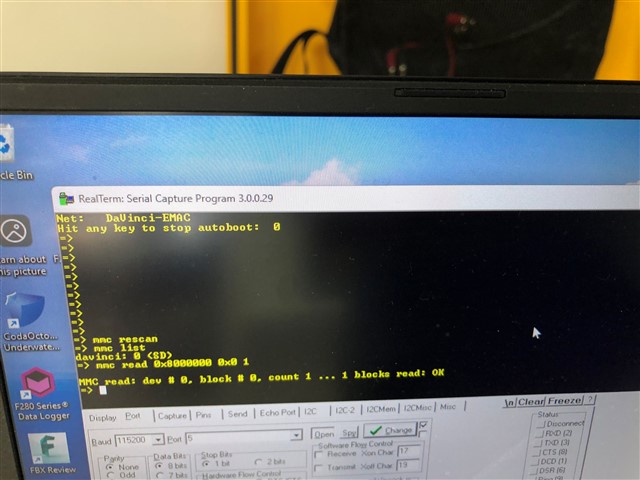
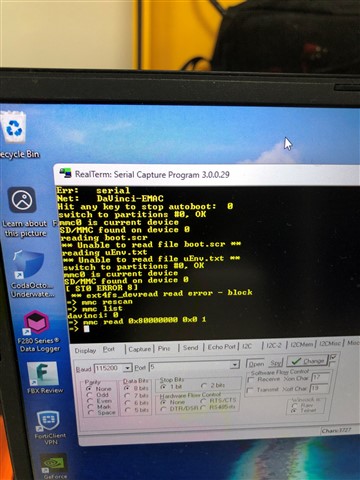
OMAP-L138: DSP Bootloader from micro-SD Card error.

Part Number: OMAP-L138
Other Parts Discussed in Thread: OMAPL138,

Helklo, I am using OMAPL138 SoC from ages on a product and recently we upgraded them to use industrial SD cards. This seem to work but every now and then it fails to read SD card. 


couple of images attahced, please let me know if there is a way to debug this.

Failed: 
IMG_0781.jpg


Passed:

IMG_0780.jpg


  • Only the failed image came through. 

    Let me check on the error and get back to you. 

    --Paul 

  • Thanks Paul.

    attached passed image.

  • Mitesh

    This is a 'random' failure on one SD card or multiple? 

    Does this issue happen on multiple boards or just one?  

    If just one card,  have you tried re-flashing and re-testing? 

    Does moving the failing card to a different board have the same result? 

    it is possible that the new cards use a controller that has marginal interoperability issues. 

    --Paul

  • Hi Paul, same SD card fails on multiple boards. 

    there are some SD card that works always and some that works few times and fails. 

  • Mitesh

    Definitely sounds like marginal timing on the SD card. 

    Some vendors use different internals/controllers under the same model and/or modify the internals over time. 

    It would be worth exploring an alternate make/model of SD card 

    --Paul 

  • Thanks Paul..

    we got 5 samples and tested them and then placed order of 50 and now some fails. so wanted to know if we can expose some debug on the u-boot or bootloader to see if the issue can be resolved 

  • I'll check with the team if they can suggest any debug options. 

    --Paul 

  • Thanks a lot!

  • Hi Paul, tried some debug,

    we ran following U-Boot commands on a working and non working sd-card bit from same manufacturer : 

  • Mitesh,. I am looping in one of our Linux experts. However, support is limited

    --Paul .

  • Hello Mitesh,

    Apologies for the delayed responses here. Please keep in mind that U-Boot 2017 is too old for us to support on the forums, and we are limited in the support we can offer for OMAP-L138 as per the support banner on the ti.com page.

    Just to make sure I understand: Are you thinking of manually testing SD cards one-by-one by plugging them into a board to see if the board boots or not? And then trying to speed up that process by running a test in uboot? (which does not make sense now that I mention it since you could just look for the read errors in your initial screenshot)

    Or are you asking for something else, like if there is a test you can run to measure an SD card's controller timing to see if the card has potential to fail during boot, or if the controller timing is "safe"?

    Regards,

    Nick

  • HI Nick, thanks for coming back on this to us.

    Exactly, we don't want to change anything on this as this is so old. 

    However, industrial SD card we got for the system works some times and not almost and they are all from same manufacturer and same batch. 
    We are in discussion with manufacturer as well, but we are still stuck and wondering if there is a way to solve this read error.

    We believe the read error is because of the timing issue with the SoC and SDcard. We can't change the uboot as we can't recall all products. so wanted to know how to proceed here. what does the error message says and how can we workaround this please? 

    Thanks 

  • Hello Mitesh,

    I have been out of office for a few weeks now, and will continue to be out through the end of August. I am sending your thread back to PaulM for followup.

    From a conceptual standpoint, "marginal SD card timing" here usually comes from variation in the timings either on the processor side, or the SD card side. Our timings are characterized and published in the datasheet for the processor, so typically variation is coming from the SD card side.

    For testing, other than probing the signal to physically observe the signals on an oscilloscope / protocol analyzer / fast logic analyzer, we are not aware of a way to empirically test SD card timing (e.g., to see if a particular SD card has timing which should work 100% of the time, or timing that is on the edge and may fail sometimes).

    Regards,

    Nick

  • Thanks Nick. we got the firmware in the u-SD card changed and this works for us.

    Thanks