


Part Number: AM62P
Hello experts,
We have an AM62P on our custom board. On CPSW port 2 we have connected an external ethernet switch from Microchip, LAN9354, over RMII. It is managed over mdio. The picture below depicts our setup:
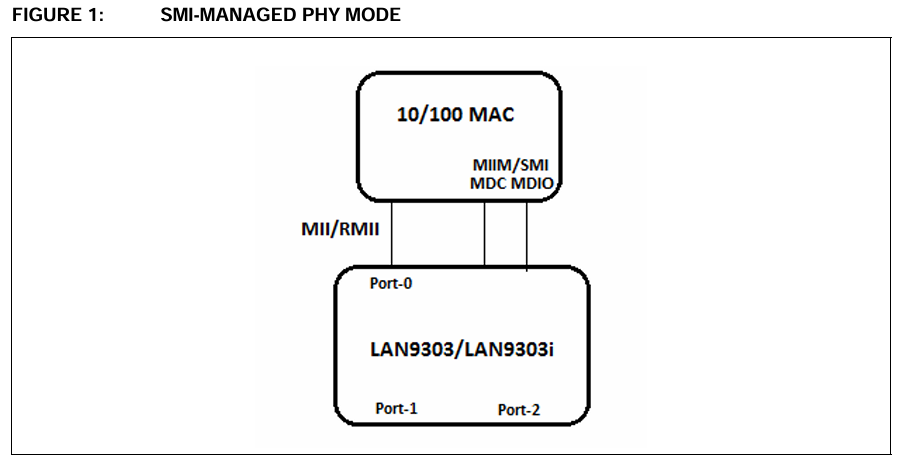
The switch works correctly in U-Boot and also in Linux if I omit the DSA driver. It then performs as a normal unmanaged switch with two ports.
When I add the DSA driver snippet in the dts, the chip seems to be probed correctly, but I get no connectivity on my two user ports.
The probing itself seem a bit shaky. Some boots it doesn't succeed and falls back to the unmanaged mode. All the data lines and clock lines have been reveiwed for trace length matching.
Here are some relevant snippets:
dts:
&cpsw3g {
	status = "okay";
	pinctrl-names = "default";
	pinctrl-0 = <&main_rgmii1_pins_default>,
		    <&main_rgmii2_pins_default>;
};

&cpsw_port1 {
	status = "disabled";
};

&cpsw_port2 {
	status = "okay";
	phy-mode = "rmii";
	fixed-link {
		speed = <100>;
		full-duplex;
	};
};

&cpsw3g_mdio {
	status = "okay";
	pinctrl-names = "default";
	pinctrl-0 = <&main_mdio1_pins_default>;

	lan9354_switch: switch@1 {
		compatible = "microchip,lan9354-mdio";
		reg = <1>;
		reset-gpios = <&main_gpio0 17 GPIO_ACTIVE_LOW>; /* GPIO0_91 */
		reset-duration = <1000>;

		ports {
			#address-cells = <1>;
			#size-cells = <0>;

			port@0 {
				reg = <0>;
				label = "cpu";
				ethernet = <&cpsw_port2>;
				phy-mode = "rmii";
				fixed-link {
					speed = <100>;
					full-duplex;
				};
			};

			port@1 {
				reg = <1>;
				label = "lan1";
			};

			port@2 {
				reg = <2>;
				label = "lan2";
			};
		};
	};
};
Boot log dmesg:
root@AS-B-3-261750009:~# dmesg | grep -i lan
[    0.146339] usbcore: registered new interface driver lan78xx
[    0.160256] 8021q: 802.1Q VLAN Support v1.8
[    1.378937] LAN9303_MDIO 8000f00.mdio:01: Found LAN9354 rev. 1
[    1.394316] LAN9303_MDIO 8000f00.mdio:01: configuring for fixed/rmii link mode
[    1.396514] LAN9303_MDIO 8000f00.mdio:01: Link is Up - 100Mbps/Full - flow control off
[    1.398273] LAN9303_MDIO 8000f00.mdio:01 lan1 (uninitialized): PHY [dsa-0.0:01] driver [Generic PHY] (irq=POLL)
[    1.401181] LAN9303_MDIO 8000f00.mdio:01 lan2 (uninitialized): PHY [dsa-0.0:02] driver [Generic PHY] (irq=POLL)
[    1.401810] LAN9303_MDIO 8000f00.mdio:01: LAN9303 MDIO driver loaded successfully
[    3.600363] LAN9303_MDIO 8000f00.mdio:01 ethernet1: renamed from lan1
[    3.603653] LAN9303_MDIO 8000f00.mdio:01 ethernet2: renamed from lan2
[    8.142677] 8021q: adding VLAN 0 to HW filter on device ethernet3
[    8.146455] am65-cpsw-nuss 8000000.ethernet: Adding vlan 1 to vlan filter
[    8.150146] LAN9303_MDIO 8000f00.mdio:01 ethernet1: configuring for phy/gmii link mode
[    8.155020] LAN9303_MDIO 8000f00.mdio:01 ethernet1: Link is Up - 100Mbps/Full - flow control rx/tx
Interfaces:
root@AS-B-3-261750009:~# ip a
1: lo: <LOOPBACK,UP,LOWER_UP> mtu 65536 qdisc noqueue qlen 1000
    link/loopback 00:00:00:00:00:00 brd 00:00:00:00:00:00
    inet 127.0.0.1/8 scope host lo
       valid_lft forever preferred_lft forever
    inet6 ::1/128 scope host noprefixroute
       valid_lft forever preferred_lft forever
2: ethernet3: <BROADCAST,MULTICAST,UP,LOWER_UP> mtu 1504 qdisc mq qlen 1000
    link/ether aa:a3:80:99:b7:66 brd ff:ff:ff:ff:ff:ff
    inet6 fe80::a8a3:80ff:fe99:b766/64 scope link
       valid_lft forever preferred_lft forever
3: ethernet1@ethernet3: <BROADCAST,MULTICAST,UP,LOWER_UP> mtu 1500 qdisc noqueue qlen 1000
    link/ether aa:a3:80:99:b7:66 brd ff:ff:ff:ff:ff:ff
    inet6 fe80::a8a3:80ff:fe99:b766/64 scope link
       valid_lft forever preferred_lft forever
4: ethernet2@ethernet3: <BROADCAST,MULTICAST> mtu 1500 qdisc noop qlen 1000
    link/ether aa:a3:80:99:b7:66 brd ff:ff:ff:ff:ff:ff
5: g_ether0: <NO-CARRIER,BROADCAST,MULTICAST,UP> mtu 1500 qdisc pfifo_fast qlen 1000
    link/ether 62:d9:66:af:f6:5c brd ff:ff:ff:ff:ff:ff
    inet6 fe80::2:6175:9/64 scope link tentative
       valid_lft forever preferred_lft forever
6: g_ether1: <BROADCAST,MULTICAST,UP,LOWER_UP> mtu 1500 qdisc pfifo_fast qlen 1000
    link/ether 2a:1a:1e:d6:3b:c9 brd ff:ff:ff:ff:ff:ff
    inet6 fe80::2:6175:9/64 scope link
       valid_lft forever preferred_lft forever
    inet6 fe80::281a:1eff:fed6:3bc9/64 scope link
       valid_lft forever preferred_lft forever
7: br0: <BROADCAST,MULTICAST> mtu 1500 qdisc noop qlen 1000
    link/ether de:ef:90:2b:e1:d3 brd ff:ff:ff:ff:ff:ff
Trying to configure ethernet1:
root@AS-B-3-261750009:~# ip addr add 10.142.3.9/22 dev ethernet1
root@AS-B-3-261750009:~# ip link set ethernet1 up
root@AS-B-3-261750009:~# ip route add default via 10.142.0.1
root@AS-B-3-261750009:~# ping -c 4 10.142.0.1
PING 10.142.0.1 (10.142.0.1): 56 data bytes

--- 10.142.0.1 ping statistics ---
4 packets transmitted, 0 packets received, 100% packet loss
As always, thankful for all help I can get.
Best regards,
/Bo
