Part Number: J784S4XEVM
Hi Team,
How can the performance of a custom kernel be benchmarked using GTC Timer and TSC, and how can the results be evaluated across different optimization levels?
This thread has been locked.
If you have a related question, please click the "Ask a related question" button in the top right corner. The newly created question will be automatically linked to this question.
Part Number: J784S4XEVM
Hi Team,
How can the performance of a custom kernel be benchmarked using GTC Timer and TSC, and how can the results be evaluated across different optimization levels?
The custom benchmark is integrated into the vision_apps framework using Concerto build files and C7x firmware updates. The patch adds the benchmark source files, updates the firmware integration flow, and enables execution of the benchmark during C7x startup. The integration involves adding the benchmark source and header files, configuring the concerto.mak build file, updating the firmware link configuration, and invoking the benchmark function from the C7x startup flow.
For adding the library to the C7x_1 firmware link modify the vision_apps/platform/j784s4/rtos/concerto_c7x_inc.mak and add the new library to the STATIC_LIBS list

The following steps describe the integration of a custom C7x kernel with GTC timer-based profiling support, building the SDK with the modified implementation, preparing the SD card for booting, and executing the application on the target platform.
PSDK_PATH = <PATH_TO_RTOS_SDK >
Steps for setting up the GTC timer
1) Include the required GTC timer header
2) Use the GTC timer API to measure execution time
uint64_t t_start, t_end;
t_start = appLogGetGlobalTimeInUsec();
/* code under test */
t_end = appLogGetGlobalTimeInUsec();
elapsed_us = t_end - t_start;
3) Invoke the benchmark function after appInit() and before appRun() in vision_apps/platform/j784s4/rtos/c7x_1/main.c

4) Allocate benchmark data in L2 SRAM
float *l2_mat = (float *)appMemAlloc(APP_MEM_HEAP_L2, size_in_bytes,alignment)
Steps for implementing the custom c7x kernel
1) Copy the patch file to the SDK root directory
2) Navigate to the SDK root Directory
3) Apply the Patch
4) Verify the patch is applied correctly
Steps for building the SDK
1) Clean the previous SDK build
2) Build the SDK with the required optimization level
Steps for SD Card Partition
1) Insert SD card device
2) Identify SD card device

3) Unmount SD card partitions
4) Partition and format SD card
5) Remove and Reinsert the SD card into the SD card slot
6) Install bootloader and roofs to SD card
7) Copy executable to the SD card
8) Remove the SD card and insert it back into the board
Steps for running on EVM
Setup
1) Connect to UART Port
2) Configure in SD BOOT using the BOOT pins
1) Opens a UART serial console to the target device

2) Login as root
3) Navigate to vision_apps and initialise it
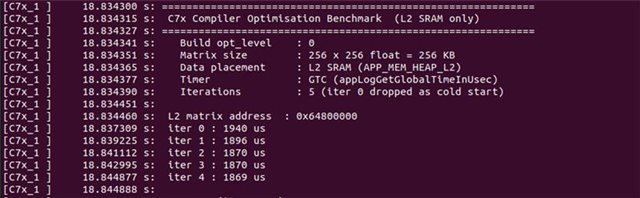
4) Verify the optimization results in the terminal output.

The optimization levels achieved by running this kernel for different optimization levels(0 to 4) are as follows:
| Optimisation Level | Cycle count |
| 0 | 1889 |
| 1 | 1622 |
| 2 | 47 |
| 3 | 24 |
| 4 | 24 |
Steps for iterative build
1) Navigate to the SDK builder directory
2) Delete only the benchmark artifacts
3) Rebuild only for vision_apps
4) Copy firmware to SD card
5) Repeat the steps for running on EVM for testing on the other optimization levels
Implementation of TSC counter in standalone code:extern volatile __cregister unsigned long __TSC;
unsigned long start_time;
unsigned long stop_time;
start_time = __TSC;
<Test code>
stop_time = __TSC;
printf("\nClock cycles elapsed = %lu",stop_time - start_time);
The code for the implementation of TSC counter on standalone code is
The optimization levels achieved by running this standalone kernel for different optimization levels(0 to 4) are as follows:
| Optimisation level | Cycle count |
| 0 | 2147341 |
| 1 | 1817727 |
| 2 | 105121 |
| 3 | 105184 |
| 4 | 103445 |
Regards,
Shabary S Sundar