This thread has been locked.

If you have a related question, please click the "Ask a related question" button in the top right corner. The newly created question will be automatically linked to this question.

EDGE-AI-STUDIO-MCU: deploy the model locally with Edge AI Studio

Part Number: EDGE-AI-STUDIO-MCU

Hi experts,


My customer wants to use F28P55 and F28P65 to develop Edge AI model. Their computer can only offline do the model training because security so they need to deploy the model locally . They want to know if they can use Edge AI Studio to deploy the model locally or have to use Tiny ML Model Maker?


Best Regards

  • Hi Kita,

    I have brought this thread to the attention of the Edge AI Studio team for further comment.

    Thanks

    ki

  • Kita,

    Yes, Edge AI Studio can work entirely offline with the desktop version. There are dependencies like the associated SDKs and compilers that you will need to have access to locally as well.

    But once you have all the dependencies resolved, you can do data capture, model training, and model deployment without internet access. For deployment, you can deploy a live preview application directly onto your device in Edge AI Studio, or export the generated model into a CCS project to continue your development.

    Please let me know if you have additional questions or clarifications.

    Thank you,

    Ricky

  • Hi Ricky,

    I could not find the model in Edge AI studio installation path, could you point out where the model is placed in installation path?

    Best Regards

    Kita

  • Kita,

    If you are referring to a trained model inside Edge AI Studio, you can find the option to export it under the Training tab. See the screenshot:

    Let me know if that is what you were asking about.

    Thanks,

    Ricky

  • Hi Ricky,

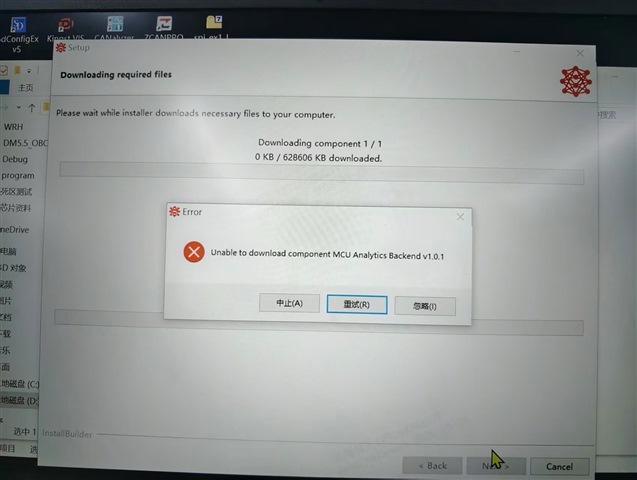
    When customer tried to install edge AI studio MCU, it needs internet access to download some dependency but customer's computer can't access Internet so it stuck here. I also could not find MCU Analytics Backend installation package in internet. 

    Could you help to check if we have separated installation package that can solve this issue? And what's other dependency customer needs to install in advanced? 

    Best Regards

  • Hi Kita,

    Yes, the "MCU Analytics Backend" are downloaded during installation. The packages are portable, so I can provide a version of the package that can be shared with the customer if needed. It is a big package though (~5GB). 

    In the meantime, I can also look into an enhancement in future releases to remove the online requirement during installation (but the install package will be a lot bigger in that case).

    Other dependencies include the specific SDK and compiler based on the device the customer is using. I can provide specific packages needed if the customer already knows which device/device family they will be developing on.

    Thanks,

    Ricky

  • Hi Ricky,

    thanks for your update here.

    Please help to provide the new package to me.

    Customer is using F28P65 and F28P55 to develop arc fault detection.

    Best Regards

    Kita

  • Hi Ricky,

    this issue is pending for 5 days, customer is urging the update. Please help to provide the new package to me.

    Thanks

    Best Regards

  • Kita,

    Sorry for the delay response. I'm currently working on uploading the packages to sharepoint, but it will take some time to complete due to the large files. I'll provide the link and instructions as soon as it is ready.

    Thank you,

    Ricky

  • Kita,

    I've sent you instructions via email.

    Please let me know if you have any follow-up questions.

    And again, sorry for the delayed in reply. I had to test a few things to make sure the offline solution works before providing the details.

    Thanks,

    Ricky