This thread has been locked.

If you have a related question, please click the "Ask a related question" button in the top right corner. The newly created question will be automatically linked to this question.

DRA821U: Processor DDR margin analysis tool not working

Part Number: DRA821U
Other Parts Discussed in Thread: CCSTUDIO, DRA821,

Hi there,

I tried to use the DDR margin analysis tool with debugger USB560v2 and it failed the JTAG connection as shown in the screenshot. How to fix the problem?

Thanks,

Charles
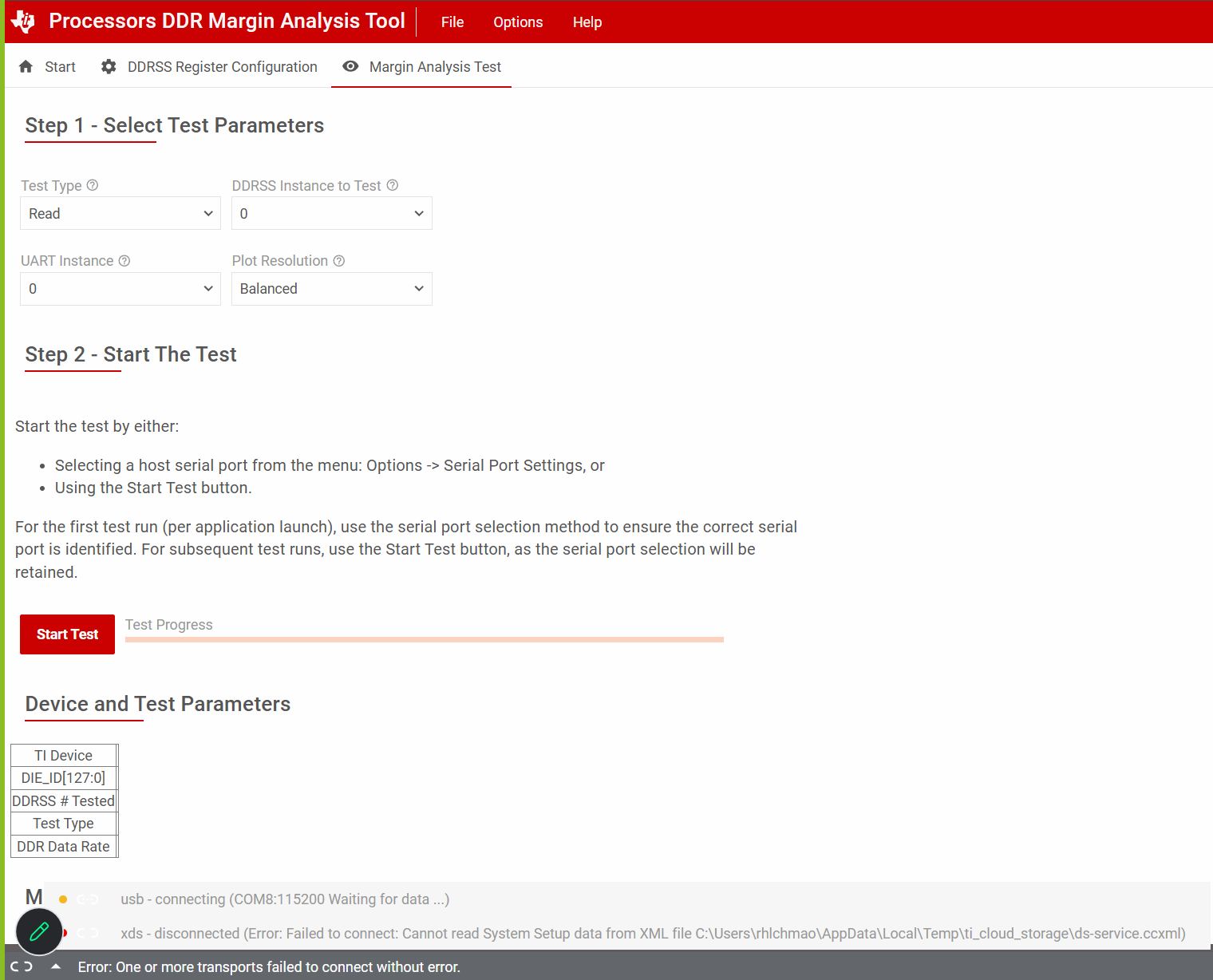
DDR_analysis_tool.jpg

  • Hi Max,

    I tried to use the DDR margin analysis tool with debugger USB560v2

    As described in the prior thread, it requires XDS110. 

     DRA821U-Q1: DDR test failed  

    Regards,
    Kevin

  • My suggestion is not to assume the issue is due to DDR, and try to better understand what could be occurring by inspecting the state of the system via JTAG after the issue occurs, adding more debug hooks to software, and monitoring voltage rails / system level signals (such as resets) on PCB with scope / probes.

    Hi Kevin,

    We have USB560v2 and XDS110 JTAG debugger, which debugger can be used for inspecting the system state ?

    As you may know UART console not working when this happened, so should add more messages to JTAG output when you say adding more debug hooks to the software? 

    do you some examples for software hooks (scripts) over JTAG?

    Thanks

    Max

  • There is no need to post the same questions on multiple threads, please refer to other thread (linked below) where you listed the same questions 10 minutes earlier.

     DRA821U-Q1: DDR test failed  

  • Hi Kevin,

    We did use XDS-110 this time and it didn't work either. The same error messages popped up- "Error: Failed to connect: Cannot read System Setup data from XML file C:\Users\rhlchmao\App|data\Local\Temp\ti_cloud_storage\ds-service.ccxml". I can confirm the file exists. Somehow, this forum doesn't allow me paste that file's content here. Can you provide any tips regarding the failure? How to troubleshoot it?

    To use the DDR margin analysis tool, is there any special preparation needed for my custom board, such as boot mode, boot configuration, etc?

    Thanks,

    Charles

  • Hi,

    No, unfortunately someone from our CCS team would need to help troubleshoot. 

    A few suggestions I can think of while I request additional help:

    • Try deleting the ti_cloud_storage subdirectory (from the AppData\Local\Temp folder) and then re-try
    • Try uninstalling TI Clout Agent ( C:\Users\<userID>\TICloudAgent\uninstall.exe), then reinstalling by running the tool again

    Please note that after reinstalling TI Cloud Agent, it takes a while (several minutes) for the tool to run background processes on the first launch. First files have to be installed, and then the first launch takes a long time to load. Please do not interrupt this process.

    Regards,
    Kevin

  • Hi,

    Here is input I received from our CCS team:

    Please enable cloud agent logging by removing “REM” from the following lines in ticloudagent.bat file. It should be located in C:\Users\rhlchmao\ticloudagent

    rem set TI_DS_ENABLE_LOGGING=1
    rem set TI_DS_LOGGING_OUTPUT=c:/temp/my.log

    Please make sure c:/temp exists and look for new .log files being created and send those.

    Thanks,
    Kevin

  • Hi Kevin,

    I tried all your suggestions and none of them worked. There are two log files I attached below.

    Thanks,

    Charles

    my.log

    my_ticld.log

  • Thanks, please see the feedback below.

    I would suggest that customer:

    • Close the app… maybe all browser tabs
    • Run fsclean command (highlighted below in bold green)
    • Open the app again, select device and connect (this should trigger that same process) that can take quite some time and wait for progress to finish. If it finishes quickly, there is a possibility that some download error happened.

    0x0000176C 84051 3  JSON R: {"data":{"message":"Cannot read System Setup data from XML file C:\\Users\\rhlchmao\\AppData\\Local\\Temp\\ti_cloud_storage\\ds-service.ccxml\nCould not fetch next record for SQL statement (database disk image is malformed)\nIf this continues, please run fsclean located at C:\\Users\\rhlchmao\\AppData\\Local\\TEXASI~1\\TICLOU~1\\loaders\\ccs_base\\common\\bin\\","messageAlreadyReported":false},"error":3}

  • Hi Kevin,
    When trying to run the Margin Analysis Tool, the tool disconnects and gives this error:
    xds - disconnected (Error: Failed to connect: Operation was aborted on 'DMSC_Cortex_M3_0')
    To debug the connection, I also tested the XDS110 connection in CCS/CCStudio. I created a target configuration using:
    - Connection: Texas Instruments XDS110 USB Debug Probe
    - Device/board: J7200_DRA821 / DRA821U family
    I then opened the target configuration in CCS, went to Advanced, and ran “Test Connections.” CCS gave this error:


    -----[An error has occurred and this utility has aborted]--------------------
    This error is generated by TI's USCIF driver or utilities.
    The value is '-233' (0xffffff17).
    The title is 'SC_ERR_PATH_BROKEN'.
    The JTAG IR and DR scan-paths cannot circulate bits, they may be broken.
    An attempt to scan the JTAG scan-path has failed.
    The target's JTAG scan-path appears to be broken
    with a stuck-at-ones or stuck-at-zero fault.


    I also tried connecting directly to DMSC_Cortex_M3_0 in CCS and got:
    "Texas Instruments XDS110 USB Debug Probe/IcePick_M_0 Error connecting to the target:
    (Error -2131 @ 0x0) Unable to access device register. Reset the device, and retry the operation.
    If error persists, confirm configuration, power-cycle the board, and/or try more reliable JTAG settings
    (e.g. lower TCLK). (Emulation package 21.0.0.3955)"


    I attached an image above showing the current custom adapter wiring from the 10-pin XDS110 connector to the 20-pin EDR JTAG connector. Note that we shorted pins 19 and 20 on the EDR connector. We also tried connecting EDR VREF to XDS110 LPVDD/VTREF and setting the XDS110 reference/supply mode to target/external, but the same errors still occurred.
    Could you help confirm whether our custom JTAG mapping looks correct, and any advice you have on how to resolve these errors?
    Thanks,
    Bennett
  • Hi Kevin,

    Just wondering if you got the message I sent 2 days ago. This is the same project, it's just that Charles and Max are busy so I'm testing the debugger. I would really appreciate it if you could take a look at the reply and help answer some questions I had.

    Thanks,
    Bennett

  • Hi,

    I apologize for the delay.

    Since XDS110 is not working outside the scope of the DDR tool, can you please post this question as a new topic as it will require help from the CCS / emulation team. 

    Thanks,
    Kevin

  • Hi Kevin,

    Please see test report:8103.MC1_ti_ddr_eye_test_DRA821_Read_DDRSS0.html5153.MC1_Write_HiRes_ti_ddr_eye_test_DRA821_DDRSS0.html

    Q1: Vref% = 13.3% read and 26.4% write, were these numbers from calibration and training ? do these numbers override what we configured in DDR config?

    Q2: what does VDDQ/3 mean for DDR drive strength calibration?

    Q3:is the drive strength also based on training result to override the DDR configuration numbers?

    Q4: Why we set DQ, CA ref differently?

    Q5: what is the eye-height and eye-width training target ? is that 232mV and 0.75UI?

    Q6: do you see our deign eye diagram any problem(read and write)?

    Thanks

    Max