This thread has been locked.

If you have a related question, please click the "Ask a related question" button in the top right corner. The newly created question will be automatically linked to this question.

EDGE-AI-STUDIO-MCU: How I can connect G5187 to edge ai studio

Part Number: EDGE-AI-STUDIO-MCU
Other Parts Discussed in Thread: LP-MSPM0G5187, SYSCONFIG, MSPM0G5187

Hi,

I'm trying to connect LP-MSPM0G5187 to edge ai studio MCU (Cloud version).
I connect USB to seriral cable (emulate XDS110) to PC and perform "option" on edge ai studio.
However, COM port was NOT recognized. Here is procedure what I did.

--
1. Create new project and choose "option" on edge ai studio.(Use Chrome brouser because I had issue when I install agent in case of Microsoft edge brouser.)

image.png
2. Click "Select port" and I could confirm several driver information. And choose youngest number (in this case, I chose "COM6".).
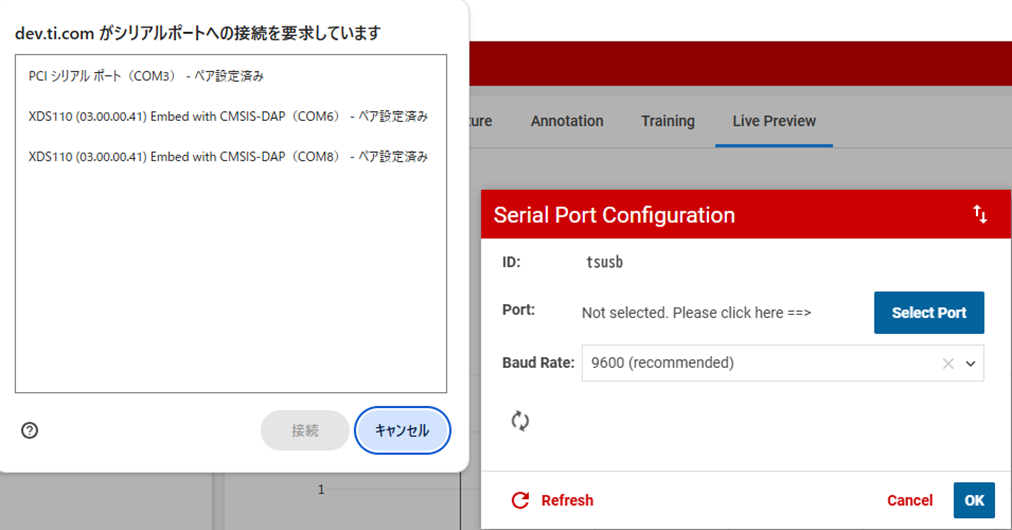
image.png
3. Finally, I got following result. (Show "unknown COM port selected")
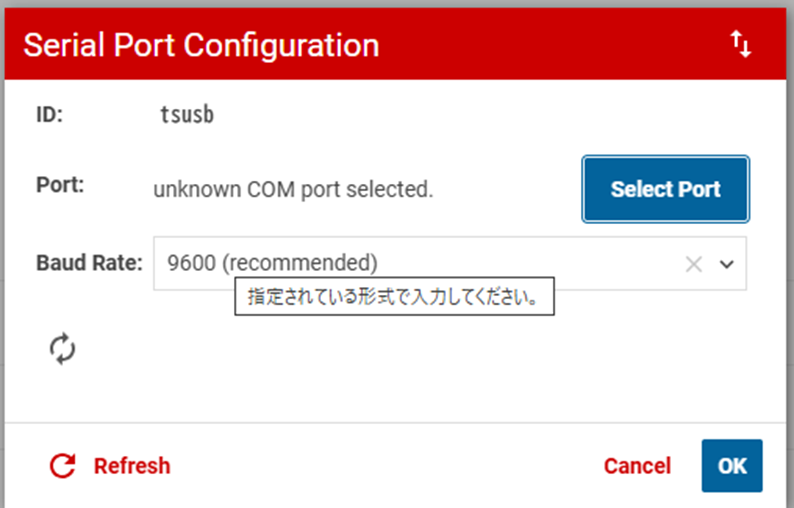
image.png
Note : I tried to connect COM3 and COM8 on above image just in case. But result was same.

Could you please give your advise about how I can avoid this issue ?

Best Regards,

  • Hi Ryuuichi,

    A few suggestions:

    1. Please make sure that the firmware is flashed onto the launchpad before you attempt to connect to it in Edge AI studio. I would recommend flashing one of our SDK examples and then attempting to connect to the device.

    2. Please check in device manager what COM port is associated with the Launchpad UART. Use that COM port when you go to select a port and connect to the device.

    3. Open Sysconfig for the project you flashed and check the baud rate settings. Make sure this matched what you enter on Edge AI studio (this may be 115200 instead of 9600)

    If you are still running into connection issues can you please attach the error message at the bottom of Edge AI studio? It should look something like this 

    Best, 

    Morgan

  • Hi Morgan-san,

    >1. Please make sure that the firmware is flashed onto the launchpad before you attempt to connect to it in Edge AI studio. I would recommend flashing one of our SDK examples and then attempting to connect to the device.
    => I flashed execution file of following project. 
    * motor_fault_data_capture_LP_MSPM0G5187_nortos_ticlang

    >2. Please check in device manager what COM port is associated with the Launchpad UART. Use that COM port when you go to select a port and connect to the device.
    => I ran above project on LP_MSPM0G5187. And here is device manager information.
    It seems that COM8 is application UART port.


    And baud rate is 115200.


    >Use that COM port when you go to select a port and connect to the device.


    Finally, I could connect LP-MSPM0G5187.

    Note : I noticed my issue is caused after once program ran. Once disconnect COM port, it seems that need to perform re-power up of EVM.

    However, I have another problem.

    * After connecting EVM to edge cloud AI as shown above, I performed "start capture". However, I could not get any data as shown below.


    I will check more detail, but let me confirm about below.

    * I'm not sure "Vib sensor" is correct choise as sensor. I use ADXL355.
    According to readme of above project, it seems I should set "Data Capture" mode. However I'm not sure above setting correspond to "Data Capture" mode.
    Is there any incorrect setting from viewpoint of edge ai studio ?


    Best Regards,

  • Hi,

    I'm sorry I just misconnect EVM and sensor at certain pin.
    I could connect EVM to sensor and capture data on edge AI. So I will close this thread.

    BR,