AM62P: Dual Display Same Content with Different Resolution

Part Number: AM62P

Hi TI Experts,

Customer has achieved dual display with same content & same resolution before on AM62 by following the below thread:

https://e2e.ti.com/support/processors-group/processors/f/processors-forum/1611439/am625-how-to-dual-display-same-content-simultaneously

This help customer fanout a new project on AM62P, working on SDK11.2. In this new project, the display reqruiement is similar (1 input, dual display, same content), but the resolution is not the same anymore:

  • Display 1: MIPI-DSI, 680*480 @30FPS
  • Display 2: RGB->HDMI, 1080p @30FPS

May I know in this scenario, could you provide the details how customer could achieve this goal?

Thanks,

Kevin

  • Hi Kevin, 

    At this moment, weston does not have support in place for cloning different resolutions.  Weston's clone mode doesn't independently scale per-display, the clone uses the primary's mode resolution. We are looking into enabling clone mode on our end; however, we also have the same limitations in our hardware where the width, height, and pixel clock must be the same for displaying the same content on two different displays.

    Regards,

    Shriya

  • Hi Shriya,

    As we discussed offline, customer is okay not using clone or mirror mode, just want to find a way achieving dual display same content with different resolution.

    We are thinking to read input frame buffer twice, 1 time to import to DPI DSS, 1 time to import to MIPI-DSI DSS, and inside the DSS we do the scale/resize and then output, could we have some guidance on this part please?

    Thanks,

    Kevin

  • Hi Kevin,

    The entire solution is implemented in userspace. Start by querying for connected devices using standard libdrm calls to detect the MIPI-DSI and DPI/HDMI displays. The next step is creating and allocate a single framebuffer and assign it to both planes with different output scales. The tidss DRM driver manages all hardware scheduling, and each video pipeline handles the independent scaling. Simply configure both planes to read from the same framebuffer at their respective output resolutions and update the content in your application loop. For reference, take a look at DRM/KMS userspace examples like kmscube to see how to query devices, create framebuffers, and read from them. Hope this guidance helps.

    Regards,

    Shriya

  • Hi Shriya,

    Where is example kmscube under SDK installation folder?

  • Hi Shriya,

    Customer still prefer Weston over Kmscube because it is more userspace friendly. We have think about a way that still using WESTON Clone mode but could display same content on two different resolutions. Our idea is below, please have a review:

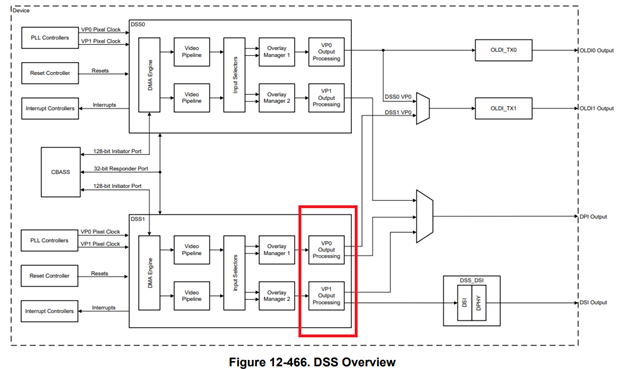
    After applying WESTON clone mode, the same content & same resolution will pass through two video pipelines in our DSS. We take the following diagram DSS1 as an example, so the input of the two video pipeline are the same content & same resolution (let's say 1080P after weston clone mode), and then, since our DSS support resize/scale, so there is feasibility that we could manually resize VP1 to a lower resolution (let's say 680*480), for example we could hardcode the DRM default scale/resize configuration, then VP0 & VP1 output to the DPI & MIPI-DSI separately at the end.

    In this setup, it is still using the WESTON clone mode, but we could make the final output as different resolutions, please review this proposal, thanks. 

    Thanks,

    Kevin

  • Hi Kevin,

    I'll will have to get back to you after discussing with the dev team and look into the feasibility. 

    Regards,

    Shriya