AM2434: IGMP

Part Number: AM2434

Hi Team,

I am using AM2434 for developing EtherNET/IP adapter application on custom board.

I am using example project ethernetip_adapter_generic_device_rgmii_demo_am243x-lp_r5fss0-0_freertos_ti-arm-clang from the SDK ind_comms_sdk_am243x_09_02_00_24. I am facing below issues -

  1. It appears that when passing IGMPv2 messages in a DLR ring, the device will corrupt the message and then re-transmit it indefinitely. It’s especially concerning as the Device is originating the messages even after the IGMP source device has been taken offline.
  2. Then for reproducing the issue I tried one other method. Device's one ethernet/ip port is connected to one switch and other port connected to another switch. For generating IGMP messages I am using one python script IGMP_Transmit.zip . As soon as we start to send IGMP messages and check wireshark log on both switches (as attached in image)  Igmp_v2_wiresharklog_port1.zip  wiresharklog_port2.zip 
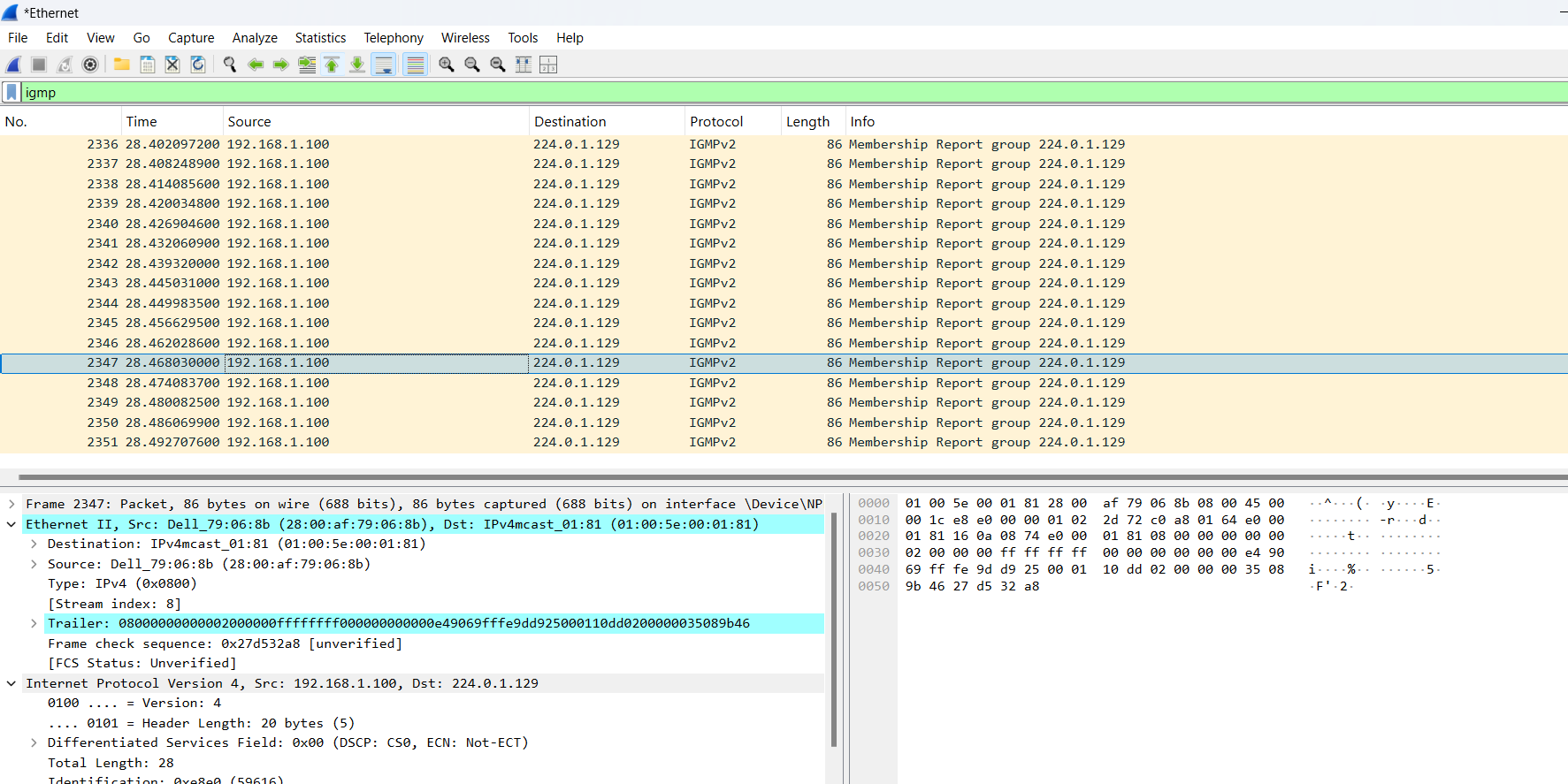
    image.pngwe can see errorous messages in the repeted manner. This is only stop when we power off the device. 
  3. We have verified it with our custom application code and original sdk. Both are showing same error.In our project to pass the ODVA conformance test this is very critical case and we want to finish it as soon as possible. Could you please check and help, in firmware how can we resolve this issue.
    Thanks in advance
  • Any update on above issue.

  • Hi Surabhi,

    I set up a comparable test on my side using the same SDK version and an LP‑AM243x target. I could not reproduce the problem; the IGMP messages pass through without corruption or duplication, regardless of the multicast address or the message type (query, leave, or report).

    Did you also test on an LP‑AM243x, or only on your custom hardware? (I don’t expect the hardware to be a factor, but I’d like to understand any differences in our test setups.)


    Best regards,
    Pourya 

  • Hi Pourya,

    We also tested with the LP-AM2434 and observed the same behavior as seen on our custom board.

    Below is the test setup we used (as shown in the diagram):

    • From the Python script, we sent an IGMP membership message to port 1 of the DUT
    • On port 2, we observed duplicated messages in the Wireshark capture on Laptop 2
    • This duplication appears consistently in our setup

    Additionally, after sending the IGMP message, we also start observing PTPv2 messages in the capture.

    Could you please share your thoughts on this behavior?

    Thank you

  • Hi Yashaswini,

    as the issue is not reproducible on my side, I would need more information to understand the differences in our test setup or procedure.
    1) Does the issue happens already by first IGMP message, or the corruption/duplication happens after some time?
    2) Is there another network path between Laptop1 and Laptop2 in your setup, even indirect (via Switch to local network, etc.)?

    Best regards,
    Pourya

  • Hi Pourya 

    1) Does the issue happens already by first IGMP message, or the corruption/duplication happens after some time?

     Yes , the issue happens in the first message 

    2) Is there another network path between Laptop1 and Laptop2 in your setup, even indirect (via Switch to local network, etc.)?

    there is no another network path between laptop1 and laptop 2 in our set up 

    Thanks 

  • Hi Yashaswini,

    The problem appears to stem from the use of an incorrect multicast address.
    The address 224.0.1.129 is reserved for PTP and must not be used for IGMP traffic. In my setup, packets sent to this address are not forwarded at all. I cannot explain why they are forwarded in your case—different TimeSync (PTP) settings could be the cause. Most likely the ICSS/PRU treats the packet as a PTP message and applies PTP‑specific forwarding, which would produce the altered and duplicated frames you observed on the opposite port.

    Please try the following:

    1. Use a legitimate IGMP multicast address (e.g., 224.0.0.2) and check whether the behavior changes.
    2. To pinpoint the discrepancy between our results (no forwarding on my side versus duplication on yours), let me know the state of your TimeSync feature: is it enabled or disabled? Any additional configuration details specific to your implementation would be helpful.


    Best regards,
    Pourya

  • Hi Pourya 

    We tried the following things 

    1. Use a legitimate IGMP multicast address (e.g., 224.0.0.2) and check whether the behavior changes.When we used this multicast address(224.0.0.2) errarenous messages were not there and only one time message is forwarding 

           2.To pinpoint the discrepancy between our results (no forwarding on my side versus duplication on yours), let me know the state of your TimeSync        feature: is it enabled or disabled? 

         Enabled 

    Once we are performing TimeSync Behavior Test for ODVA on our custom device  we are getting following error-

    1)device did not produce any delay_req messages during TimeSync testing

    2) Device did not attempt to synchronize with reference GM(Grand master) even after detecting and recording the reference time transmitter as GM.

    3)And in our test Timesync Attribute 2: IsSynchronized always returns "0".

    Can you please check on the above and please let us know your thoughts.

  • Hi Yashaswini,

    Thanks for providing more details.
    1) Then it confirms my suspicion that the IP address used for IGMP was interfering with PTP.
    2) Noted.

    regarding TimeSync test:
    Are you using CT22 interactive Test sequencer for TimeSync (V1.0) to run the test? If yes, based on my understanding the test script itself would still need update and has some bugs, please contact ODVA to confirm.
    For your information, for our last certification (based on CT21), we used the "PTPLog1_8" Software to run the TimeSync test. We passed the test with one warning, so I expect the same result for your case.

    Best regards,
    Pourya

  • Hi Pourya,

    We are also testing with CT21 and PTPLog1_8 software (for testing run PTPLog utility and enable the GM clock (check GM box)). But what we are observing during testing is 


     Class 0x67 (timesync) Attribute 2: IsSynchronized always returns "0". Device did not attempt to synchronize with reference GM(Grand master) .
    And once we checked in Eval kit and with TI sdk then also behavior is same. Could you please confirm is there any setting or any firmware change. Are we missing any step to check the attribute. 

    Thanks,

    Surabhi
