This thread has been locked.

If you have a related question, please click the "Ask a related question" button in the top right corner. The newly created question will be automatically linked to this question.

CCSTUDIO: MSPM0C1104: How to change SysConfig package from DGS20 (20-pin) to DDF (8-pin)?

Part Number: CCSTUDIO
Other Parts Discussed in Thread: MSPM0C1104, SYSCONFIG

Hi,
 
I'm using CCS + SysConfig with MSPM0C1104.
 
Even when creating a new empty project, SysConfig always shows:
 
MSPM0C1104
VSSOP-20 (DGS20)
 
Is there a way to change the package in SysConfig and view the correct pinout for the 8-pin DDF package?
 
Or is only the DGS20 package currently supported in SysConfig?
 
Thanks.
  • Hi Willie,

    The different package for MSPM0C1104 (including DDF) are supported to switch in Sysconfig. 

    Which CCS and sysconfig are you using? 

    I try with my current CCS 20.5 and sysconfig 1.26.0 version, and the MSPM0C1104 package could be switched in below interface:

  • Hi Pengfel,

    My CCS version is 20.5.0.28, and SysConfig is 1.26.2 version.

    When I click Swtich button shows under windows, but there isn't any options to choice.

  • Hi Willie,

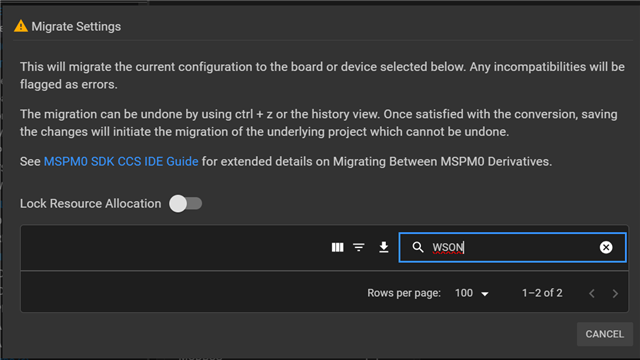
    Could you also share your SDK version? I think CCS and sysconfig version are high enough. And below is the migrate settings from my side.

    And I recommend you to import an empty project from SDK and check it again but not create one by yourself.

  • Hi Pengfei,

    Thanks for your help, I have already switched the package.

    When I drag the IDE window from my notebook screen to an external monitor, 
    It looks like the window size is fixed. I had to connect a larger monitor in order to scroll down and access the content at the bottom.