LP-AM243: Example : OSPI Flash IO no response after flashing

Part Number: LP-AM243
Other Parts Discussed in Thread: SYSCONFIG, UNIFLASH

Hi All,

We are testing OSPI Flash using the example: "ospi_flash_io_am243x-lp_r5fss0-0_nortos_ti-arm-clang", and the following tests are using the example code.

When we use SBL "sbl_null.release.hs_fs.tiimage" for developing, the application runs successfully. 
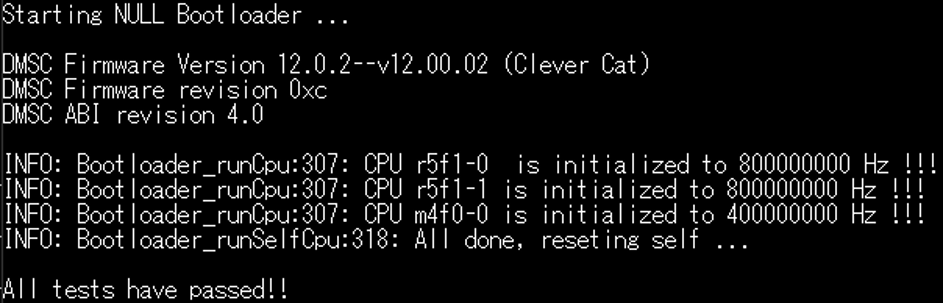
image.png

However, after we flashed the image to OSPI flash and changed SBL to "sbl_ospi.release.hs_fs.tiimage", the application doesn't work.

No more responses after switching to the application. 
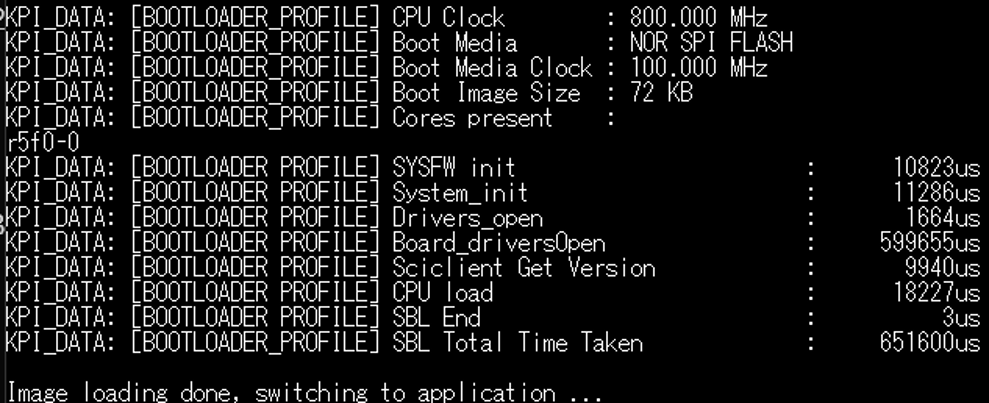
image.png


This issue occurs on both the LP and the EVM.

How can I resolve this issue? 


SDK ver : 12_00_00_26, FYI.


BR,

Harry Chu

  • Hi Harry,

    I am currently talking with the development team as to why this issue occurs. Based on my investigation, the issue seems to arise only in the OSPI Flash IO example built in RELEASE mode. In DEBUG mode, I can see the logs from the OSPI Flash IO example after the SBL OSPI has completed its execution.

    Regards,

    Aryamaan

  • Hi Aryamaan,

    In DEBUG mode, I can see the logs from the OSPI Flash IO example after the SBL OSPI has completed its execution.

    Although I built example in DEBUG mode, I can't see any log after SBL OSPI. I tried SBL "sbl_ospi.release.hs_fs.tiimage" and "sbl_ospi.debug.hs_fs.tiimage" but both failed. Could you help me look into this?

    BR,

    Harry Chu

  • Hi Harry,

    May I know the Flash part which you are using? If its the default Flash part that is being used, can you try flashing the images in DEBUG mode using a newly installed MCU+ SDK 12_00_00_26?

    Regards,

    Aryamaan

  • Hi Aryamaan,

    It's the default Flash part on LP board and the process of flashing DEBUG mode images was successful.

    But the application still fails to output any logs after SBL completed in both cases.

    sbl_ospi.debug.hs_fs.tiimage :

    sbl_ospi.release.hs_fs.tiimage : 

    BR,

    Harry Chu

  • Hi Harry,

    Give me some time till next week to discuss the issue with the software development team.

    Regards,

    Aryamaan

  • Hi Harry,

    The problem might be with NORTOS. I have created a new OSPI Flash IO example with FREERTOS and I dont the issue on AM243x-EVM.

    Can you please add this example in this path: examples/drivers/ospi/ospi_flash_io/am243x-evm/r5fss0-0_freertos.zip

    Please let me know if you see any issues with this FREERTOS example. The example is exactly the same as the NORTOS example with regards to the OSPI and Flash drivers.

    Regards,

    Aryamaan

  • Hi Aryamaan,

    There seem to be no issue on my EVM board with this FreeRTOS example after booting via SBL OSPI.

    Could you also provide the same example for the LP board?

    Thank you for your help.

    BR,

    Harry

  • Hi Harry,

    Glad to know that the issue is no longer seen with the custom example that I have shared. Please give me some time till today evening, and I will share the custom FreeRTOS example that you can use for the AM243x-LP.

    Regards,

    Aryamaan

  • Hi Harry,

    Please find attached the custom FreeRTOS example for Am243x-LP for the following path:

    examples/drivers/ospi/ospi_flash_io/am243x-lp/5518.r5fss0-0_freertos.zip

    Regards,

    Aryamaan

  • Hi Aryamaan,

    Thank you for providing the LP example.

    BR,

    Harry

  • Hi Aryamaan,

    I added the Flash driver to another project running FreeRTOS, and the same issue occurred. It seems that FreeRTOS or NORTOS is not the root cause of this issue.

    Do you have any other solutions or suggestions?

    BR,
    Harry

  • Hi Harry,

    I would need a couple of more details regarding your setup.

    Can you tell me which version of the AM243x SDK is used for the project? And are you able to see any logs from the application side? If the project application gets stuck in the Flash_norOspiOpen() API, then this would mean that there is an issue with the Flash configurations.

    Can you also share your SysConfig file too, along with the logs which you see? I would like to verify the SysConfig configurations.

    Regards,

    Aryamaan

  • Hi Aryamaan,

    SDK ver : 12_00_00_26

    Sysconfig : 

    /**
     * These arguments were used when this file was generated. They will be automatically applied on subsequent loads
     * via the GUI or CLI. Run CLI with '--help' for additional information on how to override these arguments.
     * @cliArgs --device "AM243x_ALX_beta" --part "ALX" --package "ALX" --context "r5fss0-0" --product "MCU_PLUS_SDK_AM243x@12.00.00"
     * @v2CliArgs --device "AM2434" --package "FCCSP (ALX)" --variant "AM2434-E" --context "r5fss0-0" --product "MCU_PLUS_SDK_AM243x@12.00.00"
     * @versions {"tool":"1.26.0+4407"}
     */
    
    /**
     * Import the modules used in this configuration.
     */
    const eeprom     = scripting.addModule("/board/eeprom/eeprom", {}, false);
    const eeprom1    = eeprom.addInstance();
    const flash      = scripting.addModule("/board/flash/flash", {}, false);
    const flash1     = flash.addInstance();
    const i2c        = scripting.addModule("/drivers/i2c/i2c", {}, false);
    const i2c1       = i2c.addInstance();
    const pruicss    = scripting.addModule("/drivers/pruicss/pruicss", {}, false);
    const pruicss1   = pruicss.addInstance();
    const debug_log  = scripting.addModule("/kernel/dpl/debug_log");
    const dpl_cfg    = scripting.addModule("/kernel/dpl/dpl_cfg");
    const mpu_armv7  = scripting.addModule("/kernel/dpl/mpu_armv7", {}, false);
    const mpu_armv71 = mpu_armv7.addInstance();
    const mpu_armv72 = mpu_armv7.addInstance();
    const mpu_armv73 = mpu_armv7.addInstance();
    const mpu_armv74 = mpu_armv7.addInstance();
    const mpu_armv75 = mpu_armv7.addInstance();
    const mpu_armv76 = mpu_armv7.addInstance();
    const enet_icss  = scripting.addModule("/networking/enet_icss/enet_icss", {}, false);
    const enet_icss1 = enet_icss.addInstance();
    const enet_icss2 = enet_icss.addInstance();
    
    /**
     * Write custom configuration values to the imported modules.
     */
    eeprom1.$name = "CONFIG_EEPROM0";
    
    flash1.$name                         = "CONFIG_FLASH0";
    flash1.peripheralDriver.$name        = "CONFIG_OSPI0";
    flash1.peripheralDriver.dmaEnable    = true;
    flash1.peripheralDriver.inputClkFreq = 100000000;
    flash1.peripheralDriver.phyEnable    = true;
    flash1.peripheralDriver.child.$name  = "drivers_ospi_v0_ospi_v0_template0";
    
    i2c1.$name               = "CONFIG_I2C0";
    eeprom1.peripheralDriver = i2c1;
    i2c1.I2C.$assign         = "I2C0";
    i2c1.I2C_child.$name     = "drivers_i2c_v0_i2c_v0_template1";
    
    const udma                         = scripting.addModule("/drivers/udma/udma", {}, false);
    const udma1                        = udma.addInstance({}, false);
    udma1.$name                        = "CONFIG_UDMA0";
    flash1.peripheralDriver.udmaDriver = udma1;
    
    debug_log.enableUartLog        = true;
    debug_log.enableCssLog         = false;
    debug_log.uartLog.$name        = "CONFIG_UART0";
    debug_log.uartLog.UART.$assign = "USART0";
    
    const uart_v0_template  = scripting.addModule("/drivers/uart/v0/uart_v0_template", {}, false);
    const uart_v0_template1 = uart_v0_template.addInstance({}, false);
    uart_v0_template1.$name = "drivers_uart_v0_uart_v0_template0";
    debug_log.uartLog.child = uart_v0_template1;
    
    mpu_armv71.$name             = "CONFIG_MPU_REGION0";
    mpu_armv71.size              = 31;
    mpu_armv71.attributes        = "Device";
    mpu_armv71.accessPermissions = "Supervisor RD+WR, User RD";
    mpu_armv71.allowExecute      = false;
    
    mpu_armv72.$name             = "CONFIG_MPU_REGION1";
    mpu_armv72.size              = 15;
    mpu_armv72.accessPermissions = "Supervisor RD+WR, User RD";
    
    mpu_armv73.$name             = "CONFIG_MPU_REGION2";
    mpu_armv73.baseAddr          = 0x41010000;
    mpu_armv73.size              = 15;
    mpu_armv73.accessPermissions = "Supervisor RD+WR, User RD";
    
    mpu_armv74.$name             = "CONFIG_MPU_REGION3";
    mpu_armv74.accessPermissions = "Supervisor RD+WR, User RD";
    mpu_armv74.baseAddr          = 0x70000000;
    mpu_armv74.size              = 21;
    
    mpu_armv75.$name             = "CONFIG_MPU_REGION5";
    mpu_armv75.accessPermissions = "Supervisor RD+WR, User RD";
    mpu_armv75.baseAddr          = 0xA5000000;
    mpu_armv75.size              = 23;
    mpu_armv75.attributes        = "NonCached";
    
    mpu_armv76.$name      = "CONFIG_MPU_REGION6";
    mpu_armv76.baseAddr   = 0x60000000;
    mpu_armv76.size       = 27;
    mpu_armv76.attributes = "Device";
    
    enet_icss1.$name                         = "CONFIG_ENET_ICSS0";
    enet_icss1.PktInfoOnlyEnable             = true;
    enet_icss1.mdioDisableStateMachineOnInit = true;
    enet_icss1.mdioMode                      = "MDIO_MODE_MANUAL";
    enet_icss1.mode                          = "DUAL MAC";
    enet_icss1.LargePoolPktCount             = 32;
    enet_icss1.GigabitSupportEnable          = false;
    enet_icss1.txDmaChannel[0].$name         = "ENET_DMA_TX_CH0";
    enet_icss1.netifInstance.create(1);
    enet_icss1.netifInstance[0].$name        = "NETIF_INST_ID0";
    enet_icss1.rxDmaChannel[0].$name         = "ENET_DMA_RX_CH0";
    
    const ethphy_cpsw_icssg  = scripting.addModule("/board/ethphy_cpsw_icssg/ethphy_cpsw_icssg", {}, false);
    const ethphy_cpsw_icssg1 = ethphy_cpsw_icssg.addInstance({}, false);
    ethphy_cpsw_icssg1.$name = "CONFIG_ENET_ETHPHY0";
    enet_icss1.ethphy2       = ethphy_cpsw_icssg1;
    
    enet_icss2.$name                  = "CONFIG_ENET_ICSS1";
    enet_icss2.mode                   = "DUAL MAC";
    enet_icss2.mdioMdcEnable          = false;
    enet_icss2.dualMacPortSelected    = "ENET_MAC_PORT_2";
    enet_icss2.PktInfoOnlyEnable      = true;
    enet_icss2.LargePoolPktCount      = 32;
    enet_icss2.GigabitSupportEnable   = false;
    enet_icss2.txDmaChannel[0].$name  = "ENET_DMA_TX_CH1";
    enet_icss2.netifInstance.create(1);
    enet_icss2.netifInstance[0].$name = "NETIF_INST_ID1";
    enet_icss2.rxDmaChannel[0].$name  = "ENET_DMA_RX_CH1";
    
    const ethphy_cpsw_icssg2 = ethphy_cpsw_icssg.addInstance({}, false);
    ethphy_cpsw_icssg2.$name = "CONFIG_ENET_ETHPHY1";
    enet_icss2.ethphy3       = ethphy_cpsw_icssg2;
    
    enet_icss2.icss                          = pruicss1;
    enet_icss1.icss                          = pruicss1;
    pruicss1.$name                           = "CONFIG_PRU_ICSS1";
    pruicss1.AdditionalICSSSettings[0].$name = "CONFIG_PRU_ICSS_IO0";
    pruicss1.intcMapping.create(2);
    pruicss1.intcMapping[0].$name            = "CONFIG_ICSS1_INTC_MAPPING0";
    pruicss1.intcMapping[0].event            = "41";
    pruicss1.intcMapping[0].channel          = "7";
    pruicss1.intcMapping[0].host             = "8";
    pruicss1.intcMapping[1].$name            = "CONFIG_ICSS1_INTC_MAPPING1";
    pruicss1.intcMapping[1].event            = "53";
    pruicss1.intcMapping[1].channel          = "7";
    pruicss1.intcMapping[1].host             = "8";
    
    const udma2        = udma.addInstance({}, false);
    enet_icss2.udmaDrv = udma2;
    enet_icss1.udmaDrv = udma2;
    
    /**
     * Pinmux solution for unlocked pins/peripherals. This ensures that minor changes to the automatic solver in a future
     * version of the tool will not impact the pinmux you originally saw.  These lines can be completely deleted in order to
     * re-solve from scratch.
     */
    flash1.peripheralDriver.OSPI.$suggestSolution               = "OSPI0";
    flash1.peripheralDriver.OSPI.CLK.$suggestSolution           = "OSPI0_CLK";
    flash1.peripheralDriver.OSPI.CSn0.$suggestSolution          = "OSPI0_CSn0";
    flash1.peripheralDriver.OSPI.D3.$suggestSolution            = "OSPI0_D3";
    flash1.peripheralDriver.OSPI.D2.$suggestSolution            = "OSPI0_D2";
    flash1.peripheralDriver.OSPI.D1.$suggestSolution            = "OSPI0_D1";
    flash1.peripheralDriver.OSPI.D0.$suggestSolution            = "OSPI0_D0";
    i2c1.I2C.SCL.$suggestSolution                               = "I2C0_SCL";
    i2c1.I2C.SDA.$suggestSolution                               = "I2C0_SDA";
    debug_log.uartLog.UART.RXD.$suggestSolution                 = "UART0_RXD";
    debug_log.uartLog.UART.TXD.$suggestSolution                 = "UART0_TXD";
    enet_icss1.PRU_ICSSG1_MDIO.$suggestSolution                 = "PRU_ICSSG1_MDIO0";
    enet_icss1.PRU_ICSSG1_MDIO.MDC.$suggestSolution             = "PRG1_MDIO0_MDC";
    enet_icss1.PRU_ICSSG1_MDIO.MDIO.$suggestSolution            = "PRG1_MDIO0_MDIO";
    enet_icss1.PRU_ICSSG1_IEP.$suggestSolution                  = "PRU_ICSSG1_IEP0";
    enet_icss1.PRU_ICSSG1_IEP.EDC_LATCH_IN0.$suggestSolution    = "PRG1_PRU0_GPO18";
    enet_icss1.PRU_ICSSG1_IEP.EDC_SYNC_OUT0.$suggestSolution    = "PRG1_PRU0_GPO19";
    enet_icss1.PRU_ICSSG1_MII_G_RT.$suggestSolution             = "PRU_ICSSG1_MII_G_RT";
    enet_icss1.PRU_ICSSG1_MII_G_RT.MII0_COL.$suggestSolution    = "PRG1_PRU0_GPO9";
    enet_icss1.PRU_ICSSG1_MII_G_RT.MII0_CRS.$suggestSolution    = "PRG1_PRU0_GPO10";
    enet_icss1.PRU_ICSSG1_MII_G_RT.MII0_RXD0.$suggestSolution   = "PRG1_PRU0_GPO0";
    enet_icss1.PRU_ICSSG1_MII_G_RT.MII0_RXD1.$suggestSolution   = "PRG1_PRU0_GPO1";
    enet_icss1.PRU_ICSSG1_MII_G_RT.MII0_RXD2.$suggestSolution   = "PRG1_PRU0_GPO2";
    enet_icss1.PRU_ICSSG1_MII_G_RT.MII0_RXD3.$suggestSolution   = "PRG1_PRU0_GPO3";
    enet_icss1.PRU_ICSSG1_MII_G_RT.MII0_RXDV.$suggestSolution   = "PRG1_PRU0_GPO4";
    enet_icss1.PRU_ICSSG1_MII_G_RT.MII0_RXER.$suggestSolution   = "PRG1_PRU0_GPO5";
    enet_icss1.PRU_ICSSG1_MII_G_RT.MII0_RXLINK.$suggestSolution = "PRG1_PRU0_GPO8";
    enet_icss1.PRU_ICSSG1_MII_G_RT.MII0_TXD0.$suggestSolution   = "PRG1_PRU0_GPO11";
    enet_icss1.PRU_ICSSG1_MII_G_RT.MII0_TXD1.$suggestSolution   = "PRG1_PRU0_GPO12";
    enet_icss1.PRU_ICSSG1_MII_G_RT.MII0_TXD2.$suggestSolution   = "PRG1_PRU0_GPO13";
    enet_icss1.PRU_ICSSG1_MII_G_RT.MII0_TXD3.$suggestSolution   = "PRG1_PRU0_GPO14";
    enet_icss1.PRU_ICSSG1_MII_G_RT.MII0_TXEN.$suggestSolution   = "PRG1_PRU0_GPO15";
    enet_icss1.PRU_ICSSG1_MII_G_RT.MII1_COL.$suggestSolution    = "PRG1_PRU1_GPO9";
    enet_icss1.PRU_ICSSG1_MII_G_RT.MII1_CRS.$suggestSolution    = "PRG1_PRU1_GPO10";
    enet_icss1.PRU_ICSSG1_MII_G_RT.MII1_RXD0.$suggestSolution   = "PRG1_PRU1_GPO0";
    enet_icss1.PRU_ICSSG1_MII_G_RT.MII1_RXD1.$suggestSolution   = "PRG1_PRU1_GPO1";
    enet_icss1.PRU_ICSSG1_MII_G_RT.MII1_RXD2.$suggestSolution   = "PRG1_PRU1_GPO2";
    enet_icss1.PRU_ICSSG1_MII_G_RT.MII1_RXD3.$suggestSolution   = "PRG1_PRU1_GPO3";
    enet_icss1.PRU_ICSSG1_MII_G_RT.MII1_RXDV.$suggestSolution   = "PRG1_PRU1_GPO4";
    enet_icss1.PRU_ICSSG1_MII_G_RT.MII1_RXER.$suggestSolution   = "PRG1_PRU1_GPO5";
    enet_icss1.PRU_ICSSG1_MII_G_RT.MII1_RXLINK.$suggestSolution = "PRG1_PRU1_GPO8";
    enet_icss1.PRU_ICSSG1_MII_G_RT.MII1_TXD0.$suggestSolution   = "PRG1_PRU1_GPO11";
    enet_icss1.PRU_ICSSG1_MII_G_RT.MII1_TXD1.$suggestSolution   = "PRG1_PRU1_GPO12";
    enet_icss1.PRU_ICSSG1_MII_G_RT.MII1_TXD2.$suggestSolution   = "PRG1_PRU1_GPO13";
    enet_icss1.PRU_ICSSG1_MII_G_RT.MII1_TXD3.$suggestSolution   = "PRG1_PRU1_GPO14";
    enet_icss1.PRU_ICSSG1_MII_G_RT.MII1_TXEN.$suggestSolution   = "PRG1_PRU1_GPO15";
    enet_icss1.PRU_ICSSG1_MII_G_RT.MII_MR0_CLK.$suggestSolution = "PRG1_PRU0_GPO6";
    enet_icss1.PRU_ICSSG1_MII_G_RT.MII_MR1_CLK.$suggestSolution = "PRG1_PRU1_GPO6";
    enet_icss1.PRU_ICSSG1_MII_G_RT.MII_MT0_CLK.$suggestSolution = "PRG1_PRU0_GPO16";
    enet_icss1.PRU_ICSSG1_MII_G_RT.MII_MT1_CLK.$suggestSolution = "PRG1_PRU1_GPO16";
    

    Attached is the SysConfig file from enet_icssg_tcpserver_am243x-lp_r5fss0-0_freertos_ti-arm-clang. I changed the MPU CONFIG_MPU_REGION6 attribute from "Cached" to "Strongly Ordered" for OSPI Flash read/write operations.

    Once flashed to OSPI Flash and booted via SBL OSPI, there is no UART output after the SBL switches to the application.

    BR,
    Harry

  • Hi Harry,

    Thanks a lot for providing these details. Please give me time till Monday to review this and try replicating the issue on my end.

    Also, yes, your MPU region configurations are correct, since "Strongly Ordered" is used for OSPI Flash read/write operations.

    Regards,

    Aryamaan

  • Hi Harry,

    Apologies for the delay, and thank you for your patience.

    I will test this out tomorrow or latest by Wednesday, since I was preoccupied with an high priority item.

    Meanwhile, I was reviewing your SysConfig file and I noticed the following:

    Please change the Boot Quirks Function to "NULL" in all the three examples: Uart UniFlash, SBL OSPI, and the example which you are using.

    The above function is only designed for OSPI Flashes and might brick the QSPI Flash, if used. An internal JIRA bug has been filed regarding this, and the future releases will have this corrected.

    Regards,

    Aryamaan

  • Hi Aryamaan,

    Thank you for the reminder. I will fix it.

    I look forward to your updates on the flashing issue.

    BR,
    Harry

  • Hi Harry,

    I have completed my testings and have identified the issue.

    There is no issue with adding the OSPI and Flash driver in the enet_icssg_tcpserver example. I have added a separate instance of OSPI and Flash driver and flashed the example. I can see all the logs from the application side.

    The issue which you face is because of the overlapping memory regions of MSRAM between the SBL OSPI and the Application example.

    Let me explain this in detail:

    In the SBL OSPI, the following memory regions are used by default:

    MSRAM_0: Start address: 0x70000100, Length: 0x6FF00

    MSRAM_1: Start address: 0x70070000, Length: 0x20000

    In the enet_icssg_tcpserver example, the following memory regions are used by default:

    MSRAM: Start address: 0x70080000, Length: 0x160000

    Now, this signifies an overlap between the memory region used in the SBL OSPI and the Application example. This was preventing the Application logs to be displayed in the UART console as the contents were being overwritten.

    To prevent the overlap and to resolve the issue:

    Keep the SBL OSPI example as it as, the default memory regions used by the MSRAM can be left untouched,

    In the source/networking/enet/core/examples/lwip/enet_icssg_tcpserver/am243x-lp/r5fss0-0_freertos/ti-arm-clang/linker.cmd, simply change the starting address of the MSRAM region to a non-overlapping address, for example, 0x700A0000.

    Regards,

    Aryamaan

  • Hi Aryamaan,

    I modified the MSRAM start address, and I can now see the logs from my application.

    Thank you for your help!

    BR,
    Harry

  • Hi Harry,

    Glad to know your issue has been resolved, closing this thread now.

    Also please make sure that whenever you add a Flash instance in any of the applications, please change the Boot Quirks Function to "NULL" .

    Regards,

    Aryamaan

  • Hi Aryamaan,

    I have a quick follow-up question.

    The MSRAM start address in your FreeRTOS Flash IO example is 0x70080000. I'm wondering why that example didn't encounter the same issue.

    BR,
    Harry

  • Hi Harry,

    Please refer to the release.map files for each of the example, you will find that the section loaded from the application at 0x70080000 in the ospi_flash_io example is the .bss section. During the time of loading, this is just a container which has an initialized length of 0, since this is used only during the runtime of the application. Hence, the SBL can overwrite this with its own section (which is the stack code in this case), and the .bss section is then initialized during runtime, overwriting the previous SBL stack sections.

    Whereas, the section loaded from the application at 0x70080000 in the enet_icssg_tcpserver example is the .text section which contains various APIs such as Icssg_open(), main(), etc. After this is loaded to the 0x70080000, the SBL OSPI overwrites this with its own section (which is the stack code in this case). Hence, the .text section gets overwritten and at runtime, only the stack sections of the SBL continue to remain in that region, and thats why there were no logs seen apart from the SBL OSPI logs in the UART console.

    Regards,

    Aryamaan

  • Hi Aryamaan,

    We are currently working on developing a custom SBL and came across the following thread:
    e2e.ti.com/.../am2434-problems-after-converting-to-mcelf

    Honestly, we haven't fully figured out how to load the application code into the .bss or .text sections yet, but I am quite concerned that the workaround you provided reduces the total available MSRAM space for the application.

    In fact, by applying the method mentioned in the thread above, I also successfully booted the enet_icssg_tcpserver example from SBL to the application while keeping the MSRAM start address at 0x70080000.

    I would like to know if this SBL-to-application boot issue was introduced in SDK v12_00_00_26? If so, has it been fixed in v12.1, or will it be addressed in a future release?

    BR,
    Harry

  • Hi Harry,

    I had suggested the above offset only for testing purposes. This would indeed reduce the available MSRAM size for the application.

    Yes, the method suggested in the thread linked above will work. You wouldnt have to explicitly load the application code into the .bss or .text sections yet, but you can reduce the size of the MSRAM required by the SBL OSPI, thereby using the original 0x70080000 address for the MSRAM.

    I would recommend to use the release.map files to gauge the amount of memory (MSRAM) used by the SBL and the application, after which the memory optimizations can be made (for example reducing the unused MSRAM space in the SBL OSPI case and in the application case too) in the SysConfig file for each example.

    This would then prevent explicitly loading the application code into different sections such as .bss sections or .text sections.

    Yes, there has been a JIRA bug filed for the above issue, and its expected to be fixed in the v12.2 release.

    Regards,

    Aryamaan
