AM62L-EVSE-DEV-EVM: Green Tint in UDP streaming.

Part Number: AM62L-EVSE-DEV-EVM

Hi,

We took a tisdk-edgeai-image and i am working on top of this.

We am developing a camera sensor - OX03H10-E74Y-001A-Z
We are using the. tiovxisp in order to take UDP stream from this setup.

So in order to take stream we have followed the tuning guide lines give in the Ti document 
--> AM6xA ISP Tuning Guide (SPRAD86A – MARCH 2023 – REVISED MAY 2024)

In that iwe have succesfully completed the Sensor Software intergration (section 5).

(Refer session 6 for better understanding)
To generate the dcc_bins we need to create a configuration file, using which we create the dcc_xml which inturn is used to create the dcc_bins --> dcc_2a_wdr.bin, dcc_ldc_wdr.bin, dcc_viss_wdr.bin

We are trying to capture a HDR4 stream and the binary files was created by us with the help of the already available <sensor>_properties.txt file available in the directory.
We created a new ox03h10_properties.txt file and then using that to create the dcc_xml and finally the dcc_bins.

We scp those files into the EVM and tried to take stream using the following pipeline.

gst-launch-1.0 v4l2src device=/dev/video3 io-mode=dmabuf-import ! video/x-bayer,width=1920,height=1536,framerate=30/1,format=rggb12 ! tiovxisp sink_0::device=/dev/v4l-subdev4 sensor-name=SENSOR_OX03H10 dcc-isp-file=/root/h10/dcc_viss_wdr.bin sink_0::dcc-2a-file=/root/h10/dcc_2a_wdr.bin format-msb=11 ! video/x-raw,format=NV12,width=1920,height=1536 ! tiovxmultiscaler ! video/x-raw,width=1280,height=720 ! v4l2h264enc ! h264parse config-interval=1 ! mpegtsmux ! udpsink host=192.168.1.102 port=8055

Took a vlc stream and observed that the stream has a green tint to it.
Screenshot from 2026-08-12 14-27-57.png

We also too raw_dump and converted it using the Chromatix application  and in that case the image is like this.
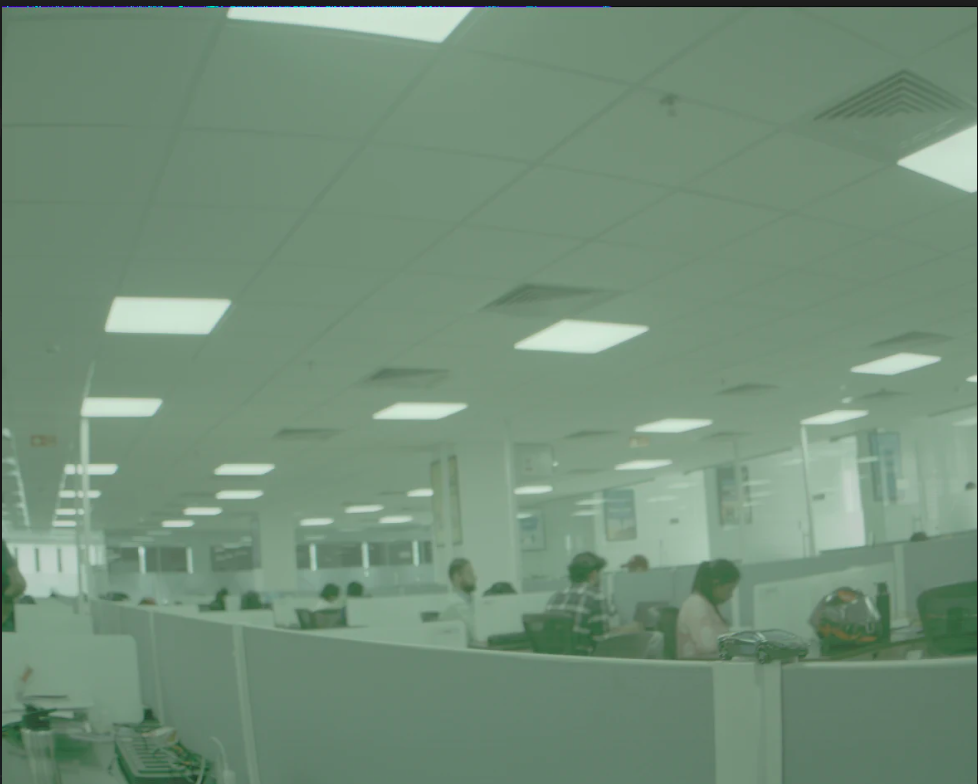
image.png

We thing the issue is with the demosacing and that is coming in the dcc_viss_wdr.bin that we have included in the pipeline.
Since we are using tiovxisp we need help from your side to resolve this issue.

If any more information is needed from my end please let me know.


  • Hi Tina,

    The binaries generated by the Python script based on your ox03h10_properties.txt don't have the right AWB gains. You'll need to perform AWB tuning to get the color correct. 

    Regards,

    Jianzhong

  • Is there any default binaries that you can provide, for this sensor to get a better image with atleast lesser green tint.

    In the properties.txt file that we created, there is a parameter called -> WDR decompanding knee points (WDR_KNEE_X & WDR_KNEE_Y).
    From where does one come across these values?
    Most of the other parameters values we got from the OX03H10 datasheet.

  • Is there any default binaries that you can provide, for this sensor to get a better image with atleast lesser green tint.

    In the properties.txt file that we created, there is a parameter called -> WDR decompanding knee points (WDR_KNEE_X & WDR_KNEE_Y).
    From where does one come across these values?
    Most of the other parameters values we got from the OX03H10 datasheet.

    SENSOR_ID 3
    PRJ_DIR ../../../sensor_drv/src/ox03h10_1
    SENSOR_NAME ox03h10
    SENSOR_DCC_NAME OX03H10

    SENSOR_WIDTH 1920
    SENSOR_HEIGHT 1536

    # 0=RGGB; 1=GRBG; 2=GBRG; 3=BGGR, 4=MONO
    COLOR_PATTERN 0

    # sensor mode: 0 for linear (no decompanding), 1 for WDR (decompanding)
    WDR_MODE 1

    # raw sensor image BIT_DEPTH: it may be 8, 10, or 12 for linear sensors; typically 12 for WDR mode because of companding
    BIT_DEPTH 12

    # WDR BIT_DEPTH: WDR raw sensor image bitdepth after decompanding, typically 20 or 24
    WDR_BIT_DEPTH 20

    # WDR decompanding knee points (comma separated without spaces in between)
    WDR_KNEE_X 0,512,1408,2176,4095,65535
    WDR_KNEE_Y 0,2048,16384,65536,1048063,1048063

    # Sensor black level to subtract before decompanding (for linear sensors only and some Sony WDR sensors)
    BLACK_PRE 0

    # Sensor black level to subtract after decompanding (for most WDR sensors and all linear sensors)
    BLACK_POST 0

    # GAMMA value for compressing 20/24-bit WDR raw to 16-bit ISP internal
    # typically around 50 (0.5) for 24-bit WDR sensors and 70 (0.7) for 20-bit sensors
    GAMMA_PRE 50

    # LSB location for H3A input bit range (from bit-H3A_INPUT_LSB to bit-H3A_INPUT_LSB+9)
    H3A_INPUT_LSB 0

    # Choose the default gamma curve used for YUV output: 0 for BT709, 1 for a high contrast gamma curve
    YUV_GAMMA 1

    This is the current properties.txt that i used

  • Hi Tina,

    Is there any default binaries that you can provide, for this sensor to get a better image with atleast lesser green tint

    No, we don't have tuning binaries for OX03H sensor.

    In the properties.txt file that we created, there is a parameter called -> WDR decompanding knee points (WDR_KNEE_X & WDR_KNEE_Y).
    From where does one come across these values?

    The sensor datasheet should have the companding knee points. You may also find that from the sensor driver. You may want to double check if WDR is enabled by the sensor driver. Mismatching knee points may cause color distorting such as green cast.

    Regards,

    Jianzhong


  • Can you explain what you mean by the WDR_KNEE_X and WDR_KNEE_Y parameters


  • we have also observed that when we take stream indoor and outdoor there is change in green tint.
    we hope to understand what exactly is the issue that is causing this green tint 

  • Can you explain what you mean by the WDR_KNEE_X and WDR_KNEE_Y parameters

    Please refer to the following section in AM62A TRM.

    we have also observed that when we take stream indoor and outdoor there is change in green tint.

    You need to tune auto exposure control and auto white balancing.

    Regards,

    Jianzhong

  • Can you please share the above mentioned document as well.

  • Hi,
    we have decided to change the spec to 60 fps, for which we have made necessary changes in the ser-des and the sensor driver register writes.
    SERIALISER - MAX9717F
    DESERIALISER - MAX96724
    SENSOR - OX03H10

    Here when we were taking 30fps stream we didnt have any issue. 
    Now that we have upgraded to 60fps we are observing a frame jump in the UDP stream.
    We are using the tiovxisp for streaming. 

    Spec --> 1920x1536, 60fps, 12 bit-rate, 640 MIPI clk.

    Is there any change that should be made to the dcc bin files becasue the we are using the same pipeline as 30fps only changed the framerate to 60 
     

    gst-launch-1.0 v4l2src device=/dev/video3 io-mode=dmabuf-import ! video/x-bayer,width=1920,height=1536,framerate=60/1,format=rggb12 ! tiovxisp sink_0::device=/dev/v4l-subdev4 sensor-name=SENSOR_OX03H10 dcc-isp-file=/root/dcc_viss_wdr.bin sink_0::dcc-2a-file=/root/dcc_2a_wdr.bin format-msb=11 ! video/x-raw,format=NV12,width=1920,height=1536,framerate=60/1 ! v4l2h264enc extra-controls="controls, video_gop_size=30, h264_i_frame_period=30, prepend_sps_and_pps_to_idr=1" ! h264parse config-interval=1 ! mpegtsmux ! udpsink host=192.168.1.102 port=8055

  • We have tried to raw dump from the sensor directly while keeping a stop watch to monitor any frame jump or skip, we checked around 200 frames and there was no frame jump/drop observed. We also tried to dump yuv right before the encoder and then converted these to png and in that case the frame jump was observed very clearly, so this frame jump is set to happen during tiovxisp.

    By frame jump i mean --> A B C D E F (normal sequenece)
                                        --> A B C D C E F (frame jump)

  • Please try to add a queue element between tiovxisp and v4l2h264enc

  • we tried that as well, not working still frame jump is observed.

    Can you tell me if the dcc binaries change with respect to different fps values?

  • While checking the TRM document i noticed this 

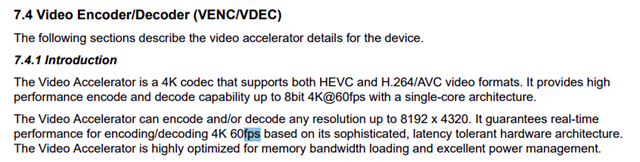
    So your encoder supports 8bit @6fps for 4K resolution, 
    So the bit step down along with other thing is taken case of by the ISP. 

    In that case can the buffer scheduling be the casue of this frame jump being observed in the 60fps where as not observed in 30fps setup?
    Because our spec is 12bit 1920x1536(3mp) @60fps. 

    Please confirm if this finding is correct and is the reason for the frame jump that is observed in 60fps

  • Can you tell me if the dcc binaries change with respect to different fps values?

    No. DCC binaries do not depend on FPS.

    We also tried to dump yuv right before the encoder and then converted these to png and in that case the frame jump was observed very clearly, so this frame jump is set to happen during tiovxisp

    When you dumped the YUV data, is v4l2h264enc also running? Can you share the pipeline?

    Which SDK version are you using?

    Can you try to add "sink_0::pool-size=8 src_0::pool-size=8 " to tiovxisp pad? For example,

    tiovxisp sink_0::device=/dev/v4l-subdev4 sensor-name=SENSOR_OX03H10 dcc-isp-file=/root/h10/dcc_viss_wdr.bin sink_0::dcc-2a-file=/root/h10/dcc_2a_wdr.bin format-msb=11 sink_0::pool-size=8 src_0::pool-size=8

  • The YUV pipeline that was used is:

    gst-launch-1.0 -e \
    v4l2src device=/dev/video3 io-mode=dmabuf-import ! \
    video/x-bayer,width=1920,height=1536,framerate=60/1,format=rggb12 ! \
    tiovxisp sink_0::device=/dev/v4l-subdev4 \
    sensor-name=SENSOR_OX03H10 \
    dcc-isp-file=/root/dcc_viss_wdr.bin \
    sink_0::dcc-2a-file=/root/dcc_2a_wdr.bin \
    format-msb=11 ! \
    video/x-raw,format=NV12,width=1920,height=1536,framerate=60/1 ! \
    filesink location=output_1920x1536_nv12.yuv

    and then this was converted to png using ffmpeg


    SDK version 11.01.07.05 edgeai-image


    tried adding the new solution that you have mentioned:

    gst-launch-1.0 v4l2src device=/dev/video3 io-mode=dmabuf-import ! video/x-bayer,width=1920,height=1536,framerate=60/1,format=rggb12 ! tiovxisp sink_0::device=/dev/v4l-subdev4 sensor-name=SENSOR_OX03H10 dcc-isp-file=/root/dcc_viss_wdr.bin sink_0::dcc-2a-file=/root/dcc_2a_wdr.bin format-msb=11 sink_0::pool-size=8 src_0::pool-size=8 ! video/x-raw,format=NV12,width=1920,height=1536,framerate=60/1 ! v4l2h264enc extra-controls="controls, video_gop_size=30, h264_i_frame_period=30, prepend_sps_and_pps_to_idr=1" ! h264parse config-interval=1 ! mpegtsmux ! udpsink host=192.168.1.102 port=8055

    Still there is frame jump in dynamic setting.

  • Ok. Can you try the following:

    gst-launch-1.0 -e \
    v4l2src device=/dev/video3 io-mode=dmabuf-import ! \
    video/x-bayer,width=1920,height=1536,framerate=60/1,format=rggb12 ! queue leaky=2 ! \
    tiovxisp sink_0::device=/dev/v4l-subdev4 \
    sensor-name=SENSOR_OX03H10 \
    dcc-isp-file=/root/dcc_viss_wdr.bin \
    sink_0::dcc-2a-file=/root/dcc_2a_wdr.bin \
    format-msb=11 sink_0::pool-size=8 src_0::pool-size=8 ! \
    video/x-raw,format=NV12,width=1920,height=1536,framerate=60/1 ! queue leaky=2 ! \
    filesink location=output_1920x1536_nv12.yuv

  • Yes the frame jump is still observed, 
    I will attach the video for reference

    Note: the stop watch is mirrored because our application requires mirrored stream 


    here u can see the number repeating 95 --> 76 --> 95 --> 76

  • Please run the perf_stats tool to see the load on CPU cores and hardware accelerators: https://github.com/TexasInstruments/edgeai-gst-apps/tree/main/scripts/perf_stats

    Another thing unrelated to the frame jump, I see the pictures are greenish. Are you using WDR mode from the sensor? If that's the case, you'll need to enable WDR processing for the ISP by adding "wdr-enabled=true" to tiovxisp. For example, 

    tiovxisp sink_0::device=/dev/v4l-subdev4 \
    sensor-name=SENSOR_OX03H10 \
    dcc-isp-file=/root/dcc_viss_wdr.bin \
    sink_0::dcc-2a-file=/root/dcc_2a_wdr.bin \
    format-msb=11 wdr-enabled=true sink_0::pool-size=8 src_0::pool-size=8 

  • We have tried to raw dump from the sensor directly while keeping a stop watch to monitor any frame jump or skip, we checked around 200 frames and there was no frame jump/drop observed.

    For this test, you were not running the downstream applications which probably were the reason for the frame jump.

    Can you try streaming the camera feed to a display and see if you observe the issue? Try both 30fps and 60fps.

    gst-launch-1.0 -e \
    v4l2src device=/dev/video3 io-mode=dmabuf-import ! \
    video/x-bayer,width=1920,height=1536,framerate=60/1,format=rggb12 ! queue leaky=2 ! \
    tiovxisp sink_0::device=/dev/v4l-subdev4 \
    sensor-name=SENSOR_OX03H10 \
    dcc-isp-file=/root/dcc_viss_wdr.bin \
    sink_0::dcc-2a-file=/root/dcc_2a_wdr.bin \
    format-msb=11 sink_0::pool-size=8 src_0::pool-size=8 ! \
    video/x-raw,format=NV12,width=1920,height=1536,framerate=60/1 ! queue leaky=2 ! \
    tiovxmultiscaler ! video/x-raw, format=NV12, width=1920, height=1080 | queue leaky=2 ! \
    kmssink driver-name=tidss sync=false force-modesetting=true

  • This is the stats while streaming uisng UDP for around 15 minutes. I have also added the wdr-enabled=true 
    There is no frame jump now, but we are observing that the frame freezes for a few milliseconds , now and then.