TDA4VH-Q1: Main R5 Peripheral Access

Part Number: TDA4VH-Q1

This is a followup to this post:

https://e2e.ti.com/support/processors-group/processors/f/processors-forum/1675172/tda4vh-q1-main-r5-peripheral-access

One of our developers is directly interacting with TIMER_TCLR (Timer0 base address of 0x02400000 and register offset of 0x38).  On the EVM board he has no problems interacting with these registers without issues.  But when moving to our custom hardware, he is getting exceptions.  Our hardware is using hs-se version of the TDA4.

Is is certain that perepherals are unlocked, powered, and running without any extra APIs required?  Everything I've read online talks about using sciclient APIs.  The above forum post indicated nothing else was required, so I'm confused.

  • Hi Jason,

    One of our developers is directly interacting with TIMER_TCLR (Timer0 base address of 0x02400000 and register offset of 0x38).

    How are you using this TIMER0 instance? Are you using this for a generic Application usage?

    The SoC has a number of R5F and C7x cores running an RTOS, and each RTOS uses a specific TIMER instance to serve as the Tick timer for the Scheduler. You cannot use these timers for general-purpose applications.

    Please see the 5.4.2.3. RTOS Tick-Timer Allocation section of the PDK documentation for the allocations used with the TI SDK.

    TIMER0 is reserved for C7x_1 core, so you should not be using this from an R5F core if you are using it as a General-Purpose timer.

    You may be able to use an associated Timer if the corresponding processor core is not utilized in your system.

    On the EVM board he has no problems interacting with these registers without issues.  But when moving to our custom hardware, he is getting exceptions.

    There can typically be two root-causes:

    1. Module/Peripheral is not powered-ON. So, any register access will result in a bus error.

    2. Module/Peripheral address is Firewalled. This also results in a bus error and Firewall exception.

    Is is certain that perepherals are unlocked, powered, and running without any extra APIs required?  Everything I've read online talks about using sciclient APIs.  The above forum post indicated nothing else was required, so I'm confused.

    This really depends on the default SoC Power-on-Reset states for various peripherals. There are some modules which are present in Always-ON power-domain and some which are powered-on by default. The ones that are already powered-up do not require any additional SciClient API usage (unless some prior component has turned them OFF). Most of the peripherals are not powered-on by default and these indeed require powering up using the SciClient API.

    There are only a limited set of Timer instances that are powered-on by default. Others requiring the SciClient API usage to turn them on. 

    Please see the 5.2.2 WKUP_PSC0 Device-Specific Information section of the J784S4 TRM for more details. TIMER0 will require powering up.

    The PDK Board layer does initialize a number of clocks, and does power-on a number of modules as part of the Board_init() function invocations. Please see the logic in <RTOS SDK>/<PDK>/packages/ti/board/src/j784s4_evm/board_clock.c file.

    The list of Firewalls configured by default are described in the J784S4 Firewall Descriptions section of the TI-SCI documentation. The TI SDK does not enable Firewalls for Timers by default.

    Hope this clarifies.

    regards

    Suman

  • Hi Suman,

    Thanks for the help.

    This is for an R5F application that will be running on the first main R5 (mcu2_0).  The timer will be used for our FreeRTOS application.  We aren't using any application provided in the PDK.  We don't have any C7x_0 things running, but could in the future.  I do see how TI allocates the timers in the comments under FreeRTOSConfig_mcu2_0.h.  We can always change which timer we use, but I think the same issue will persist.

    1 and 2 ) Yes, this is what i was thinking but was confused when the other forum post indicated nothing needed to be done.

    Do you have specific examples on how to power and open up the firewall for a timer?  I also don't see timer listed in J784S4 Firewall Desciption.  Is there a sub-page that has the timers?

    Our next peripheral we will be accessing from a R5F is one of the CAN devices.  I'm guessing we will need to power it and unlock it?

    Thanks,

    Jason

  • Hi Jason,

    This is for an R5F application that will be running on the first main R5 (mcu2_0).  The timer will be used for our FreeRTOS application.

    Thanks for the confirmation. MCU2_0 uses TIMER4 as its FreeRTOS OS Tick. If you are not booting C7x_0 core, you should be able to use the TIMER0 in your MCU2_0 application as a General Purpose Timer.

    1 and 2 ) Yes, this is what i was thinking but was confused when the other forum post indicated nothing needed to be done.

    This is from default PDK usage for the TI EVM. The module would have been turned ON as part of the Board Init. If your application is not invoking this, then you would need to specifically turn on the module.

    Do you have specific examples on how to power and open up the firewall for a timer?

    The J784S4 Firewall Descriptions section describes the pre-configured Firewalls as part of the TIFS firmware boot. All other firewalls are left open, and you need not do anything to open up the TIMER0 firewall for access from MCU2_0, unless your Bootloader is enforcing/configuring the corresponding Firewall.

    The API to turn on the power for a module is the Sciclient_pmSetModuleState() API. You can see the reference usage in either the Board_moduleClockEnable() in the above referenced board_clock.c file. You will typically need to invoke the Sciclient_init() once in your application to initialize the Sciclient module before invoking any other Sciclient API.

    You can also look up the Sciclient unit test references in <RTOS SDK>/<PDK>/packages/ti/drv/sciclient/examples/sciclient_unit_testapp and sciclient_fw_testapp folders for reference Sciclient usage.

    Our next peripheral we will be accessing from a R5F is one of the CAN devices.  I'm guessing we will need to power it and unlock it?

    You will mostly need Power ON. Firewall unlock is mostly not needed.

    The Firewalls for TIMER and CAN peripherals are all part of the Target Firewalls sheet of the J784S4_Appendix_Public_20250628.xlsx document as part of the TRM package.

    Following is an excerpt of the Firewalls associated with MAIN and MCU domain TIMERs.

    regards

    Suman

  • Suman,

    Thanks, I appreciate the detailed response!

    I will start looking into Sciclient_pmSetModuleState() and how its used.

    I still don't fully understand how you can tell from J784S4_Appendix_Public_20250628.xlsx that a firewall is not enabled for a peripheral.  Can you go into more details on how to read this spreadsheet?

    Thanks,

    Jason

  • Hi Jason,

    I still don't fully understand how you can tell from J784S4_Appendix_Public_20250628.xlsx that a firewall is not enabled for a peripheral.

    No, this does not tell whether a firewall is enabled or not. But rather, it provides the Firewall Id details in the H/W. The Firewall Id and/or Address can be cross-checked against the J784S4 Firewall Descriptions section to see if TIFS firmware is configuring them.

    Can you go into more details on how to read this spreadsheet?

    This sheet is considered part of the TRM Collateral for reading Firewalls Information (this is one of the sheets in the Appendix document). The Excel sheet format allows you to filter on keywords, addresses for easier searchability.

    The main columns that are of interest for identifying a peripheral firewall would be the following:

    • Target (Col. B) / Instance (Col. G)
    • Firewall Id (Col. C)
    • Number of Priv IDs per Region (Col. D)
    • Firewall Regions (Col. E)
    • Start Address (Col. I)
    • End Address (Col. J)

    Please read the 3.2.4 Firewalls (FW) chapter of the TRM for an understanding of the various Firewall terminology.

    regards

    Suman

  • Hi Suman:

    This is Jim from Caterpillar. The table from J784S4_Appendix_Public_20250628.xlsx (you pasted above)  does not provide the firewall owner info for the timer, and the TISI website does not have the info either. Could you please provide the owner info?

    We are using TI HSFS soc, not GP soc. Is the ownership same for HSFS soc and GP soc?

    Also when I tried to access the register, the exception is permission denied access, not something related to power failure. We don't have this issue for GP soc, but have issue for HSFS soc. Why we don't need turn on the power on GP soc, but need turn on the power for HS/FS chip ? Your explanation is not convincible for me.

    Thanks

  • Hi Jim,

    The table from J784S4_Appendix_Public_20250628.xlsx (you pasted above)  does not provide the firewall owner info for the timer, and the TISI website does not have the info either.

    The Excel document provides only the h/w details on Firewall Ids for various peripherals. The latter showcases all the Firewalls that are configured by TIFS firmware on boot. It does not configure Firewalls for Timer or CAN peripherals, so there are no entries for any of Timer or CAN peripherals. This means they are not owned by any s/w component.

    We are using TI HSFS soc, not GP soc. Is the ownership same for HSFS soc and GP soc?

    Yes, the Firewall concepts are the same across GP, HS-FS or HS-SE devices.

    Please see the Firewall FAQ for a list of common questions on Firewalls.

    regards

    Suman

  • Suman:

    Thank you so much for the quick answer!

    Do you have example app for using TISCI_MSG_SET_FWL_REGION to reconfigure the firewall?

  • Hi Jim,

    Do you have example app for using TISCI_MSG_SET_FWL_REGION to reconfigure the firewall?

    I have provided the reference for this earlier, the sciclient_fw_testapp is an example application dealing with Firewalls.

    You can also look up the Sciclient unit test references in <RTOS SDK>/<PDK>/packages/ti/drv/sciclient/examples/sciclient_unit_testapp and sciclient_fw_testapp folders for reference Sciclient usage.

    regards

    Suman

  • Hi Jim, Jason,

    FWIW, I don't think Firewalls is the root-cause for your issues. Please ensure the peripheral is powered up before using it.

    regards

    Suman

  • Any idea why GP does not need power up, but HSFS need?

  • Hi Jim,

    Any idea why GP does not need power up, but HSFS need?

    The Timer power behavior is agnostic of SoC device type, should behave the same way between GP and HS-FS, unless your software is creating a distinction. 

    regards

    Suman

  • Jim,

    I agree that we need to start with the sciclient commands for powering the device first to see if that works.

    Thanks,

    Jason

  • Hi Jason,

    I agree that we need to start with the sciclient commands for powering the device first to see if that works.

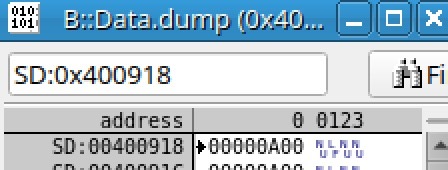
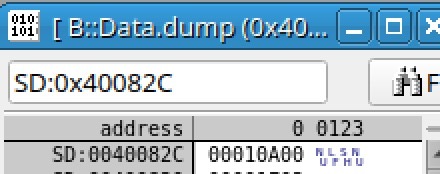
    If you have JTAG access, you should be able to connect to the MCU R5F core, and inspect the PSC registers associated with TIMER, specifically the MDSTAT and MDCTL registers. The MDSTAT register should read 0x103 or 0x3 with the 3 indicating the module is powered on.

    The MAIN domain PSC registers should be at 0x400000 + 0x800 or 0xA00 + (lpsc_id * 4).  

    regards

    Suman

  • Suman,

    Thanks.  We do have JTAG access.  This is something that we can inspect.  We should be able to easily turn it on via JTAG as well to see if that allows us to gain access to the timer.

    Thanks,

    Jason

  • Hi Jason,

    We do have JTAG access.  This is something that we can inspect.  We should be able to easily turn it on via JTAG as well to see if that allows us to gain access to the timer.

    Sure. 

    FYI, DMTIMER8 (and other related timers) are all controlled by LPSC_PER_Spare0 (lpsc_id value = 11 in the above formula).

    The PSC Register details are documented in the 221_PSC0 sheet of the J784S4_Registers_Public_20250808.xlsx document.

    regards

    Suman

  • Does this mean the lpsc_id is 70 if we were to start with dmtimer0?

  • If it is indeed 70, which I think it is.  Then its turned off.

    Same goes for TIMER8 - TIMER19.

  • Hi Jason,

    Does this mean the lpsc_id is 70 if we were to start with dmtimer0?

    Yes, correct.

    If it is indeed 70, which I think it is.  Then its turned off.

    Indeed, this reflects the default Power-On-Reset behavior. So, you have to turn on the modules without which any register accesses will trigger a bus error/data abort.

    regards

    Suman