This thread has been locked.

If you have a related question, please click the "Ask a related question" button in the top right corner. The newly created question will be automatically linked to this question.

Importing legacy files to CCSv5.2

Other Parts Discussed in Thread: CODECOMPOSER

I teach a DSP course but have not done this class for over 3 years. We own the Spectrum Digital, TMS320C6713 DSK 16 Meg SDRAM for student usage. I used lab programs from the Digital Signal Processing book by Chassaing and Reay running on CCSV3.  I am now trying to import them into v5.2. Features have changed significantly. Previous include files are not being found; notably rts6700.lib, csl6713.lib, and dsk6713bsl.lib.  Through the project linked resource I am currently forcing an absolute path location for the csl and bsl libraries. Is there a better way?  Still not sure that this is working but the error message disappears. The rts file was a part of CCSv3.  In version 5.2 I find the rts6740. I do not know that I can use this in lieu of the 6700.  If so, I also have been unable to force this project in this direction. Where/How does the legacy program need to be changed or how/where does the CCSv5 need direction?

Without resolving the rts issue, I have tried to force a build.  I get the following message in the CDT Build Console:

' '

gmake: *** No rule to make target `M:/CodeComposer/workspace/C6000/csl/lib/csl6713.lib', needed by `sine8_LED.out'.

gmake: *** No rule to make target `M:/CodeComposer/workspace/C6000/dsk6713/lib/dsk6713bsl.lib', needed by `sine8_LED.out'.

gmake: *** No rule to make target `C:/ti/ccsv5/tools/compiler/c6000_7.3.4/lib/rts6700.lib', needed by `sine8_LED.out'.

gmake: Target `all' not remade because of errors.

This first two are append a legacy path to my current workspace.  How is this to be corrected?  This final issue would be associated with the rts library.


  • You can build rts6700.lib by following directions in the ti/ccsv5/tools/compiler/*/lib folder (which is a somewhat tricky process; see discussion in another thread from a few weeks ago), or you can just use rts6200.lib.  The BSL was supplied by Spectrum Digital, not TI, and you can use the old one or build anew from the supplied source code.  The CSL is available as a download, and also includes source code.  (Make sure you get the one for 6713, not a newer model.)

  • Larry,

    Welcome to the TI E2E forum. I hope you will find many good answers here and in the TI.com documents and in the TI Wiki Pages. The Community is growing stronger every day, and you will find a lot of help from the Community and from other threads on the forums.

    I trust that you are already a member of our University Program. Information on that is available through TI.com.

    Douglas' reply above is more on-point to your question than mine. But I would like to point you to some resources for your class that you may also want to consider:

    Code Composer Studio Q&A for Academics

    splash page link

    promotional blog on E2E

    You may already have the re-released C6713 second edition from a couple of years ago with updated CCS v3.3 and many new examples

    Donald Reay has also released a book on C6748/OMAPL138 this year in the similar style as Chassaing's work

    Please contact your regional program manager by going to www.ti.com/university and click on regional support.  If in the US/Canada, instructors like yourself can send an email to univ@ti.com for an evaluation kit sample for course consideration.

    On your build issues: the libraries should not be trying to get built, so they may be included in the project directly rather than being linked in through the linker command file. As long as you are still building with COFF format, you should be able to use the BSL and CSL libraries directly; the RTS library will be available from your compiler's folder.

    The Import process sometimes leaves issues like these laying around. I will always try the Import process, but then often end up building a new project and just copying in the source files I need and setting the build parameters and include paths and library paths manually. It just depends on how easy the import goes and how complex the project is.

    Regards,
    RandyP

  • I am trying to reply again. My first attempt did not appear to post.

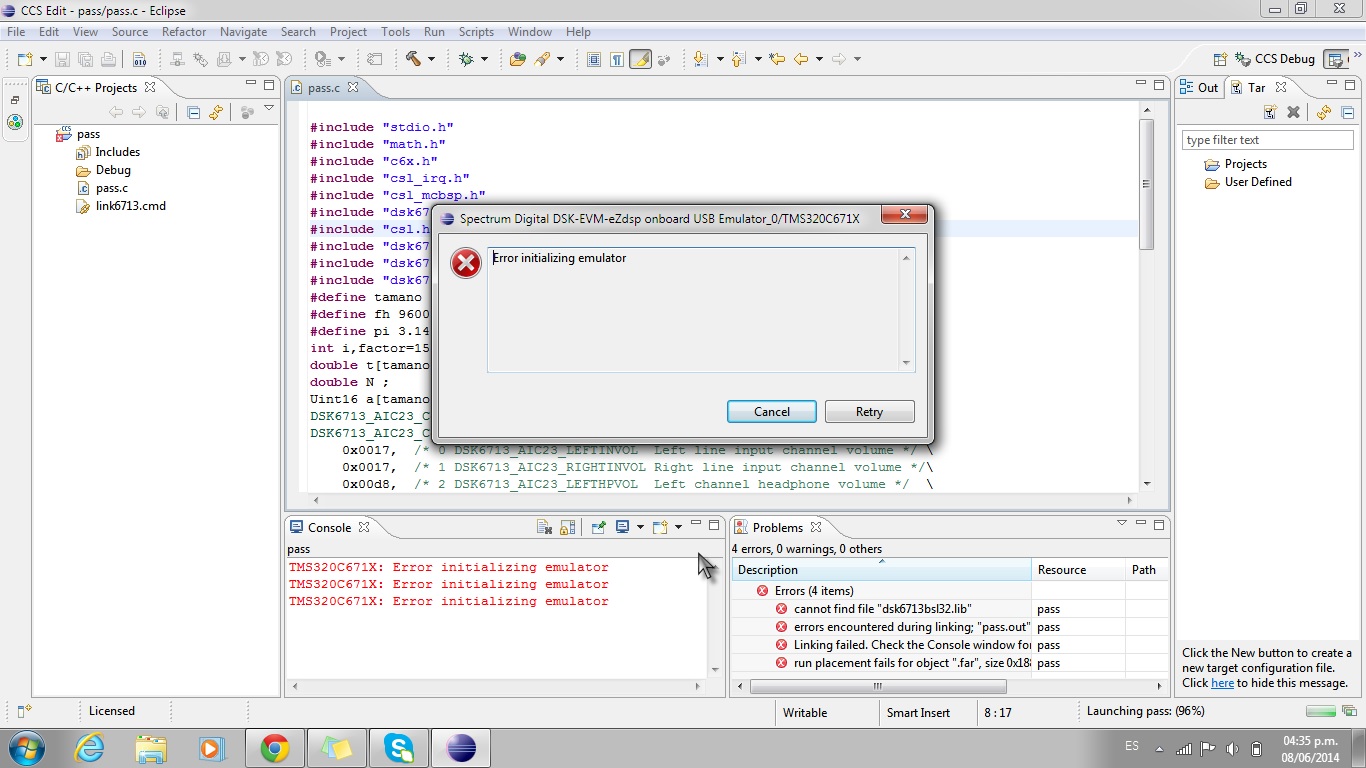
    Thanks for your information regarding the creation of the rts6700 library using cygwin. I found your previous thread and was able to get help from other people who understand that process.  My initial linking errors are now gone. I am now having difficulty connecting throught the JTAG port on the DSK board.  When I initialize the target confirguration I get a message: 

    TMS320C671X: Error initializing emulator

    In your same previous thread, you made the statement:

    I should have mentioned that when I got the DSK6713 working via its USB on-board JTAG emulation, it was under CCSv5.2 on native Windows 7 (64-bit), not in a virtual machine.  I forget exactly what the snag was, but if somebody is having the same problem, let me know and I'll try to help.

    Does your snag and mine match?  Do you remember what you did to correct the issue? 

  • The USB driver for the connection to the JTAG emulation port whould be installed as part of CCS 5.2.  To make sure that you're trying to access the correct JTAG emulation device, check in CCS 5.2 (Alt+Enter, or use menus to select Properties for your current project) that your have configured: Family:C6000; Variant:DSK6713; Connection:Spectrum Digital DSK-EVM-eZdsp onboard USB emulator.  Build your application program and make sure there were no error messages, then click the "bug" icon to connect and download.  Often when I do that, I get a message window saying "Error initializing emulator".  But then I just click on the "Retry" button and it works okay at that point.  The program should be stalled at _c_int00 or _main, depending on how you set things up; click the green triangle (or press F8) to continue running the program.

    I suggest trying a simple "hello, world" program first (see "C (programming language)" on the Wikipedia), with an all-ISRAM linker command file.  If that works (you can see the output in the "Console" tab), then the basic C run-time system is working well enough that you can change the program to your actual application.  Try adding CSL_init(); to the main() function, and if you can build and execute that then the CSL (chip support library) is functional.  Add DSK_LED_on(3);for(;;); in main(), and if that program builds and runs (the right-hand LED should illuminate) then the BSL (board support library) is functional.  You can try #including the headers that declare those functions, to verify that they are in your #include path.

    Good luck!

  • Oops, that should have been DSK6713_LED_on(3);for(;;);


  • I am having the

    TMS320C671X: Error initializing emulator

    problem described above. I installed ccs v5.2 into my windows 7 machine and then went to help>updates, which installed a bunch of updates. I imported the post example from the DSK6713 installation.

    If I look in

    Control Panel\Hardware and Sound\Devices and Printers

    I see an unknown device that comes and goes as I plug and unplug the usb cable to my DSK6713 board. It looks like the CCSv5 installation does not install the driver.

    Any ideas?

    Kent

  • Hi !!

    I´m working with TMS320C6713 DSK 16 MEG and Code composer studio V5. I have a problem at moment of debug pass the example. 

    Any solution? 

    Thank you Luis.

  • Luis,

    Proper etiquette on the forum is to post a new question onto a new thread. You have double posted your question onto two different, unrelated, closed/answered threads, which means they could get less attention. Also, a CCS question such as yours needs to be posted to the E2E Code Composer Forum and not this hardware-centric C67x Single Core Forum.

    I will ask a Moderator to move your duplicate post, but if it does not work please re-post correctly.

    Regards,
    RandyP