This thread has been locked.

If you have a related question, please click the "Ask a related question" button in the top right corner. The newly created question will be automatically linked to this question.

nandecc when booting from UART don't work

hello,

i'm booting from UART. i have the spl, and u-boot file as describe in the booting options.

but after i get to the u-boot prompt the command nandecc is not recognized. does someone know why?

other commands like nand erase and nand write are working. but after i'm writing something to the nand without using "nandecc hw 2" i get gibrish text (after boot from nand).

any help will be accepted.

  • Hi Eliah,

    Which version of the AM335x SDK/PSP are you using? With the latest version only HW ECC BCH8 is supported. Take a look at the NAND ECC algorithm selection from the AM335x U-Boot User's Guide. Here is an excerpt:

    Starting with the 04.06.00.09-rc2 release only BCH8 is supported, and is used by default in all cases. No user interaction is required to select the algorithm and the references to nandecc below are not applicable.

    Best regards,
    Miroslav

  • Hi Miroslav,

    I'm using latest sdk. (05.06...).

    I didn't understand what you are saying... Why when I'm booting from SD I can use nandecc hw 2 command. Why can I do it when booting to UART?

    Thanks

  • Hi Eliah,

    I am currently booting from SD card with the latest U-Boot that comes with the latest SDK/PSP and when I type the "help" command in U-Boot mode, there is no nandecc command listed. Please verify that the U-Boot image that is on your SD card is in fact compiled from the latest SDK/PSP?

    Best regards,
    Miroslav

  • hi,

    i'm booting actially from the SD card that cames with the EVM. maybe it is old (based on an old SDK). i put nothing on the SD card.

    and i'm booting from uart base on spl and u-boot that were compiled on the SDK 05.06 (latest).

    from your reply before, i understend, that from SDK 05.06 only one ecc is possible and it is also the the default. so actually when booting from UART (with spl and u-boot based on the latest SDK) i don't need to use the command "nand ecc hw 2". am i right?

    if this is correct let me tell you why i'm asking this - i have an EVM that don't have SD (the SD connection was brocken since it fail on the floor :-(. i can only boot through UART. but when i'm booting through UART, tranfer a file through tftp to burn on the nand and not using the nandecc command that i mentioned. then after booting (switch for nand booting) i get strange chareceters instead of english on my tera-term terminal. i though it is becuase i don't have the nandecc command working. since when i do the same on a different EVM (that has SD) and i'm doing the same file tranfer (tftp) to the nand and i'm using the nandecc comand, everything works fine after booting from nand.

    it is strange... i know :-) it seems like it mess something on the PC side of the serial connection more that on the EVM... but i don't know what.

  • Hi Eliah,

    The image on the SD card is most definitely from a previous SDK.

    Eliah Ninyo said:
    from your reply before, i understend, that from SDK 05.06 only one ecc is possible and it is also the the default. so actually when booting from UART (with spl and u-boot based on the latest SDK) i don't need to use the command "nand ecc hw 2". am i right?

    Yes, in the latest SDK/PSP the default ECC is BCH8 (which is equal to nandecc hw 2) as stated here.

    Getting strange characters in your terminal doesn't actually mean that there is a problem with the NAND ECC. Most probably you have a difference in the baud rate settings for your serial connection to the EVM. Please use these settings: (I am using picocom on a Linux machine - you can adjust these setting with your terminal)

    port is        : /dev/ttyS0
    flowcontrol    : none
    baudrate is    : 115200
    parity is      : none
    databits are   : 8
    escape is      : C-a
    noinit is      : no
    noreset is     : no
    nolock is      : no

    If this doesn't fix your problem then please post a screenshot with the strange symbols that appear after NAND boot and also post the command sequence you use to boot from UART and then flash the NAND chip. I'd like to take a look and check if everything is OK.

    Best regards,
    Miroslav

  • hi,

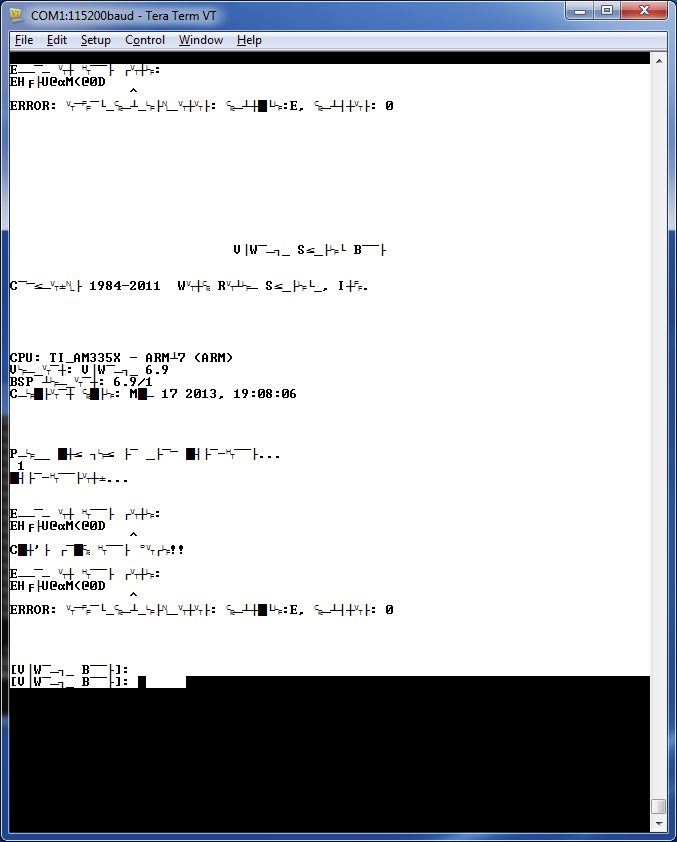
    i attached the gibrish screen. and also the serial port setting.

    astrange thing is when i want to copy and past the strange charecters i get a valid text (see below).

    regrading the boot from UART:

    i setting SW3 so it will boot from UART. then send X-MODEM the spl file and then Y-MODEM the u-boot file. after i get the u-boot prompt, i'm setting the ipaddr and serverip for the tftp. and then i'm running this lines:

            tftp 0x87C00000 bootrom.bin

            nand erase 0x0 $(ROM_SIZE)

            nandecc hw 2

            nand write.i 0x87C00000 0x0 $(ROM_SIZE)

    the line in yellow is not working when booting from UART. but does work when booting from SD.

    since i'm doing the same on two different boards i guess it it fine. since the only line that that not work is the one in yellow, i assume it is because of it. but now that i want to copy the strange charecter and see valid ones it is strange. maybe because the yellow line didn't excecute the writing to nand has faults and this make the boot to crash.

    by the way, this is a vxworks boot. (that works find on other board EVM).

    this is the paste test:

    Error in boot line: EHÕtU@àM(@0D               
    ^ ERROR: ipcom_drv_eth_init: drvname:E, drvunit: 0


                                VxWorks System Boot

    Copyright 1984-2011  Wind River Systems, Inc.


    CPU: TI_AM335X - ARMv7 (ARM)
    Version: VxWorks 6.9 BSP
    version: 6.9/1
    Creation date: Mar 17 2013, 19:08:06


    Press any key to stop auto-boot...  1 auto-booting...

    Error in boot line: EHÕtU@àM(@0D                ^ Can't load boot file!!

    Error in boot line: EHÕtU@àM(@0D                ^ ERROR: ipcom_drv_eth_init: drvname:E, drvunit: 0


    [VxWorks Boot]: [VxWorks Boot]:

  • Hi Eliah,

    Your serial port setup looks good. I didn't catch if you have tried booting from UART on the other EVM board. Please try the exact same steps (which cause the gibberish text on your EVM board) on the other EVM board (which has not been dropped on the floor). If these steps (booting from UART, flashing the NAND via tftp and finally booting from NAND) execute with no complications on the other EVM board and the text output through the serial port is not gibberish, then I'm afraid you may have caused some other damage to your EVM board, besides the SD connections not working.

    Best regards,
    Miroslav

  • You might also try a different terminal program. I've also seen TeraTerm sometimes switch to "gibberish mode" when it receives a special character. It looks to me like your baud rate / serial port settings are correct, and it's TeraTerm that's generating the gibberish.

  • hello,

    you are right!

    i used another termonal application and i could see the words.

    due to this i could change the boot parameters and after that it was ok on teraterm.

    for somereason there were special charecters that probably made teraterm to show gibrish. after i fixed the parameters to valid charecters and switch off and on again the teraterm is was ok.


    very strange issue (i don't know where the speciall charecters came from and why teraterm got gibrish)


    anyway, thanks for the support - the issue is closed :-)