This thread has been locked.

If you have a related question, please click the "Ask a related question" button in the top right corner. The newly created question will be automatically linked to this question.

Linux arago cpu frequency

Hi,


I have a board loosely based on the AM335x EVM. I managed to port U-boot and arago linux.

My question is how I can find the cpu frequency, it's for testing purposes?

When I googled it, I found that you can see the cpu freq in the directories:

/sys/devices/system/cpu/cpu0/cpufreq/

or
/proc/cpuinfo

but I don't have any of these directories. Anybody have any ideas?

My version of u-boot is 2013.01 of the ti-sdk (psp06.00.00.00) and I'm using the arago linux distro from the TI board port labs ( kernel 3.2 ).

Thanks in advance,

Laurens

  • Hi Laurens,

    What you found from your Google search is indeed correct. However, the absence of these /proc file system files/folders is really strange.

    Please check if your kernel configuration has the CONFIG_PROC_FS option enabled.

    Best regards,
    Miroslav

  • It's not strange at all.  He stated that he's in u-boot - the kernel isn't running yet.

  • GaryS57064 said:

    It's not strange at all.  He stated that he's in u-boot - the kernel isn't running yet.

    I'm sorry, Gary, but I don't see how this is the case. Laurens states that he managed to port both U-Boot and the Linux kernel for his board and he points out the U-Boot and Linux kernel versions he is using. I'm assuming he is trying to read the CPU frequency from user space as this is where the /proc file system is (should be) available.

    Best regards,
    Miroslav

  • My mistake Miroslav,

    I didn't notice the stated kernel version.  Indeed as you stated he just needs to go into the kernel config and enable cpufreq.

    Sorry,

    Gary

  • If I recall, the CPU freq is only available when the governor is userspace.

    processors.wiki.ti.com/index.php/AM335x_Power_Management_User_guide

    Scroll down to Kernel configuration.

  • The config_proc_fs is set :

    #
    # Pseudo filesystems
    #
    CONFIG_PROC_FS=y
    CONFIG_PROC_SYSCTL=y
    CONFIG_PROC_PAGE_MONITOR=y

    So I don't really know what's wrong. And yes, the kernel is running :),

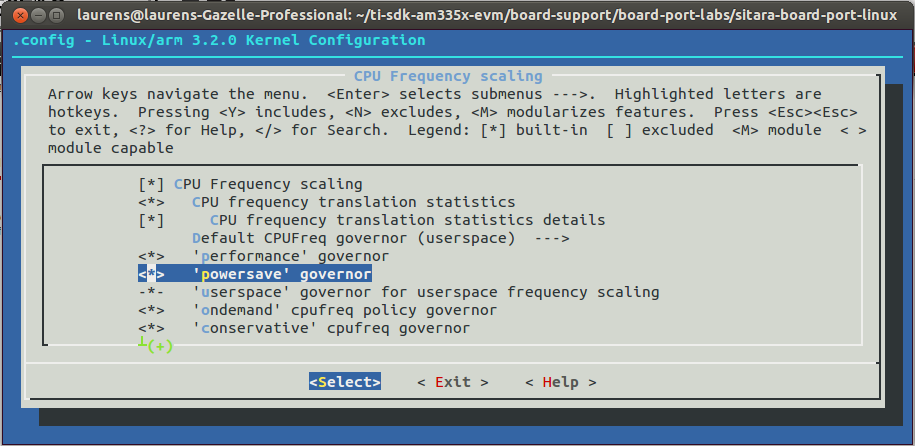
    I tried the above link : processors.wiki.ti.com/index.php/AM335x_Power_Management_User_guide

    But as you can see here;

    All the options are included by default, I use the am335x_evm_defconfig. And yes i'm trying to read the cpu freq in userspace. I do have a /proc directory but nothing that can give me the cpufreq.

  • Reading the cpu frequency should be available under sysfs regardless of the selected governor - at least it is for me.  If you want to manually control the cpu frequency, then you will indeed need to set the governor to userspace.

  • Hi Laurens,

    I can't speak to /proc, but you should find the current cpu frequency under sysfs (assuming sysfs is being mounted).

    /sys/devices/system/cpu/cpu0/cpufreq/cpuinfo_cur_freq

    or

    /sys/devices/system/cpu/cpu0/cpufreq/scaling_cur_freq 

  • Are you saying that you don't have a /sys directory at all, or you don't find cpufreq under sysfs?

  • Do you have CONFIG_SYSFS set?

  • I have a /sys directory but nothing concerning the cpu frequency:

    root@am335x-evm:/sys/devices/system/cpu# ls
    cpu0        cpuidle     offline     possible
    cpufreq     kernel_max  online      present
    root@am335x-evm:/sys/devices/system/cpu# cd cpufreq/
    root@am335x-evm:/sys/devices/system/cpu/cpufreq# ls (nothing in this directory)
    root@am335x-evm:/sys/devices/system/cpu/cpufreq# cd ..
    root@am335x-evm:/sys/devices/system/cpu# cd cpu0/
    root@am335x-evm:/sys/devices/system/cpu/cpu0# ls
    cpuidle

    And yes, CONFIG_SYSFS is set. Here is the config for the pseudo file systems, maybe I'm just missing something here:

    #
    # Pseudo filesystems
    #
    CONFIG_PROC_FS=y
    CONFIG_PROC_SYSCTL=y
    CONFIG_PROC_PAGE_MONITOR=y
    CONFIG_SYSFS=y
    CONFIG_TMPFS=y
    # CONFIG_TMPFS_POSIX_ACL is not set
    # CONFIG_TMPFS_XATTR is not set
    # CONFIG_HUGETLB_PAGE is not set
    # CONFIG_CONFIGFS_FS is not set
    CONFIG_MISC_FILESYSTEMS=y
    # CONFIG_ADFS_FS is not set
    # CONFIG_AFFS_FS is not set
    # CONFIG_ECRYPT_FS is not set
    # CONFIG_HFS_FS is not set
    # CONFIG_HFSPLUS_FS is not set
    # CONFIG_BEFS_FS is not set
    # CONFIG_BFS_FS is not set
    # CONFIG_EFS_FS is not set
    # CONFIG_JFFS2_FS is not set
    CONFIG_UBIFS_FS=y
    # CONFIG_UBIFS_FS_XATTR is not set
    # CONFIG_UBIFS_FS_ADVANCED_COMPR is not set
    CONFIG_UBIFS_FS_LZO=y
    CONFIG_UBIFS_FS_ZLIB=y
    # CONFIG_UBIFS_FS_DEBUG is not set
    # CONFIG_LOGFS is not set
    CONFIG_CRAMFS=y
    # CONFIG_SQUASHFS is not set
    # CONFIG_VXFS_FS is not set
    # CONFIG_MINIX_FS is not set
    # CONFIG_OMFS_FS is not set
    # CONFIG_HPFS_FS is not set
    # CONFIG_QNX4FS_FS is not set
    # CONFIG_ROMFS_FS is not set
    # CONFIG_PSTORE is not set
    # CONFIG_SYSV_FS is not set
    # CONFIG_UFS_FS is not set
    CONFIG_NETWORK_FILESYSTEMS=y
    CONFIG_NFS_FS=y
    CONFIG_NFS_V3=y
    CONFIG_NFS_V3_ACL=y
    CONFIG_NFS_V4=y
    # CONFIG_NFS_V4_1 is not set
    CONFIG_ROOT_NFS=y
    # CONFIG_NFS_USE_LEGACY_DNS is not set
    CONFIG_NFS_USE_KERNEL_DNS=y
    # CONFIG_NFS_USE_NEW_IDMAPPER is not set
    # CONFIG_NFSD is not set
    CONFIG_LOCKD=y
    CONFIG_LOCKD_V4=y
    CONFIG_NFS_ACL_SUPPORT=y
    CONFIG_NFS_COMMON=y
    CONFIG_SUNRPC=y
    CONFIG_SUNRPC_GSS=y
    # CONFIG_CEPH_FS is not set
    # CONFIG_CIFS is not set
    # CONFIG_NCP_FS is not set
    # CONFIG_CODA_FS is not set
    # CONFIG_AFS_FS is not set