This thread has been locked.

If you have a related question, please click the "Ask a related question" button in the top right corner. The newly created question will be automatically linked to this question.

Help compiling ADC driver as a loadable kernel module.

Hello,


I have looked at the AM335x ADC Driver's Guide but I am unclear on how I need to go about compiling the loadable kernel module for ti_adc.

I have installed the 6.00.00.00 SDK on Ubuntu 12.04 32-bit. What do I do next?


Thank you,

Nik

  • Hi Nik,

    You have to follow the AM335x ADC Driver's Guide to configure the kernel to have the TI ADC driver built as a loadable module. Then you have yo build the module using the "make modules" command after you have already built the kernel itself.

    If you don't know how to build the kernel, follow this guide: http://processors.wiki.ti.com/index.php/AMSDK_Linux_User%27s_Guide

    Best regards,
    Miroslav

  • Hey Miroslav, 

    Thanks for the reply. Unfortunately I figured out why this isn't working and now I have another question. Let me know if I need to post is elsewhere, but here it is.

    I am using Angstrom Linux 3.8.13 and they don't have a continuous mode ADC Kernel Module. I am attempting to write my own. I am currently communicating with the TSC_ADC_SS device registers but am having trouble handling the interrupts. According to the Datasheet interrupt 16 is ADC_TSC_GENINT, but when I set up my interrupt registers for FIFOXTHRESHOLD I get no interrupts at all. Here's my code:

    /* 
    	ADC Device Driver
    */
    
    #include <linux/module.h>
    #include <linux/version.h>
    #include <linux/kernel.h>
    #include<linux/init.h>
    #include<linux/io.h>
    #include<linux/irq.h>
    #include<linux/interrupt.h>
    
    // ADC Device Registers
    #define TSC_ADC_SS 		0x44E0D000
    #define IRQSTATUS		(adc_base + 0x28)
    #define IRQENABLE_SET	(adc_base + 0x2c)
    #define IRQENABLE_CLR	(adc_base + 0x30)
    #define STEPENABLE		(adc_base + 0x54)
    #define STEPCONFIG1		(adc_base + 0x64)
    #define STEPDELAY1		(adc_base + 0x68)
    #define FIFO0DATA		(adc_base + 0x100)
    #define FIFO1DATA		(adc_base + 0x200)
    #define ADC_CLKDIV		(adc_base + 0x4c)
    #define ADCSTAT			(adc_base + 0x44)
    #define FIFO0COUNT		(adc_base + 0xe4)
    #define FIFO0THRESHOLD	(adc_base + 0xe8)
    #define FIFO1COUNT		(adc_base + 0xf0)
    #define FIFO1THRESHOLD	(adc_base + 0xf4)
    #define CTRL			(adc_base + 0x40)
    #define IRQEOI 			(adc_base + 0x20)
    
    // Constants
    #define ADC_TSC_GENINT 	16		// ADC_TCS Controller General Interrupt
    
    // ADC Base Address
    static __iomem void *adc_base;
    static __iomem void *CM_WKUP_ADC_TSC_CLKCTRL;
    int ret, err;
    static __iomem unsigned int buffer[4096]; 
    
    // Interrupt Handler
    #define STEP1_FIFO_SEL 0x04000000;
    static irqreturn_t adc_irq_handler(int irq, void *dev_id) {
    	
    	// check if buffer filled
    	// swap buffer
    	// read buffer into memory
    	
    	//ioread32_rep(FIFO0DATA, buffer, 64);
    	//printk(KERN_ALERT "INTERRUPT!!!! IRQSTATUS: %x\n", ioread32(IRQSTATUS));
    	//iowrite32(0x03ff, IRQENABLE_CLR);		// Disable Interrupts
    	//iowrite32(0x03ff, IRQSTATUS);			// Clear pending Interrupts
    	iowrite32(0x03ff, IRQENABLE_CLR);		// Disable Interrupts
    	iowrite32(0x03ff, IRQSTATUS);			// Clear pending Interrupts
    	iowrite32(0x0000, STEPENABLE);			// Disable all steps
    	ret++;
    	return IRQ_NONE;
    }
    
    // ADC Init
    static int adc_init(void) {
    	
    	ret = err = 0;
    	
    	// Map base address to local variable
    	adc_base = ioremap(TSC_ADC_SS, 768);
    	CM_WKUP_ADC_TSC_CLKCTRL = ioremap(0x44E00000, 1024);
    	CM_WKUP_ADC_TSC_CLKCTRL += 0x00bc;
    	
    	// Enable ADC Interface Clock
    	iowrite32(0x0002, CM_WKUP_ADC_TSC_CLKCTRL);
    	
    	iowrite32(0x03ff, IRQENABLE_CLR);		// Disable Interrupts
    	iowrite32(0x03ff, IRQSTATUS);			// Clear pending Interrupts
    	
    	iowrite32(0x0000, ADC_CLKDIV);			// Set ADCCLK to 24 MHz
    	iowrite32(0x0001, STEPCONFIG1);			// SW, Continuous, No Averaging, FIFO0
    	iowrite32(0x0311, STEPDELAY1);			// Open delay 785 + 15 cycles (30 ksps)
    	iowrite32(0x003f, FIFO0THRESHOLD);		// Set FIFO0THRESHOLD to 64 samples
    	iowrite32(0x003f, FIFO1THRESHOLD);		// Set FIFO1THRESHOLD to 64 samples
    	//iowrite32(0x0024, IRQENABLE_SET);		// Enable FIFO0 and FIFO1 Threshold Interrupts
    	iowrite32(0x0002, STEPENABLE);			// Enable step 1
    
    
    	// Install interrupt Handler. Interrupt for BOTH edge.
    	err = request_irq(ADC_TSC_GENINT, adc_irq_handler, IRQF_TRIGGER_RISING | IRQF_TRIGGER_HIGH, "ADC", NULL);
    	if ( err != 0 ) {
    		printk (KERN_INFO "Error: request_irq returned %d\n", ret);
    		return -EIO;
    	}
    
        //printk(KERN_ALERT "REVISION: %x\n", ioread32(adc_base));
    	printk(KERN_ALERT "FIFO0DATA: %x\n", ioread32(FIFO0DATA + 4*63));
    	printk(KERN_ALERT "IRQSTATUS: %x\n", ioread32(IRQSTATUS));
    	printk(KERN_INFO "adc_mod: Initialized Successfully\n");
        return 0;
    }
     
     // ADC Exit
    static void adc_exit(void) {
    	printk(KERN_ALERT "========================   EXIT   ====================================== \n");
    	printk(KERN_ALERT "IRQSTATUS (24 means bit 5 and 2 pending): %x\n", ioread32(IRQSTATUS));
    	printk(KERN_ALERT "ret: %d\n", ret);
    	// reverse init
    	//iowrite32(0x03ff, IRQENABLE_CLR);		// Disable Interrupts
    	//iowrite32(0x03ff, IRQSTATUS);			// Clear pending Interrupts
    	//iowrite32(0x0000, STEPENABLE);			// Disable all steps
    
    	// Unmap memory
    	iounmap(adc_base);
    	
    	// Free interrupt
    	free_irq(ret, NULL);
    	
        printk(KERN_INFO "adc_mod: Exited Successfully\n");
    	printk(KERN_ALERT "IRQSTATUS (24 means bit 5 and 2 pending): %x\n\n\n", ioread32(IRQSTATUS));
    }
     
    module_init(adc_init);
    module_exit(adc_exit);
     
    MODULE_LICENSE("GPL");
    MODULE_AUTHOR("Nik Marinob <nik.marinov@okstate.edu>");
    MODULE_DESCRIPTION("ADC Device Driver");


  • Nik, my suggestion is to wait for the TI AM335x SDK version 07.00.00.00. The expected release date is the end of 2014Q1, which is in a day or so. The new SDK will be based on kernel version 3.12 and will definitely include the TI ADC driver, so porting it to the Angstrom kernel 3.8 would be a lot easier.

    Angstrom is supported at the Beagle community and if you do a quick search there, perhaps you will find someone who has already ported this.


    From a quick look at your code, it seems OK. Do you successfully retrieve the IRQ? Are you sure nothing else in your system uses this interrupt? If it does, make sure the IRQF_SHARED (I may be wrong about the name) flag is set.

    Best regards,
    Miroslav

  • Miro,

    It appears the new SDK has already been posted:

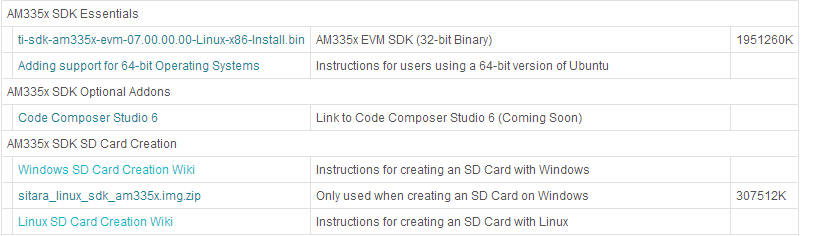
    I downloaded and installed the sitara_linux_sdk_am335x.img.zip to my SD card and booted my BBB, however the Board seems to just sit there. I can no longer SSH into it.

    The guide says to "run ifconfig to get the IP address of the target board in order to connect to it" but if I can't ssh into it how do I run ifconfig on it?

    Regards,

    Nik

  • Update:

    I got it to boot the new Sitara Linux by holding the S2 button and releasing it after inserting the power cable. I found the ti_am335x_adc.ko file and attached it by doing:

    $ modprobe industrialio

    $ insmod /path/to/ti_am335x_adc.ko

    Now I don't see the device in "/sys/bus/iio/devices/iio\:device0/". In fact the "/sys/bus/iio/devices/" directory is empty. Did you guys move where this structure is created?

    Thank you for your time,

    Nik

  • Nik, doing modprobe ti_am335x_adc should handle the dependency for the industrialio kernel module, so no need to insert it first.

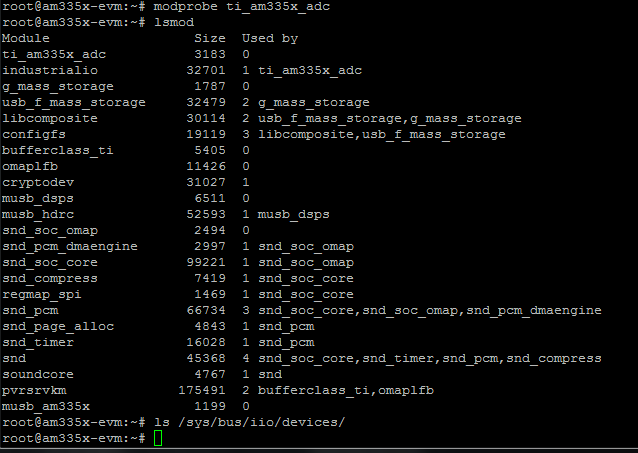
    Actually I just tried the pre-built images from the new SDK and the TI ADC module seems to be inserted by default. The /sys/bus/iio/devices/iio\:device0/ is present and lsmod shows both industrialio and ti_am335x_adc modules are inserted:

    Module                  Size  Used by
    ti_am335x_adc           3183  0
    industrialio           32701  1 ti_am335x_adc

    I can't really try the Windows SD Card Creation method you are using, because I'm under Linux, but I doubt the problem is in the image file archive you are using.

    Can you check if the "lsmod" command shows both modules? Is the industrialio module in use by the ti_am335x_adc module?

    Best regards,
    Miroslav

  • Miro,

    I was originally doing modprobe ti_am335x_adc.ko which is why it wasn't working, but it actually works and loads drivers and they show up when I do lsmod, however the directory " /sys/bus/iio/devices/iio\:device0/" is still missing.

    Do you get anything to show up in dmesg when you load the module, because mine doesn't show any new messages after modprobe ti_am335x_adc.

    Thanks,

    Nik

    Edit:

    Also my modules are not already inserted. I just reused the "sitara_linux_sdk_image_am335x.img" file to reimage my SD card and even tried it on a 2nd Beaglebone Black with same results. Suggestions?

    Edit2:
    Here are some screenshots.

  • Nik,

    I'm really sorry, I just realized that I'm actually testing on the AM335x GP EVM and not on the BeagleBone Black.

    The two boards use different device tree files. The BeagleBone Black does not have the ADC module initialized by default so this is the reason why the modules are not inserted at system boot and nothing appears inside /sys/bus/iio/devices even when you insert them later. :)

    The .dts files for the GP EVM and for the BeagleBone Black are located inside <linux_dir>/arch/arm/boot/dts/ and are named am335x-evm.dts and am335x-boneblack.dts respectively.

    You can generate the corresponding .dtb files that the kernel reads on boot with this command:

    make am335x-boneblack.dtb

    The .dtb file will be generated in the <linux_dir>/arch/arm/boot/dts/ folder.

    The missing structure about the ADC looks like this (you don't need the touch screen part for the BBB):

    &tscadc {
        status = "okay";
        tsc {
            ti,wires = <4>;
            ti,x-plate-resistance = <200>;
            ti,coordinate-readouts = <5>;
            ti,wire-config = <0x00 0x11 0x22 0x33>;
        };

        adc {
            ti,adc-channels = <4 5 6 7>;
        };
    };

    Best regards,
    Miroslav

  • Miro,


    I am assuming I need to do this inside the SDK 07.00.00.00 on Ubuntu and not on the BBB.


    When I go to /ti-sdk-am335x-evm-07.00.00.00/board-support/linux-3.12.10-ti2013.12.01/arch/arm/boot/dts, and type make am335x-boneblack.dtb I get make: *** No rule to make target `am335x-boneblack.dtb'.  Stop.

    I did add the above code to the am335x-boneblack.dts file.

    Regards,

    Nik

    Update:

    After reviewing the Makefiles in each directory I found a way to compile this by going to the main SDK directory and typing make linux-dtbs.


    I have the new Device Tree Structure it auto-loads industrialio and ti_am335x_adc, however the device tree structure code you gave me does not give me continuous mode sampling.

    Where is the guide or documentation that explains how to enable all the features of this driver including features and modes (such as continuous sampling, buffering, sample delay)? Where is there a description of how to use the driver from a C based user program?

  • Nik,

    The .dtb file has to be "made" from inside the linux kernel main folder with "make am335x-boneblack.dtb" or "make dtbs"; or from inside the main SDK folder with "make linux-dtbs" as you already found out.

    Here is the AM335x ADC Driver Guide: http://processors.wiki.ti.com/index.php/AM335x_ADC_Driver%27s_Guide

    Continuous mode support has been added some releases ago, so it should be available. To enable it do:

    echo continuous > /sys/bus/iio/devices/iio\:device0/mode

    At the bottom of the ADC Driver Guide page there is a sample user space application. Please take a look at it.

    Best regards,
    Miroslav

  • Miro.

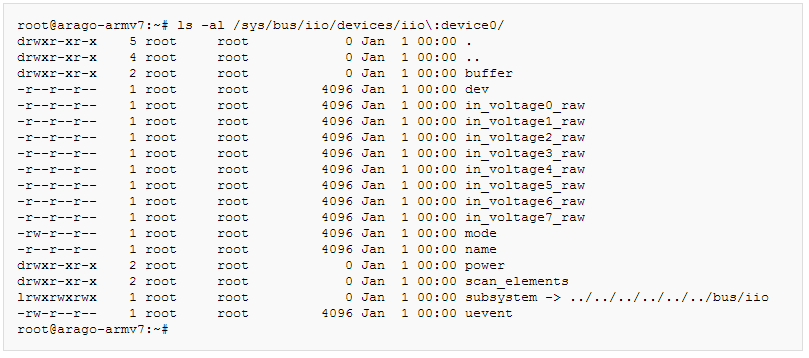
    Unfortunately mode along with other options shown in the guide are missing altogether. Here's what the Driver's Guide says I should see:

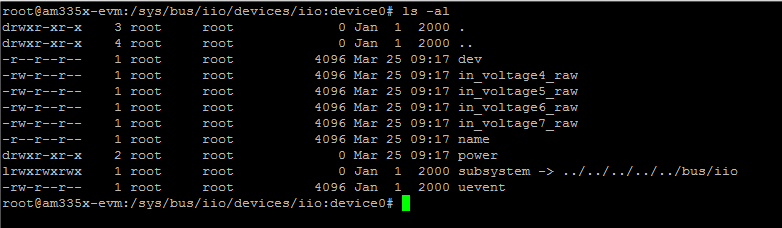
    Here's what I actually see with the .dts code you gave me a couple of posts up.

    As you can see I don't have buffer, mode, and scan_elements, how do I make those appear on there?

    Regards,

    Nik

  • Nik, the documentation for the new SDK is still in the process of being released and all the information I have about the changes is the source code itself. From looking at the ADC driver it seems like continuous mode support has been removed and the ADC Driver Guide has not been updated yet.

    You can compare the old and new drivers to see what the changes are. The old SDK adc driver is <linux_dir>/drivers/staging/iio/adc/ti_adc.c and the new SDK adc driver is <linux_dir>/drivers/iio/adc/ti_am335x_adc.c.

    I'm sorry for not being able to give you a consistent answer, but I'm waiting for proper documentation too.

    I'll try to ask the factory team for more information on why the continuous mode has been removed and update you as soon as I can.

    Best regards,
    Miroslav

  • Hi again, Nik,

    Just got a response from the factory team. Here is a link to the SDK 7 ADC information: http://processors.wiki.ti.com/index.php/Sitara_Linux_SDK_ADC

    Please check the ADC interface known issues page. Unfortunately continuous mode is not supported and currently there is no schedule for it.

    Best regards,
    Miroslav

  • Hi Miro,

    I was really hoping to have to not buy an external ADC for my project.
    Thank you for your time,

    Nik

  • Miroslav,

    Could you check with those engineers again and let me know exactly which registers I need to enable in order for Interrupt 16 to work as it should? I have reviewed all the source files and it remains a mystery to me which interrupt they are using to get inside their interrupt handler.

    All I need is to know how to set up interrupt 16 so that I can know when FIFO0THRESHOLD is reached so I can swap data collection to FIFO1 and copy the data in FIFO0.

    Thanks,

    Nik

  • Hi Nik,

    The registers concerned with INT16 are:
     
    IRQSTATUS_RAW
    IRQSTATUS
    IRQENABLE_SET
    IRQENABLE_CLR
     
    You can read how they work in sections 12.5.1.3 to 12.5.1.6 of the AM335X TRM Rev. J.