This thread has been locked.

If you have a related question, please click the "Ask a related question" button in the top right corner. The newly created question will be automatically linked to this question.

Serial Boot and Flash Loading Utility


Hello,

I am working with the Serial Boot and Flash Loading Utility

http://wiki.davincidsp.com/index.php/Serial_Boot_and_Flash_Loading_Utility

I would like to compile a UBL with using the .Net framework, but I do not understand the instructions provided in the page (maybe because i'm a beginner) Could someone elaborate the instructions a little bit more?

What do they mean by "put the C sharp compiler's (the csc.exe executable) install location in the user's path" or by "Then go to the top level directory of the package and run: make" I am stuck there. I have cygwin installed and using .Net v3.5. I know the path to csc.exe.

Thank you so much in advance.

Jorge

  • Jorge said:
    What do they mean by "put the C sharp compiler's (the csc.exe executable) install location in the user's path"

    The user's path is where your system will look for the executable.  To see which directories are in the user's path, type "echo $PATH" on the command line, and place the csc.exe in one of those directories.  Typically, the path will contain the /usr/local/bin, /usr/bin/, and /bin directories, among others.  Copying csc.exe in any of those directories will work.

    Jorge said:
    Then go to the top level directory of the package and run: make

    The top level directory is the one that contains the Makefile.  For me, this is located at "<install_dir>\DM35x_FlashAndBootUtils_1_10\DM35x".  In cygwin, you can go to this directory by typing "cd <install_dir>/DM35x_FlashAndBootUtils_1_10/DM35x/"

  • Hi David,

    Thank you so much, this is a good lead.

    An alternative I also found to copying csc.exe to the current PAT directories was to actually add the Net. framework directory to the path using:

    "PATH=$PATH:<my directory>" which in my case was "PATH=$PATH:/cygdrive/c/WINDOWS/Microsoft.NET/Framework/v3.5/"

    However, I am still stuck in the second part: Is make a valid command? Does it have any arguments? When I try running "make" I get an error message "bash: make: command not found"

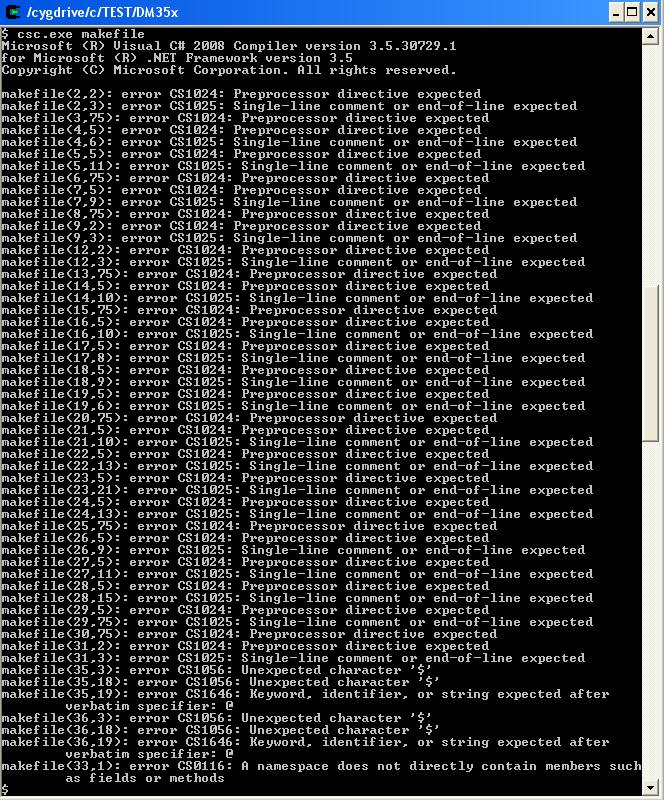
    I also tried running "csc.exe makefile" to see if the makefile could be compiled and generated any output but I got a very long message full of errors:

    Am I confused about what I expect from this compiling function? I though I could generate a ubl.bin file from the source code available in the directory.

    Thank you so much,

    Jorge

  • Jorge said:
    Is make a valid command? Does it have any arguments? When I try running "make" I get an error message "bash: make: command not found"

    Jorge,

    "make" is a valid command, but you need to have the make package installed.  This should be done when running the cygwin installer.  Once you've done that, you can run "make" without any arguments - it executes the instructions of the makefile in the current directory.

    Jorge said:
    Am I confused about what I expect from this compiling function? I though I could generate a ubl.bin file from the source code available in the directory.

    I'm not able to run through this right now, but it's my understanding that this will build the serial loading and flashing utiltities, as well as the ubl.  Now that I think about it, these may already be prebuilt, so I'm not sure you have to recompile anything at all...

    From here:

    For flashing the DaVinci DM365 EVM using Serial Flash utilities, refer to the following instructions. The pre-built binaries for Serial Flash, UBL and U-Boot can be downloaded from DaVinci GIT Linux Kernel Releases.

    It sounds like you've already downloaded the package, so you don't need to go to the GIT Linux Kernel.  Just look for the files sfh_DM35x.exe, slh_DM35x.exe, and ubl_DM35x_[nand/nor].bin.