This thread has been locked.

If you have a related question, please click the "Ask a related question" button in the top right corner. The newly created question will be automatically linked to this question.

Problem with EZSDK 7.0 - Stops at uboot - Linux EZ Software Development Kit (EZSDK) for Sitara LINUXEZSDK-BONE: - 7.0


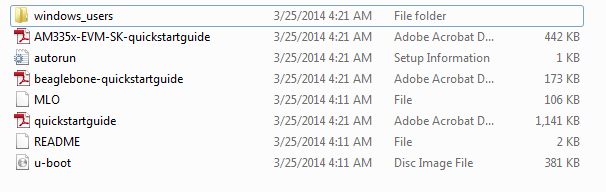
I am just getting started (will build a kernel for new development) and wanted to begin with a known good Linux that would run on the BeagleBone Black. I downloaded the EZSDK on a windows 7 system. Windows 7 extracted the file (see image below)

I then used win32diskimager to write a 16Gb  micro SD card.

When I look at the SD card after the write I see the following: (I do not see uImage or uEnv.txt. - Not sure if I should but uboot later reports these as missing)
  

When I place the microSD card in the BeagleBoneBlack it only boots as far as uboot. Without the microSD card the BeagleBone Black boots the angstrom distribution that is resident (out of the box) on the MMC. Below is the serial output from the BBB. the uboot prompt is visible on the bottom. Is there a way to proceed? It cannot find the uEnv.txt file or /boot/uImage

  • Hi,

    The Linux included in SDK v7 is version 3.12 and uses zImage + device trees, instead of uImage to boot. The linux "create-sdcard.sh" script creates two partitions: "boot" and "rootfs". The "boot" partition only contains the MLO and u-boot.img binaries. The zImage and device tree binaries are located inside the /boot folder under the "rootfs" partition. This is how you should partition your SD card.

    I notice that the version of your U-Boot is 2013.04, which isn't the one included in SDK v7 (U-Boot 2013.10). Please check why. Perhaps this is the reason why your U-Boot is trying to look for an uImage instead of a zImage.

    Please note, that booting using uImage is also possible - you just need to alter the U-Boot environment variables. Using an older U-Boot, this may already be the case - check the "bootcmd" variable.

    Best regards,
    Miroslav

  • Thank you - Your point about the uboot version gave me a clue that the BBB really wasn't booting off the SD card, SO I removed power, held down the boot switch and reapplied power. The Arago Linux image comes up now - Thanks